

An interesting video for the 4.1.1 update...
Part 1
Part 2
[PreSonus Studio One] Music | Design | Film | VFX Production Resource
-
- KVRAF
- Topic Starter
- 3496 posts since 30 Dec, 2014
KVR S1-Thread | The Intrancersonic-Design Source > Program Resource | Studio One Resource | Music Gallery | 2D / 3D Sci-fi Art | GUI Projects | Animations | Photography | Film Docs | 80's Cartoons | Games | Music Hardware |
-

- KVRist
- 329 posts since 13 Nov, 2013 from Charlotte, North Carolina
There are no automation tracks, but there are automation lanes on tracks. Create an automation lane for any parameter you want to automate.Vortifex wrote: Fri Nov 09, 2018 10:51 pm Downloaded Studio One Prime, how do I split an automation track? The split tool doesn't work on the automation and I can't find anything in the manual.
If you let us know what you are trying to do by splitting an automation lane, can probably offer more helpful stuff.
-
- KVRAF
- Topic Starter
- 3496 posts since 30 Dec, 2014
You can't because it's not how the automation feature functions. If you want zero activity, you set the automation point to the lowest value of zero. On the same line where you have set the value of zero, you can choose to continue from point zero or that of anywhere to one hundred to the next point position.Vortifex wrote: Fri Nov 09, 2018 10:51 pm Downloaded Studio One Prime, how do I split an automation track? The split tool doesn't work on the automation and I can't find anything in the manual.
KVR S1-Thread | The Intrancersonic-Design Source > Program Resource | Studio One Resource | Music Gallery | 2D / 3D Sci-fi Art | GUI Projects | Animations | Photography | Film Docs | 80's Cartoons | Games | Music Hardware |
-
- KVRAF
- 9589 posts since 5 Aug, 2009
im demoin studio one pro, seems to be not really CPU friendly? i thought fl studio would be bad but studio one doesnt seem any better so far even worse? any tips?
DAW FL Studio Audio Interface Focusrite Scarlett 1st Gen 2i2 CPU Intel i7-7700K 4.20 GHz, RAM 32 GB Dual-Channel DDR4 @2400MHz Corsair Vengeance. MB Asus Prime Z270-K, GPU Gainward 1070 GTX GS 8GB NT Be Quiet DP 550W OS Win10 64Bit
-
- KVRAF
- Topic Starter
- 3496 posts since 30 Dec, 2014
Different DAWS, with different settings...Caine123 wrote: Fri Nov 09, 2018 11:27 pm im demoin studio one pro, seems to be not really CPU friendly? i thought fl studio would be bad but studio one doesnt seem any better so far even worse? any tips?
https://www.soundonsound.com/techniques ... ow-latency
KVR S1-Thread | The Intrancersonic-Design Source > Program Resource | Studio One Resource | Music Gallery | 2D / 3D Sci-fi Art | GUI Projects | Animations | Photography | Film Docs | 80's Cartoons | Games | Music Hardware |
-
- KVRAF
- Topic Starter
- 3496 posts since 30 Dec, 2014
Vortifex wrote: Fri Nov 09, 2018 11:51 pm
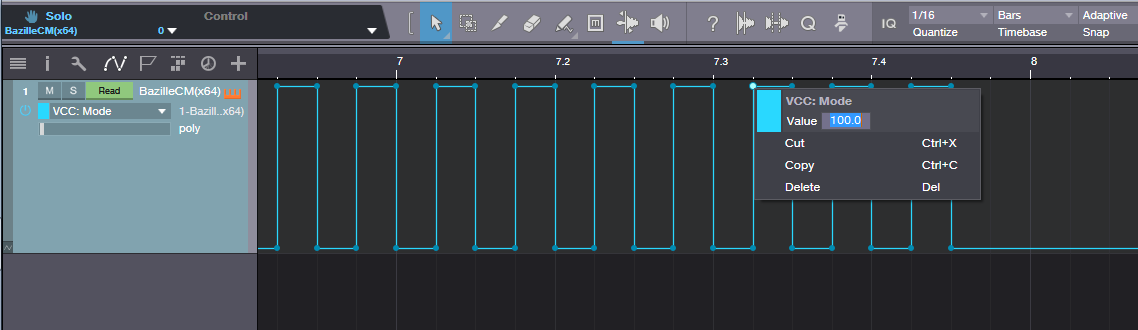
I want to split off the end of an automation track leaving just the part I highlighted in the image, and then copy/paste that section into parts of the track:
You can copy, edit point value, cut, delete, and paste (CTRL+V)... you need to zoom in a bit, right click your mouse button and the popup will appear. It can be a single point or a group of them.
KVR S1-Thread | The Intrancersonic-Design Source > Program Resource | Studio One Resource | Music Gallery | 2D / 3D Sci-fi Art | GUI Projects | Animations | Photography | Film Docs | 80's Cartoons | Games | Music Hardware |
-
- KVRAF
- Topic Starter
- 3496 posts since 30 Dec, 2014
To have the points in a container clip like fashion and to be able to move and copy them them, select the points and double click whilst in cursor mode. This will create a clip (as you would normally have for anything like midi notes for example). The points within the clip area can be moved and copied as I think you'll want. Select the lower half of the clip and hold the ALT key (this is on the PC btw) to copy the points within along with the clip area. You can also move the points within the clip, and you can select the edge of the clip area to move the clip away from the points you selected.
KVR S1-Thread | The Intrancersonic-Design Source > Program Resource | Studio One Resource | Music Gallery | 2D / 3D Sci-fi Art | GUI Projects | Animations | Photography | Film Docs | 80's Cartoons | Games | Music Hardware |
-
- KVRAF
- Topic Starter
- 3496 posts since 30 Dec, 2014
Simply don't double click on the points as that deletes them, double click anywhere around them or from anywhere for that matter on the sequencer lanes to create a container for them to follow. You can go even further in point editing with the transform tool, which provides practically infinite ways to position points manually.Vortifex wrote: Sat Nov 10, 2018 2:04 am Your patience is much appreciated
When I select the automation points they glow white but double clicking them deletes them. Not sure where else I'm supposed to double click because when I click anywhere else they get deselected.
OT, I spent about 3 years on the presonus forum on a daily basis providing technical help for users of the program... my honest straight outspoke ways ruffled feathers though in that church run like community (terrible moderators).
KVR S1-Thread | The Intrancersonic-Design Source > Program Resource | Studio One Resource | Music Gallery | 2D / 3D Sci-fi Art | GUI Projects | Animations | Photography | Film Docs | 80's Cartoons | Games | Music Hardware |
-
- KVRAF
- 9589 posts since 5 Aug, 2009
This interests me as well as automation is easy in fl studio but also cumbersome with 3rd party plugins and you always have to make sections unique etc....
@vortifex. Why do you use studio one as fl studio user? Cause i demo studio one as a fl studio user
@vortifex. Why do you use studio one as fl studio user? Cause i demo studio one as a fl studio user
DAW FL Studio Audio Interface Focusrite Scarlett 1st Gen 2i2 CPU Intel i7-7700K 4.20 GHz, RAM 32 GB Dual-Channel DDR4 @2400MHz Corsair Vengeance. MB Asus Prime Z270-K, GPU Gainward 1070 GTX GS 8GB NT Be Quiet DP 550W OS Win10 64Bit