


Wusik Beta Testing (new installers, new Wusik EVE V5 and other products updates)
-
- KVRian
- 975 posts since 10 Jan, 2007 from London
OK, downloading Crisis again...what should be the install destination...Wusik Engine Data, or Shared, or Wusik EVE V5?
Last edited by goldglob on Sat Dec 01, 2018 6:54 pm, edited 1 time in total.
-

- Banned
- Topic Starter
- 5089 posts since 12 Jun, 2001 from Wusik Dot Com
-

- KVRAF
- 11162 posts since 16 Mar, 2003 from Porto - Portugal
Auto increment of MIDI Channels not working here either. Will we have a new build today yet?WilliamK wrote: Sat Dec 01, 2018 6:32 pm No, is not like that, I created a separated variable for the multi mode, but I forgot to use it in some areas...
BTW: previous multi preset files won't work anymore, so please delete those.
Fernando (FMR)
-
- Banned
- Topic Starter
- 5089 posts since 12 Jun, 2001 from Wusik Dot Com
-
- KVRist
- 123 posts since 4 Sep, 2006
Crisis really expands the capability of EVE. Excellent addition. 
Was trying to nail down some reproducible examples of fx conflicts. This is one using only stock effects.
A sound doesn't have to be loaded, but in the fx section, add mdaPiano and mdaEPiano.
The two instruments are in conflict, even though one can be given dominance by moving up or down.
Position mdaEPiano first and mdaPiano second.
MdaEPiano wet knob has no effect and the piano is absent. MdaPiano is present.
MdaPiano wet knob all the way up is MdaPiano 100%. The knob does control volume of MdaPiano, but as it is turned down, MdaEPiano starts to come in until we get mdaEPiano at full volume when the wet knob for mdaPiano is at zero.
If we move their positions in the first and second slots, the problem carries over in reverse.
This could be tricky to fix. Making each vst/vsti receive midi data from the source (parallel option) would feed the soundsets to everything equally, getting around effects or synths that might block midi thru, which might be the present problem. This fixed though means that you can't run the effects in series to get some desirable compound effects.
Checkbox option to feed midi data to each fx in parallel could be engaged if there were troubles with a specific setup like the mda pianos. Feel however that this could be a massive undertaking for right now.
John
Was trying to nail down some reproducible examples of fx conflicts. This is one using only stock effects.
A sound doesn't have to be loaded, but in the fx section, add mdaPiano and mdaEPiano.
The two instruments are in conflict, even though one can be given dominance by moving up or down.
Position mdaEPiano first and mdaPiano second.
MdaEPiano wet knob has no effect and the piano is absent. MdaPiano is present.
MdaPiano wet knob all the way up is MdaPiano 100%. The knob does control volume of MdaPiano, but as it is turned down, MdaEPiano starts to come in until we get mdaEPiano at full volume when the wet knob for mdaPiano is at zero.
If we move their positions in the first and second slots, the problem carries over in reverse.
This could be tricky to fix. Making each vst/vsti receive midi data from the source (parallel option) would feed the soundsets to everything equally, getting around effects or synths that might block midi thru, which might be the present problem. This fixed though means that you can't run the effects in series to get some desirable compound effects.
Checkbox option to feed midi data to each fx in parallel could be engaged if there were troubles with a specific setup like the mda pianos. Feel however that this could be a massive undertaking for right now.
John
-
- Banned
- Topic Starter
- 5089 posts since 12 Jun, 2001 from Wusik Dot Com
Actually they are working exactly how they should, as each is an effect, actually.  So the wet and dry signals will be mixed when you set the last one wet to middle position. MIDI information is been copied and sent in parallel to both. This is actually a hack, to use VSTis as effects. Maybe later on I make a better place for this sort of usage.
So the wet and dry signals will be mixed when you set the last one wet to middle position. MIDI information is been copied and sent in parallel to both. This is actually a hack, to use VSTis as effects. Maybe later on I make a better place for this sort of usage. -
- KVRian
- 975 posts since 10 Jan, 2007 from London
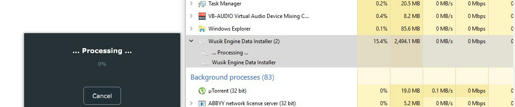
Crisis installer stuck on "Processing.. 0%", and after about 7 mins get "Error reading packed data"
Last edited by goldglob on Sat Dec 01, 2018 7:51 pm, edited 3 times in total.
-
- Banned
- Topic Starter
- 5089 posts since 12 Jun, 2001 from Wusik Dot Com

-
- KVRian
- 975 posts since 10 Jan, 2007 from London
Auto Increment MIDI channels still not working. OK, previously the option ON would not stick...that is sticking now, but the channels don't increment (even after pressing OK then re-opening the window).
-

- KVRist
- 315 posts since 13 Jun, 2009
Crisis Installer, pic taken after 7 mins, after 12 mins same as above message "Error reading...."

-
- Banned
- Topic Starter
- 5089 posts since 12 Jun, 2001 from Wusik Dot Com
They will only increment after you turn it on and add a new instance, then the new instance will have the correct number. At least here it is working like that.
-
- Banned
- Topic Starter
- 5089 posts since 12 Jun, 2001 from Wusik Dot Com
Maybe my code is not prepared to handle 1.6 Gig single file. I will check if I forgot somewhere to use 64 bits for file-handles. 
-
- KVRist
- 123 posts since 4 Sep, 2006
William,
Thanks for the clarification on the wet/dry knob settings, what they are actually doing. Makes sense now, and a great hack. I was seeing it through the filter of expected behavior.
John
Thanks for the clarification on the wet/dry knob settings, what they are actually doing. Makes sense now, and a great hack. I was seeing it through the filter of expected behavior.
John
-
- KVRian
- 975 posts since 10 Jan, 2007 from London
Ah yes, I see that now. Still not ideal...WilliamK wrote: Sat Dec 01, 2018 8:05 pm They will only increment after you turn it on and add a new instance, then the new instance will have the correct number. At least here it is working like that.
Say increment has been previously set to off.
Start new multi...don't even populate instance 1.
Open MIDI channels, set increment to ON, click OK.
Populate instance 1 with a preset.
Populate instance 2 with a preset.
Open MIDI channels, instance 1 is stuck on omni (all the other instances are incremented).
So to make increment work 100% need to set to ON, then close multi, then start again.
Is it technically possible to have it just work regardless of all this?