

Is there a way to make the LX interface permanently bigger, or zoomed?
I can set Live this way so that the fonts, etc are at 120%, cannot find this in LX.
Enlarge the appearance of LogicX?
-

- KVRAF
- 11950 posts since 31 Aug, 2013 from Someplace else
You would have to set it up as you want, and then lock it as a screen set. I think.
“The Generals sat, and the lines on the map, moved from side to side.”
― Pink Floyd
― Pink Floyd
-

- KVRAF
- 11162 posts since 16 Mar, 2003 from Porto - Portugal
Screensets are saved per song, they do not become permanent settings, AFAIK.Bombadil wrote: Sun Dec 30, 2018 3:40 pm You would have to set it up as you want, and then lock it as a screen set. I think.
Fernando (FMR)
-
- KVRAF
- 11162 posts since 16 Mar, 2003 from Porto - Portugal
You would still need to create ALL your new songs after that template. And it would not solve the problem for the already created songs

Fernando (FMR)
-
- KVRAF
- Topic Starter
- 2982 posts since 9 Dec, 2008
Thanks gents for the replies.
But even ignoring how I'd save it, how do I zoom it in the first place?
I dont mean a track or a plug in, I mean the menus, fonts etc. Is it even possible to enlarge the whole UI the way it is in Live, for example?
But even ignoring how I'd save it, how do I zoom it in the first place?
I dont mean a track or a plug in, I mean the menus, fonts etc. Is it even possible to enlarge the whole UI the way it is in Live, for example?
-

- Banned
- 11467 posts since 4 Jan, 2017 from Warsaw, Poland
One radical way to do that would be to lower the resolution of your screen, perhaps?
-
- KVRAF
- 2751 posts since 15 Apr, 2004 from Capital City, UK
There's nothing like the UI scaling from Live in Logic, but changing font sizes is definitely possible as this guy http://logicproxthemes.blogspot.com/ exploits it to make various 'themes' for Logic. It might be a good place to start.
-

- KVRist
- 89 posts since 3 Jul, 2018
Besides the already mentioned font sizes there is no such thing as a zoom function for the UI in Logic (as it's the case with FL Studio, Live or Bitwig).
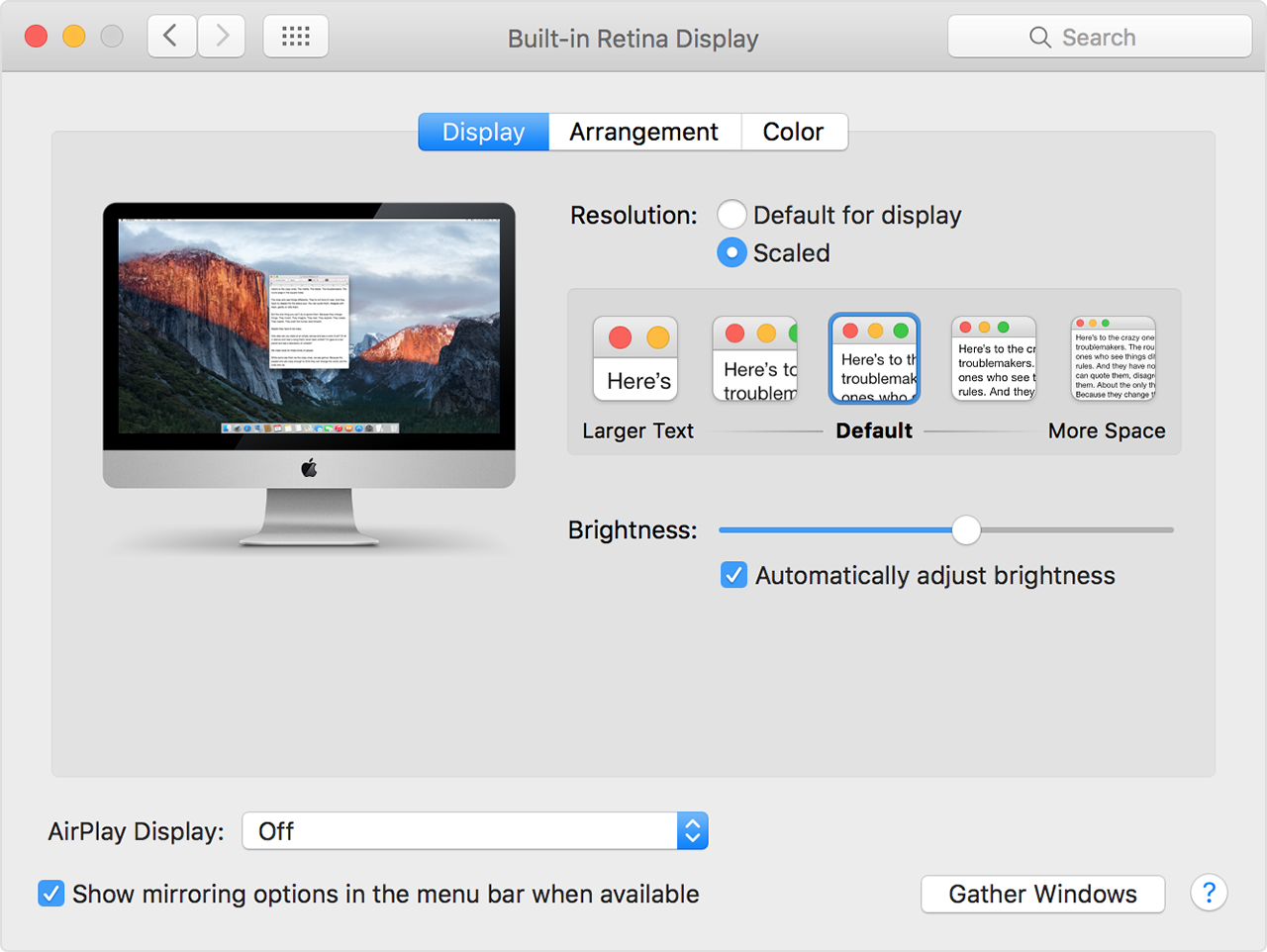
But you can adjust the overall resolution of your Mac for your Logic sessions. Just use the scaling option in the System Preferences. This way you can gain more screen space or make the UI including all controls as well as plug-ins much bigger:
There is also this handy tool which allows you to change the resolution via keyboard hot keys: https://manytricks.com/resolutionator/
But you can adjust the overall resolution of your Mac for your Logic sessions. Just use the scaling option in the System Preferences. This way you can gain more screen space or make the UI including all controls as well as plug-ins much bigger:
There is also this handy tool which allows you to change the resolution via keyboard hot keys: https://manytricks.com/resolutionator/