Studio One 4 and triggering vst's with loopMIDI in Max2019-03-29T19:52:43+00:00I usually use loopMIDI to trigger vst's in my DAW's with Max. I'd like to be able to do this in Studio One as well. In Ableton, I select loopMIDI in the Midi From menu, what is the procedure for Studio One 4? Where should loopMIDI be showing up at? Under Inputs, right? If so, it's not showing up though the device is added.
I'm new to Studio One but loving the workflow and getting music done. zklaushttps://www.kvraudio.com/forum/memberlist.php?mode=viewprofile&u=430882
I usually use loopMIDI to trigger vst's in my DAW's with Max. I'd like to be able to do this in Studio One as well. In Ableton, I select loopMIDI in the Midi From menu, what is the procedure for Studio One 4? Where should loopMIDI be showing up at? Under Inputs, right? If so, it's not showing up though the device is added.
I'm new to Studio One but loving the workflow and getting music done.
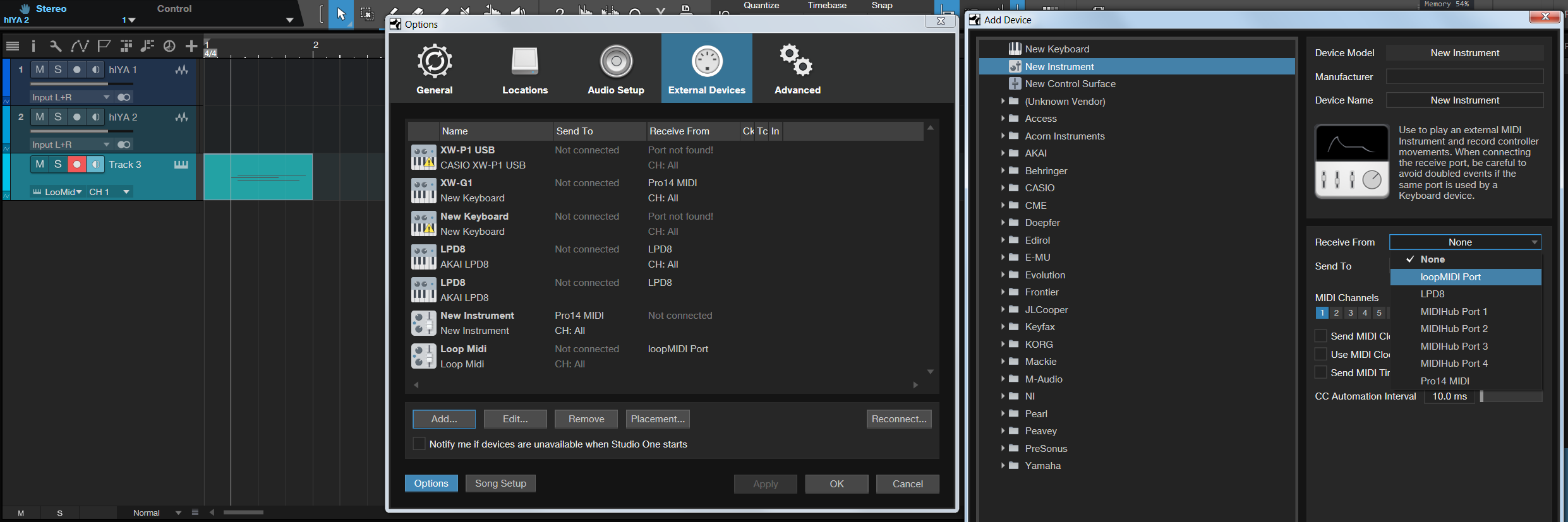
You can set up Loopmidi from accessing the main menu, Studio One / Options / External Devices tab. Add the device, give it a name and select it from the menu as shown. There is a list of folders for all the vendors from this panel where it will be added to (Unknown Vendors), should you with to edit / remove it in the future. You have options for adding additional midi ports to use also.
From the main menu selecting Track, or when right clicking on the left side pane, select 'Add Instrument'.
KVR S1-Thread | The Intrancersonic-Design Source > Program Resource | Studio One Resource | Music Gallery | 2D / 3D Sci-fi Art | GUI Projects | Animations | Photography | Film Docs | 80's Cartoons | Games | Music Hardware |
Okay, that's the way I thought it was done. And that's the same way I do Waveform and Ableton. I add a MIDI instrument to the track and select loopMIDI and I'm set. For some reason or another it's not working for me. I guess it's something that I set wrong, at one point in time, in my settings. I don't know, just a guess. I'll keep working to see what the issue is...weird....
You do not have the required permissions to view the files attached to this post.