

Yes. But I don‘t get it working. How I have to route the performer for play notes?Functional wrote: Sat Jun 29, 2019 6:28 pmThere is no traditional arp but you can use the performer like one. However, it's not going to be quite as simple to use as traditional arps but it is more capable on the other hand.bartoszkwiecinski wrote: Sat Jun 29, 2019 6:23 pm Hey Guys.
Can someone explain how to make sequencens with Massive X?
Is there an arp?
What is the exact funktion of the VR Modulator?
Someone figured those things out?
Btw: great Synthesizer to play with the ears and not looking on animated Displays
VR modulator: I'm not sure, I think we have to wait for manual for that. I mean, name implies virtual reality, but I have no idea what that means. It makes no sense.

Native Instruments Massive X Synth - Sequel to Massive (Out Now!)
-
bartoszkwiecinski bartoszkwiecinski https://www.kvraudio.com/forum/memberlist.php?mode=viewprofile&u=443620
- KVRer
- 11 posts since 29 Jun, 2019
-
- KVRian
- 880 posts since 26 Oct, 2011
Sigh, sometimes things are too obvious.EvilDragon wrote: Sat Jun 29, 2019 6:36 pmVoice Random. Every voice gets a random value, then it's cycled.Functional wrote: Sat Jun 29, 2019 6:28 pmVR modulator: I'm not sure, I think we have to wait for manual for that. I mean, name implies virtual reality, but I have no idea what that means. It makes no sense.
 That's actually really handy
-
bartoszkwiecinski bartoszkwiecinski https://www.kvraudio.com/forum/memberlist.php?mode=viewprofile&u=443620
- KVRer
- 11 posts since 29 Jun, 2019
So there we have with VR the randomEvilDragon wrote: Sat Jun 29, 2019 6:36 pmVoice Random. Every voice gets a random value, then it's cycled.Functional wrote: Sat Jun 29, 2019 6:28 pmVR modulator: I'm not sure, I think we have to wait for manual for that. I mean, name implies virtual reality, but I have no idea what that means. It makes no sense.
option, which can be routed to any parameter?
-

- KVRAF
- 26929 posts since 3 Feb, 2005 from in the wilds
I didn't expect to buy Massive X (basically upgrade Komplete) but am leaning that way now. I'm impressed by the sound quality to CPU use ratio. I never particularly liked the basic character of Massive and using it felt like I had to put in effort to get to places I like. But with MX, it seems to easily make sounds I am pleased with.
-
experimental.crow experimental.crow https://www.kvraudio.com/forum/memberlist.php?mode=viewprofile&u=6258
- KVRAF
- 6895 posts since 9 Mar, 2003 from the bridge of sighs
was this link posted earlier ?..
if not , it's quite useful ...
https://www.native-instruments.com/en/m ... uickstart/
if not , it's quite useful ...
https://www.native-instruments.com/en/m ... uickstart/

-
- KVRian
- 880 posts since 26 Oct, 2011
bartoszkwiecinski wrote: Sat Jun 29, 2019 6:44 pm Yes. But I don‘t get it working. How I have to route the performer for play notes?
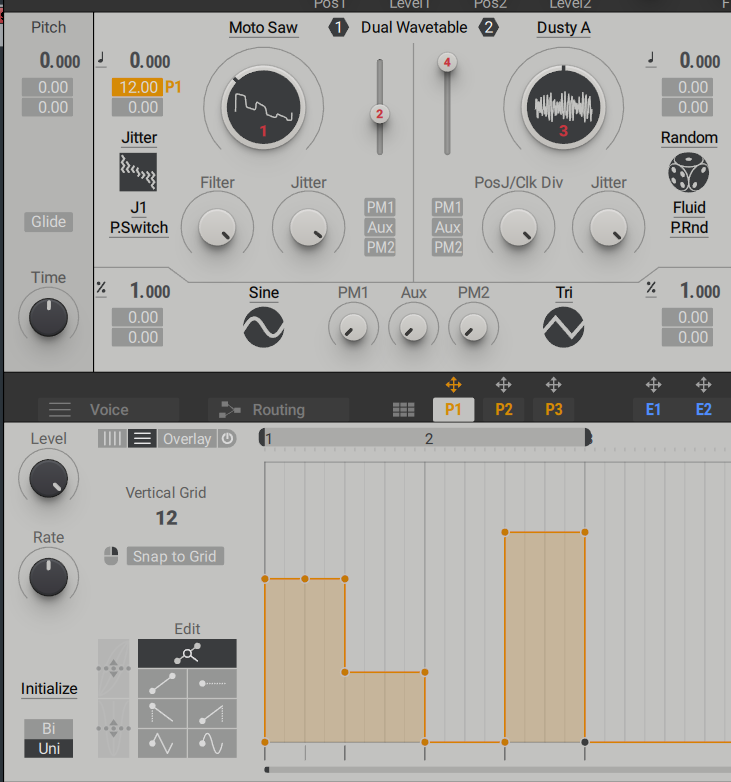
See the yellowish modulator at the left osc pitch? That's how. You define your note range there. It's currently +12 in my case, which means that if I play +1 on the performer, it's going to play +1 note (i.e. if I play C and performer is at +1, it plays D).
It's also integral for you to set the performer to the vertical columns overlay at the top (next to "Overlay" text). There you can set the vertical grid to your liking. In my case it's 12, which matches with the +12 modulation. If you want +24 (2 octave grid), you want to set vertical grid to 24.
But as you can imagine, this means that you can't simply play straight up chords and trigger notes like you could in traditional arpeggiator and instead you have to program the sequence yourself. It's kind of a shame that they didn't include a traditional arpeggiator but on the other hand Cubase has couple of them inbuilt and you can always manually arpeggiate the notes you'd like. The sequencer is useful for making inbuilt slides though. Or, because you have 3 of them, you could make a chord progression with triads (or otherwise chords that omit notes) by assigning each one of them to their own oscillators.
-
- KVRAF
- 26929 posts since 3 Feb, 2005 from in the wilds
How does that differ from the Envelope Level control? Functionally, they seem to do the same thing except for the Amp Env where the Level control does nothing.EvilDragon wrote: Sat Jun 29, 2019 6:40 pmPeak parameter is maximum amplitude of the envelope. Effectively scales it.pdxindy wrote: Sat Jun 29, 2019 6:30 pmI assumed it would be like that too... however all it does is lower the level of the whole env. Turn it all the way down and the envelope is silenced completely. Maybe it's a bug.Functional wrote: Sat Jun 29, 2019 6:21 pmI think it's the peak between attack & decay stage. So if it's lower than sustain, the decay phase will actually increase to the sustain level rather than stay at same level (with max sustain) or lower to the sustain level. Don't quote me on this, but this seems logical.pdxindy wrote: Sat Jun 29, 2019 6:09 pm Speaking of the MX envelopes, it is not clear to me what the Peak parameter is above the Attack stage. It seems to behave as just another version of Env Level.
-
- KVRist
- 55 posts since 5 May, 2017
And probably because when I opened Diva for the first time, and I picked up the Dream Synth folder (I remember), and I listened to the first few sounds, I said, OMG. OMG.pdxindy wrote: Sat Jun 29, 2019 6:27 pmDiva didn't waste like 10% of the GUI space on a useless graphic.Functional wrote: Sat Jun 29, 2019 6:15 pmThe point is that I can't recall people complaining about that in Diva, like ever.
Also, the Diva envelopes are simple and easy to see at a glance. Especially the sliders essentially serve as a visual representation.
By the way, in some regards, Diva can be more accurate than Zebra. For example, phase.
Put an arp before them. Set it to 1/16th. Gate 50% or less. Set Diva and ZebraHZ to saw. Set Diva to OSC Reset and Zebra to reset. Put an oscilloscope plugin to the output, 1/16th view.
The Zebra wave will be sliding over time. For me, right now, it’s sliding to the right. After a while (quite a lot of sliding), it jumps back in a moment.
Diva’s wave remains at the same place. Although, it’s moving back and forward a bit on every note. Hive behaves like Diva.
Serum won’t move at all. It’s almost like a static image. (I admit soundwise I prefer Zebra and Diva).
-
- KVRAF
- 35671 posts since 11 Apr, 2010 from Germany
Totally agree.pdxindy wrote: Sat Jun 29, 2019 6:49 pm I didn't expect to buy Massive X (basically upgrade Komplete) but am leaning that way now. I'm impressed by the sound quality to CPU use ratio. I never particularly liked the basic character of Massive and using it felt like I had to put in effort to get to places I like. But with MX, it seems to easily make sounds I am pleased with.
-
- KVRAF
- 26929 posts since 3 Feb, 2005 from in the wilds
That isn't retriggering notes though...Functional wrote: Sat Jun 29, 2019 6:54 pmSee the yellowish modulator at the left osc pitch? That's how. You define your note range there. It's currently +12 in my case, which means that if I play +1 on the performer, it's going to play +1 note (i.e. if I play C and performer is at +1, it plays D).bartoszkwiecinski wrote: Sat Jun 29, 2019 6:44 pm Yes. But I don‘t get it working. How I have to route the performer for play notes?
-
- KVRAF
- 2418 posts since 9 Nov, 2016
Now if we only could see a visual representation, then we would figure it out easily. HmmmFunctional wrote: Sat Jun 29, 2019 6:21 pmI think it's the peak between attack & decay stage.pdxindy wrote: Sat Jun 29, 2019 6:09 pm Speaking of the MX envelopes, it is not clear to me what the Peak parameter is above the Attack stage. It seems to behave as just another version of Env Level.
-
- KVRian
- 880 posts since 26 Oct, 2011
Which is why I wrote the following afterwards:pdxindy wrote: Sat Jun 29, 2019 6:58 pmThat isn't retriggering notes though...Functional wrote: Sat Jun 29, 2019 6:54 pmSee the yellowish modulator at the left osc pitch? That's how. You define your note range there. It's currently +12 in my case, which means that if I play +1 on the performer, it's going to play +1 note (i.e. if I play C and performer is at +1, it plays D).bartoszkwiecinski wrote: Sat Jun 29, 2019 6:44 pm Yes. But I don‘t get it working. How I have to route the performer for play notes?
But as you can imagine, this means that you can't simply play straight up chords and trigger notes like you could in traditional arpeggiator and instead you have to program the sequence yourself. It's kind of a shame that they didn't include a traditional arpeggiator but on the other hand Cubase has couple of them inbuilt and you can always manually arpeggiate the notes you'd like. The sequencer is useful for making inbuilt slides though. Or, because you have 3 of them, you could make a chord progression with triads (or otherwise chords that omit notes) by assigning each one of them to their own oscillators.

-
- KVRAF
- 2418 posts since 9 Nov, 2016
Yes, you can assign it to pitch for example.KBSoundSmith wrote: Sat Jun 29, 2019 6:29 pmPretty sure VR = Voice RandomizationFunctional wrote: Sat Jun 29, 2019 6:28 pmThere is no traditional arp but you can use the performer like one. However, it's not going to be quite as simple to use as traditional arps but it is more capable on the other hand.bartoszkwiecinski wrote: Sat Jun 29, 2019 6:23 pm Hey Guys.
Can someone explain how to make sequencens with Massive X?
Is there an arp?
What is the exact funktion of the VR Modulator?
Someone figured those things out?
Btw: great Synthesizer to play with the ears and not looking on animated Displays
VR modulator: I'm not sure, I think we have to wait for manual for that. I mean, name implies virtual reality, but I have no idea what that means. It makes no sense.
-
- KVRist
- 55 posts since 5 May, 2017
My first two posts were about Massive X. I don’t care. I have dozens of synths.Functional wrote: Sat Jun 29, 2019 6:44 pm You're trying to find every smallest excuse you can to complain about a great synth. A lot of people here agree that it feels a bit rushed but you're literally painting demons on the wall because apparently a magnifying glass to you has to mean a search function. See how pdxindy criticizes MX; no whining, no BS.
The rest of my comments were about the reactions. Like people telling me that wavetable synths can’t make a sine wave after I posted a video on which most of the correct sine waves were done by wavetable synths.
It’s true that Falcon’s analog OSC can make a sine wave and its wavetable synth can’t (same about the saw). I consider it not a feature but a weakness of the engine. It’s not called "Almost sine". It’s called "Sine". It should be sine then.
-

- KVRAF
- 24404 posts since 7 Jan, 2009 from Croatia
Seems that Peak is not dynamically adjustable but only refreshed at note on, and env level is just scaling the result of the envelope in realtime.pdxindy wrote: Sat Jun 29, 2019 6:56 pmHow does that differ from the Envelope Level control? Functionally, they seem to do the same thing except for the Amp Env where the Level control does nothing.