

OK, this is going to sound a bit weird but in Orion's DrumRack, you can force a sample to fill a preset length, from a semi-tone to several bars, and it just pitches it up or down to keep it in time with the sequencer. To me it seems like the most basic behaviour anyone would want in something that plays back samples. Apparently, though, it is beyond the capacity of Battery to do this, so I am going to need to find a VSTi that can do it instead. It doesn't need to do anything else, just this one, simple thing. I don't want it to preserve the pitch, I want the pitch to change with the length and tempo because I often run the same loop at normal and half-speed together (just for shits and giggles, obviously).
Any suggestions? I tried searching but it's more than the search filters can handle and all the results I looked at were something different to what I'm after. I imagine it wouldn't be hard to do in Cubase with an audio track but I think a VSTi offers a more elegant solution.

Looking For A Simple Loop Player VSTi
-

- Suspended
- 17889 posts since 14 Jun, 2001 from Somewhere you're not!
NOVAkILL : Legion GO, AMD Z1x, 16GB RAM, Win11 | Audient EVO 8 | Lumi Keys | Studio Pro 8
Korg Odyssey, bx-oberhausen, Proxima, PolyMax, GR8, JP6K, Union, Atomika,
Invader 2, Flow Motion, Olga, TRK 01, Thorn, Spire, VG Iron
Korg Odyssey, bx-oberhausen, Proxima, PolyMax, GR8, JP6K, Union, Atomika,
Invader 2, Flow Motion, Olga, TRK 01, Thorn, Spire, VG Iron
-

- KVRAF
- 2784 posts since 18 Apr, 2001
Maybe this one: https://hy-plugins.com/product/hy-slicerwin-mac/
You can try the free version first. It even might be enough for what you want to do.You can slice loaded sample into max 32 and those slice will be triggered by internal step sequencer.
You can set slice index, on/off, division, playhead shape, reverse on/off, pitch, trigger prob, attack, gate and level per step.
CrimsonWarlock aka TechnoGremlin, Moved to Reason and Rack Extensions exclusively (from Reaper and VSTs) several years ago.
-
- KVRAF
- 2447 posts since 5 Jan, 2006
For Free:
UVI Workstation can do it automatically with Apple loops/ACID/REX and not automatically with non-ACID WAV (you need to enter the loop's original BPM first)
https://www.uvi.net/en/instruments/uvi-workstation.html
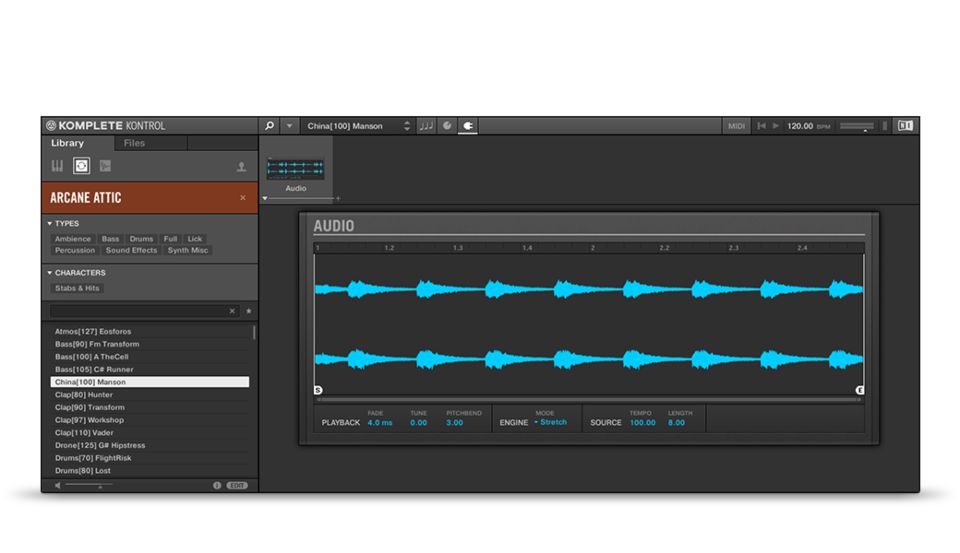
Komplete Kontrol Software will do it automatically with any loop with its "Audio" instrument
https://www.native-instruments.com/en/p ... e-kontrol/
Loopcloud
https://www.loopcloud.net/
UVI Workstation can do it automatically with Apple loops/ACID/REX and not automatically with non-ACID WAV (you need to enter the loop's original BPM first)
https://www.uvi.net/en/instruments/uvi-workstation.html
Komplete Kontrol Software will do it automatically with any loop with its "Audio" instrument
https://www.native-instruments.com/en/p ... e-kontrol/
Loopcloud
https://www.loopcloud.net/
-
- Suspended
- Topic Starter
- 17889 posts since 14 Jun, 2001 from Somewhere you're not!
UVI might be able to do it, I will have to download and test it, though. I don't think Komplete Kontrol can. The Sampler (there is no "Audio" instrument that I can see) doesn't have any options for it. Loopcloud only works with their samples. HY-Slicer won't do it, either.
There are plenty of ways to slice loops, that's not what I'm looking for. Don't think of it as a loop, think of it as an audio sample that I want to play for exactly one bar (or one note or four bars or whatever), regardless of tempo. I don't want it to preserve the pitch, I want the pitch to be really low when it's four bars and really high when it's a quarter note. I just want the sample to fill the whole bar (or bars or note). So it's the simplest possible thing to do beyond just playing the sample unaffected. In Battery I can manually re-pitch it until it's just about right but it's a slow, manual process. I want to be able to enter a value - "1/4" or "4 bars" - and have it work perfectly. It shouldn't be that hard.
There are plenty of ways to slice loops, that's not what I'm looking for. Don't think of it as a loop, think of it as an audio sample that I want to play for exactly one bar (or one note or four bars or whatever), regardless of tempo. I don't want it to preserve the pitch, I want the pitch to be really low when it's four bars and really high when it's a quarter note. I just want the sample to fill the whole bar (or bars or note). So it's the simplest possible thing to do beyond just playing the sample unaffected. In Battery I can manually re-pitch it until it's just about right but it's a slow, manual process. I want to be able to enter a value - "1/4" or "4 bars" - and have it work perfectly. It shouldn't be that hard.
NOVAkILL : Legion GO, AMD Z1x, 16GB RAM, Win11 | Audient EVO 8 | Lumi Keys | Studio Pro 8
Korg Odyssey, bx-oberhausen, Proxima, PolyMax, GR8, JP6K, Union, Atomika,
Invader 2, Flow Motion, Olga, TRK 01, Thorn, Spire, VG Iron
Korg Odyssey, bx-oberhausen, Proxima, PolyMax, GR8, JP6K, Union, Atomika,
Invader 2, Flow Motion, Olga, TRK 01, Thorn, Spire, VG Iron
-
- Suspended
- Topic Starter
- 17889 posts since 14 Jun, 2001 from Somewhere you're not!
UVI doesn't do it, either. Surely it's the easiest, most obvious thing to do?
NOVAkILL : Legion GO, AMD Z1x, 16GB RAM, Win11 | Audient EVO 8 | Lumi Keys | Studio Pro 8
Korg Odyssey, bx-oberhausen, Proxima, PolyMax, GR8, JP6K, Union, Atomika,
Invader 2, Flow Motion, Olga, TRK 01, Thorn, Spire, VG Iron
Korg Odyssey, bx-oberhausen, Proxima, PolyMax, GR8, JP6K, Union, Atomika,
Invader 2, Flow Motion, Olga, TRK 01, Thorn, Spire, VG Iron
-
- KVRian
- 783 posts since 6 Jan, 2006 from Premià
Enso should do it:
https://www.audiodamage.com/products/ad049-enso
TX16Wx does since v2 iirc... v3 implements timestretching, but the free version should still do simple pitch to tempo:
https://www.tx16wx.com/
Perhaps overkill for such a simple need though.
https://www.audiodamage.com/products/ad049-enso
TX16Wx does since v2 iirc... v3 implements timestretching, but the free version should still do simple pitch to tempo:
https://www.tx16wx.com/
Perhaps overkill for such a simple need though.
The mind boggles.
-
- KVRAF
- 2447 posts since 5 Jan, 2006
There are two instruments that comes with Komplete Kontrol - "Sampler" & "Audio". "Sampler" just plays the file as it is with no options. "Audio" stretches it to project tempo and has options to set the number of bars and also to change the stretch algorithm so you can set it to just pitchshift.BONES wrote: Tue Jul 02, 2019 12:01 pm The Sampler (there is no "Audio" instrument that I can see) doesn't have any options for it. Loopcloud only works with their samples. HY-Slicer won't do it, either.
As far as I know Loopcloud 4.0 also works for your own sample library and not just their samples but I haven't tried it myself.
-
- KVRAF
- 2784 posts since 18 Apr, 2001
What you describe is dead center in the middle of audio recording and editing. You being used to Orion might be why you think of a plugin, but I'm pretty sure Cubase can do this for you with less mouse clicks than you need to just load a plugin.BONES wrote: Tue Jul 02, 2019 12:01 pm think of it as an audio sample that I want to play for exactly one bar (or one note or four bars or whatever), regardless of tempo. I don't want it to preserve the pitch, I want the pitch to be really low when it's four bars and really high when it's a quarter note. I just want the sample to fill the whole bar (or bars or note).
Indeed. Load the sample in an audio track, stretch it to the amount of bars you want it and make sure there's no option set to active like 'preserve pitch while stretching' or something like that.BONES wrote: Tue Jul 02, 2019 12:01 pm So it's the simplest possible thing to do beyond just playing the sample unaffected.
...
It shouldn't be that hard.
Using a plugin for that in a linear DAW (like Cubase) seems counter productive to me.
CrimsonWarlock aka TechnoGremlin, Moved to Reason and Rack Extensions exclusively (from Reaper and VSTs) several years ago.
-
- KVRAF
- 2447 posts since 5 Jan, 2006
In UVI there are 3 sample playback methods: "sample" (for one shots), "stretch" and "slice". If you know the file's original BPM you can select "stretch", enter the original BPM and then half or double the speed (up to 1/4 or x4) which is equal to changing the number of bars.BONES wrote: Tue Jul 02, 2019 12:17 pm UVI doesn't do it, either. Surely it's the easiest, most obvious thing to do?
-
- Suspended
- Topic Starter
- 17889 posts since 14 Jun, 2001 from Somewhere you're not!
The thing with a plugin, though, is it is much easier to propagate it through the arrangement and make changes that also propagate more easily. And I'm not sure how easily I could swap the loop for something else. e.g. If the loop is triggered 150 times through the song and I want to use a different loop, would I have to replace it 150 times? Doing it with audio also means using a lot more channels, especially if I want the same loop playing at two different pitches at once, which makes Cubase's already crowded UI even harder to work with. Having it in the same instrument as all my drums in Orion was perfect, doing it any other way is going to involve compromises, I just need to work out which has the least.crimsonwarlock wrote: Tue Jul 02, 2019 12:39 pmWhat you describe is dead center in the middle of audio recording and editing. You being used to Orion might be why you think of a plugin, but I'm pretty sure Cubase can do this for you with less mouse clicks than you need to just load a plugin.
OK, I found it. It is a new feature in the latest update. It's only a couple of months since I lasted updated all my NI stuff but there was another KK update in the queue tonight (probably a Komplete 12 thing, which I'm not bothering with).PTV wrote: Tue Jul 02, 2019 12:30 pmThere are two instruments that comes with Komplete Kontrol - "Sampler" & "Audio". "Sampler" just plays the file as it is with no options. "Audio" stretches it to project tempo and has options to set the number of bars and also to change the stretch algorithm so you can set it to just pitchshift.
After it finally got around to installing it, the Audio instrument is now an option. Interestingly, to get it to do what I want, you don't use "re-pitch", you use "stretch". So I can use it but it's still not ideal as it seems to be monophonic, which means I'd need two instances to play the loop at full and half-speed together.
From what I read on their site, the VSTi is just a way to preview and purchase loops, which you then use in other instruments. It uses timestretching to maintain pitch at different tempos, so it's not what I need.As far as I know Loopcloud 4.0 also works for your own sample library and not just their samples but I haven't tried it myself.
At the moment audio is looking like it might be the best option, it just does my head in that something we've relied upon for 20 years doesn't seem to be available in any of the big players' toolkits. Maybe NI can copy the functionality out of Komplete Kontrol and put it into Battery? That would be the perfect solution. Anyway, as always, thanks for all your help and effort, it's greatly appreciated.
Last edited by BONES on Tue Jul 02, 2019 1:42 pm, edited 1 time in total.
NOVAkILL : Legion GO, AMD Z1x, 16GB RAM, Win11 | Audient EVO 8 | Lumi Keys | Studio Pro 8
Korg Odyssey, bx-oberhausen, Proxima, PolyMax, GR8, JP6K, Union, Atomika,
Invader 2, Flow Motion, Olga, TRK 01, Thorn, Spire, VG Iron
Korg Odyssey, bx-oberhausen, Proxima, PolyMax, GR8, JP6K, Union, Atomika,
Invader 2, Flow Motion, Olga, TRK 01, Thorn, Spire, VG Iron
-
- Suspended
- Topic Starter
- 17889 posts since 14 Jun, 2001 from Somewhere you're not!
Don't mind me, I'm an idiot.
NOVAkILL : Legion GO, AMD Z1x, 16GB RAM, Win11 | Audient EVO 8 | Lumi Keys | Studio Pro 8
Korg Odyssey, bx-oberhausen, Proxima, PolyMax, GR8, JP6K, Union, Atomika,
Invader 2, Flow Motion, Olga, TRK 01, Thorn, Spire, VG Iron
Korg Odyssey, bx-oberhausen, Proxima, PolyMax, GR8, JP6K, Union, Atomika,
Invader 2, Flow Motion, Olga, TRK 01, Thorn, Spire, VG Iron

-
- KVRAF
- 2784 posts since 18 Apr, 2001
I do agree with that sentiment wholeheartedly. I see videos where people arrange single drum hits on an audio track to build rhythms. Works for boom-tchak but for any serious stuff editing must be a nightmare.BONES wrote: Tue Jul 02, 2019 1:39 pm The thing with a plugin, though, is it is much easier to propagate it through the arrangement and make changes that also propagate more easily
I just wanted to point out that it should be simple for a single instance. You didn't mention you wanted to do this for every two bars in a whole song

CrimsonWarlock aka TechnoGremlin, Moved to Reason and Rack Extensions exclusively (from Reaper and VSTs) several years ago.
