

5 Hours ago Presonus posted the 'Half Price Black Friday Deal' ...so you can buy Studio One Professional 4.5 for £172 or your regional equivalent, it's valid till the the last minute of the 1st Dec CST time.. Other vendors have additional discount codes such as Audiodeluxe where you can use a coupon code to save an additional 15% off. It say up to which probably means that because your paying for the top end version, you'll get that amount off, rather than what you might get with the Artist version...
If you've been on the fence and not yet bought Studio One, these offers might sway you... There's also an undisclosed point one update early / mid December to wet your mitts on also...
https://www.audiodeluxe.com/products/da ... ofessional
[PreSonus Studio One] Music | Design | Film | VFX Production Resource
-
- KVRAF
- Topic Starter
- 3496 posts since 30 Dec, 2014
KVR S1-Thread | The Intrancersonic-Design Source > Program Resource | Studio One Resource | Music Gallery | 2D / 3D Sci-fi Art | GUI Projects | Animations | Photography | Film Docs | 80's Cartoons | Games | Music Hardware |
-
beatmangler443 beatmangler443 https://www.kvraudio.com/forum/memberlist.php?mode=viewprofile&u=306784
- KVRist
- 421 posts since 11 Jun, 2013
As a studio one user, that looks like a cluttered mess.THE INTRANCER wrote: Wed Nov 27, 2019 12:38 am Studio One Multi Console Integration & Management Network With Effect Channel Mixing & Master Mix Overview|' Design Concept '
Click Here For Full Size Image
To follow up on the thread relating to having more than one main mixer, I've drawn up a realistic representation of the vision I have, in which using multiple mixing consoles can give greater control, flexibility and management in song production. This is just one configuration in how it could look, but obviously by the way you can toggle windows, can be further configured to one needs. The system goes way beyond the limitations in which folder tracks and grouping provides whilst also complementing them at the same time.
With not only being able to multi mix between different mix consoles, retaining configurations, being able to save multiple setups and recall them on the fly, and having multiple views in how you want to monitor your mix, you save time with production by that of mouse clicks, and mouse scrolling that can disrupts one's workflow..
It allows easily find your big tracks in big productions, with full console mixer labelling.
Chain multiple mix consoles together and add effects globally to them all. If you have accidentally messed up a mix and forgot to save, well you can prevent that by having a backup of an earlier console mix session you've saved. Save and import multiple mix console setups into new songs you create....
Another benefit is that you can save CPU load and better manage how that affects each mixer console. Assign new Consoles to Scratch Pads without affecting the main song and the instruments being used.
Console Mixers, selectable from single tabs.
Shadow Selection of mixer channels.
Pin, Expand, Collapse, Undock and arrange multiple consoles horizontally, in quad view or vertically....which allows you to view not just 20 to 40 tracks at one time but two times, three times or more in different configuration view states. Expand the monitoring levels of not just one mixing console but several or select one individually.
Dedicate different Consoles for different external hardware setups instead of being limited to just one.
Compare your actual song mix setup with the Mastering one you have without ever needing to switch screens to make direct comparisons.
The concept I've drawn up, is one I have thought about for several days up to this point and documented. It's taken several hours to bring the aspects of a real image in improving Studio One.
This more than just adding a another console mixer or two, this is about transforming Studio One into a powerful mixing environment that takes a new step in the evolution of DAWs. It looks simple, but that's the beauty of it, whilst keeping on the same rails of what Studio One is.
-
- KVRAF
- Topic Starter
- 3496 posts since 30 Dec, 2014
That's exactly what I think about Propellerheads Reason since I switched DAWs years ago... you can make that GUI look worse than a dogs breakfast.. if one wants to. But for the purpose of my illustration concept, I am showing multiple elements being open simultaneously should one ever reach that point. But in anycase it's only using two 3rds of the screen and thus elements like menu's would widen apart with the window being expandable.beatmangler443 wrote: Wed Nov 27, 2019 3:41 am As a studio one user, that looks like a cluttered mess.
But, I'm sorry... I have little time for missable people on this forum, hence this short reply...Do get some sleep, some sun and exercise, it does wonders for your mental well being.
KVR S1-Thread | The Intrancersonic-Design Source > Program Resource | Studio One Resource | Music Gallery | 2D / 3D Sci-fi Art | GUI Projects | Animations | Photography | Film Docs | 80's Cartoons | Games | Music Hardware |
-
- KVRian
- 1151 posts since 2 Feb, 2005
Thanks for your info. However, I found a bit strange that the cross grade price is way higher than the price you mentioned.THE INTRANCER wrote: Wed Nov 27, 2019 1:57 am 5 Hours ago Presonus posted the 'Half Price Black Friday Deal' ...so you can buy Studio One Professional 4.5 for £172 or your regional equivalent, it's valid till the the last minute of the 1st Dec CST time.. Other vendors have additional discount codes such as Audiodeluxe where you can use a coupon code to save an additional 15% off. It say up to which probably means that because your paying for the top end version, you'll get that amount off, rather than what you might get with the Artist version...
If you've been on the fence and not yet bought Studio One, these offers might sway you... There's also an undisclosed point one update early / mid December to wet your mitts on also...
https://www.audiodeluxe.com/products/da ... ofessional
-
- KVRAF
- Topic Starter
- 3496 posts since 30 Dec, 2014
The price I have on Presonus FB Link states: " Studio One 4 Professional PreSonus Audio Electronics $199.98 from the previous price of ($399.95)."cowby wrote: Wed Nov 27, 2019 4:14 am
Thanks for your info. However, I found a bit strange that the cross grade price is way higher than the price you mentioned.
That equates to £173 UK pounds (Going by their conversion with tax) when you click on the next page that diverts to their shop. I don't know why that is because the conversion from US dollars to UK Pounds is £154 UK pounds. So I don't know how Presonus calculated that, because that doesn't seem right.
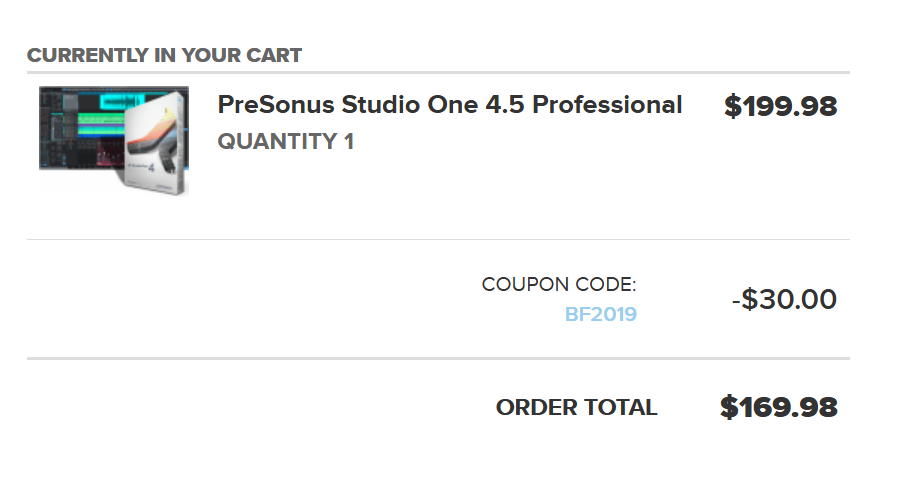
However, on further inspection on the Audiodeluxe website the the price is $199.98 and with the $30 discount code added is $169 which equates to £131.46 for the Studio One Pro 4.5 version. This is lower than the cross grade version as you mentioned.
From my recollection, it was around £131 that i paid for Studio One 2 back in 2014, what appears to be now.
I noted that there was a crossgrade from Notion to Studio One for $299.95...on the Audiodeluxe website also.
One can only assume that they have not noticed this and adjusted the prices accordingly...It is way further down the list of viewable products. One would naturally go for the first option being shown on the list anyway and not notice that. Although that is odd.
I didn't see any additional tax being added to the Audiodeluxe website with the discount included, just the totals. I can't be sure if there is or not and because I don't need to buy another version, I stopped before that point to know for sure. Someone needs to tell Presonus that their price conversion is wrong though I think...
Studio One 5.0 will be out in May of 2020, so... you could for instance wait till next years Blackfriday to pick it up. It pretty much depends on what side of the fence you want to sit on... and whether your existing DAW is killing you or not.
Last edited by THE INTRANCER on Wed Nov 27, 2019 5:59 am, edited 6 times in total.
KVR S1-Thread | The Intrancersonic-Design Source > Program Resource | Studio One Resource | Music Gallery | 2D / 3D Sci-fi Art | GUI Projects | Animations | Photography | Film Docs | 80's Cartoons | Games | Music Hardware |
-

- KVRAF
- 1721 posts since 21 Sep, 2007 from USA
The full version is cheaper still at JRR Shop with the discount code: 
[Core i7 8700 | 32GB DDR4 | Win11 x64 | Studio One 7 Pro | WASAPI ]
-
- KVRAF
- Topic Starter
- 3496 posts since 30 Dec, 2014
With audiodeluxe, you can if you have them use deluxebucks to shave off more money in addition to the discount, but only if you have any. Dunno if JRR does that.
KVR S1-Thread | The Intrancersonic-Design Source > Program Resource | Studio One Resource | Music Gallery | 2D / 3D Sci-fi Art | GUI Projects | Animations | Photography | Film Docs | 80's Cartoons | Games | Music Hardware |
-
- KVRAF
- Topic Starter
- 3496 posts since 30 Dec, 2014
( Previous post removed, replaced with updated version..)
Studio One Multi Console Integration & Management Network With Effect Channel Mixing & Master Mix Overview|' Design Concept '
Click Here For Full Size Image
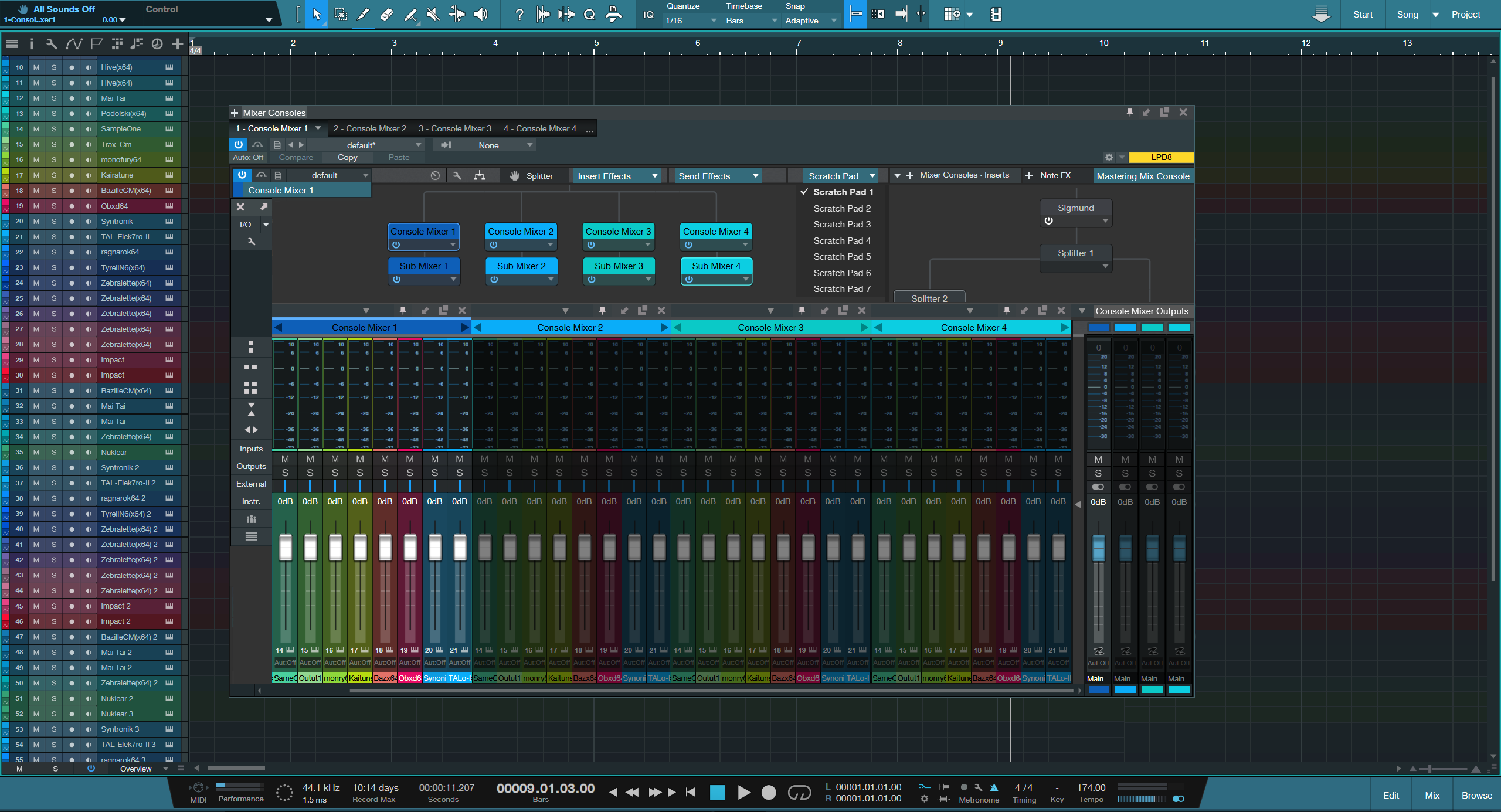
I've drawn up a realistic representation of the vision I have, in which using multiple mixing consoles can give greater control, flexibility and management in song production.This is just one configuration in how it could look, but obviously by the way you can toggle windows, it can be further configured to one's needs.
________
● The new revised 'Mixer Console System' goes way beyond the limitations in which 'Folder Tracks' and the 'Grouping' options introduced in version 4.5 provide, whilst also complementing them at the same time, with not only being able to multi mix between different mix consoles and retain configurations individually, you can also save multiple setups and recall them on the fly within the node based system and view them a multitude of ways that you desire.
● You can chain multiple mix consoles together and add effects globally to them all. If you have accidentally messed up a mix and forgot to save, you can prevent that by having a backup of an earlier console mix session you've saved, whilst also allowing you to save and import multiple mix console setups into new songs you create.
● The new console mixing system saves time with production by that of mouse clicks, and mouse scrolling that can disrupt one's workflow..whilst allowing you to easily find your big tracks in big productions, with full console mixer labelling. Rather than with being limited to that of individual mixer widths or panels that you prefer to have or have otherwise closed.
● You can save CPU load and by turning off the mixer nodes so it allows you to better manage how the groups of instruments and effects are handled.
● You can build mixing console setups from scratch for Scratch Pads based songs.
● You can assign mixer consoles to Scratch Pads which you can select from the drop down menu without affecting the main song and the instruments being used.
● Console Mixers are selectable from single tabs, in the same way multiple instruments are and allows you to take a screenshot of the console mixer layout you have created.
● You can use dark shadow glass effects for isolating selections of mixer channels sections more clearly.
● You can pin, expand, collapse, undock and arrange multiple consoles horizontally, in quad view or vertically....which allows you to view not just 20 to 40 tracks at one time but two times, three times or more in different configuration view states and possibly up to 200, 300 mixer channels in a narrow format on a 1440p or higher resolution screen.
● You can expand the monitoring levels of not just one mixing console but several in addition to randomly selected ones.
● You can dedicate different mixing consoles for different external hardware setups instead of being limited to just one.
● It makes it easy to compare your actual song mix setup with the mastering one you have without ever needing to switch screens to make direct comparisons.
______
The concept I've drawn up, is one I have thought about for several days up to this point and documented. It's taken several hours to bring the aspects of a real image in improving Studio One.
This more than just adding a another console mixer or two, this is about transforming Studio One into a powerful mixing environment that takes a new step in the evolution of DAWs. It looks simple, but that's the beauty of it, whilst keeping on the same rails of what Studio One is.
Studio One Multi Console Integration & Management Network With Effect Channel Mixing & Master Mix Overview|' Design Concept '
Click Here For Full Size Image
I've drawn up a realistic representation of the vision I have, in which using multiple mixing consoles can give greater control, flexibility and management in song production.This is just one configuration in how it could look, but obviously by the way you can toggle windows, it can be further configured to one's needs.
________
● The new revised 'Mixer Console System' goes way beyond the limitations in which 'Folder Tracks' and the 'Grouping' options introduced in version 4.5 provide, whilst also complementing them at the same time, with not only being able to multi mix between different mix consoles and retain configurations individually, you can also save multiple setups and recall them on the fly within the node based system and view them a multitude of ways that you desire.
● You can chain multiple mix consoles together and add effects globally to them all. If you have accidentally messed up a mix and forgot to save, you can prevent that by having a backup of an earlier console mix session you've saved, whilst also allowing you to save and import multiple mix console setups into new songs you create.
● The new console mixing system saves time with production by that of mouse clicks, and mouse scrolling that can disrupt one's workflow..whilst allowing you to easily find your big tracks in big productions, with full console mixer labelling. Rather than with being limited to that of individual mixer widths or panels that you prefer to have or have otherwise closed.
● You can save CPU load and by turning off the mixer nodes so it allows you to better manage how the groups of instruments and effects are handled.
● You can build mixing console setups from scratch for Scratch Pads based songs.
● You can assign mixer consoles to Scratch Pads which you can select from the drop down menu without affecting the main song and the instruments being used.
● Console Mixers are selectable from single tabs, in the same way multiple instruments are and allows you to take a screenshot of the console mixer layout you have created.
● You can use dark shadow glass effects for isolating selections of mixer channels sections more clearly.
● You can pin, expand, collapse, undock and arrange multiple consoles horizontally, in quad view or vertically....which allows you to view not just 20 to 40 tracks at one time but two times, three times or more in different configuration view states and possibly up to 200, 300 mixer channels in a narrow format on a 1440p or higher resolution screen.
● You can expand the monitoring levels of not just one mixing console but several in addition to randomly selected ones.
● You can dedicate different mixing consoles for different external hardware setups instead of being limited to just one.
● It makes it easy to compare your actual song mix setup with the mastering one you have without ever needing to switch screens to make direct comparisons.
______
The concept I've drawn up, is one I have thought about for several days up to this point and documented. It's taken several hours to bring the aspects of a real image in improving Studio One.
This more than just adding a another console mixer or two, this is about transforming Studio One into a powerful mixing environment that takes a new step in the evolution of DAWs. It looks simple, but that's the beauty of it, whilst keeping on the same rails of what Studio One is.
Last edited by THE INTRANCER on Thu Nov 28, 2019 8:44 pm, edited 3 times in total.
KVR S1-Thread | The Intrancersonic-Design Source > Program Resource | Studio One Resource | Music Gallery | 2D / 3D Sci-fi Art | GUI Projects | Animations | Photography | Film Docs | 80's Cartoons | Games | Music Hardware |
-
- KVRer
- 2 posts since 28 Nov, 2019
Great mock-up of graphics. I would add one thing to take this to the next-level:THE INTRANCER wrote: Wed Nov 27, 2019 10:24 pm ( Previous post removed, replaced with updated version..)
Studio One Multi Console Integration & Management Network With Effect Channel Mixing & Master Mix Overview|' Design Concept '
You should be able to switch between whatever the active sub-mixer is via Midi messages. This opens a new world of possibilities.
For instance, you could create a few different mixes of a track and then "comp" between those mixes (ie. take mix1 for intro, mix2 for verse, mix1 for chorus, and mix5 for outro, etc)
-
beatmangler443 beatmangler443 https://www.kvraudio.com/forum/memberlist.php?mode=viewprofile&u=306784
- KVRist
- 421 posts since 11 Jun, 2013
Looks to busy. DAW's that have fastest workflows don't have busy looking mixers. Studio One's mixer is straight to the point.THE INTRANCER wrote: Wed Nov 27, 2019 10:24 pm ( Previous post removed, replaced with updated version..)
Studio One Multi Console Integration & Management Network With Effect Channel Mixing & Master Mix Overview|' Design Concept '
Click Here For Full Size Image
I've drawn up a realistic representation of the vision I have, in which using multiple mixing consoles can give greater control, flexibility and management in song production.This is just one configuration in how it could look, but obviously by the way you can toggle windows, it can be further configured to one's needs.
________
● The new revised 'Mixer Console System' goes way beyond the limitations in which 'Folder Tracks' and the 'Grouping' options introduced in version 4.5 provide, whilst also complementing them at the same time, with not only being able to multi mix between different mix consoles and retain configurations individually, you can also save multiple setups and recall them on the fly within the node based system and view them a multitude of ways that you desire.
● You can chain multiple mix consoles together and add effects globally to them all. If you have accidentally messed up a mix and forgot to save, you can prevent that by having a backup of an earlier console mix session you've saved, whilst also allowing you to save and import multiple mix console setups into new songs you create.
● The new console mixing system saves time with production by that of mouse clicks, and mouse scrolling that can disrupt one's workflow..whilst allowing you to easily find your big tracks in big productions, with full console mixer labelling. Rather than with being limited to that of individual mixer widths or panels that you prefer to have or have otherwise closed.
● You can save CPU load and by turning off the mixer nodes so it allows you to better manage how the groups of instruments and effects are handled.
● You can build mixing console setups from scratch for Scratch Pads based songs.
● You can assign mixer consoles to Scratch Pads which you can select from the drop down menu without affecting the main song and the instruments being used.
● Console Mixers are selectable from single tabs, in the same way multiple instruments are and allows you to take a screenshot of the console mixer layout you have created.
● You can use dark shadow glass effects for isolating selections of mixer channels sections more clearly.
● You can pin, expand, collapse, undock and arrange multiple consoles horizontally, in quad view or vertically....which allows you to view not just 20 to 40 tracks at one time but two times, three times or more in different configuration view states and possibly up to 200, 300 mixer channels in a narrow format on a 1440p or higher resolution screen.
● You can expand the monitoring levels of not just one mixing console but several in addition to randomly selected ones.
● You can dedicate different mixing consoles for different external hardware setups instead of being limited to just one.
● It makes it easy to compare your actual song mix setup with the mastering one you have without ever needing to switch screens to make direct comparisons.
______
The concept I've drawn up, is one I have thought about for several days up to this point and documented. It's taken several hours to bring the aspects of a real image in improving Studio One.
This more than just adding a another console mixer or two, this is about transforming Studio One into a powerful mixing environment that takes a new step in the evolution of DAWs. It looks simple, but that's the beauty of it, whilst keeping on the same rails of what Studio One is.
-
- KVRAF
- Topic Starter
- 3496 posts since 30 Dec, 2014
Thanks, it's your first post, but I think know who you might be as I've had messages from other places about it.u297 wrote: Thu Nov 28, 2019 6:37 pmGreat mock-up of graphics. I would add one thing to take this to the next-level:THE INTRANCER wrote: Wed Nov 27, 2019 10:24 pm ( Previous post removed, replaced with updated version..)
Studio One Multi Console Integration & Management Network With Effect Channel Mixing & Master Mix Overview|' Design Concept '
You should be able to switch between whatever the active sub-mixer is via Midi messages. This opens a new world of possibilities.
For instance, you could create a few different mixes of a track and then "comp" between those mixes (ie. take mix1 for intro, mix2 for verse, mix1 for chorus, and mix5 for outro, etc)
In regard to midi messages, that's an interesting idea...I guess that would infer that one would want to control different mix consoles from an external hardware controller. Typically one would do this vie a macro key on one's qwerty keyboard. Can't think off the top of my head in which CC command one would use to switch things vie midi, but I guess that's where the midi learn function comes in so one can set a knob / pad / button on a controller to do that.
Also I didn't think about this initially, but it it would provide a path for Surround Sound setups because one has multiple mix consoles that one could use for that.
I've added a feature request on Questions & Answers, so it will theoretically be within the Presonus radar other than through social media billboards where it's also been posted, even if I do find the Q&A page as a flawed futile entity. Studio One owners can login and vote here should they wish to..
https://answers.presonus.com/46147/cons ... l-overview
KVR S1-Thread | The Intrancersonic-Design Source > Program Resource | Studio One Resource | Music Gallery | 2D / 3D Sci-fi Art | GUI Projects | Animations | Photography | Film Docs | 80's Cartoons | Games | Music Hardware |
-
- KVRer
- 2 posts since 28 Nov, 2019
I have voted on Answers and yes its pretty flawed entity.
My idea regarding having this connected to MIDI CC's is really just an implementation detail on how to make it easier to integrate into the rest of S1 (although in mixing sessions it could be helpful to A/B mix ideas by turning a midi pot).
Overall, my idea is that: much like there are already dedicated tracks for Arranger, Tempo, Time Sig...I would envision a dedicated "Mixer Track" which encapsulates your idea. Then this global "Mixer Track" would hold all the settings for each mixer.
Since its just fundamentally a midi lane, you can use all the included S1 tools to work with it (ie. swipe comp between mix versions to provide variation between sections, etc).
My idea regarding having this connected to MIDI CC's is really just an implementation detail on how to make it easier to integrate into the rest of S1 (although in mixing sessions it could be helpful to A/B mix ideas by turning a midi pot).
Overall, my idea is that: much like there are already dedicated tracks for Arranger, Tempo, Time Sig...I would envision a dedicated "Mixer Track" which encapsulates your idea. Then this global "Mixer Track" would hold all the settings for each mixer.
Since its just fundamentally a midi lane, you can use all the included S1 tools to work with it (ie. swipe comp between mix versions to provide variation between sections, etc).
-
- KVRAF
- Topic Starter
- 3496 posts since 30 Dec, 2014
Ah, I see...yes... that sounds like a great idea, so it's like an extension to the multi mix console system at track level one can use and get creative with. With that, mixer console blocks would contain things like automation and fader sound levels which can be arranged as required. So my thoughts would be that double clicking on them would open up the Node Console Network where the parameters for these mix consoles could further be displayed and manipulated during the region time they are active on as you say, 'the 'Mixer Track'. Essentially you would have simple and advanced view modes for Mix Console based tracks that can be easily manipulated vie that of midi control. This would open the doors to back front and side multi mixing of groups of instruments both at midi control level and audio dynamically. So essentially being able to throw your music around in ways that wasn't possible before. Humm, now that sounds really cool... How that would all work, would probably need some illustration, but as per your additional idea with a 'Mixer Track', that's simple enough to imagine I think, given the existing methods Studio One uses already.u297 wrote: Fri Nov 29, 2019 6:13 pm I have voted on Answers and yes its pretty flawed entity.
My idea regarding having this connected to MIDI CC's is really just an implementation detail on how to make it easier to integrate into the rest of S1 (although in mixing sessions it could be helpful to A/B mix ideas by turning a midi pot).
Overall, my idea is that: much like there are already dedicated tracks for Arranger, Tempo, Time Sig...I would envision a dedicated "Mixer Track" which encapsulates your idea. Then this global "Mixer Track" would hold all the settings for each mixer.
Since its just fundamentally a midi lane, you can use all the included S1 tools to work with it (ie. swipe comp between mix versions to provide variation between sections, etc).
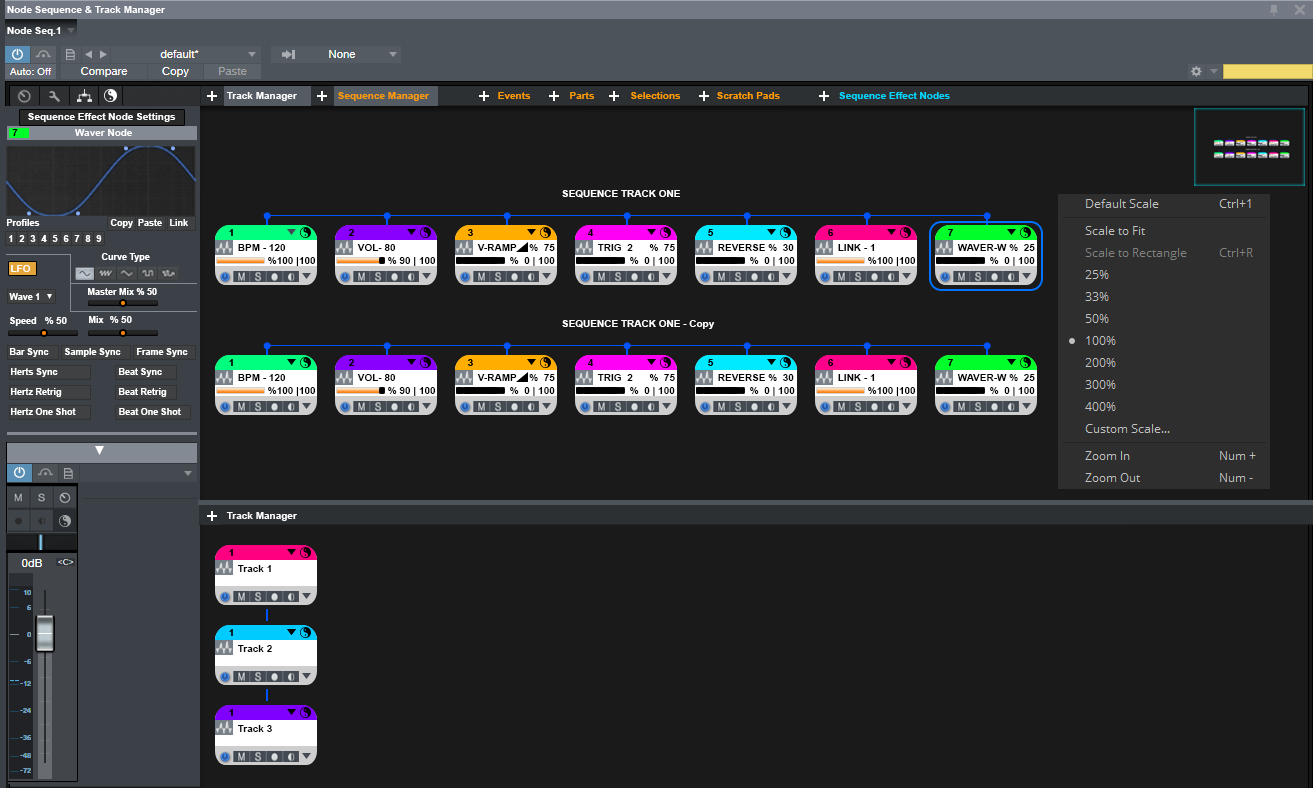
It kinda reminds me of a design I had come up with about 3 years ago I posted earlier in this thread... on page 4 found here. There's a concept for a new Mojito I did on that page, one instrument that Presonus have still to update.
Large Image
KVR S1-Thread | The Intrancersonic-Design Source > Program Resource | Studio One Resource | Music Gallery | 2D / 3D Sci-fi Art | GUI Projects | Animations | Photography | Film Docs | 80's Cartoons | Games | Music Hardware |
-
charmcitymusic charmcitymusic https://www.kvraudio.com/forum/memberlist.php?mode=viewprofile&u=449315
- KVRer
- 17 posts since 7 Oct, 2019
No thanks.THE INTRANCER wrote: Fri Nov 29, 2019 7:28 pmAh, I see...yes... that sounds like a great idea, so it's like an extension to the multi mix console system at track level one can use and get creative with. With that, mixer console blocks would contain things like automation and fader sound levels which can be arranged as required. So my thoughts would be that double clicking on them would open up the Node Console Network where the parameters for these mix consoles could further be displayed and manipulated during the region time they are active on as you say, 'the 'Mixer Track'. Essentially you would have simple and advanced view modes for Mix Console based tracks that can be easily manipulated vie that of midi control. This would open the doors to back front and side multi mixing of groups of instruments both at midi control level and audio dynamically. So essentially being able to throw your music around in ways that wasn't possible before. Humm, now that sounds really cool... How that would all work, would probably need some illustration, but as per your additional idea with a 'Mixer Track', that's simple enough to imagine I think, given the existing methods Studio One uses already.u297 wrote: Fri Nov 29, 2019 6:13 pm I have voted on Answers and yes its pretty flawed entity.
My idea regarding having this connected to MIDI CC's is really just an implementation detail on how to make it easier to integrate into the rest of S1 (although in mixing sessions it could be helpful to A/B mix ideas by turning a midi pot).
Overall, my idea is that: much like there are already dedicated tracks for Arranger, Tempo, Time Sig...I would envision a dedicated "Mixer Track" which encapsulates your idea. Then this global "Mixer Track" would hold all the settings for each mixer.
Since its just fundamentally a midi lane, you can use all the included S1 tools to work with it (ie. swipe comp between mix versions to provide variation between sections, etc).
It kinda reminds me of a design I had come up with about 3 years ago I posted earlier in this thread... on page 4 found here. There's a concept for a new Mojito I did on that page, one instrument that Presonus have still to update.
Large Image