

Anyone using deCoda as compositional tool?
Seems to me that hosts like Studio One 4 can already do what this app offers for instrumental practice.
deCoda App by zplane
-
- KVRAF
- 5710 posts since 24 May, 2004 from []1
-
- KVRist
- 128 posts since 13 Aug, 2017 from Gothenburg
I think it's meant to be a transcribing tool. I can't see any advantage in using this over a DAW or notation software when writing songs.
Yes, there's really nothing that you can't already do with most DAWs. But the tool where you can focus an instrument and see notes seems very nice. Kinda like a combination of iZotope RX and Melodyne. I can see why people would buy deCoda just for that feature alone.Musical Gym wrote: Wed Dec 18, 2019 12:24 am Seems to me that hosts like Studio One 4 can already do what this app offers for instrumental practice.
-
- KVRAF
- Topic Starter
- 5710 posts since 24 May, 2004 from []1
Thanks for feedback. Will visit their tutorials to see if it may be worth investing in at the intro price.
-
- KVRAF
- 6402 posts since 8 Jun, 2009
It's not a compositional tool. It's for analysing existing songs, where you get more hints from the software in addition to being able to slow stuff down for transcribing.Musical Gym wrote: Wed Dec 18, 2019 12:24 am Anyone using deCoda as compositional tool?
Seems to me that hosts like Studio One 4 can already do what this app offers for instrumental practice.
-
 neverbeeninariot neverbeeninariot https://www.kvraudio.com/forum/memberlist.php?mode=viewprofile&u=350084
 - KVRian
- 1079 posts since 3 Feb, 2015 from UK
Reminds me of the now defunct Riffstation (https://www.riffstation.com/index.html). It could do the slowdown, filter, loop thing but it was awkward to use, and the algorithms were grainy at best.
zplane have (arguably) one of the best time-stretch algos around, which, if the ux is good would make this a shoe-in replacement, esp given the intro price. The midi features look pretty good too.
zplane have (arguably) one of the best time-stretch algos around, which, if the ux is good would make this a shoe-in replacement, esp given the intro price. The midi features look pretty good too.
-
- KVRAF
- Topic Starter
- 5710 posts since 24 May, 2004 from []1
I think I still have Riffstation. Will see if I'm able to resurrect my semi-crashed pc.
Song Surgeon has replaced it.
http://songsurgeon.com/Riffstation_LP.h ... 744fc4a8f7
Song Surgeon has replaced it.
http://songsurgeon.com/Riffstation_LP.h ... 744fc4a8f7
-
- KVRAF
- 1670 posts since 13 Jan, 2014
What I would really like to see is how the exported midi looks and what you can export. Of course this is disabled in demo and I cant find any info about it in the manual/vids. Only the part you have marked ? One "track" ? Whole song as one midi ? Whole song as different midi tracks ? If anyone has this would be really interested in any hints on this.
-
- KVRist
- 283 posts since 6 Aug, 2017
There's a sale on this at Plugin Boutique that's ending soon, and apparently there's still no midi export example. Googling for one turned up this thread. Does anyone have an example they could share yet?
-

- KVRAF
- 2764 posts since 28 Feb, 2015
deCoda doesn't transcribe for you automatically, so the midi file depends completely on the notes you enter in the piano roll.
Mac Mini M4 Pro | 14 Cores (10P/4E) | 48GB RAM | Studio One | Reason | Bitwig Studio | Logic Pro | FL Studio | Cubase Pro | Waveform | Reaper | Renoise | ~1000 VSTs/AUs | ~350 REs
-
- KVRAF
- 2066 posts since 11 Aug, 2012 from omfr morf form romf frmo
You are basically plotting every note, though it does a decent job guessing where and what they are. It has a good workflow though. You can have it loop over sections and have it play the original and your transcription to help you ensure it's correct. But again, since you are plotting every note it is extremely tedious. It should have an inverse mode, where it plots for you, then you can correct it.
-

- KVRAF
- 44004 posts since 11 Aug, 2008 from clown world
I tried it on some stuff and it didn't get any of the chords right.
Didn't know it was possible to compose with it too.
Perhaps I didn't understand how to use it properly.
Didn't know it was possible to compose with it too.
Perhaps I didn't understand how to use it properly.
This is the same method MJ used when he was working on Anthony Marinelli's Thriller.
-
- KVRAF
- 3374 posts since 2 Oct, 2004
Zplane Decoda looks an awful lot like this entirely freeware and open source application called Tony. Like Decoda it shows you a visualisation and expects the user to transcribe the notes themselves.starflakeprj wrote: Mon Feb 03, 2020 6:12 am deCoda doesn't transcribe for you automatically, so the midi file depends completely on the notes you enter in the piano roll.
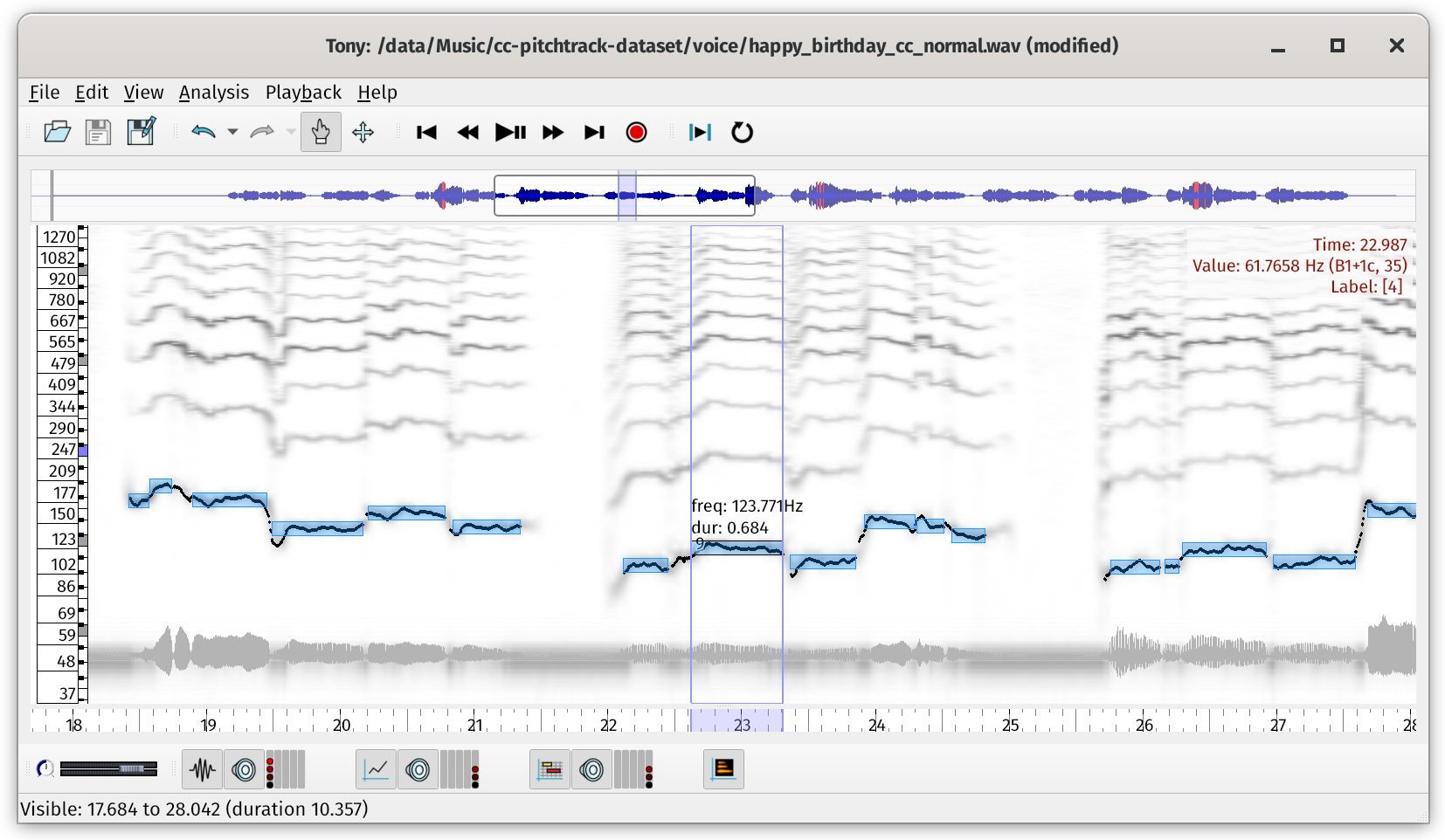
https://sonicvisualiser.org/tony/
Orion Platinum, Muzys 2
-

- KVRAF
- 1728 posts since 21 Sep, 2007 from USA
v1o wrote: Sat Oct 30, 2021 8:10 pmZplane Decoda looks an awful lot like this entirely freeware and open source application called Tony. Like Decoda it shows you a visualisation and expects the user to transcribe the notes themselves.starflakeprj wrote: Mon Feb 03, 2020 6:12 am deCoda doesn't transcribe for you automatically, so the midi file depends completely on the notes you enter in the piano roll.
https://sonicvisualiser.org/tony/
If I recall correctly, the WidiSoft WIDI Recognition System was one of the first audio-to-MIDI software tools to work that way.

[Core i7 8700 | 32GB DDR4 | Win11 x64 | Studio One 7 Pro | WASAPI ]