[PreSonus Studio One] Music | Design | Film | VFX Production Resource

Audio Plugin Hosts and other audio software applications discussion
Locked New Topic
RELATED
PRODUCTS
Studio One Professional

Post

middle_color wrote: Sat Apr 11, 2020 1:35 am ...
I had a problem with audio dropouts when adding instrument while song is playing. I thought it is caused by GUI glitch, because DAW freezes UI for a moment apart from audio glitch.

Turns out it is because there was enabled option "Low latency monitoring for instruments". When i turned it off all glitches gone and CPU usage drastically went down. So i now have no problem with instrument being shown.
Stay away from this option as imho Presonus implemented this in a very silly way...

What this does is nothing else than duplicating this instrument for the low latency monitoring... meaning this instrument exists double in that moment... one "normal" and one which uses a second monitor path with low latency...
Of course this uses nearly double the CPU than normally...

I would prefer if they would have implemented a way to take the original instrument out of the high latency path instead of doubling it...

Post

If you're reading this, you're on the wrong page, Easter Monday is on Page 1... with a special treat of a video.. (Second from the top) .
KVR S1-Thread | The Intrancersonic-Design Source > Program Resource | Studio One Resource | Music Gallery | 2D / 3D Sci-fi Art | GUI Projects | Animations | Photography | Film Docs | 80's Cartoons | Games | Music Hardware |

Post

I must admit I am not an expert with S1... I have V2, waiting to upgrade to V5, and have not been able to find anywhere how to set up a Midi track to route output to another midi track.

I just purchased the VST PhraseBox. It takes Midi input from a track, processes it and sends it out to another track. Does S1 allow for Midi tracks to send Midi to another track, or is this something that is a future feature. Live does this... I must be missing something...
Coronal Winds Radio - Tune In!
Remember, what you believe doesn't rewrite reality.

Post

dlt123 wrote: Fri Apr 17, 2020 8:28 am I must admit I am not an expert with S1... I have V2, waiting to upgrade to V5, and have not been able to find anywhere how to set up a Midi track to route output to another midi track.

I just purchased the VST PhraseBox. It takes Midi input from a track, processes it and sends it out to another track. Does S1 allow for Midi tracks to send Midi to another track, or is this something that is a future feature. Live does this... I must be missing something...
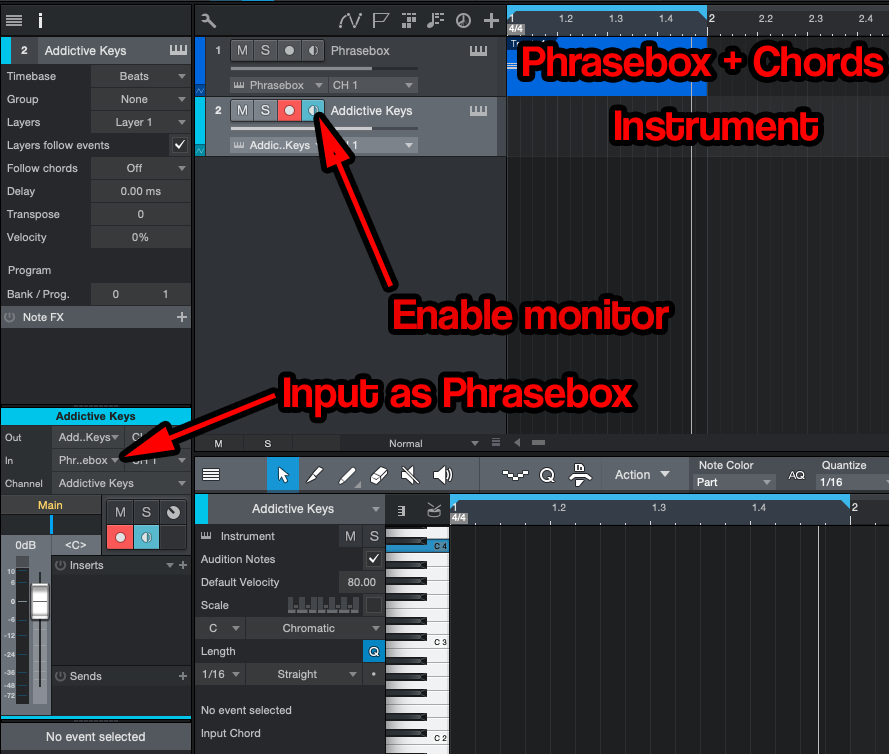
I belive you cannot SEND midi from one track to the other, but you can RECEIVE midi on one track from another. So, put that PhraseBox on a track, play into it live (or from midi clip) and then on another track with an instrument receive the midi from PhraseBox track :)

EDIT: It's all on their website, too: https://venomode.com/faqs#phraseboxroute

Image
Music tech enthusiast
DAW, VST & hardware hoarder
My "music": https://soundcloud.com/antic604

Post

antic604 wrote: Fri Apr 17, 2020 8:32 am
dlt123 wrote: Fri Apr 17, 2020 8:28 am I must admit I am not an expert with S1... I have V2, waiting to upgrade to V5, and have not been able to find anywhere how to set up a Midi track to route output to another midi track.

I just purchased the VST PhraseBox. It takes Midi input from a track, processes it and sends it out to another track. Does S1 allow for Midi tracks to send Midi to another track, or is this something that is a future feature. Live does this... I must be missing something...
I belive you cannot SEND midi from one track to the other, but you can RECEIVE midi on one track from another. So, put that PhraseBox on a track, play into it live (or from midi clip) and then on another track with an instrument receive the midi from PhraseBox track :)

EDIT: It's all on their website, too: https://venomode.com/faqs#phraseboxroute
This method has only one problem...
You cannot lock this monitor button state!!!
Insert another instrument track and select it and bang!!! your monitoring changed to this track only...
Of course you can shut off automatic monitoring but this isn´t useable neither...

This is only a workaround which shall be recorded to midi as soon as possible... sadly...
That´s i.e. what I like in Ableton and Bitwig... automatic monitoring for every track but if you set it manually to monitor it doesn´t change anymore... perfect!!!

Post

Trancit wrote: Fri Apr 17, 2020 8:45 am This method has only one problem...
You cannot lock this monitor button state!!!
But that's only the case when you want to play live "through" it. Once the MIDI clip is on the track it doesn't matter anymore.
Music tech enthusiast
DAW, VST & hardware hoarder
My "music": https://soundcloud.com/antic604

Post

antic604 wrote: Fri Apr 17, 2020 8:32 am
dlt123 wrote: Fri Apr 17, 2020 8:28 am I must admit I am not an expert with S1... I have V2, waiting to upgrade to V5, and have not been able to find anywhere how to set up a Midi track to route output to another midi track.

I just purchased the VST PhraseBox. It takes Midi input from a track, processes it and sends it out to another track. Does S1 allow for Midi tracks to send Midi to another track, or is this something that is a future feature. Live does this... I must be missing something...
I belive you cannot SEND midi from one track to the other, but you can RECEIVE midi on one track from another. So, put that PhraseBox on a track, play into it live (or from midi clip) and then on another track with an instrument receive the midi from PhraseBox track :)

EDIT: It's all on their website, too: https://venomode.com/faqs#phraseboxroute

Image
Thanks, I will give this a try tomorrow... Heading to bed. zzzzz...
Didn't make it to bed... I had to try it out and it worked. Thanks again. Will have to play more with it, but this worked.
Last edited by dlt123 on Fri Apr 17, 2020 9:24 am, edited 1 time in total.
Coronal Winds Radio - Tune In!
Remember, what you believe doesn't rewrite reality.

Post

antic604 wrote: Fri Apr 17, 2020 8:56 am
Trancit wrote: Fri Apr 17, 2020 8:45 am This method has only one problem...
You cannot lock this monitor button state!!!
But that's only the case when you want to play live "through" it. Once the MIDI clip is on the track it doesn't matter anymore.
That´s what I meant... I would love to see a "monitor safe" state 8)

Post

Trancit wrote: Fri Apr 17, 2020 9:20 am That´s what I meant... I would love to see a "monitor safe" state 8)
But you can disable "Instrument Input Follows Selection" option in the Options menu, so when you enable monitoring and switch to other track the monitoring remains on:

https://s1manual.presonus.com/Content/R ... Tracks.htm
Music tech enthusiast
DAW, VST & hardware hoarder
My "music": https://soundcloud.com/antic604

Post

antic604 wrote: Fri Apr 17, 2020 9:29 am
Trancit wrote: Fri Apr 17, 2020 9:20 am That´s what I meant... I would love to see a "monitor safe" state 8)
But you can disable "Instrument Input Follows Selection" option in the Options menu, so when you enable monitoring and switch to other track the monitoring remains on:

https://s1manual.presonus.com/Content/R ... Tracks.htm
I know... but as I wrote:
Trancit wrote: Fri Apr 17, 2020 8:45 am ...
Of course you can shut off automatic monitoring but this isn´t useable neither...
...
8)

Post

Trancit wrote: Fri Apr 17, 2020 11:04 am
antic604 wrote: Fri Apr 17, 2020 9:29 am
Trancit wrote: Fri Apr 17, 2020 9:20 am That´s what I meant... I would love to see a "monitor safe" state 8)
But you can disable "Instrument Input Follows Selection" option in the Options menu, so when you enable monitoring and switch to other track the monitoring remains on:

https://s1manual.presonus.com/Content/R ... Tracks.htm
I know... but as I wrote:
Trancit wrote: Fri Apr 17, 2020 8:45 am ...
Of course you can shut off automatic monitoring but this isn´t useable neither...
...
8)
But how it's not usable? How does that differ from e.g. Bitwig, where you also need to disable automatic monitoring and enable "fixed" monitoring?
Music tech enthusiast
DAW, VST & hardware hoarder
My "music": https://soundcloud.com/antic604

Post

New Studio One design and development project added to page one. :-)
KVR S1-Thread | The Intrancersonic-Design Source > Program Resource | Studio One Resource | Music Gallery | 2D / 3D Sci-fi Art | GUI Projects | Animations | Photography | Film Docs | 80's Cartoons | Games | Music Hardware |

Post

antic604 wrote: Fri Apr 17, 2020 11:20 am But how it's not usable? How does that differ from e.g. Bitwig, where you also need to disable automatic monitoring and enable "fixed" monitoring?
That´s not true...
You just have to disable automatic monitoring for this track and it still works for all others...
And that´s what different to S1... in S1 it´s all or nothing, in Bitwig it´s per track...

Post

Trancit wrote: Fri Apr 17, 2020 2:02 pm
antic604 wrote: Fri Apr 17, 2020 11:20 am But how it's not usable? How does that differ from e.g. Bitwig, where you also need to disable automatic monitoring and enable "fixed" monitoring?
That´s not true...
You just have to disable automatic monitoring for this track and it still works for all others...
And that´s what different to S1... in S1 it´s all or nothing, in Bitwig it´s per track...
In practice does it matter?

Turn it off for all tracks then turn on the tracks you want on. Not seeing a big difference there. I have auto monitoring turned off anyway because of low latency monitoring. It can really cause a spike in CPU usage because like you said it looks like S1 is duplicating the track in the background or something, but I still need it on larger projects.
Studio One // Bitwig // Logic Pro // Ableton // Reason // FLStudio // MPC // Force // Maschine

Post

apoclypse wrote: Fri Apr 17, 2020 3:48 pm In practice does it matter?

Turn it off for all tracks then turn on the tracks you want on. Not seeing a big difference there. I have auto monitoring turned off anyway because of low latency monitoring. It can really cause a spike in CPU usage because like you said it looks like S1 is duplicating the track in the background or something, but I still need it on larger projects.
For me it does matter...

I find any disabling of auto monitoring a silly behaviour as I want to hear what I play for every instrument track I select... so auto monitoring is essential for me for not having to monitor enable it everytime manually...

But in S1 if you want to use the track to track workaround for i.e. modulation or external arps, auto monitoring shuts off the monitoring for the modulated/triggered track every time you select a different one... so that does not work...
Every DAW relying on such a workflow because of just allowing one VSTi per chain should really got an option to lock the monitoring state...

In Ableton or Bitwig I can have auto monitoring enabled for every track but just shut it off /lock it for the tracks which are listening to others, while in Bitwig it wouldn´t any necessary because of being able to listen to midi from any track inside the chain anyway...

Locked

Return to “Hosts & Applications (Sequencers, DAWs, Audio Editors, etc.)”