Voxengo Colour Schemes Repository..
-

- KVRian
- Topic Starter
- 1305 posts since 12 Nov, 2002 from Newcastle, UK
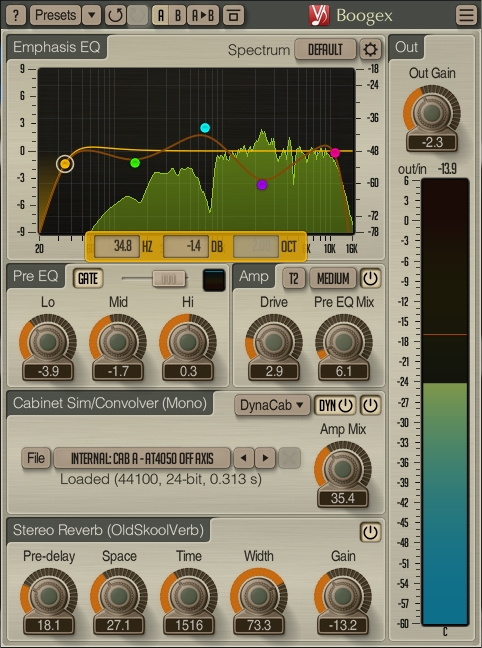
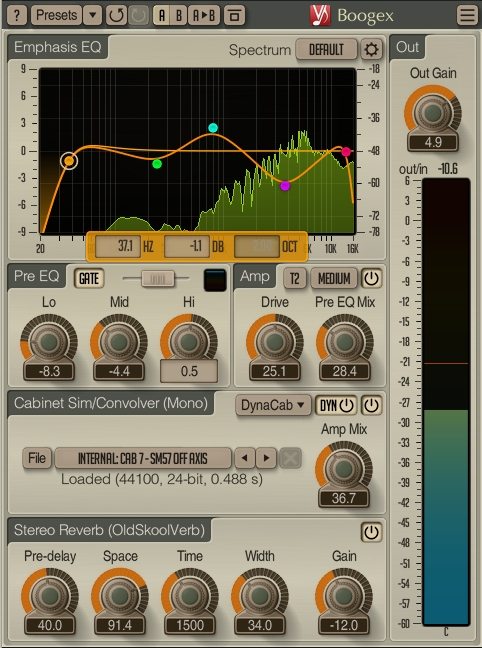
Personal preference. I kept the 'standard' green/yellow for the more conventional colour schemes. The blue is a little different and I prefered it with the alternative meter colours.fmr wrote: Fri May 01, 2020 1:53 pm Why is the VUmeter green/yellow in this last one, and not in the previous one?
Also note, the meter colours are brighter in most of the other plugins. There is a bug in Boogex and a couple of newly updated plugins where the disabled control transparency setting affects the transparency of the meter.
It's relatively easy to change the colours to suit your needs

"Micro Kid speaks digi-talk.."
-
- KVRian
- 837 posts since 1 Sep, 2007
In the works, been working on it the whole day, checking all the Voxengo plugins and made some minor improvements and some combability modes for a few of them, so probably ready to upload within the next 36 hours or so... now I need to get some sleep.
-

- KVRAF
- 2772 posts since 22 May, 2017
Great alt. schemes, Shifrin. Much appreciated for you sharing. 
-
- KVRAF
- 2772 posts since 22 May, 2017
Awesome! Looking forward to it, Kr3eM!Kr3eM wrote: Sat May 02, 2020 2:41 amIn the works, been working on it the whole day, checking all the Voxengo plugins and made some minor improvements and some combability modes for a few of them, so probably ready to upload within the next 36 hours or so... now I need to get some sleep.
Sleep well, dude!

-
 Hermetech Mastering Hermetech Mastering https://www.kvraudio.com/forum/memberlist.php?mode=viewprofile&u=7418
 - KVRAF
- 1619 posts since 30 May, 2003 from Milan, Italy
Thanks for all the work, looking forward to it, I think this is the nicest light colour scheme I have seen so far.Kr3eM wrote: Sat May 02, 2020 2:41 amIn the works, been working on it the whole day, checking all the Voxengo plugins and made some minor improvements and some combability modes for a few of them, so probably ready to upload within the next 36 hours or so... now I need to get some sleep.
-
- KVRian
- Topic Starter
- 1305 posts since 12 Nov, 2002 from Newcastle, UK
You can change the spectrum fill colour using the control as shown :-
The first 10 colours in that list are hard-coded into the plugin, colours 11 - 16 are editable in the scheme editor and labelled as Spectrum and EQ area 11 .. 16.
The Spectrum fill parameter controls the opacity of the fill, i.e. how see-through it is
The first 10 colours in that list are hard-coded into the plugin, colours 11 - 16 are editable in the scheme editor and labelled as Spectrum and EQ area 11 .. 16.
The Spectrum fill parameter controls the opacity of the fill, i.e. how see-through it is
You do not have the required permissions to view the files attached to this post.
"Micro Kid speaks digi-talk.."
-
- KVRian
- Topic Starter
- 1305 posts since 12 Nov, 2002 from Newcastle, UK
Oh, and you can use the Set as Default option in the preset manager to save the colour you chose so that new instances of SPAN use the same colour 
"Micro Kid speaks digi-talk.."
-
- KVRAF
- 2772 posts since 22 May, 2017
Yes, it makes for a very attractive GUI.Hermetech Mastering wrote: Sat May 02, 2020 9:35 amThanks for all the work, looking forward to it, I think this is the nicest light colour scheme I have seen so far.Kr3eM wrote: Sat May 02, 2020 2:41 amIn the works, been working on it the whole day, checking all the Voxengo plugins and made some minor improvements and some combability modes for a few of them, so probably ready to upload within the next 36 hours or so... now I need to get some sleep.
-
- KVRAF
- 6786 posts since 17 Dec, 2009
11-16 can beVortifex wrote: Sat May 02, 2020 1:10 pmNone of those colours relate to the green waveform on the display. Not one single option on there changes it.Shifrin wrote: Sat May 02, 2020 1:01 pm You can change the spectrum fill colour using the control as shown :-
SPAN.png
The first 10 colours in that list are hard-coded into the plugin, colours 11 - 16 are editable in the scheme editor and labelled as Spectrum and EQ area 11 .. 16.
The Spectrum fill parameter controls the opacity of the fill, i.e. how see-through it is
Oh nvm I just realised the button next to Hold does itshame that can't be tweaked though

-
- KVRian
- 837 posts since 1 Sep, 2007
@ Aleksey Vaneev
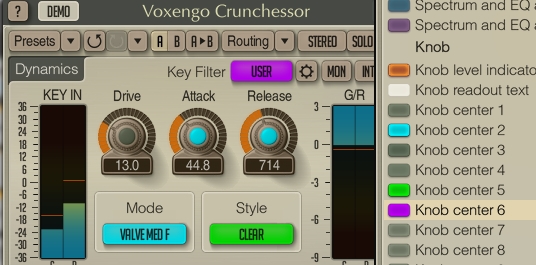
Crunchessor for some reason share the same Knob Center 2 color for all 3 items, Attack, Release and Mode button.
Is this a bug or a permanent feature? There are plenty of Knob Center parameters unused after all.
Crunchessor for some reason share the same Knob Center 2 color for all 3 items, Attack, Release and Mode button.
Is this a bug or a permanent feature? There are plenty of Knob Center parameters unused after all.
-
- KVRAF
- 6786 posts since 17 Dec, 2009
iirc the knob center colors are used for different MODES in crunchessor, not knobs.Kr3eM wrote: Sat May 02, 2020 5:15 pm @ Aleksey Vaneev
Crunchessor for some reason share the same Knob Center 2 color for all 3 items, Attack, Release and Mode button.
Is this a bug or a permanent feature? There are plenty of Knob Center parameters unused after all.
-
- KVRian
- 837 posts since 1 Sep, 2007
They are all tied to Knob Center 2 color... at leats in v2.13Ploki wrote: Sat May 02, 2020 6:55 pmiirc the knob center colors are used for different MODES in crunchessor, not knobs.Kr3eM wrote: Sat May 02, 2020 5:15 pm @ Aleksey Vaneev
Crunchessor for some reason share the same Knob Center 2 color for all 3 items, Attack, Release and Mode button.
Is this a bug or a permanent feature? There are plenty of Knob Center parameters unused after all.