

Oh look, the "official thread".
Can I just express how angry I am that you can't chose the install location? What on Earth is the reasoning behind this?! My computer is built with a tiny solid state C Drive, all it does is host Windows. I install everything to my D drive. I found a really ugly non-official work-around, but please just implement this feature... lol "feature". And I make this joke every time I bitch about this in a post... but sadly, it's not a joke; In recent memory the only things I've come across that you can't choose where to install are Arturia and... Genesis Pro.

Arturia VCollection 7 Official thread
-
 an-electric-heart an-electric-heart https://www.kvraudio.com/forum/memberlist.php?mode=viewprofile&u=182734
 - KVRAF
- 2513 posts since 13 Jun, 2008 from Napier,New Zealand
-
- KVRAF
- 15135 posts since 7 Sep, 2008
Are you sure about this? I have Pigments, 3 Delays, Plate 140 all installed on my D: drive. I would seem odd if V Collection took a different approach.an-electric-heart wrote: Mon May 04, 2020 7:42 am Oh look, the "official thread".
Can I just express how angry I am that you can't chose the install location? What on Earth is the reasoning behind this?! My computer is built with a tiny solid state C Drive, all it does is host Windows. I install everything to my D drive. I found a really ugly non-official work-around, but please just implement this feature... lol "feature". And I make this joke every time I bitch about this in a post... but sadly, it's not a joke; In recent memory the only things I've come across that you can't choose where to install are Arturia and... Genesis Pro.
"I was wondering if you'd like to try Magic Mushrooms"
"Oooh I dont know. Sounds a bit scary"
"It's not scary. You just lose a sense of who you are and all that sh!t"
"Oooh I dont know. Sounds a bit scary"
"It's not scary. You just lose a sense of who you are and all that sh!t"
-
an-electric-heart an-electric-heart https://www.kvraudio.com/forum/memberlist.php?mode=viewprofile&u=182734
- KVRAF
- 2513 posts since 13 Jun, 2008 from Napier,New Zealand
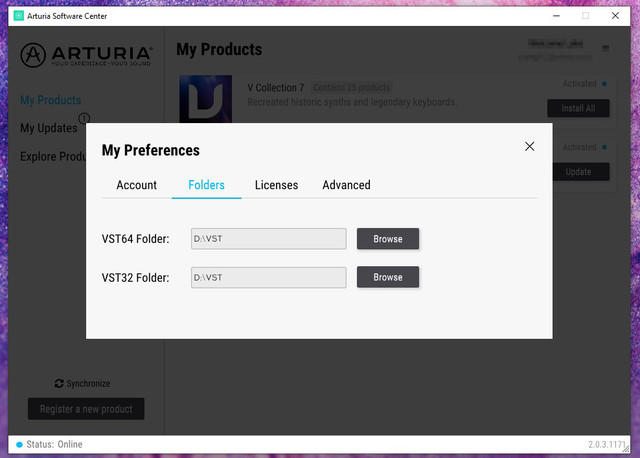
Well, I found plenty of people on the net talking about different work-arounds. So people have been put in a possition where they need to solve this problem. You can choose your VST folder, but that's it. All the data (and it's a fair bit, 10 gigs or so) just goes the default C/program files/Arturia folder, you get no say in the matter.Mushy Mushy wrote: Mon May 04, 2020 7:44 amAre you sure about this? I have Pigments, 3 Delays, Plate 140 all installed on my D: drive. I would seem odd if V Collection took a different approach.an-electric-heart wrote: Mon May 04, 2020 7:42 am Oh look, the "official thread".
Can I just express how angry I am that you can't chose the install location? What on Earth is the reasoning behind this?! My computer is built with a tiny solid state C Drive, all it does is host Windows. I install everything to my D drive. I found a really ugly non-official work-around, but please just implement this feature... lol "feature". And I make this joke every time I bitch about this in a post... but sadly, it's not a joke; In recent memory the only things I've come across that you can't choose where to install are Arturia and... Genesis Pro.
-
- KVRAF
- 15135 posts since 7 Sep, 2008
Yes, you're right. I just checked and I have loads of Arturia on C: and seemingly the exact same files on D:\Arturiaan-electric-heart wrote: Mon May 04, 2020 7:59 amWell, I found plenty of people on the net talking about different work-arounds. So people have been put in a possition where they need to solve this problem. You can choose your VST folder, but that's it. All the data (and it's a fair bit, 10 gigs or so) just goes the default C/program files/Arturia folder, you get no say in the matter.Mushy Mushy wrote: Mon May 04, 2020 7:44 amAre you sure about this? I have Pigments, 3 Delays, Plate 140 all installed on my D: drive. I would seem odd if V Collection took a different approach.an-electric-heart wrote: Mon May 04, 2020 7:42 am Oh look, the "official thread".
Can I just express how angry I am that you can't chose the install location? What on Earth is the reasoning behind this?! My computer is built with a tiny solid state C Drive, all it does is host Windows. I install everything to my D drive. I found a really ugly non-official work-around, but please just implement this feature... lol "feature". And I make this joke every time I bitch about this in a post... but sadly, it's not a joke; In recent memory the only things I've come across that you can't choose where to install are Arturia and... Genesis Pro.

"I was wondering if you'd like to try Magic Mushrooms"
"Oooh I dont know. Sounds a bit scary"
"It's not scary. You just lose a sense of who you are and all that sh!t"
"Oooh I dont know. Sounds a bit scary"
"It's not scary. You just lose a sense of who you are and all that sh!t"
-
an-electric-heart an-electric-heart https://www.kvraudio.com/forum/memberlist.php?mode=viewprofile&u=182734
- KVRAF
- 2513 posts since 13 Jun, 2008 from Napier,New Zealand
Trust me, it's as I said it is. I spent a long time trying to solve this problem. I doubt it's an over site, they must have some reasoning for it.Mushy Mushy wrote: Mon May 04, 2020 8:07 amYes, you're right. I just checked and I have loads of Arturia on C: and seemingly the exact same files on D:\Arturiaan-electric-heart wrote: Mon May 04, 2020 7:59 amWell, I found plenty of people on the net talking about different work-arounds. So people have been put in a possition where they need to solve this problem. You can choose your VST folder, but that's it. All the data (and it's a fair bit, 10 gigs or so) just goes the default C/program files/Arturia folder, you get no say in the matter.Mushy Mushy wrote: Mon May 04, 2020 7:44 amAre you sure about this? I have Pigments, 3 Delays, Plate 140 all installed on my D: drive. I would seem odd if V Collection took a different approach.an-electric-heart wrote: Mon May 04, 2020 7:42 am Oh look, the "official thread".
Can I just express how angry I am that you can't chose the install location? What on Earth is the reasoning behind this?! My computer is built with a tiny solid state C Drive, all it does is host Windows. I install everything to my D drive. I found a really ugly non-official work-around, but please just implement this feature... lol "feature". And I make this joke every time I bitch about this in a post... but sadly, it's not a joke; In recent memory the only things I've come across that you can't choose where to install are Arturia and... Genesis Pro.
-

- KVRAF
- 11162 posts since 16 Mar, 2003 from Porto - Portugal
Actually, that's not correct. My Program Files/Arturia has less the 500 Mb, and I have everything. You are probably talking about the Program Data folder, which is where Arturia stores the accessory files and content (samples, etc.). This is the advised location (Microsoft guidelines) and that's why it exists.an-electric-heart wrote: Mon May 04, 2020 7:59 am You can choose your VST folder, but that's it. All the data (and it's a fair bit, 10 gigs or so) just goes the default C/program files/Arturia folder, you get no say in the matter.
People insist in having a very small disk for the system, forgetting that a lot of programs need to install files in Program Data (and also Users/Current User/AppData). Having this location defined as optional by the user may lead to problems, since they can change ideas version after version, placing the files in different locations, and then the programs start to behave wrong, and that leads to tickets to support with problems that result from User errors.
I have witnessed this with, for example, NI and Native Access.
Fact is: Program Data exists for a reason, and THIS is the reason it exists for. Allowing users to define a different/optional location for the Data files may and usually leads to problems.
You can always use symbolic links and place the Program Data folder elsewhere, if you want: https://www.howtogeek.com/howto/16226/c ... -or-linux/
Fernando (FMR)
-
an-electric-heart an-electric-heart https://www.kvraudio.com/forum/memberlist.php?mode=viewprofile&u=182734
- KVRAF
- 2513 posts since 13 Jun, 2008 from Napier,New Zealand
That's kind of what I did. I had to install it to C bit by bit (I couldn't fit it all at once), then drag it out bit by bit into a folder in D, then created a link from the original folder in C to the folder in D. I found the answer here, from the "Metaller" guy (see link). But again; very ugly work-around.fmr wrote: Mon May 04, 2020 10:39 amActually, that's not correct. My Program Files/Arturia has less the 500 Mb, and I have everything. You are probably talking about the Program Data folder, which is where Arturia stores the accessory files and content (samples, etc.). This is the advised location (Microsoft guidelines) and that's why it exists.an-electric-heart wrote: Mon May 04, 2020 7:59 am You can choose your VST folder, but that's it. All the data (and it's a fair bit, 10 gigs or so) just goes the default C/program files/Arturia folder, you get no say in the matter.
People insist in having a very small disk for the system, forgetting that a lot of programs need to install files in Program Data (and also Users/Current User/AppData). Having this location defined as optional by the user may lead to problems, since they can change ideas version after version, placing the files in different locations, and then the programs start to behave wrong, and that leads to tickets to support with problems that result from User errors.
I have witnessed this with, for example, NI and Native Access.
Fact is: Program Data exists for a reason, and THIS is the reason it exists for. Allowing users to define a different/optional location for the Data files may and usually leads to problems.
You can always use symbolic links and place the Program Data folder elsewhere, if you want: https://www.howtogeek.com/howto/16226/c ... -or-linux/
https://audiosex.pro/threads/arturia-v- ... der.33496/
-
- KVRAF
- 11162 posts since 16 Mar, 2003 from Porto - Portugal
If you used the Maizelman suggestion, you would not have to do anything, nor have think about it. Installation would work normally, as IF the folder was in C:\. It's not "ugly" at all.an-electric-heart wrote: Mon May 04, 2020 11:10 am That's kind of what I did. I had to install it to C bit by bit (I couldn't fit it all at once), then drag it out bit by bit into a folder in D, then created a link from the original folder in C to the folder in D. I found the answer here, from the "Metaller" guy (see link). But again; very ugly work-around.
https://audiosex.pro/threads/arturia-v- ... der.33496/
Anyway, I don't advise these solutions to regular users, only power users, users that know what they are doing, and later don't forget what they did. It's easy to mess things up when working like this.
You would be better replacing your "tiny" C disk with something bigger (500 MB at least). It's not like they cost fortunes.
Fernando (FMR)
-
 WatchTheGuitar WatchTheGuitar https://www.kvraudio.com/forum/memberlist.php?mode=viewprofile&u=440193
 - KVRAF
- 13256 posts since 30 Apr, 2019
I really don't understand why people still have tiny system drives when SSDs are about £100 per terabyte these days.*
You can even buy gadgets like this
https://www.amazon.co.uk/Inateck-Dockin ... ers&sr=1-5
that allow you to do a complete drive clone outside of a PC, stick small drive in one slot, bigger one in the other, press a few buttons and within an hour or so you've cloned the smaller drive's contents onto the bigger one.
* I guess the rider to my statement is those closed box systems that won't let you upgrade the drives yourself. To which my response is - don't buy systems like that.
You can even buy gadgets like this
https://www.amazon.co.uk/Inateck-Dockin ... ers&sr=1-5
that allow you to do a complete drive clone outside of a PC, stick small drive in one slot, bigger one in the other, press a few buttons and within an hour or so you've cloned the smaller drive's contents onto the bigger one.
* I guess the rider to my statement is those closed box systems that won't let you upgrade the drives yourself. To which my response is - don't buy systems like that.
-
- KVRAF
- 2064 posts since 13 Dec, 2016
If every company did the same BS as Arturia, forcing their customers to install the entire content on the system drive, then we would need system drives which are 10 TB large or even bigger.
Its over for Bitwig--CUBASE WON !!!!!!!!!!!!!!!!!!!!!!!!!!!!!!!!!
-
an-electric-heart an-electric-heart https://www.kvraudio.com/forum/memberlist.php?mode=viewprofile&u=182734
- KVRAF
- 2513 posts since 13 Jun, 2008 from Napier,New Zealand
I didn't build it. It's got a 100GB C Drive, and 1 TB D Drive... that's how it came. 
I've got Komplete and Superior Drummer 3 and a bunch of other huge sample libraries, they all let you have the program in C (that's fine), and put the "library" in D (or wherever).
The bottom line is; This is one of the only computer programs in general that you can't choose the install location.
I've got Komplete and Superior Drummer 3 and a bunch of other huge sample libraries, they all let you have the program in C (that's fine), and put the "library" in D (or wherever).
The bottom line is; This is one of the only computer programs in general that you can't choose the install location.
-
- KVRAF
- 11162 posts since 16 Mar, 2003 from Porto - Portugal
Who in his right mind will work with system disk with only 100 GB? That's asking for trouble. It may have come like that, but it doesn't need to end like that. If I would buy something like that (I wouldn't, in the first place, unless it was a really "to die for" deal), I my first measure would me to immediately replace that system disk by a 1 TB unit.an-electric-heart wrote: Mon May 04, 2020 12:20 pm I didn't build it. It's got a 100GB C Drive, and 1 TB D Drive... that's how it came.
Last edited by fmr on Mon May 04, 2020 1:54 pm, edited 1 time in total.
Fernando (FMR)
-
- KVRAF
- 11162 posts since 16 Mar, 2003 from Porto - Portugal
Don't be silly. Many companies write into Program Data. That's how it should be done. What shouldn't exist is computers with a 100 GB SSD for the OS. There is no excuse for that these days. Even a 250 GB SSD is now "small", with a 500 Gb considered more and more as "standard". Remember that you should not use the system drive in full. You should preserve a generous amount of space empty for the system to work well, be able to update, etc.:enCiphered wrote: Mon May 04, 2020 12:17 pm If every company did the same BS as Arturia, forcing their customers to install the entire content on the system drive, then we would need system drives which are 10 TB large or even bigger.
https://www.howtogeek.com/324956/how-mu ... indows-pc/
https://support.microsoft.com/en-us/hel ... rive-space
https://www.quora.com/What-is-the-ideal ... Windows-10
Last edited by fmr on Mon May 04, 2020 1:55 pm, edited 1 time in total.
Fernando (FMR)
-

- KVRAF
- 9560 posts since 6 Jan, 2017 from Outer Space
Do you even get SSDs smaller than 1 TB? 
-
- KVRAF
- 15135 posts since 7 Sep, 2008
I just bought V Collection 7 along with OB-Xa have have no use for the latter. Does anybody know if I can sell it? There is a seperate license in my account so I assume so.
"I was wondering if you'd like to try Magic Mushrooms"
"Oooh I dont know. Sounds a bit scary"
"It's not scary. You just lose a sense of who you are and all that sh!t"
"Oooh I dont know. Sounds a bit scary"
"It's not scary. You just lose a sense of who you are and all that sh!t"