Which DAW Has the Best GUI?

Audio Plugin Hosts and other audio software applications discussion
Post Reply New Topic

Which DAW Do You Like the Look of Best?

Poll ended at Mon May 25, 2020 9:03 pm

Ableton Live
70
16%
Acoustica Mixcraft
0
No votes
Apple Garageband
2
0%
Apple Logic Pro X
63
15%
Avid Pro Tools
2
0%
Bitwig Studio
78
18%
Cakewalk By Bandlab
13
3%
Cockos Reaper
20
5%
Image-Line FL Studio 20
21
5%
Magix Acid Pro
0
No votes
Magix Samplitude
3
1%
Motu Digital Performer
6
1%
MuTools MuLab
5
1%
Ohm Studio
1
0%
Presonus Studio One
63
15%
Reason Studios
21
5%
Steinberg Nuendo
4
1%
Steinberg Cubase
47
11%
Tracktion
5
1%
UAD Luna
2
0%
 
Total votes: 426

RELATED
PRODUCTS

Post

fese wrote: Tue May 05, 2020 7:51 am
jamcat wrote: Tue May 05, 2020 6:35 am
If you know how to use Cubase, then you already know how to use Studio One.
Except Studio One is even easier. Everything is drag&drop
For me, drag&drop isn’t a criterion for ease of use. I rarely ever use it and prefer key commands all the way.
Until you start looking at single actions that perform several compound actions.
For example, if you want to lay down some guitars, drag your favorite ampsim preset into the arrange window.
Studio One creates an audio track, inserts your ampsim, loads your preset, and record enables the track for you in about 2 seconds.

Drag and drop a VST instrument onto the arrange window and Studio One loads the instrument, creates a MIDI track, routes it to the instrument, and sets it live. Again, in about 2 seconds.
THIS MUSIC HAS BEEN MIXED TO BE PLAYED LOUD SO TURN IT UP

Post

BONES wrote: Tue May 05, 2020 8:59 am I despise DnD. It's the Fisher-Price way of doing things. I prefer to know where everything is and how to access it, DnD just dumbs the process down. It was good when I first started with Cubase but now I do everything properly and it feels faster. e.g. instead of dragging an effect from the list on the right edge of the screen, all the way to the left edge of the screen and into a slot, it is much faster/easier to use the drop-down menu in the Insert section of the inspector strip/window.
That's because the Cubase way of doing things is unnecessarily convoluted.
In Studio One you don't have to drag it to an open slot. See my post above for the workflow.

Of course if you really want to create a track from a menu and then load a plugin from the track's menu, you can of course do that, and sometimes that makes sense. Other times, you just want your instrument set up and ready to record right now.
BONES wrote: Tue May 05, 2020 8:59 am Yes but the question was about form, not function, hence my surprise.
Not for me. The way I and several other people looked at it was how the user interfaces with the software graphically. The interaction is just as important to the GUI experience as the artistry of the pixels. I specifically had the above actions in mind when thinking about the GUI, as well as the "look and feel."
THIS MUSIC HAS BEEN MIXED TO BE PLAYED LOUD SO TURN IT UP

Post

Studio One works for me. Is it the best, I couldn't tell you.
I will take the Lord's name in vain, whenever I want. Hail Satan! And his little goblins too. :lol:

Post

Don't understand the objections towards drag and drop. For me, it's a big time saver.

Post

jamcat wrote: Tue May 05, 2020 10:32 am Drag and drop a VST instrument onto the arrange window and Studio One loads the instrument, creates a MIDI track, routes it to the instrument, and sets it live. Again, in about 2 seconds.
Don't see what's so revolutionary in this. Cubase also does it. As a matter of fact, I never used this feature, because I rarely use "track" instruments. I sually instantiate my virtual instruments as "rack" instruments, as this gives me more flexibility - I have independent MIDI tracks, which I can route anywhere I want, and I have the virtual instruments, which may receive MIDI from anywhere I want.
Fernando (FMR)

Post

Ergonomically - Live, because as others said it's (positively) utilitarian where it matters & makes sense and uses colour to focus attention in Session / Arranger.

Visually - Reason, because most of devices are very tastefully designed and immediately speak to me in terms of how I'm gonna use them. Currently the low-res assets can be a problem on some setups, but this is supposed to be fixed soon(ish).

I really like how Bitwig looks, too. But I don't appreciate recent changes in 3.2 Beta, where they started introducing wild rainbow-y colours to frequency displays and knobs - it makes it a bit chaotic, potentially unreadable in certain conditions and worse of all is inconsistent between new & old devices.
Music tech enthusiast
DAW, VST & hardware hoarder
My "music": https://soundcloud.com/antic604

Post

chk071 wrote: Tue May 05, 2020 10:52 am Don't understand the objections towards drag and drop. For me, it's a big time saver.
For me, it's easier to find what I want in a drop down menu. :shrug:
Fernando (FMR)

Post

chk071 wrote: Tue May 05, 2020 9:23 am I'm a bit surprised that Cubase isn't doing that well though. I mean, honestly, I'm a Studio One user, but, how you can objectively consider its GUI better than Cubase's is a mystery to me. :)
When I was an avid Cubase user, I loved it for the graphics. When I switched to Studio One, I loved it in spite of the graphics.

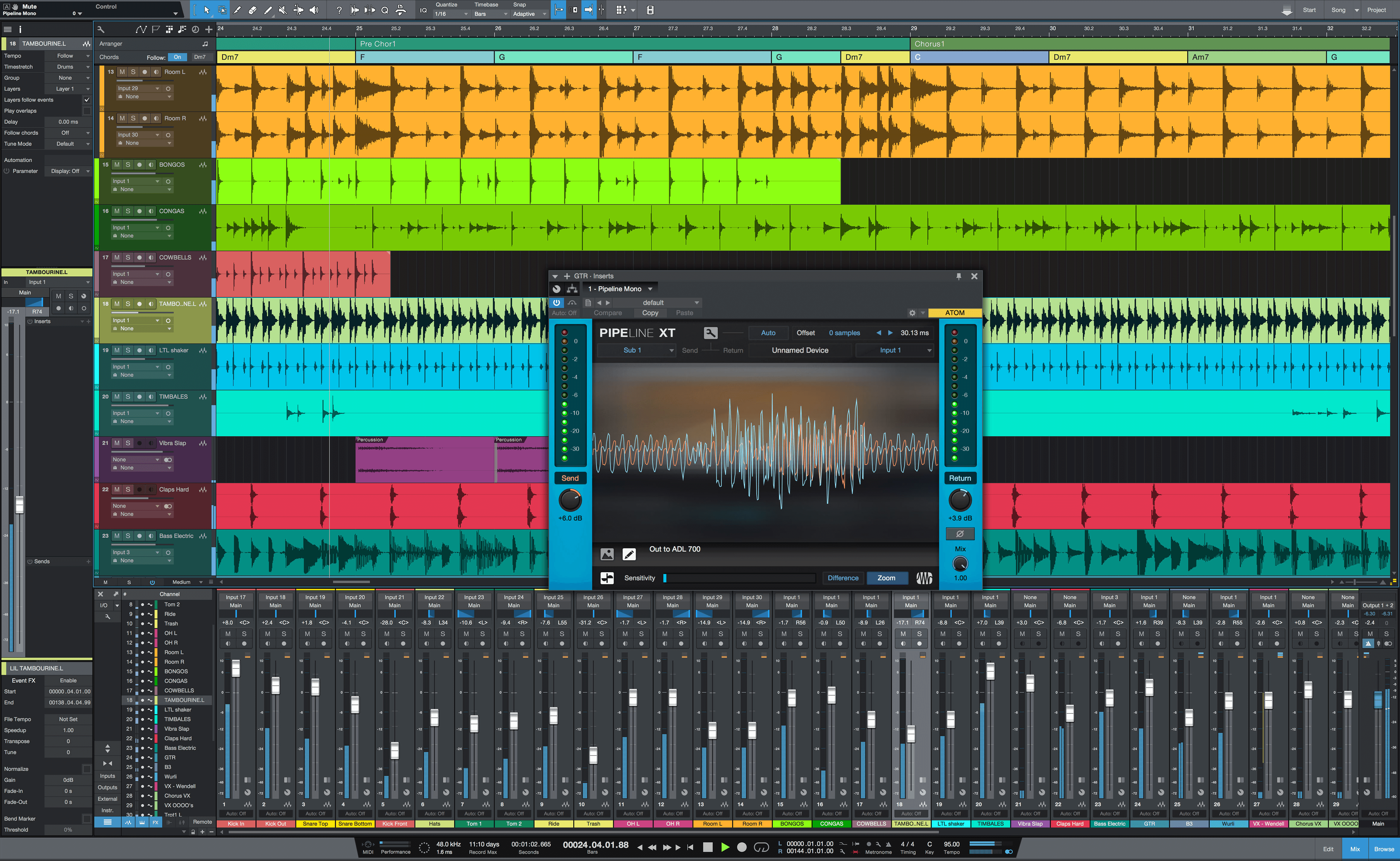
But version 4 really matured and perfected the look of Studio One, and I can honestly say I like how it looks better than Cubase. Studio One just looks more refined than Cubase now.


Studio One 4.6:
Image


Cubase 10.5:
Image
THIS MUSIC HAS BEEN MIXED TO BE PLAYED LOUD SO TURN IT UP

Post

fmr wrote: Tue May 05, 2020 10:57 am Don't see what's so revolutionary in this. Cubase also does it. As a matter of fact, I never used this feature, because I rarely use "track" instruments. I sually instantiate my virtual instruments as "rack" instruments, as this gives me more flexibility - I have independent MIDI tracks, which I can route anywhere I want, and I have the virtual instruments, which may receive MIDI from anywhere I want.
Instrument tracks are just another example of Cubase's poor and convoluted design approach.

Studio One doesn't have track instruments. There is only an instrument rack, which loads an unlimited number of instruments that you route MIDI tracks to independently, as you see fit.

Studio One puts the instrument in the rack, creates a MIDI track, and routes the MIDI track to the instrument in the rack.

These are 3 steps you have to perform. Studio One does it in a single action. And it has been doing it like this for 10 years.
Last edited by jamcat on Tue May 05, 2020 11:18 am, edited 1 time in total.
THIS MUSIC HAS BEEN MIXED TO BE PLAYED LOUD SO TURN IT UP

Post

Well, there is a substantial difference between a "good looking GUI" and a "good GUI". When it comes to looks they all have their merit. With the exception of Pro Tools on a Windows machine maybe. When I switched from Mac to Windows I was not expecting to be thrown back into the 90s. :)
Follow me on Youtube for videos on spatial and immersive audio production.

Post

BONES wrote: Tue May 05, 2020 5:44 am How obvious is it that everyone has just voted for the host they use? It's pathetic. I cannot believe I am the only person to vote for Cakewalk, it's GUI is very clean, clear, uncluttered and consistent, at least from the screenshots I've seen. I also can't believe Live has the most votes, it's GUI is awful. There is nowhere near enough contrast between control and the background which means you have to stare at it closely to see what's going on. As a Cubase user, I certainly can't believe anyone thinks it's GUI looks nice. It's a horrid mish-mash of colours and styles. I think it looks awful. If it all looked like the native plugins, it would be incredible but seeing those nice GUIs feels like the devs are taunting me.

My Top 3 would be Cakewalk, Studio One and Logic. Whenever I see any of them in YT videos, I think "ooh, that host looks nice, I should try it out" but I never do. Learning Cubase was enough of a struggle for me, although switching again probably wouldn't be nearly as hard.
I agree. Reaper and Abelton aren't nice looking GUI's. Cakewalk has it's nice-ities. I think overall it has to be Logic and FL Studio which were the 2 I voted for if you take every aspect into consideration but some daw's have other bits that are nicer looking. Bitwig and FL Studio have (for me) the best looking piano rolls / midi editors, Logic and FL Studio have the nicest looking clips / arrangement / sequencer areas, Cakewalk has a lovely looking Console (Mixer) and I really like Logic's Transport and I think Reaper (dependant on theme) has the nicest Inspector / Track Control Panel.

Instruments and effects-wise - FL Studio and Reason win in this respect. Ones to look at in Reason - Thor, Subtractor, Malstrom, The Matrix, BV512 Vocoder, Parsec and Kong. FL Studio - Harmour, Sawer, Transistor Bass, Edison, Slicex even Transient Processor has a nice GUI.

I know functionality shouldn't matter in terms of graphics but it could alter it's look but if Reason's Main Mixer (SSL9000k emulation) had a bit more functionality (lacks some things) and they allowed the themes to affect it (dark or blue theme on it looks beautiful - someone did a mock up on Reasontalk) and it was also scalable, it would probably be arguably the best looking mixer out of all the daw's but then it's all subjective isn't it, my opinions of course.

Post

jamcat wrote: Tue May 05, 2020 11:11 am Instrument tracks are just another example of Cubase's poor and convoluted design approach.

Studio One doesn't have track instruments. There is only an instrument rack, which loads an unlimited number of instruments that you route MIDI tracks to independently, as you see fit.

Studio One puts the instrument in the rack, creates a MIDI track, and routes the MIDI track to the instrument in the rack.

These are 3 steps you have to perform. Studio One does it in a single action. And it has been doing it like this for 10 years.
Yeah, I also prefer Rack instruments, as I said. But Cubase has them too - you simply have OTHER OPTIONS. Options are not limiting. If you don't want them you simply ignore them. But if/when you want them, it's good to have them.

And when you instantiate a rack instrument, Cubase asks you if you want also a MIDI track routed to ti, so yeah, you can perform the task in a single step too. :shrug:
Fernando (FMR)

Post

jamcat wrote: Tue May 05, 2020 11:05 amStudio One 4.6:
Image
Looks quite nice. One question though... I cannot seem to find any info on setting the meters on the mixer channels to 'post panner'. Is it possible? The above pic seems to show the meters being unaffected by the panning.

It's really not a deal breaker. But if I pan my instruments within the mixer (like I do in Cubase), I would really like the meters to adjust to the panning. Makes it a bit easier to identify (at a glance) where my tracks sit within the stereo field.

Post

Bitwig, try to set the contrast: midtones: 10 (I prefer '8'), and the black one to 100 (max), looks awesome

so..
arranger
Image
mixer
Image
"Where we're workarounding, we don't NEED features." - powermat

Post

I'm a fan of realistic looking graphics so I chose Cubase. I just love the mixer in Cubase, it actually looks like a big mixing console. Same with the instruments and effects that come with Cubase, they not only sound great but they look like real synths and effects.

As much as I love Ableton Live, it's mostly for the quick and easy workflow. Those flat graphics are not really my thing.

Post Reply

Return to “Hosts & Applications (Sequencers, DAWs, Audio Editors, etc.)”