

If I use same synth & same preset of that synth (let’s say Serum) in different DAWS - will there be different CPU load? I mean does some DAWs use more CPU than some other even if using same VST instrument?
Naturally there will be differences if using DAW’s own instruments etc.
How do different DAWs compare by CPU?
-
- Banned
- 383 posts since 12 Mar, 2020 from Toilet, or on the way to toilet
-
- KVRAF
- 35684 posts since 11 Apr, 2010 from Germany
Yes, they will.
That's why stuff like DAWBench exists: http://www.dawbench.com/
I think the differences are never earth shaking though.
That's why stuff like DAWBench exists: http://www.dawbench.com/
I think the differences are never earth shaking though.
-
- KVRAF
- 5071 posts since 27 Jul, 2004
As already stated there is a difference...Tannaliini wrote: Sat May 09, 2020 9:17 am If I use same synth & same preset of that synth (let’s say Serum) in different DAWS - will there be different CPU load? I mean does some DAWs use more CPU than some other even if using same VST instrument?
Naturally there will be differences if using DAW’s own instruments etc.
Please note that this difference doesn´t tell you anything and that comparing DAWs by CPU doesn´t serve you anything...
In real life scenarios there are far more important things than if you can load 100 instances or 101 instances of the VSTi before it starts to crackle...
-
- KVRAF
- 2648 posts since 20 Jun, 2012
There's no other DAW beside Reaper that does well with the CPU.
No signature here!
-
- Banned
- Topic Starter
- 383 posts since 12 Mar, 2020 from Toilet, or on the way to toilet
It was more out of curiosityTrancit wrote: Sat May 09, 2020 10:50 amAs already stated there is a difference...Tannaliini wrote: Sat May 09, 2020 9:17 am If I use same synth & same preset of that synth (let’s say Serum) in different DAWS - will there be different CPU load? I mean does some DAWs use more CPU than some other even if using same VST instrument?
Naturally there will be differences if using DAW’s own instruments etc.
Please note that this difference doesn´t tell you anything and that comparing DAWs by CPU doesn´t serve you anything...
In real life scenarios there are far more important things than if you can load 100 instances or 101 instances of the VSTi before it starts to crackle...

But surely if there would have been a huge difference between DAWs then it would might be something to consider
-
- KVRAF
- 2989 posts since 5 Nov, 2014
-
- KVRAF
- 5071 posts since 27 Jul, 2004
If I judge about the kind of postings you did the last couple of month you are curious about a lot of stuff...Tannaliini wrote: Sat May 09, 2020 11:26 am It was more out of curiosity
But surely if there would have been a huge difference between DAWs then it would might be something to consider

There is no huge difference anymore between the DAWs... we are really talking about using a VSTi instance more or less...
In a real life scenario much more important are features like dynamically taking plugins out of the processing if silent...
There for instance was FL Studio the first who implemented this "smart disabling"... now it´s present in Ableton, Bitwig and perhaps a few others...
If you got a bunch of tracks running they are hardly making noise all of the time layering on top of each others...
Many times you can save up to 30-40% of CPU by just this feature as it is a big difference if the whole processing for every single plugin is active all the time or the plugin is automatically bypassed if it doesn´t make any sound...
This is just one example to consider... 30-40% "less" CPU usage compared to perhaps 5% difference between the "most perfomant" DAW vs. the least one... you choose what´s improtant for you....
Another example which does matter is rendering to audio as freezing, bouncing to new tracks etc...
In programms like Ableton, Studio One the bigger the project gets (and the more plugins you´ve got in there) the process takes more and more time as they are not able to intelligently take out the processing of the unnecessary plugins... then you wait 10-20 times longer for a single clip to be bounced to a new track compared to others...
Very quick with even large projects are i.e. Reaper, where you can take out all muted tracks of the processing or FL Studio which does a very good job there too...
To be mentioned as really horrible are i.e. Ableton, Cubase and Studio One... you choose what´s important for you...
These are just 2 little examples why all DAW benchmarks are absolutely nonsense as they tell you nothing...
What does it serves you if DAW x can run even 10 plugins more but there it takes you hours to get an every day job done which DAW y does for you in a minute...
If you compare 2 or more DAWs by creating real projects you will notice the differences which matter to you as they directly influence your personal workflow much easier and in a much more meaningful way as always asking which DAW uses the least CPU on that or which synth has the best filters...(just random examples)...
Demo a bunch and pick the one which inspires you the most and let you, with your personal way of doing things, do whatever you want to do with a lot of fun and finally shit on a possible fact that you could run a plugin more in another DAW...
-

- KVRAF
- 7711 posts since 2 Sep, 2019
Trancit, this sounds like some bad info (or at least incomplete info.)
Disabling processing when no signal is present is a VST3 feature.
(The host and plugin both need to have process suspension enabled.)
Cubase most certainly supports this feature.
Here is the setting in Cubase:
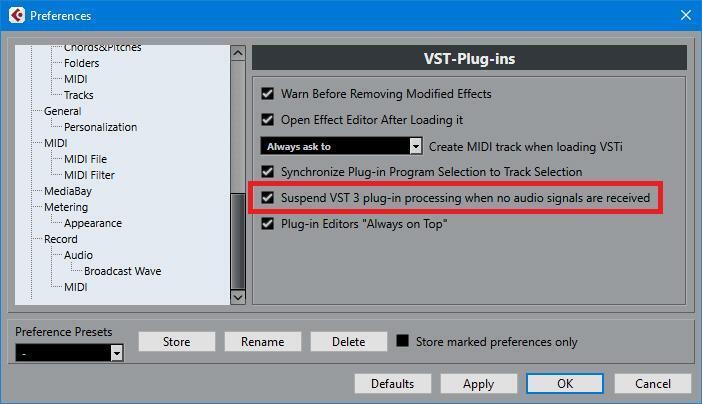
I can't seem to find a straight answer regarding Studio One.
But, one of the guys who designed Studio One literally created the VST3 spec when he was at Steinberg, so I would be surprised if Studio One doesn't support this VST3 feature.
If you aren't running VST3 version of your plugins, then be sure to install them.
If your plugins don't support VST3, contact the developer and demand it. Remind them that VST2.4 support and maintenance ended in 2013, and the VST2.4 subset was removed from the VST SDK entirely in 2018. You shouldn't have to settle for an obsolete discontinued plugin format for new plugins in 2020.
VST3 also introduces sample accurate automation.
https://www.steinberg.net/en/company/te ... /vst3.html
Disabling processing when no signal is present is a VST3 feature.
(The host and plugin both need to have process suspension enabled.)
Cubase most certainly supports this feature.
Here is the setting in Cubase:
I can't seem to find a straight answer regarding Studio One.
But, one of the guys who designed Studio One literally created the VST3 spec when he was at Steinberg, so I would be surprised if Studio One doesn't support this VST3 feature.
If you aren't running VST3 version of your plugins, then be sure to install them.
If your plugins don't support VST3, contact the developer and demand it. Remind them that VST2.4 support and maintenance ended in 2013, and the VST2.4 subset was removed from the VST SDK entirely in 2018. You shouldn't have to settle for an obsolete discontinued plugin format for new plugins in 2020.
VST3 also introduces sample accurate automation.
https://www.steinberg.net/en/company/te ... /vst3.html
THIS MUSIC HAS BEEN MIXED TO BE PLAYED LOUD SO TURN IT UP
-
- KVRAF
- 5071 posts since 27 Jul, 2004
No, it´s not...jamcat wrote: Sun May 10, 2020 9:12 am Trancit, this sounds like some bad info (or at least incomplete info.)
Disabling processing when no signal is present is a VST3 feature.
(The host and plugin both need to have process suspension enabled.)
1. I am pretty sure this only works with plugins where the developer allowed/implemented this which isn´t valid for most of the plugins I tested (3rd party not Cubase native)
2. The biggest problem in all DAWs which is slowing down freeze/bounce are not FX but instruments and since there are not many VSTi´s offering VST3 the problem still remains...
That´s because there isn´t any!!I can't seem to find a straight answer regarding Studio One.
But, one of the guys who designed Studio One literally created the VST3 spec when he was at Steinberg, so I would be surprised if Studio One doesn't support this VST3 feature.
The problem here is the same... for FX there are some macros which help but the biggest problems are caused by instruments and there is nothing which helps than manually turning off all unnecessary one´s and turning them back on afterwards...
-
- Banned
- 21 posts since 30 Apr, 2020
I'm not seeing much data or statistics that are based on CPU type, i7, i5, i3, etc.Tannaliini wrote: Sat May 09, 2020 9:17 am If I use same synth & same preset of that synth (let’s say Serum) in different DAWS - will there be different CPU load? I mean does some DAWs use more CPU than some other even if using same VST instrument?
Naturally there will be differences if using DAW’s own instruments etc.
Also don't forget to factor in if it's a laptop CPU or a desktop CPU, much different beasts.
There are also a lot of factors based on your O/S, current setup and configuration and loaded applications in the background.
And your hardware setup, using an SSD, speed of your HDD, etc. All play roles in number crunching.
I'm not sure how useful your kind of tests are, but you're missing a lot of key details...