This! It would increase my motivation to buy soundbanks drastically. I don’t use presets that’s why I don’t buy Falcon expansions now but if I could use their material selectively - it will be usefulpadillac wrote: Mon Jun 15, 2020 10:38 pmThis would be so amazing and something I’ve wanted for a long time. Personally I don’t care about presets – I’d much rather have a bunch of easily-browsable source material to make my own patches. I would buy a lot more UVI libraries to get access to sound sources if they made them available.Cepheus wrote: Mon May 11, 2020 10:37 am I was wondering if one could browse from within Falcon in the various ufs soundbanks that come with the various Falcon expansions. A bit like source browsing in Omnisphere2. There is a wealth of resources (samples, wavetables..) in the soundbanks but not really visible for the user (correct me if I am wrong). Yes, one can edit an existing preset containing a certain sample or wavetable but not from a new preset.

UVI Falcon - v4 = 26.0.7 released - rumors, ads, praise, kindergarden, bug reports and off-topic inside!
-
- KVRian
- 834 posts since 7 Dec, 2018 from Saint-Petersburg
-
- KVRAF
- 2000 posts since 5 Jan, 2003 from Brookings, OR
In case it's more likely to be seen here, I'm reposting this inside this thread, as there's been no response to the thread I originally created for it:
Just tried my new UVI library—IRCAM Solo Instruments, LOVING IT!…until after a little messing around with the COLOR control and the Guitar extended techniques (NO samples were intentionally touched at all!), I decided to change patches…and I get this message:

…and then I try to respond without saving anything, and get THIS:

…which is but a mere tiny glimpse of the MANY, MANY times I've clicked on CANCEL only to have a NEW message, ref'ing a different sample, pop up. Selecting OK takes me to a file-open dialog, a new one FOR EACH SAMPLE! Which of course, I DON'T want… Finally, after dozens more CANCEL clicks, I had to force-quit Logic just to save my brain…
WHAT in hell did I do, and HOW to avoid ever doing it again!!!?? TIA!
(And thanks for the wonderful sounds and all the great benefits of having them inside Falcon—plus the great sale price:)
Just tried my new UVI library—IRCAM Solo Instruments, LOVING IT!…until after a little messing around with the COLOR control and the Guitar extended techniques (NO samples were intentionally touched at all!), I decided to change patches…and I get this message:
…and then I try to respond without saving anything, and get THIS:
…which is but a mere tiny glimpse of the MANY, MANY times I've clicked on CANCEL only to have a NEW message, ref'ing a different sample, pop up. Selecting OK takes me to a file-open dialog, a new one FOR EACH SAMPLE! Which of course, I DON'T want… Finally, after dozens more CANCEL clicks, I had to force-quit Logic just to save my brain…
WHAT in hell did I do, and HOW to avoid ever doing it again!!!?? TIA!
(And thanks for the wonderful sounds and all the great benefits of having them inside Falcon—plus the great sale price:)
-
- KVRAF
- 2000 posts since 5 Jan, 2003 from Brookings, OR
Is keyboard scaling available as a modulator in Falcon? I can't find it in the manual, or any edit panels, but that's a lot of places to deep search… Maybe the terminology is different in Falcon?
-

- KVRAF
- 24459 posts since 7 Jan, 2009 from Croatia
Yes it is. It's called Key Follow, and there's also Key and Linear Key Follow. It's in Voice submenu when adding modulation.
I am not 100% sure what the differences are, honestly. I think Key is unipolar, and (Linear) Key Follow is bipolar.
I am not 100% sure what the differences are, honestly. I think Key is unipolar, and (Linear) Key Follow is bipolar.
-
- KVRAF
- 24459 posts since 7 Jan, 2009 from Croatia
Macros are not polyphonic, so no.
-

- KVRist
- 103 posts since 14 Jan, 2014
On windows 10 using Chrome to download Falcon 2.0.9, The message "Can not be downloaded securely" with an exclamation mark is displayed. I actuality had NO problems downloading the file. 
By the way, the Parametric LFO is awesome.
I had an idea about the Mod Mapper- Presets for pitch bend quantization or scales. Or maybe a second Mod Mapper that is preset only. Anyone want to share any Mod mapper presets for applying to pitch bend?
By the way, the Parametric LFO is awesome.
I had an idea about the Mod Mapper- Presets for pitch bend quantization or scales. Or maybe a second Mod Mapper that is preset only. Anyone want to share any Mod mapper presets for applying to pitch bend?
Falcon user since 2015
-
 WatchTheGuitar WatchTheGuitar https://www.kvraudio.com/forum/memberlist.php?mode=viewprofile&u=440193
 - KVRAF
- 13256 posts since 30 Apr, 2019
Did you not use UVI Portal?newuser2014 wrote: Thu Aug 06, 2020 12:48 pm On windows 10 using Chrome to download Falcon 2.0.9, The message "Can not be downloaded securely" with an exclamation mark is displayed. I actuality had NO problems downloading the file
-
- KVRist
- 103 posts since 14 Jan, 2014
Correct. (and understand that you are suggesting I use the portal.)
Any Mod Matrix presets for Pitch bend quantization?
Falcon user since 2015
-

- KVRAF
- 2346 posts since 2 Jul, 2007
Tonight while layering Falcon 2 with my analog synth, I found myself wanting to finally start adding some of the presets I like to a favorite list. For example I own VV3, and wanted to mark the patch from OB Legacy from UV-1 - Preset ( Daybreak ) but couldn't find a way to do this. I took the time to index patches, yet when I tried to search for it I could not.
Perhaps I'm doing this all wrong, but I clearly am finding some issues with the way this software works in terms of cataloging my favorites, and own patches etc.. Again maybe I'm doing something wrong, but I'd love to see a much better/deeper browser, such as Cubase's mediabay in Falcon 2, in order to be completely confident I can find the sounds I want at any time, with proper tagging etc..
Is this coming soon? Thanks tru
ps: for the most part, the sounds that have been indexed load great, yet, it'd be amazing if we could simply tag/search by sound a bit better.
Perhaps I'm doing this all wrong, but I clearly am finding some issues with the way this software works in terms of cataloging my favorites, and own patches etc.. Again maybe I'm doing something wrong, but I'd love to see a much better/deeper browser, such as Cubase's mediabay in Falcon 2, in order to be completely confident I can find the sounds I want at any time, with proper tagging etc..
Is this coming soon? Thanks tru
ps: for the most part, the sounds that have been indexed load great, yet, it'd be amazing if we could simply tag/search by sound a bit better.
INTERFACE: RME ADI-2/4 Pro/Antelope Orion Studio Synergy Core/BAE 1073 MPF Dual/Heritage Audio Successor+SYMPH EQ
SYNTHS: Arturia Polybrute 12/Roland Jupiter X + Juno X/Yamaha Montage M/Yamaha KX88
PEDALS: Chase Bliss Blooper + Mood MK II
SYNTHS: Arturia Polybrute 12/Roland Jupiter X + Juno X/Yamaha Montage M/Yamaha KX88
PEDALS: Chase Bliss Blooper + Mood MK II
-
 machinesworking machinesworking https://www.kvraudio.com/forum/memberlist.php?mode=viewprofile&u=8505
 - KVRAF
- 8103 posts since 15 Aug, 2003 from seattle
When you have the preset selected in either the left hand OS X style browser that pops up when you double click a Program slot or the file browsers at the right, if you right click you get "Add To Favorites". To use a Favorite double click a Program slot and it's the last entry under the "search" entry which is the first category in the list.trusampler wrote: Sat Aug 15, 2020 3:18 am Tonight while layering Falcon 2 with my analog synth, I found myself wanting to finally start adding some of the presets I like to a favorite list. For example I own VV3, and wanted to mark the patch from OB Legacy from UV-1 - Preset ( Daybreak ) but couldn't find a way to do this. I took the time to index patches, yet when I tried to search for it I could not.
Perhaps I'm doing this all wrong, but I clearly am finding some issues with the way this software works in terms of cataloging my favorites, and own patches etc.. Again maybe I'm doing something wrong, but I'd love to see a much better/deeper browser, such as Cubase's mediabay in Falcon 2, in order to be completely confident I can find the sounds I want at any time, with proper tagging etc..
Is this coming soon? Thanks tru
ps: for the most part, the sounds that have been indexed load great, yet, it'd be amazing if we could simply tag/search by sound a bit better.
I guess this is not exactly what you're asking for, but it's a start.
-
- KVRian
- 1481 posts since 2 Mar, 2005
Thanks again, UVI Team for making the slices in the alice engine brighter! Makes it way more easier to use.
So, A soundbank that I use a lot is Plugsound Pro, that Ice been using a lot for the past 4 years. 1 thing I wish Falcon would've kept is that easy to use interface like it has in the UVI workstation. Having easy access to the basic parameters for this oldie but goodie make it really quick and easy to use. If UVI was to bring this back for the older libraries like Plugsound Pro that would be great!
I know that we are bringing our little nuggets of what we don't like about Falcon, but in the interest of making it better.
So, A soundbank that I use a lot is Plugsound Pro, that Ice been using a lot for the past 4 years. 1 thing I wish Falcon would've kept is that easy to use interface like it has in the UVI workstation. Having easy access to the basic parameters for this oldie but goodie make it really quick and easy to use. If UVI was to bring this back for the older libraries like Plugsound Pro that would be great!
I know that we are bringing our little nuggets of what we don't like about Falcon, but in the interest of making it better.
I read more than post = I listen more than I talk
-

- KVRAF
- 1941 posts since 26 Feb, 2013 from Sweden
FR: Edit page.
I'd like scroll left/right arrows appear in the macro knob row when having lots of macros.
I'd like scroll left/right arrows appear in the macro knob row when having lots of macros.
Soundsets and presets for Absynth.
Sounds and presets for UVI Falcon "Iterata X".
Bazille soundset - Crystalline Textures 3.
Sounds and presets for UVI Falcon "Iterata X".
Bazille soundset - Crystalline Textures 3.
-
- KVRAF
- 1941 posts since 26 Feb, 2013 from Sweden
And now I just noticed the wrench tool far left for bringing a knob (or any modulator) to the front.
Splendid.
Splendid.
Soundsets and presets for Absynth.
Sounds and presets for UVI Falcon "Iterata X".
Bazille soundset - Crystalline Textures 3.
Sounds and presets for UVI Falcon "Iterata X".
Bazille soundset - Crystalline Textures 3.
-
- KVRer
- 15 posts since 6 Jan, 2010
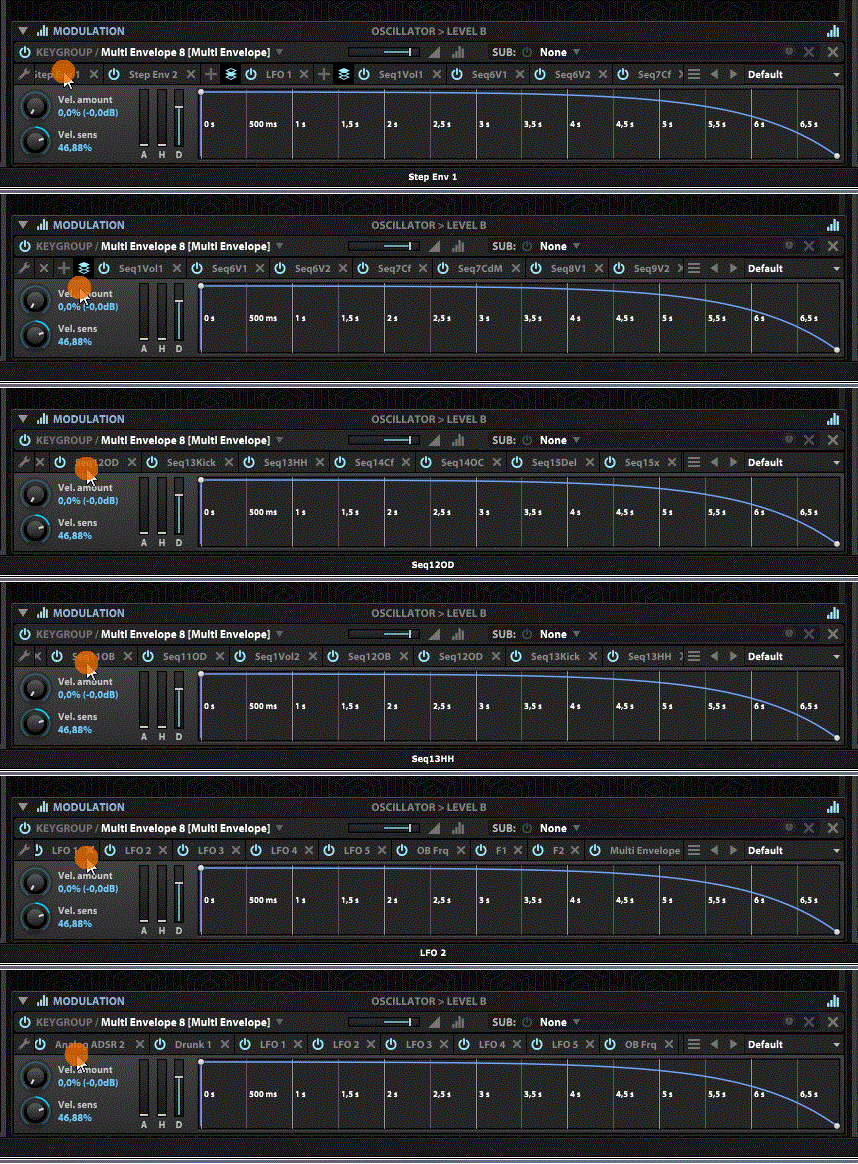
A faster method is hovering over the mod source row and use the Mouse Wheel: