

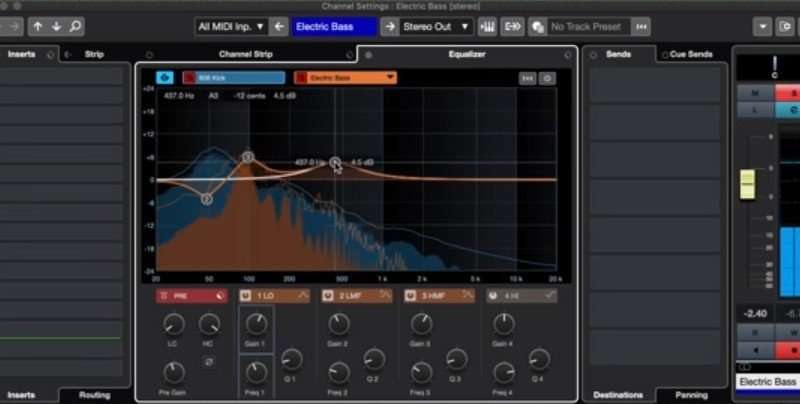
I've been through preferences but can't see anything relevant. I assume therefore it's part of the 10.5 upgrade?
Amazing. It's not via the gear icon though, I did check there first.Reefius wrote: Wed Jun 24, 2020 10:52 am Click the gear icon at the top right of the EQ, it opens the EQ settings.

The level is customisation is absolutely superb. Not a week goes by where I don't adjust something to suit my personal workflow.fese wrote: Wed Jun 24, 2020 11:17 am Cubase gets a lot of flak sometimes because of its UI (sometimes rightfully so), but I think this is really cool, allowing the user to chose between different control variants in the channel EQ!

yes, some pop-ups are still old GUI, but overall i like the UI of cubase, it UI works great for my workflow (but i must learn control keys..., i do everything with the MCU, and what it can't do with the mouse.. but there are keys.. must print it out).fese wrote: Wed Jun 24, 2020 11:17 am Cubase gets a lot of flak sometimes because of its UI (sometimes rightfully so), but I think this is really cool, allowing the user to chose between different control variants in the channel EQ!
This week I assigned the quantize settings to Q to Y. I'm able to fly around a project nowWasteLand wrote: Wed Jun 24, 2020 12:17 pmyes, some pop-ups are still old GUI, but overall i like the UI of cubase, it UI works great for my workflow (but i must learn control keys..., i do everything with the MCU, and what it can't do with the mouse.. but there are keys.. must print it out).fese wrote: Wed Jun 24, 2020 11:17 am Cubase gets a lot of flak sometimes because of its UI (sometimes rightfully so), but I think this is really cool, allowing the user to chose between different control variants in the channel EQ!
o well every GUI gets its beating... (or not?).
Mushy Mushy wrote: Wed Jun 24, 2020 12:18 pmThis week I assigned the quantize settings to Q to Y. I'm able to fly around a project nowWasteLand wrote: Wed Jun 24, 2020 12:17 pmyes, some pop-ups are still old GUI, but overall i like the UI of cubase, it UI works great for my workflow (but i must learn control keys..., i do everything with the MCU, and what it can't do with the mouse.. but there are keys.. must print it out).fese wrote: Wed Jun 24, 2020 11:17 am Cubase gets a lot of flak sometimes because of its UI (sometimes rightfully so), but I think this is really cool, allowing the user to chose between different control variants in the channel EQ!
o well every GUI gets its beating... (or not?).


I once wrote a little HTML app that allows you to display (and eventually print) all the mapped key commands of Cubase, that might be useful for you:WasteLand wrote: Wed Jun 24, 2020 12:17 pmyes, some pop-ups are still old GUI, but overall i like the UI of cubase, it UI works great for my workflow (but i must learn control keys..., i do everything with the MCU, and what it can't do with the mouse.. but there are keys.. must print it out).fese wrote: Wed Jun 24, 2020 11:17 am Cubase gets a lot of flak sometimes because of its UI (sometimes rightfully so), but I think this is really cool, allowing the user to chose between different control variants in the channel EQ!
Submit: News, Plugins, Hosts & Apps | Advertise @ KVR | Developer Account | About KVR / Contact Us | Privacy Statement
© KVR Audio, Inc. 2000-2026