Swanky Amp (release 1.4.0)

VST, AU, AAX, CLAP, etc. Plugin Virtual Effects Discussion
Post Reply New Topic
RELATED
PRODUCTS
Swanky Amp

Post

guitarzan wrote: Tue Jun 23, 2020 8:35 am I realize that there is more to be done, but as it becomes more about presets and other practicalities I simply will not have much to suggest, or even an opinion for that matter, since this has been the first I've used a DAW and plugins in something like ten years. I'll still be here following progress.
I understand that sentiment. On my road map I do want to revisit the cab and for possible dynamic behaviours (and also add parameters for open/closed back,1x12/4x12, dynamic condenser mics). I'll be sure to ping you if/when I get around to that. I suspect I'll find other ways to improve the model as well, I'm just not sure what direction I'll take things yet.

Anyway, I do really appreciate all the feedback so far. I don't know what the sag would've been like if it weren't for those elaborate discussions we had. So thank you for that.

Garrin

Post

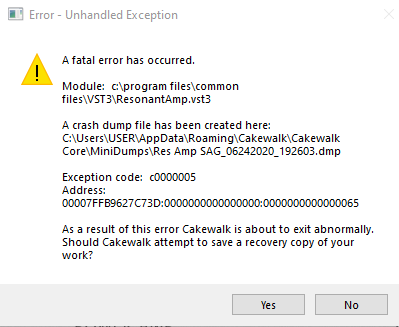
Actually, I guess I do have something to report about presets — using v0.6.0 of Resonant Amp in Cakewalk Version 2020.04 (Build 179, 64 bit) — I get a fatal error whenever selecting a preset.

Image

Do you need the crash dump file?

EDIT: Also selecting RA preset crashes Cantibile Lite, no notification, just goes down.

Post

guitarzan wrote: Wed Jun 24, 2020 10:27 pm Actually, I guess I do have something to report about presets — using v0.6.0 of Resonant Amp in Cakewalk Version 2020.04 (Build 179, 64 bit) — I get a fatal error whenever selecting a preset.

Exeptions code: c0000005
Address: 00007FFCBBFD73D:0000000000000000:0000000000000065

Do you need the crash dump file?

EDIT: Also selecting RA preset crashes Cantibile Lite, no notification, just goes down.
Oh, that's nasty. I suppose it was a matter of time until something like this showed up. I do test this on cantabile, and haven't seen this yet, so probably something specific to your environment is causing the issue (of course I imagine other people will also run into it). I will start revising the code for what could cause this. Thanks for reporting.

Post

garrinm wrote: Wed Jun 24, 2020 11:41 pm I do test this on cantabile, and haven't seen this yet, so probably something specific to your environment is causing the issue (of course I imagine other people will also run into it). I will start revising the code for what could cause this. Thanks for reporting.
I know presets were working fine in other recent versions of Resonant Amp, but I'm not sure exactly when this started (I've never used presets much).

EDIT: I thought I had it fixed a few times, but what it seems like to me now is that if I start a new project with RA in it the presets work fine until I save the project with a preset selected. Then when I go back to the RA UI the preset name is blank and when I try to select another preset that's when it starts crashing — Cakewalk and Cantibile Lite. I'll try to verify that again tomorrow though — because like I said, I thought I had it pinned down a few times before.
EDIT2… : Still seems to have something to do with saving the project, then changing presets, but doesn't repeat every time, so still a mystery — but I notice the Preset name field goes blank every time I leave the RA UI and return. Shouldn't the selected Preset name remain displayed? Maybe it isn't about saving the Project or Song, maybe it's just about leaving the UI and then returning?
Last edited by guitarzan on Thu Jun 25, 2020 7:58 am, edited 5 times in total.

Post

FWIW I use Cakewalk 2020.05 with ResonantAmp but I honestly haven't done that much testing with 0.6.0 yet. I'll give this a try now and report back.

UPDATE: Gave it a pretty thorough workout with creating, saving, deleting, switching presets and did not encounter the error.

Post

No preset issues for me in Reaper although I still believe where Slope leaves off and Power amp begins to Bass Eq needs work. Power amp rarely aounds good up and too tied to Tight and Sag to even begin to sound good. 2 cents

Post

acousticglue wrote: Thu Jun 25, 2020 11:57 am No preset issues for me in Reaper although I still believe where Slope leaves off and Power amp begins to Bass Eq needs work. Power amp rarely aounds good up and too tied to Tight and Sag to even begin to sound good. 2 cents
As much as I like sag in an amp, I think I agree that there is too much of something going on with the power-amp.

Here is another video by Oscar Isaksson demonstrating the Whizzer settings on his Neil Young based rig while playing a cover of the Dead Man movie theme:

The "4" setting on that pretty much represents the most sag a tube amp can get (I would guess guitar volume / tone is on 10 throughout, possibly guitar controls bypassed in the actual NY version). There's nothing wrong with having experimental settings available, but it seems like we are already approaching Dead Man territory at around 3 or 4 power-amp drive / sag. When the output level starts to drop significantly from sag, that doesn't seem like realistic amp-like behavior to me.

This is the actual Neil Young version which is somewhat less saturated sounding:

For whatever it's worth, I think I was getting my favorite power-amp performance so far out of v0.5.0 for the brief time I tested it.

Post

So we know the answer is in there lol

Post

I just downloaded this and have been trying it a bit. Very interesting! It seems more alive than the amp sims in Amplitube that I am used to. My strat here feels more "rubbery", if that makes sense, and this makes me want to do more expressive stuff.

I've never played a real tube amp before, so I can't offer any feedback on realism.

It does seem a bit unstable on my system though. For me, Reaper rarely crashes. But I've had two crashes with this plugin in a very short time, each time while adjusting a knob in Resonant Amp. I had my buffer size set to 64 though, which is pretty small for my old system and low-end audio interface (Windows 10 64 Pro, i5 2500, Scarlett Solo), so that might be a factor.

Thanks for the awesome work! I look forward to seeing what this becomes! It's already a great plugin!

Post

JO512 wrote: Thu Jun 25, 2020 10:49 pm I just downloaded this and have been trying it a bit. Very interesting! It seems more alive than the amp sims in Amplitube that I am used to. My strat here feels more "rubbery", if that makes sense, and this makes me want to do more expressive stuff.

I've never played a real tube amp before, so I can't offer any feedback on realism.

It does seem a bit unstable on my system though. For me, Reaper rarely crashes. But I've had two crashes with this plugin in a very short time, each time while adjusting a knob in Resonant Amp. I had my buffer size set to 64 though, which is pretty small for my old system and low-end audio interface (Windows 10 64 Pro, i5 2500, Scarlett Solo), so that might be a factor.

Thanks for the awesome work! I look forward to seeing what this becomes! It's already a great plugin!
Hey, thanks for the chiming in. Glad you're having fun with it (when it works).

There's clearly some stability issues in the current patch. I'm working to get this resolved as quickly as possible but unfortunately I have limited time to work on this in the coming days. I've seen the issue you're having, and it seems possibly related to the issue reported by guitarzan. I have a few leads to track down. I'll have an update out as soon as I can.

Thanks,
Garrin

Post

garrinm wrote: Fri Jun 26, 2020 12:45 am … I'm working to get this resolved as quickly as possible but unfortunately I have limited time to work on this in the coming days… I'll have an update out as soon as I can.
No one was even expecting this great new amp sim, so I doubt anyone is in a huge hurry. I understand if you have a timeframe you'd like to stick to, but I know I'm fine waiting until you have the time. I'm just happy someone is finally making a serious attempt at simulating power amp behavior!

Post

so I doubt anyone is in a huge hurry. I understand if you have a timeframe you'd like to stick to, but I know I'm fine waiting until you have the time
What he said... ;)
John Braner
http://johnbraner.bandcamp.com
http://www.soundclick.com/johnbraner
and all the major streaming/download sites.

Post

I really appreciate that patience when things aren't quite working. That said I did manage to get a patch out that *might* address the crashes. It's been very stable on my system in spite of my best efforts to break it, but I can't know for sure that this will also fix the issues that have been raised here. If not I do have another lead I can follow, but best to change 1 thing at a time to find out what the real issue was.

Version 0.6.1 addresses possible crashes with preset management and parameter changing. The links are the same:

https://github.com/resonantdsp/ResonantAmp
Installer: https://drive.google.com/file/d/1aOKUJy ... sp=sharing
VST3: https://drive.google.com/file/d/1BrrAsj ... sp=sharing

Issues that still need to be addressed:
  • Preset name doesn't load correctly after restarting the plugin
  • Preset order might change after reload
Work I will focus on based on feedback:
  • Allow removing factory presets
  • Easier preset order management
  • Revisit power amp sag / drive range and interaction
  • Revisit overhead in power amp
If crashes persist I might be able to address that fairly quickly. The rest of the work listed will have to wait until sometime next week.

Thanks for all the feedback helping move this forward, and thanks for the patience.

Garrin

Post

Allow removing factory presets
Just put them on a folder ;)
John Braner
http://johnbraner.bandcamp.com
http://www.soundclick.com/johnbraner
and all the major streaming/download sites.

Post

I haven't had any problems with crashes and presets etc (even before 0.6.1).
Just a thought - I have similar problems with Neural DSP amps, and I have to set my buffers setting to 128 to fix it.
Yes, the buffer somehow affects scrolling through presets. And they use XML file presets too.
So, for those with preset/crashing problems - maybe try increasing your buffer size for your audio interface? It's annoying - but may help point to the problem.

Also one more thing for Garrin - could you put "next" and "previous" buttons for the presets - at some point?
Thanks.
John Braner
http://johnbraner.bandcamp.com
http://www.soundclick.com/johnbraner
and all the major streaming/download sites.

Post Reply

Return to “Effects”