

Hey guys,
is there a way to install the latest logic 10.5 and keep 10.4 as well?
Really like the new features, but i heard some plugins refuse to work. No option for me, as iam in various projects atm.
Spec.:
Macbook Pro mid 2014
Latest High Sierra
Thanks
Flo
Logic 10.5
-
- KVRist
- 341 posts since 30 Nov, 2008

-
el-bo (formerly ebow) el-bo (formerly ebow) https://www.kvraudio.com/forum/memberlist.php?mode=viewprofile&u=208007
- KVRAF
- 18052 posts since 24 May, 2009 from A galaxy, far far away
Not at my computer now, but it used to be just a case of renaming the current version e.g just add “10.4” to the end of the current version name. Then they will happily co-exist. Just remember to “Open with” (right-click menu), when opening a project, to choose which version it should be opened with.
Also, make a backup of the current, now unavailable, version
Also, make a backup of the current, now unavailable, version
-
- KVRist
- 47 posts since 8 Feb, 2008
Yep this still works there's even a suggested approach from Apple:el-bo (formerly ebow) wrote: Wed Jul 22, 2020 7:42 am Not at my computer now, but it used to be just a case of renaming the current version e.g just add “10.4” to the end of the current version name. Then they will happily co-exist. Just remember to “Open with” (right-click menu), when opening a project, to choose which version it should be opened with.
Also, make a backup of the current, now unavailable, version
https://support.apple.com/en-us/HT202992
-
- KVRist
- Topic Starter
- 341 posts since 30 Nov, 2008
Thanks a lot guys
-
- KVRAF
- 2140 posts since 16 Jan, 2013 from USA
It works because those are actually pseudo "apps". They're actually folders which you can browse by using "view contents", or some such. I'm on Windows right now and can't check.
-
 EdgarRothermich EdgarRothermich https://www.kvraudio.com/forum/memberlist.php?mode=viewprofile&u=198722
 - KVRist
- 214 posts since 19 Jan, 2009 from West Hollywood
Finally, this "best-practice" is catching on.
The concept with the zipped file that Apple recommends is good for archiving but not really practical for trouble-shooting or research (which I do a lot for my books)
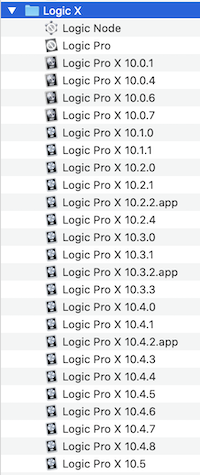
I recommend creating a separate Applications Archive folder in your Home Folder and keep all versions of apps that you rely upon for your work (Logic, Pro Tools, Final Cut Pro, etc.). Copy them over and add the version number to the name. This way you can launch any version of an app if you need too.
Here is how my Logic folder looks like
Hope that helps,
The concept with the zipped file that Apple recommends is good for archiving but not really practical for trouble-shooting or research (which I do a lot for my books)
I recommend creating a separate Applications Archive folder in your Home Folder and keep all versions of apps that you rely upon for your work (Logic, Pro Tools, Final Cut Pro, etc.). Copy them over and add the version number to the name. This way you can launch any version of an app if you need too.
Here is how my Logic folder looks like
Hope that helps,
Edgar Rothermich
(iMac5K, 32GB)
YouTube Videos https://YouTube.com/c/MusicTechExplained/
Books for Logic Pro X, Pro Tools, GarageBand and FCPx http://DingDingMusic.com/
My Instagram for Logic Pro X, Pro Tools https://www.instagram.com/edgarrothermich/
(iMac5K, 32GB)
YouTube Videos https://YouTube.com/c/MusicTechExplained/
Books for Logic Pro X, Pro Tools, GarageBand and FCPx http://DingDingMusic.com/
My Instagram for Logic Pro X, Pro Tools https://www.instagram.com/edgarrothermich/