


Please enlighten me as to what tool can I use in Cubase to see what am I doing to the curve in real time (not to the result after processing - but the actual internal curve that I'm generating by manipulating the controls)SLiC wrote: Tue Nov 03, 2020 1:54 pmTo be fair, its 29 bucks and almost every DAW has a free scope built in so that it doesn't need to be integrated in to every plug in that effects a signal.Michey wrote: Tue Nov 03, 2020 1:10 pm IMO this processor needs DESPERATELY a frequency plot. I find it ridiculous that I have to resort to Plugin doctor in order to understand what am I "doing" to the sound (the quote on quote comes because I can't hear what am I doing) and to what extent... and then - saving a preset and tweaking from there.
Just my 0.02
(yea, I know... "use your ears" etc. etc. ... but there are way too many processors nowadays and any developer must strive to make it as easy as they can for the users to understand what is the outcome of every function. I mean... there's a layer/sculpt ; saturate/poke ; analog/digital. and they interact in ways that are not always "logical" from its outset. the complexity of the interaction makes this visual representation a must, imo)
I know that it is very cheap but as I've said, the market is overly saturated (no pun intended...) and free tools (or completely free) are in abundance. CCA knob values are not even in dB (!) so one pretty much "shoots in the dark". don't get me wrong, I'm HAPPY to own this... I was just thinking aloud...
Just out of interest : can you generate the following curve with one of your DAW's scope ?
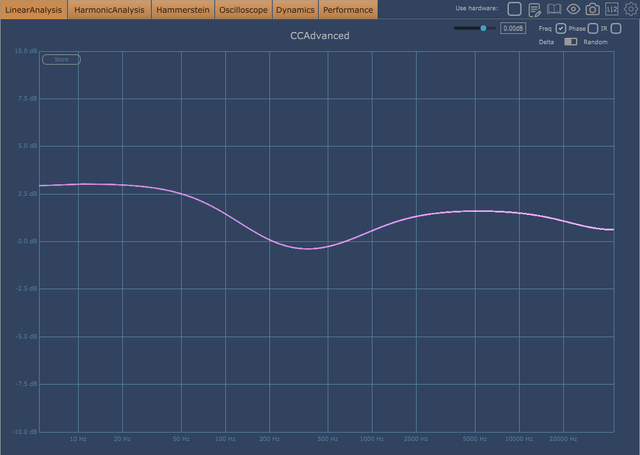
 this one is an improvement over the old default one though.

 )
)

 Free Streaming!