

btw. there is a DAW for EDM recommending video on Zen
AL/FL/Logic are the recommended ones
How's FL Studio 20?
-
- KVRAF
- 2814 posts since 26 Jul, 2015 from Philadelphia
That is the one thing that annoys me the most.Reefius wrote: Sat Nov 07, 2020 8:10 am
- Renaming every track 3 times (channel rack, mixer and arrangement)
Follow me on Youtube for videos on spatial and immersive audio production.
-

- Banned
- 11467 posts since 4 Jan, 2017 from Warsaw, Poland
Thanks, but I deleted the demo already

For the 4th time

-

- KVRist
- 312 posts since 19 May, 2017 from Ukraine, Odesa
I am using FL studio for video visualisation. Pretty awesome feature.
-
- KVRAF
- 5071 posts since 27 Jul, 2004
... people please first inform yourself... then open your mouth!!
Workarounds against that (i.e. CTRL+L) have existed already since long time and with implementation of Instrument/Audio tracks this issue is completely gone since 20.1
Second a little bit of this belongs to the workflow of FL Studio as there are too many situations where you simply want to name stuff differently so having this option is important even if it is perhaps not easily comprehensible for users of not as flexible DAWs...
... sometimes things are made with some meaningful thoughts in mind and not bad design as many noobs rapidly insinuate...
-
- KVRist
- Topic Starter
- 282 posts since 7 Nov, 2009 from DC
So far I'm impressed with FL. I know Studio One very very well in terms of music production use. Which workflow do you prefer for yourself with FL, and Ableton? I haven't touched Live since version 8 (when I left) after the bugs mess.tooneba wrote: Fri Nov 06, 2020 3:51 pmIt feels snappy so far if I compare to ableton. Adding tracks, re-arranging order, adding FX lag ableton 1-1x sec. It's underwhelming considering running on beefy CPU. I can't comment for mac.
-
- KVRAF
- 2814 posts since 26 Jul, 2015 from Philadelphia
Well, I had that issue with 20.1 but I no longer have FL Studio installed and reinstalling it just to prove a point seems mood. So I'll give you that one.Trancit wrote: Sat Nov 07, 2020 3:58 pm Workarounds against that (i.e. CTRL+L) have existed already since long time and with implementation of Instrument/Audio tracks this issue is completely gone since 20.1
That is true. However, this is where the purpose of the third layer in the workflow lacks a bit consistency. If you name everything differently it soon becomes a big mess. I found myself constantly thinking about naming conventions and less about music.Trancit wrote: Sat Nov 07, 2020 3:58 pm Second a little bit of this belongs to the workflow of FL Studio as there are too many situations where you simply want to name stuff differently so having this option is important even if it is perhaps not easily comprehensible for users of not as flexible DAWs...
Follow me on Youtube for videos on spatial and immersive audio production.
-

- KVRAF
- 6300 posts since 12 Jan, 2018
All I can say is that FL Studio 21 (hopefully by Q2 next year) is going to be mind blowing.
-
- KVRist
- Topic Starter
- 282 posts since 7 Nov, 2009 from DC
Nice. I'm going through it, as I haven't use it in years. Checking my account it's $110 for me. I'm definitely grabbing this (all plugin bundle). I feel as a music producer Logic, and FL have the best stock instruments/effects.xbitz wrote: Fri Nov 06, 2020 5:38 pm btw. worth to check the Black Friday All Plugins Edition deal if somebody has the Signature bundle without any additional plugins https://support.image-line.com/jshop/sh ... 1602163751 it's almost a joke (especially for the All Plugins Edition owners
-
- KVRist
- Topic Starter
- 282 posts since 7 Nov, 2009 from DC
What are they adding?LoveEnigma18 wrote: Sat Nov 07, 2020 4:19 pm All I can say is that FL Studio 21 (hopefully by Q2 next year) is going to be mind blowing.
-
- KVRAF
- 5144 posts since 3 Oct, 2013
^^^ preset files are editable, just don't be lazy to create own onesmgw38 wrote: Sat Nov 07, 2020 4:14 pmWell, I had that issue with 20.1 but I no longer have FL Studio installed and reinstalling it just to prove a point seems mood. So I'll give you that one.Trancit wrote: Sat Nov 07, 2020 3:58 pm Workarounds against that (i.e. CTRL+L) have existed already since long time and with implementation of Instrument/Audio tracks this issue is completely gone since 20.1
That is true. However, this is where the purpose of the third layer in the workflow lacks a bit consistency. If you name everything differently it soon becomes a big mess. I found myself constantly thinking about naming conventions and less about music.Trancit wrote: Sat Nov 07, 2020 3:58 pm Second a little bit of this belongs to the workflow of FL Studio as there are too many situations where you simply want to name stuff differently so having this option is important even if it is perhaps not easily comprehensible for users of not as flexible DAWs...
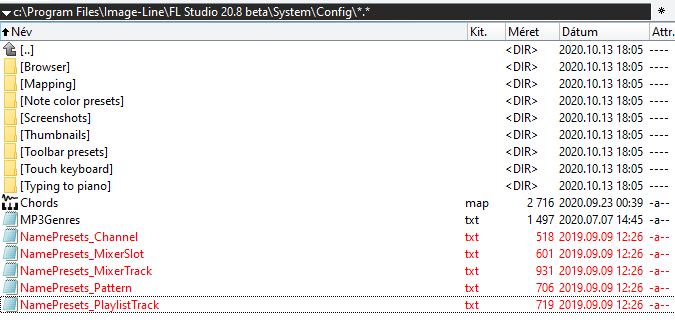
don't have to type again (check the image lines forums about the different icon, color codes)
"Where we're workarounding, we don't NEED features." - powermat
-
- KVRAF
- 2814 posts since 26 Jul, 2015 from Philadelphia
No offense guys, but this is slowly turning into a Reaper forum. 
Follow me on Youtube for videos on spatial and immersive audio production.
-
- KVRAF
- 5071 posts since 27 Jul, 2004
Perhaps you haven´t used this new feature???mgw38 wrote: Sat Nov 07, 2020 4:14 pm Well, I had that issue with 20.1 but I no longer have FL Studio installed and reinstalling it just to prove a point seems mood. So I'll give you that one.
But it´s there and works fine...
Can´t be easier... and the quick name feature of FLS is outstanding!!
It´s absolutely fine if you cannot adapt to FLS´workflow but then please agree that you don´t need to use... but it´s there waiting for you if you perhaps need it anyway...That is true. However, this is where the purpose of the third layer in the workflow lacks a bit consistency. If you name everything differently it soon becomes a big mess. I found myself constantly thinking about naming conventions and less about music.
