RapidComposer v4 beta feedback and discussion (locked)

Official support for: musicdevelopments.com
Locked New Topic
RELATED
PRODUCTS
RapidComposer RapidComposer LE

Post

sj1 wrote: Thu Nov 05, 2020 6:48 pm
However, once there, any stray right-click makes the display infinitesimal again. This is never desirable for me, and is a recurring interruption whenever I'm working in this area.

I'd like to suggest that Ctrl-MouseWheel be the only "way in" and the only "way out", without any other gesture resetting things. Alternatively, if there -must- be another gesture to reset things, please make it defeatable in the Settings. Thanks!
You are right, it was a bad idea to use right-click as splitting/joining chords, when Alt-click is used for the same purpose everywhere else. So I fixed that.

Not just Ctrl-mousewheel can be used, zooming works the same way as for standard tracks, that is Ctrl-vertical drag on the piano keyboard zooms in/out, and double-click on the piano keyboard resets the zoom.

Thanks,
Attila

Post

lulukom wrote: Thu Nov 05, 2020 9:47 pm Oh, how I would like to convert my drum midi files and phrases into a percussion generator, but I never noticed before that this cannot be done))
Good idea lulukom, I added this to my to-do list.
Thanks,
Attila

Post

a mini video about:

Idea Tool / Phrase Selection
&
Note Edit Mode / Phrase Length (?) (overlapping notes ? )

https://drive.google.com/file/d/1WDXL3u ... sp=sharing

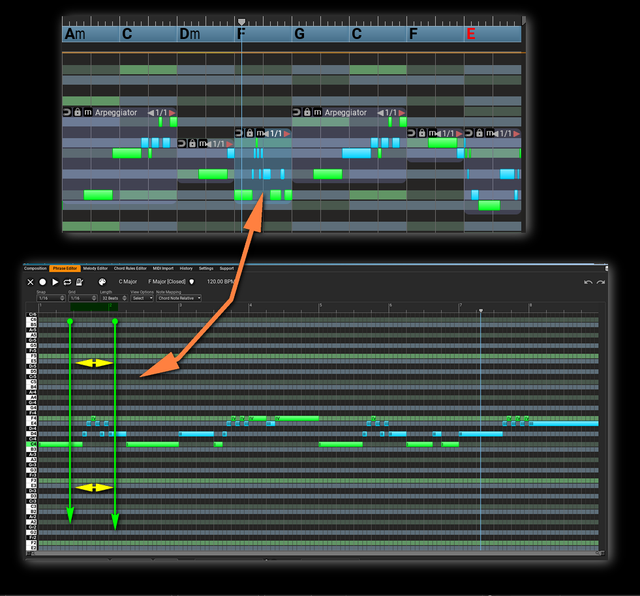
EDIT for an idea:

when we use a portion of a phrase with the shifted content
wouldn't be great helper to see the exact part when we open it in the Phrase Editor?
maybe with a color highlight ?

Image

Post

RapidComposer v4.0b10 is available!

Thanks for the very helpful feedback!

Improvements:
  • Chord Generator adjusts its rhythm to the signature used when added
  • More chord preview options added to Settings / Preview that was available only in the Chord Selector
  • Track templates can be deleted in the browser (right-click)
  • Master track inspector can be made wider
  • Alt-click splits/joins chords in the voicing editor, rather than right-click
  • The next available MIDI channel is set when changing track instrument
  • Crashing bug fixed when clicking on a phrase generator in the browser

Post

Can't be updated via RС support

Post

Thanks much for v4b10 !

I may need education here, but I think there might be an issue as to Voicings not reflecting (including) designated bass notes (i.e. slash chords).

In the attached pic, I've defined an E7/Bb chord, but no Bb's appear in the notes offered in the Voicing area.

Aside from the question of having designated notes actually appear ...

--

How are notes (chord and scale degrees, the #s) designated in the editor for slash chords?

Consider E7/Bb.

Wrt. the chord (neglecting the scale for now), are notes #1, #2, #3, and #4 E G# B and D? (This is what I would offhand expect for an E7 chord, regardless of slash bass note) or

is note #1 Bb? In which case what are the rest of them?

RC - No Bbs.jpg

The background to keep in mind here is the tritone substution, example where ii V7 i is replaced by ii bii7((b5) i in order to have chromatic bass movement. Since bii7((b5) and V7(b5) are actually the same collection of notes (but with a different choice for the bass note), this sub does not really upend the harmony - rather it specifies a specific use of chromatic motion in the bass.

Under these circumstances, it seems that having all the degree numbers be different wrt. the base key (and the root chord symbol, by which I mean the E7 part of E7/Bb) doesn't really help the thinking/composition process ... BUT, if that's the way it is and is going to be, I'd like to understand that clearly.

Is my comment clear enough to make sense?

In any case, please educate/advise. Thanks!
You do not have the required permissions to view the files attached to this post.

Post

Track templates can be deleted in the browser (right-click)
THIS is very good, but lacks "Create a new folder from the selected templates"
Also, this command would be good for tracks.

Post

Alt-click splits/joins chords in the voicing editor, rather than right-click
Yes it works, but only for chords greater than 1 bar. I could not split by the lower value.

Post

yes indeed, making some serious headway hehehe.. ok, so, just noticed that any generator that has the new rhythm processing seems to be missing the random lightning bolt button. You will have to go through each one to see who has it and who don't.

Post

musicdevelopments wrote: Sat Nov 07, 2020 7:09 pm
thebutler wrote: Fri Nov 06, 2020 12:01 pm Lower scroll-bar 'zooming' weird behaviour still in v4.0b8 (see earlier post). Anyone..?
Thanks, thebutler, it is fixed in v4.0b9.
It is much better to use Ctrl+horizontal drag over the timeline for zooming...

Thanks,
Attila
Confirmed. Appreciate your attention as always Attila :)
Both methods are useful I find. :tu:
System 1 - Win11; i9 13900HK miniPC; 64Gb; Iris XE graphics; Cubase 15.0.30; Studio Pro v8.1;UR44 i/o
System 2 - Win10; i7 4790; 16Gb; GTX750Ti; Cubase v14.0.41; WLab Pro v12.0.51; StudioOne v6.6.4

Post

in the phrase inspector, harmonize tab, (Harmonization: hover,) you need to correct the pop-up help. It looks like you renamed the function being refenced, hehe, my guess is chord rules..

Post

dbender wrote: Sun Nov 08, 2020 3:20 am
lulukom wrote: Sat Nov 07, 2020 8:20 pm BTW, DOES NOT UPDATE THE BETA through the support in the program
Just tried, same here :neutral:
Now it should work, sorry.

Post

lulukom wrote: Sun Nov 08, 2020 8:24 pm
Track templates can be deleted in the browser (right-click)
THIS is very good, but lacks "Create a new folder from the selected templates"
Also, this command would be good for tracks.
Please use Finder, it is much better at file operations than RapidComposer...

Post

yellukhan wrote: Sun Nov 08, 2020 10:06 am :love:
Thank you for the new note selector!
seems we have Scale Arpeggiator now!
Oh yes, the possibilities are endless with this option. I'll implement the same for other phrase generators. It may seem like an option for expert users to select certain notes but it is really powerful, e.g. now you can arpeggiate the root of a chord in different octaves if you want.
yellukhan wrote: Sun Nov 08, 2020 10:06 am a quick find in the Idea Tool
i am having hard time with the select/move/open the inspector with the phrases in the tracks ..
if i play the arrangement i am able to select / open the phrase inspector
after a few clicks to different time positions but if arrangement doesn't play
phrases become un-clickable ..

am i only one with this?
The good news is that I have fixed this today. I'll upload an update shortly.
I cannot easily fix your other reported bug about editing overlapped phrases, that were resized to a shorter length by the Idea Tool. Unfortunately the way it works that the unresized phrases are displayed for note editing. :( (Making the phrases shorter is also a non-destructive operation)

Thanks!
Attila

Post

musicdevelopments wrote: Mon Nov 09, 2020 5:16 pm ...
The good news is that I have fixed this today. I'll upload an update shortly.
I cannot easily fix your other reported bug about editing overlapped phrases, that were resized to a shorter length by the Idea Tool. Unfortunately the way it works that the unresized phrases are displayed for note editing. :( (Making the phrases shorter is also a non-destructive operation)

Thanks!
Attila
yes indeed understandable,

in this case
the idea with a poor mockup pic. i upload a few post earlier,
would more than enough for note editing in the Phrase Editor with a highlight to see the used part of the phrase
:scared:
:oops:

EDIT:
just in case

Image

Locked

Return to “MusicDevelopments”