


RapidComposer v4 beta feedback and discussion (locked)
-
- KVRer
- 7 posts since 22 Apr, 2016
hmmm good to know it's not the program and its the daw that's an easy fix been wanting to use more fl studio haha. thanks!
-

- KVRAF
- 1782 posts since 10 Mar, 2004
i hope this is the right topic to report
RC v4.01 x64 Standalone .. windows 7 x64
i get this error message first time when i save-as the project, but luckily then RC allowed to save the project
so .. to me its not a big thing for now
might points something important..
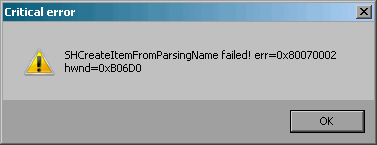
and
this seems still exist
Mater Track still resets to one chord in the Idea Tool/Master Generate, with this settings:
(if the "Keep harmonic rhythm" active)

RC v4.01 x64 Standalone .. windows 7 x64
i get this error message first time when i save-as the project, but luckily then RC allowed to save the project
so .. to me its not a big thing for now
might points something important..
and
this seems still exist
Mater Track still resets to one chord in the Idea Tool/Master Generate, with this settings:
(if the "Keep harmonic rhythm" active)
-
- KVRer
- 26 posts since 17 Dec, 2009
Hi Attilamusicdevelopments wrote: Sat Dec 05, 2020 12:20 pm Good news: the updated RapidComposer PDF manual with v4 screenshots is finished:
http://www.musicdevelopments.com/RCUserGuide.pdf
At the same time the wiki is retired.
Thanks,
Attila
Thanks for th great, updated manual. I would llike to print it out to read and keep to use by my side when using RC but I have an issue/request - please can I have access to a copy in Word, Libreoffice or a similar format? Why?
1) It is over 180 pages long - I would like to edit it so only the bits I need are printed.
2) It is fomatted to USA Letter - I use A4 (waste of paper)
3) I have used the Adobe online service to convert to Word format but it creates a number of issues in conversion (many tables and blocks, odd formatting etc which requires hours to fix).
4) Index relates to the un-edited version - so would need to be udated if edited
5) I sometimes like to add my own notes in my printed manuals that I have collected from websites, forums or experience in use etc.
Thanks again
BB
-
 musicdevelopments musicdevelopments https://www.kvraudio.com/forum/memberlist.php?mode=viewprofile&u=223336
 - KVRAF
- Topic Starter
- 6014 posts since 9 Jan, 2010
Yes, of course I can send it to you in LibreOffice format.
I did not realize the pages were set to Letter format. (I did not expect that anyone prints it.)
I'll send a PM about it.
Thanks,
Attila
I did not realize the pages were set to Letter format. (I did not expect that anyone prints it.)
I'll send a PM about it.
Thanks,
Attila
-
musicdevelopments musicdevelopments https://www.kvraudio.com/forum/memberlist.php?mode=viewprofile&u=223336
- KVRAF
- Topic Starter
- 6014 posts since 9 Jan, 2010
This is not a serious error, it means that the file selector initial directory could not be set. Probably it is displayed on Windows7 only. I don't know exactly why...yellukhan wrote: Wed Dec 09, 2020 12:37 am i get this error message first time when i save-as the project, but luckily then RC allowed to save the project
so .. to me its not a big thing for now
might points something important..
You are rightyellukhan wrote: Wed Dec 09, 2020 12:37 amand
this seems still exist
Mater Track still resets to one chord in the Idea Tool/Master Generate, with this settings:
(if the "Keep harmonic rhythm" active)
I fixed this bug today, thanks for reporting!I updated the v4.03 build with this fix.
Thanks,
Attila
-
- KVRAF
- 1782 posts since 10 Mar, 2004


Thank you so much Attila!
-
ExittheLemming ExittheLemming https://www.kvraudio.com/forum/memberlist.php?mode=viewprofile&u=33419
- KVRer
- 19 posts since 16 Jul, 2004 from Brisbane, Australia
Apologies up front if this a complete noob question  I am using Rapid Composer V4.03 as a VST3 within my DAW (Presonus Studio One V5) but don't see the option shown in the manual to be able to scan my PC for VST instruments? This option is available in the standalone version but not the one from within my DAW
I am using Rapid Composer V4.03 as a VST3 within my DAW (Presonus Studio One V5) but don't see the option shown in the manual to be able to scan my PC for VST instruments? This option is available in the standalone version but not the one from within my DAW-

- KVRist
- 117 posts since 16 Dec, 2014
When using RC in your DAW, think of it as a "MIDI generator" like an arpeggiator. You want to feed the output of the RC track to a different track where your "sound generating" VST will be. All the VST hosting is in your DAW (when RC is run as a VST itself).ExittheLemming wrote: Sat Dec 12, 2020 12:39 pm Apologies up front if this a complete noob question
Too many DAWs and plug-ins
-
ExittheLemming ExittheLemming https://www.kvraudio.com/forum/memberlist.php?mode=viewprofile&u=33419
- KVRer
- 19 posts since 16 Jul, 2004 from Brisbane, Australia
Thanks for the info and I do get that 'MIDI generator' aspect of the routing now. That said, it does seem to crash PreSonus Studio One V5 very frequently. This might be a Presonus issue rather than an RC issue of course. Any other Studio One users out there who can confirm if there are issues with RC and this DAW?BluesMuse wrote: Sat Dec 19, 2020 4:07 amWhen using RC in your DAW, think of it as a "MIDI generator" like an arpeggiator. You want to feed the output of the RC track to a different track where your "sound generating" VST will be. All the VST hosting is in your DAW (when RC is run as a VST itself).ExittheLemming wrote: Sat Dec 12, 2020 12:39 pm Apologies up front if this a complete noob question
-
- KVRist
- 117 posts since 16 Dec, 2014
TBH I have not been using RC inside Studio One for many months (just by chance, and my tendency to "DAW hop"). A year ago I was having to problems using it there, but both programs have had major upgrades since. Hopefully someone else will chime in.
Too many DAWs and plug-ins
-
- KVRist
- 55 posts since 13 Nov, 2018
If you are referring to Studio One v5 or v5.1.1 (I’m on v5.1.1 build 61815), and the issue is with scanning for VST’s, please download the latest user manual and check out page 23 and pages 136 to 138 for information about VST Plug-ins and Plug-in Manager for scanning locations and blacklisted VST’s
As you may already know, Studio One will scan your VST locations at startup including any new plugin you’ve added. If any plug-in fails to start a notice appears next to its name in the startup message list and SO puts the plug-in in a blacklist and ignores from that point on. You can reset the blacklisted plug-in. Use the Plugin Manager to fix RC if it was blacklisted.
FYI, I have not had any crashes with RC and SO v5.1.1 so far.
As you may already know, Studio One will scan your VST locations at startup including any new plugin you’ve added. If any plug-in fails to start a notice appears next to its name in the startup message list and SO puts the plug-in in a blacklist and ignores from that point on. You can reset the blacklisted plug-in. Use the Plugin Manager to fix RC if it was blacklisted.
FYI, I have not had any crashes with RC and SO v5.1.1 so far.
-
- KVRian
- 1405 posts since 11 Nov, 2013
i get sometimes crash when delete the the rc plugin in s1 5.1 or when play phrase in phrase editor. I can not reprodce it. it happen not often and randomly. I think this happen when you use sf2 sound of RC. best add only 1 instance of rapid composer in 1 track of s1. and create tracks in s1 that use rapid_composer as input and the input channel to the track of rc you need.ExittheLemming wrote: Sat Dec 19, 2020 2:36 pmThanks for the info and I do get that 'MIDI generator' aspect of the routing now. That said, it does seem to crash PreSonus Studio One V5 very frequently. This might be a Presonus issue rather than an RC issue of course. Any other Studio One users out there who can confirm if there are issues with RC and this DAW?BluesMuse wrote: Sat Dec 19, 2020 4:07 amWhen using RC in your DAW, think of it as a "MIDI generator" like an arpeggiator. You want to feed the output of the RC track to a different track where your "sound generating" VST will be. All the VST hosting is in your DAW (when RC is run as a VST itself).ExittheLemming wrote: Sat Dec 12, 2020 12:39 pm Apologies up front if this a complete noob question
I notice only thing in RC use in S1. it is too small on my 4k monitor. I select 14 point font and set in windows font size to 175%. standalone size is good. change font size in rc in s1 does not work(delete plugin and restart. must be in standalone font make larger. but when i make larger, then standalone get too large. my guess is rc in S1 do not recognize the 175 % font setting in windows. in standalone it does
win 11 64 25H2 ryzen 8600G (6*4.3 GHZ) 48 GB Ram
-
- KVRer
- 2 posts since 6 Jul, 2004
Hi Attila,
thumbs up - your V4 update is another big step in the RC development.
I appreciate the possibility to use odd meters like 7/8, 9/8 etc. and also change them during a composition.
However, RC still needs some adjustments in the code to support this and so far some adustments in using RC can be done and some don't.
E.g. it doesn't seem to be possible to set a new chord on odd 8th beats in the master track (the beginning is retricted to 4th beats). This is not only in odd meters but in all meters other than 4th.
It may not be a bid deal for you. Otherwise please put it in your list.
Best regards
Thomas
thumbs up - your V4 update is another big step in the RC development.
I appreciate the possibility to use odd meters like 7/8, 9/8 etc. and also change them during a composition.
However, RC still needs some adjustments in the code to support this and so far some adustments in using RC can be done and some don't.
E.g. it doesn't seem to be possible to set a new chord on odd 8th beats in the master track (the beginning is retricted to 4th beats). This is not only in odd meters but in all meters other than 4th.
It may not be a bid deal for you. Otherwise please put it in your list.
Best regards
Thomas