


Hi Attila
I notice only thing in RC use in S1. it is too small on my 4k monitor. I select 14 point font and set in windows font size to 175%. standalone size is good. change font size in rc in s1 does not work(delete plugin and restart. must be in standalone font make larger. but when i make larger, then standalone get too large. my guess is rc in S1 do not recognize the 175 % font setting in windows. in standalone it does
RapidComposer v4 beta feedback and discussion (locked)
-
- KVRian
- 1405 posts since 11 Nov, 2013
win 11 64 25H2 ryzen 8600G (6*4.3 GHZ) 48 GB Ram
-
 musicdevelopments musicdevelopments https://www.kvraudio.com/forum/memberlist.php?mode=viewprofile&u=223336
 - KVRAF
- Topic Starter
- 6014 posts since 9 Jan, 2010
Hi magicmusic,
please don't use windows font scaling, because RapidComposer does not use windows font rendering. It is best to set at least 22pt font size in RC, and both standalone and VST will have the same size.
Thanks,
Attila
please don't use windows font scaling, because RapidComposer does not use windows font rendering. It is best to set at least 22pt font size in RC, and both standalone and VST will have the same size.
Thanks,
Attila
-
- KVRian
- 1405 posts since 11 Nov, 2013
Hi Attila
On a 4k monitor windows GUI is too small when not use windows font scaling. microsoft set the default on 4K monitor to 150%. I increase to 175%.
Maybe you can ignore the windows font scaling in RC standalone ?. then i can use 22 pt font size. I test standalone with 22 pt on my system. but fonts are too large then.
On a 4k monitor windows GUI is too small when not use windows font scaling. microsoft set the default on 4K monitor to 150%. I increase to 175%.
Maybe you can ignore the windows font scaling in RC standalone ?. then i can use 22 pt font size. I test standalone with 22 pt on my system. but fonts are too large then.
Last edited by magicmusic on Tue Dec 22, 2020 1:18 pm, edited 1 time in total.
win 11 64 25H2 ryzen 8600G (6*4.3 GHZ) 48 GB Ram
-

- KVRAF
- 1782 posts since 10 Mar, 2004
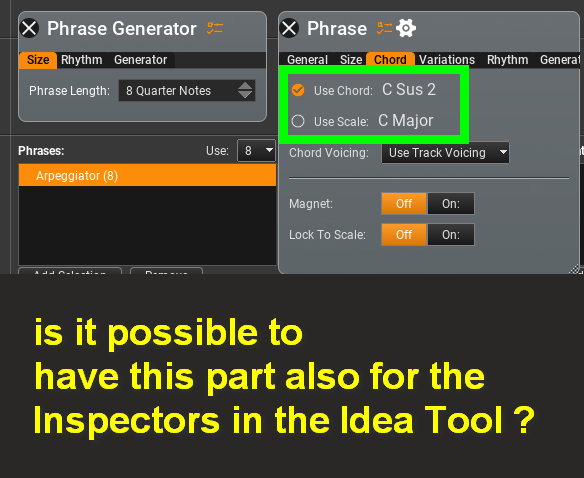
thinking out loud, wouldn't it be useful?
-
- KVRAF
- 1753 posts since 30 Nov, 2013
Hello Attila!
I had to set up the connection of a sound device to the Mac for a long time and in order for the RC to see this device, I had to reboot the program many times. In this regard, I would like to propose to make the “Rescan Audio Devices” button in the Audio Settings, similar to the “Rescan Midi Devices ". Thank you .
I had to set up the connection of a sound device to the Mac for a long time and in order for the RC to see this device, I had to reboot the program many times. In this regard, I would like to propose to make the “Rescan Audio Devices” button in the Audio Settings, similar to the “Rescan Midi Devices ". Thank you .
-
musicdevelopments musicdevelopments https://www.kvraudio.com/forum/memberlist.php?mode=viewprofile&u=223336
- KVRAF
- Topic Starter
- 6014 posts since 9 Jan, 2010
Hello lulukom,
when the device is available, you should start RapidComposer with the Option (Alt) key held down. This will disable audio. Then you can click on Settings / Audio, and set up the audio.
Thanks,
Attila
when the device is available, you should start RapidComposer with the Option (Alt) key held down. This will disable audio. Then you can click on Settings / Audio, and set up the audio.
Thanks,
Attila
-
musicdevelopments musicdevelopments https://www.kvraudio.com/forum/memberlist.php?mode=viewprofile&u=223336
- KVRAF
- Topic Starter
- 6014 posts since 9 Jan, 2010
I don't know, you are using the Idea Tool more than anyone else here

If you say that would be good, I'll add it to my to-do list.
This way you could always ignore the master track when using that phrase.
Thanks,
Attila
-
- KVRAF
- 1782 posts since 10 Mar, 2004
yaAYy !musicdevelopments wrote: Thu Dec 24, 2020 10:07 amI don't know, you are using the Idea Tool more than anyone else here
If you say that would be good, I'll add it to my to-do list.
This way you could always ignore the master track when using that phrase.
Thanks,
Attila

ehamm... to my taste ?

i am not sure if it would get use daily/project base but .. would delicious

as you already pointed out, creating somethings like as in the last track in the video ..
but with the Idea Tool's randomize power! means a new door to me

-
musicdevelopments musicdevelopments https://www.kvraudio.com/forum/memberlist.php?mode=viewprofile&u=223336
- KVRAF
- Topic Starter
- 6014 posts since 9 Jan, 2010
Yes, I understand.
Another beautiful song!
Another beautiful song!
-
- KVRAF
- 1782 posts since 10 Mar, 2004
Hi community!
i wish you
Merry Christmas

Happy New Year

Happy Holidays

Stay Safe.
i wish you
Merry Christmas
Happy New Year
Happy Holidays
Stay Safe.
-
musicdevelopments musicdevelopments https://www.kvraudio.com/forum/memberlist.php?mode=viewprofile&u=223336
- KVRAF
- Topic Starter
- 6014 posts since 9 Jan, 2010
Very kind of you, yellukhan!
Merry Christmas/Happy Holidays, and a happy new year to all dear forum posters!
Attila
Merry Christmas/Happy Holidays, and a happy new year to all dear forum posters!
Attila
-
musicdevelopments musicdevelopments https://www.kvraudio.com/forum/memberlist.php?mode=viewprofile&u=223336
- KVRAF
- Topic Starter
- 6014 posts since 9 Jan, 2010
New year, new beta version:
RapidComposer v4.1b1 is available!
Please try the chords track in the Melody Editor.
Improvements:
RapidComposer v4.1b1 is available!
Please try the chords track in the Melody Editor.
Improvements:
- Chords track added to Melody Editor. You can generate melody for a chord progression!
- Chord builder added to the new chord selector
- New variation: Rhythm Mapper. Now it is available as a variation and a phrase generator. Use which is more convenient.
- New option in Idea Tool track menu: Use Rhythms For 'Rhythm Mapper'
- Fixed crash in Chord Selector when using bigger font sizes
- [Plug-ins] Fixed: settings were saved in the RapidComposer folder instead of RapidComposerV4
-
musicdevelopments musicdevelopments https://www.kvraudio.com/forum/memberlist.php?mode=viewprofile&u=223336
- KVRAF
- Topic Starter
- 6014 posts since 9 Jan, 2010
RapidComposer v4.1b2 is available!
The beta download URL has changed since v3! You need to add the word "beta" to the normal download URL. E.g. the URL xyz.php becomes xyzbeta.php.
I will gladly send the URL to any RapidComposer owners by request (PM or e-mail).
Improvements:
The beta download URL has changed since v3! You need to add the word "beta" to the normal download URL. E.g. the URL xyz.php becomes xyzbeta.php.
I will gladly send the URL to any RapidComposer owners by request (PM or e-mail).
Improvements:
- Using sliders in the track header updates the same slider in the track inspector
- Variations display help when the mouse is hovered on the name
- Crash fixed when clicking on the 'envelope' button in the Velocity Generator, and other Velocity Generator fixes
- [Windows] Fixed window size issue on 4K monitors when there is a smaller resolution primary monitor