

In my experience not the case, Studio One was developed for both platforms initially so that argument does not hold water. I currently run Cubase (originally PC) with no issues as well as Live 10. All OS have their quirks , how many times have PC DAWs been borked with an update to W10. Apple is no exception either of course, but to claim that all PC users have no issues with Studio One in clearly not the case. Either way my answer to the OP is above, make of it what you will. Not engaging in a silly Mac v PC off topic discussion.Cancel Culture Club wrote: Sun Jan 03, 2021 6:14 pmLet's be honest here for a second, most of your issues are probably related to running on Apple hardware and their O/S. It seems that Apple users have the most gripes and complaints about software that was initially developed for PCs and not properly emulated. This can be seen throughout the entire audio industry, translating existing code or dual coding along with Apple's software updates make it very difficult to be without bugs and hiccups.woodsdenis wrote: Sun Jan 03, 2021 5:39 pm Did they not notice re show page that the world is in a middle of a pandemic and there are NO live gigs. Whatever about the need for one in normal times, actually putting this in now as a primary feature is beyond stupid.
Wolfgang Kundrus was the original genius behind Studio One, when he left and the problems began, simple as that. I was an early user and although it didn't have a lot of the features of other DAWs it was rock solid. When Wolfgang left all sorts of bugs appeared in subsequent releases, culminating with me leaving because of the "save as" bug. This hi lighted the total incompetence of the the support and software team TBH. All this coupled with a toxic Studio One forum mod and shills despatched to other forums to divert criticism really ranked of desperation.
Why did you leave Studio One?
-
- KVRAF
- 1945 posts since 25 Feb, 2005
Mac Studio M4
15.7.3
Cubase 15, Ableton Live 12
15.7.3
Cubase 15, Ableton Live 12
-
- KVRAF
- 9145 posts since 7 Oct, 2005
I don't know. I haven't tried this, but I'll try it when I turn on my PC.chk071 wrote: Sun Jan 03, 2021 1:13 pm Is it possible to switch quickcontrol pages via MIDI? Because that's what always bugged me about it, the inability to use more than 8 parameters at a time, and the need to operate the software to switch through quickcontrol parameter pages.
But, yes! I don't like the restricted Quick Controls idea. I like the good old "midi learn" then mapping to your controller directly. However, for me personally it's not a problem as I usually use the mod wheel as a source for a modulation as it's easier to move while playing. Otherwise, I use automation drawing for a precise sound movements if not doing it with LFOs or envelopes inside the synth itself. I haven't hit a wall as limits to what I want to achieve.
Nothing is perfect I'm afraid. I need to sacrifice something in my choices

Using: Cubase Pro 15, Reason 13, Tascam US-4x4HR, MODX6, DM12D, LaunchKey 49, Yamaha guitar(Pacifica 612v) and bass (BB234) and some virtual instruments and synths.
-
- KVRAF
- 35672 posts since 11 Apr, 2010 from Germany
Yeah, TBH, I don't make much use of MIDI mapping either. More of a mouse pusher here. You can't learn every parameter anyway, and, learning every synth is simply cumbersome.
-

- Banned
- 11467 posts since 4 Jan, 2017 from Warsaw, Poland
That's true, but still Cubase's workflow for adding VST parameters going through (sometimes endless) list of parameters to find the one you're looking for is really cumbersome... And with regards to controller mapping - do VST effects even show up as VST rack devices available for quick control? I don't think they do?chk071 wrote: Sun Jan 03, 2021 8:46 pm Yeah, TBH, I don't make much use of MIDI mapping either. More of a mouse pusher here. You can't learn every parameter anyway, and, learning every synth is simply cumbersome.
S1 has lots of drawbacks (like any DAW...) but automation and controller mapping aren't two of them. Actually controller mapping is even smarter than in Live or Bitwig, because it's very easy to decide whether the link is local ("yellow") or global ("blue"):
-
- KVRAF
- 5144 posts since 3 Oct, 2013
^^^ have I missed something? (btw. which one is the correct Did I miss or Have I missed?  )
)
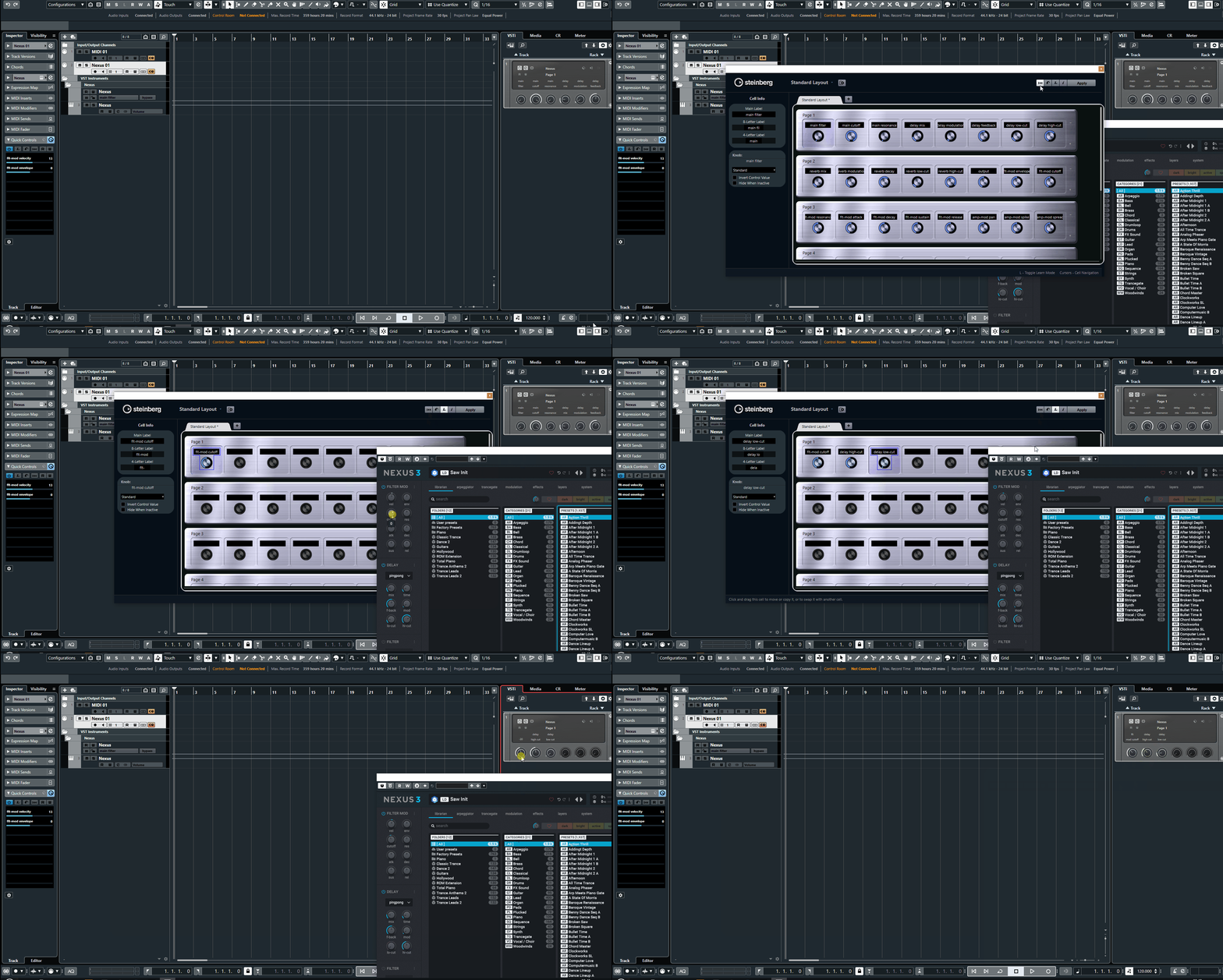
it not seems complicated, it can be automated or assigned to quick controlls (with its own learning)
)it not seems complicated, it can be automated or assigned to quick controlls (with its own learning)
"Where we're workarounding, we don't NEED features." - powermat
-
- KVRian
- 557 posts since 11 Dec, 2017
I think it's a bit harsh to say "total incompetence." Purely from reading the release notes and listening to live streams, their philosophy in terms of feature choice and frequency has been aiming towards adding as many user requested features as possible and figuring out the bugs as they go. Again, just my estimation from watching interviews and such.woodsdenis wrote: Sun Jan 03, 2021 5:39 pmWhen Wolfgang left all sorts of bugs appeared in subsequent releases, culminating with me leaving because of the "save as" bug. This hi lighted the total incompetence of the the support and software team TBH. All this coupled with a toxic Studio One forum mod and shills despatched to other forums to divert criticism really ranked of desperation.
Judging from friends who work for Apple's iOS team, this seems to be a common philosophy these days, though iOS is mostly for consumers and Studio One is for professionals or at least prosumers. The philosophy, I think, being that the benefit from the new features will outweigh the temporary issues that come with them.
I can totally understand how for some users that was not what they wanted, hence a lot of the sentiment in this thread. When I encounter an issue, it's annoying. Yes, I have to run parallel installations to keep my more crucial sessions on less recent versions from time to time. Yes, there are some things I just do in a different DAW. But, to paraphrase a movie about a different Wolfgang...
“There are simply too many features, that’s all. Just cut a few and it'll be perfect."
"Which few did you have in mind, majesty?”
-
- Banned
- 11467 posts since 4 Jan, 2017 from Warsaw, Poland
Well, apparently I did.
Probably because the GUI of that template looks like something from the 80s and I ignored it

-
- KVRAF
- 5144 posts since 3 Oct, 2013
so about Cubase, this is my issue with it,
seems C totally ignores the different plugin introduced latencies, can confirm it, https://steinberg.help/cubase_pro_artis ... ion_c.html solution: switch them off, well thanks
if somebody has some solution audio/midi please share it, this where I've given up, Cubase can see it then nothing
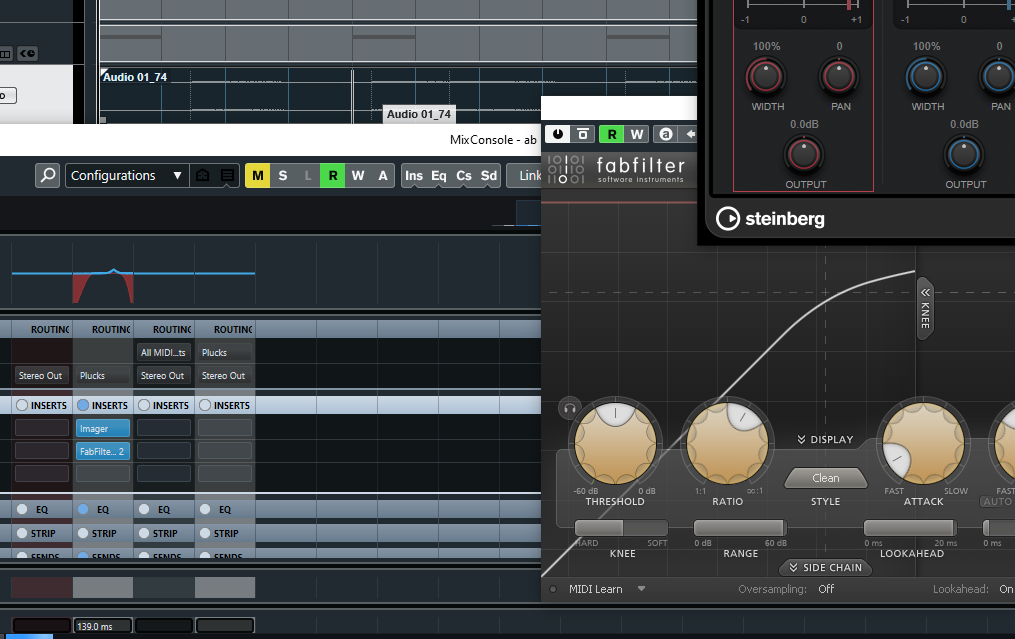
Bitwig, Reaper handles this case perfectly dunno the others, so it was a fyi ... be warned about it
- https://forums.steinberg.net/t/plugin-d ... /143983/10...I am having the same issue, on Cubase 10.5, when I add plugins (famous and known ones that I use on Cubase 5 without issues), like Waves, Antares etc…I get massive latency, I can see the delay that has been added by the plugin in Milliseconds in the mixer which is informative, then Cubase does not compensate for it! there must be a way to fix this...
...I have the same problem in Cubase Pro 10.5 specifically with Oeksound Spiff plugin: it adds hell of a lot of latency and Cubase does not care: that specific track where that plugin is inserted is delayed...
seems C totally ignores the different plugin introduced latencies, can confirm it, https://steinberg.help/cubase_pro_artis ... ion_c.html solution: switch them off, well thanks
if somebody has some solution audio/midi please share it, this where I've given up, Cubase can see it then nothing
Bitwig, Reaper handles this case perfectly dunno the others, so it was a fyi ... be warned about it
Last edited by xbitz on Sun Jan 03, 2021 11:46 pm, edited 5 times in total.
"Where we're workarounding, we don't NEED features." - powermat
-
- KVRAF
- 9145 posts since 7 Oct, 2005
I couldn't find a midi learn for pages navigation. But to be hoenst, I don't think it is very practical to navigate through the pages of parameters unless it is a very limited instruments with two or three pages of controls. Even then, I think it is better to map what you want.chk071 wrote: Sun Jan 03, 2021 8:46 pm Yeah, TBH, I don't make much use of MIDI mapping either. More of a mouse pusher here. You can't learn every parameter anyway, and, learning every synth is simply cumbersome.
Well, xbitz did illustrate a way. But for me personally, I use the Learn function in the Quick Controls (L) by clicking L then the slot I want to assign then click on the knob on the instrument you want to map. It is the same way that I do in Studio One (mapping only the controls I need in the time of making the song).
The only thing I'm not convinced of is the limit of the number of the quick controls. It should be 16 at least, rather than 8 slots only.
Using: Cubase Pro 15, Reason 13, Tascam US-4x4HR, MODX6, DM12D, LaunchKey 49, Yamaha guitar(Pacifica 612v) and bass (BB234) and some virtual instruments and synths.
-
Cancel Culture Club Cancel Culture Club https://www.kvraudio.com/forum/memberlist.php?mode=viewprofile&u=486062
- KVRist
- 146 posts since 28 Dec, 2020
Again I repeat, across the entire audio industry the Apple O/S updates have caused more "bugs" and anomalies then you may want to accept. Having dual code for two different operating systems isn't as cut and dry as you may think. It's not as easy to track down an issue that is buried within someone's personal configuration and setup either.woodsdenis wrote: Sun Jan 03, 2021 7:53 pmIn my experience not the case, Studio One was developed for both platforms initially so that argument does not hold water. I currently run Cubase (originally PC) with no issues as well as Live 10. All OS have their quirks , how many times have PC DAWs been borked with an update to W10. Apple is no exception either of course, but to claim that all PC users have no issues with Studio One in clearly not the case. Either way my answer to the OP is above, make of it what you will. Not engaging in a silly Mac v PC off topic discussion.Cancel Culture Club wrote: Sun Jan 03, 2021 6:14 pmLet's be honest here for a second, most of your issues are probably related to running on Apple hardware and their O/S. It seems that Apple users have the most gripes and complaints about software that was initially developed for PCs and not properly emulated. This can be seen throughout the entire audio industry, translating existing code or dual coding along with Apple's software updates make it very difficult to be without bugs and hiccups.woodsdenis wrote: Sun Jan 03, 2021 5:39 pm Did they not notice re show page that the world is in a middle of a pandemic and there are NO live gigs. Whatever about the need for one in normal times, actually putting this in now as a primary feature is beyond stupid.
Wolfgang Kundrus was the original genius behind Studio One, when he left and the problems began, simple as that. I was an early user and although it didn't have a lot of the features of other DAWs it was rock solid. When Wolfgang left all sorts of bugs appeared in subsequent releases, culminating with me leaving because of the "save as" bug. This hi lighted the total incompetence of the the support and software team TBH. All this coupled with a toxic Studio One forum mod and shills despatched to other forums to divert criticism really ranked of desperation.
It's rather easy to blame Presonus for your lack of computer savvy, but it doesn't fix the well known issues of Apple hardware and their yearly O/S updates that throws everything into whack. But, you're probably already versed on that, you just haven't come to terms with it yet.
-
- Banned
- 11467 posts since 4 Jan, 2017 from Warsaw, Poland
Are quick controls available for insert FX?EnGee wrote: Sun Jan 03, 2021 11:38 pmWell, xbitz did illustrate a way. But for me personally, I use the Learn function in the Quick Controls (L) by clicking L then the slot I want to assign then click on the knob on the instrument you want to map.
-
Cancel Culture Club Cancel Culture Club https://www.kvraudio.com/forum/memberlist.php?mode=viewprofile&u=486062
- KVRist
- 146 posts since 28 Dec, 2020
In addition, what kind of affect do you think this will have on the future of legacy code and hardware?
"The Mac transition to Apple Silicon is the process of changing the central processing unit (CPU) of Apple Inc.'s line of Mac computers from Intel's x86-64 chips to Apple-designed chips that use the ARM64 architecture."
-

- GRRRRRRR!
- 17766 posts since 14 Jun, 2001 from Somewhere you're not!
In my experience, never. Not even once, not even the tiniest little hiccup. And I am on the Insider Programme so I get new beta versions several times a year, as well as the regular updates.woodsdenis wrote: Sun Jan 03, 2021 7:53 pmAll OS have their quirks , how many times have PC DAWs been borked with an update to W10.
I'm pretty sure it is accurate or, at the very least, fewer people on PC have far less significant problems. In my experience Studio One is as stable as any application I have ever used for anything. It is absolutely rock-solid. I had one crash in the first few weeks of using it but since then I haven't been able to kill it with a stick. OTOH, Cubase caused me so many issues I couldn't wait to get rid of it. We decided on Cubase because we figured it was the industry-standard and that everything would just work but that didn't turn out to be the case at all.Apple is no exception either of course, but to claim that all PC users have no issues with Studio One in clearly not the case.
NOVAkILL : Legion GO, AMD Z1x, 16GB RAM, Win11 | Audient EVO 8 | Lumi Keys | Studio Pro 8
Korg Odyssey, bx-oberhausen, Proxima, PolyMax, GR8, JP6K, Union, Atomika,
Invader 2, Flow Motion, Olga, TRK 01, Thorn, Spire, VG Iron
Korg Odyssey, bx-oberhausen, Proxima, PolyMax, GR8, JP6K, Union, Atomika,
Invader 2, Flow Motion, Olga, TRK 01, Thorn, Spire, VG Iron
-

- KVRAF
- 26963 posts since 3 Feb, 2005 from in the wilds
No doubt there will be older stuff that never makes it over to Apple Silicon. That would include plugins, hardware drivers, etc.Cancel Culture Club wrote: Mon Jan 04, 2021 1:43 am In addition, what kind of affect do you think this will have on the future of legacy code and hardware?
"The Mac transition to Apple Silicon is the process of changing the central processing unit (CPU) of Apple Inc.'s line of Mac computers from Intel's x86-64 chips to Apple-designed chips that use the ARM64 architecture."
-
- KVRAF
- 9145 posts since 7 Oct, 2005
Yes. They share the same 8 controls though.antic604 wrote: Mon Jan 04, 2021 1:14 amAre quick controls available for insert FX?EnGee wrote: Sun Jan 03, 2021 11:38 pmWell, xbitz did illustrate a way. But for me personally, I use the Learn function in the Quick Controls (L) by clicking L then the slot I want to assign then click on the knob on the instrument you want to map.
Below you see in the image that for Cubase effects, I just right click and assign it to a quick control while 3rd party I use the "L" learn function then a slot and then click on the control on the effect (in the image I have assigned the Feedback of RAUM).
You do not have the required permissions to view the files attached to this post.
Using: Cubase Pro 15, Reason 13, Tascam US-4x4HR, MODX6, DM12D, LaunchKey 49, Yamaha guitar(Pacifica 612v) and bass (BB234) and some virtual instruments and synths.