

Looking forward to version 21 as well! Because of the news I actually reinstalled Fl Studio again only to find out I still can't find my way around its current workflow. I've been going through tutorials though...
I'm too used to the linear workflow but am also fed up with the annual upgrade prices for my current DAWs. I do midi only and always loved FL's piano roll. If version 21 matches the way I work there's no need for me to keep my other DAWs.
Any insights when the first beta might arrive?
Use FL Studio as a “normal” DAW
-

- Banned
- 11467 posts since 4 Jan, 2017 from Warsaw, Poland
Don't remember now, but I think it had something to do with swapping instrument for another one? Or I clicked something that broke the connection? It was a month ago and I moved since. I'm not sure FL 20.1+ actually "locks" the tracks to be either instrument or audio, it just runs a "script" to do the initial connections for you, but you can easily dismantle it.
I should probably follow my own advice and just use it "properly", like FL was designed for.
-
- KVRAF
- 5070 posts since 27 Jul, 2004
This sounds like the key to success...antic604 wrote: Mon Jan 04, 2021 12:14 pm ...
I should probably follow my own advice and just use it "properly", like FL was designed for.

None of what you mentioned is a problem to do... but I think your interest in FLS is very low anyway, isn´t it??
-
- KVRAF
- 2070 posts since 5 Oct, 2005
I usually skip a few DAW upgrade cycles and upgrade at my own pace. Saves money on the yearly updates and sometimes you’ll get offered cheaper upgrade pricing if you wait around.cranium wrote: Mon Jan 04, 2021 12:10 pm
I'm too used to the linear workflow but am also fed up with the annual upgrade prices for my current DAWs.
Also most bugs are found and if not fixed, at least documented by the time I’m getting there.
Last edited by Acid Mitch on Mon Jan 04, 2021 1:17 pm, edited 1 time in total.
-
- KVRAF
- 5070 posts since 27 Jul, 2004
But the new features are so appealing... I want them now!!!Acid Mitch wrote: Mon Jan 04, 2021 1:09 pm I usually skip a few DAW upgrade cycles and upgrade at my own pace. Saves money on the yearly updates and sometimes you’ll get offered cheaper upgrade pricing f you wait around.
Also most bugs are found and if not fixed, at least documented by the time I’m getting there.

-
- Banned
- 11467 posts since 4 Jan, 2017 from Warsaw, Poland
No, not really. Not in its current state, at least. I could probably live with - and maybe even like - the disconnected rack/playlist/mixer, but NOT with multi-level drop down menus everywhere and complete chaos that's windows managementTrancit wrote: Mon Jan 04, 2021 12:45 pmNone of what you mentioned is a problem to do... but I think your interest in FLS is very low anyway, isn´t it??

But as I said - let's see what v21+ brings.
-
- KVRAF
- 5070 posts since 27 Jul, 2004
I am curious too...
The last few updates were already very very good ...it seems the dry spell of the last 1 1/2 years is over and more interesting things are coming... for free!!
-
- KVRAF
- 2628 posts since 17 Apr, 2004
Really all it does is synchronises the names (rack <-> playlist <-> mixer) and adds an icon. You are still free to place things freeform.antic604 wrote: Mon Jan 04, 2021 12:14 pm Or I clicked something that broke the connection? It was a month ago and I moved since. I'm not sure FL 20.1+ actually "locks" the tracks to be either instrument or audio, it just runs a "script" to do the initial connections for you, but you can easily dismantle it.
Hence it just being an organisational thing - you can synchronise names more easily.
The basic misconception that people have - and that tends to throw them - is that they think the playlist is part of the routing. It's not, it's completely independent.
The routing in FL is done in the channel rack (instrument channel -> mixer channel).
The playlist is simply for arranging the track in time (what plays when). Once you understand that, it all makes sense, albeit being different from how other software approaches it.
Voted KVR's resident drunk Robert Smith impersonator (thanks Frantz!)
https://open.spotify.com/artist/2myYesRBRgQB3LkZzEYdt5 | https://soundcloud.com/steevm/
https://open.spotify.com/artist/2myYesRBRgQB3LkZzEYdt5 | https://soundcloud.com/steevm/
-
- KVRAF
- 5144 posts since 3 Oct, 2013
^^^ + there are three different clip types(that's why there are three different pickers in the playlist editor) , so a clip can be
pattern clip
automation clip
audio clip
the last two ones are pattern independent ones but both of them (automation/audio) can be triggered by MIDI notes too(the triggering itself is pattern-based), the audio clip can be a sampler generator too (can see the diffs here https://www.admiralbumblebee.com/music/ ... Audio.html ) that one is pattern-based(count as an instrument), instrument/audio channels are routed to the mixer, automation ones are routed to automation clips
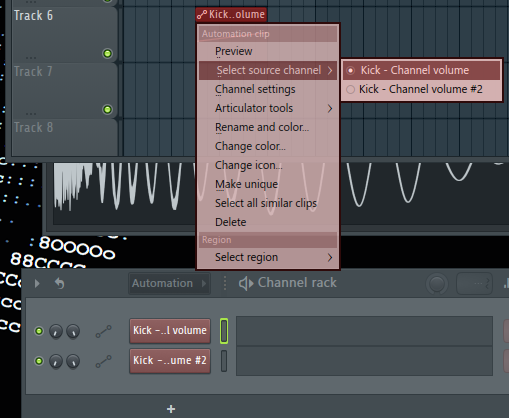
so all of them have only one source(can be same so 1:m assignment) in/from the channel rack and one or more target and done
automation signals can be generated too (so automation signal can go not just from clips) >> https://www.image-line.com/fl-studio-le ... ternal.htm
this(automation/modulation) is the strongest point of FL so
worth to know it well
pattern clip
automation clip
audio clip
the last two ones are pattern independent ones but both of them (automation/audio) can be triggered by MIDI notes too(the triggering itself is pattern-based), the audio clip can be a sampler generator too (can see the diffs here https://www.admiralbumblebee.com/music/ ... Audio.html ) that one is pattern-based(count as an instrument), instrument/audio channels are routed to the mixer, automation ones are routed to automation clips
so all of them have only one source(can be same so 1:m assignment) in/from the channel rack and one or more target and done
automation signals can be generated too (so automation signal can go not just from clips) >>
but that would be a different storyInternal automation sources include:
Automation Clips - Draw your own automation curves in the Playlist.
Control Surface - Create your own interface, link it to target controls and control them from one 'Surface'.
Event Editor - Draw or record your own automation associated with patterns.
Fruity Envelope Controller - Play back user-specified envelopes from the Piano roll/Step Sequencer.
Fruity Formula Controller - Define your own controller functions using mathematical formulae.
Fruity Keyboard Controller - Use controller keyboard performances as a control source.
Fruity Peak Controller - Generates controller data based on audio input and LFO settings.
Fruity X-Y Controller - Control two parameters simultaneously with your mouse.
Dashboard - Create your own interface, link it to target controls and control them from one 'dashboard'.
Touch Controllers - Touch enabled Keyboard and Drumpads.
VFX Envelope - Per voice Velocity (volume), Pitch, Pan & X/Y targets.
ZGameEditor Visualizer - Analyze videos to create Red, Green, Blue and Luminance control signals.
https://www.image-line.com/fl-studio-le ... ternal.htmthis(automation/modulation) is the strongest point of FL so
worth to know it well
"Where we're workarounding, we don't NEED features." - powermat
-
- KVRian
- Topic Starter
- 1078 posts since 24 Apr, 2008 from USA
I really really like FL’s instruments and effects , but the pattern-based production is not my workflow. Too bad I can’t use FL’s plugins in other DAW 
Main Computer Specs: MacBook M1 Max, 32GB, 4TB, Cubase 13.