Presonus Studio One 5.2 vs Cubase 11

Audio Plugin Hosts and other audio software applications discussion
Post Reply New Topic
RELATED
PRODUCTS

Post

Serhii Kot wrote: Fri Mar 12, 2021 4:19 pm
lessera wrote: Fri Mar 12, 2021 3:22 pm
Serhii Kot wrote: Fri Mar 12, 2021 2:42 pmI understand. BTW I am a pretty confident reaper user. In my reaper config, a created an action that does exactly as in studio one. Just touch any parameter and pres ALT+A. So it's a draw in that regard.
Hmmm. I like the sound of that.

I have always just switched the automation mode between 'trim/read' and 'touch' ... but I think I would prefer your method even more. Do you know off-hand what the action you mention is called within the action list?
I checked, actually, this is a built-in feature I guess :)
FX: Show/hide track envelope for last touched FX parameter
Hey. That's great!

Thanks for the tip. :)

Post

antic604 wrote: Fri Mar 12, 2021 4:30 pm
Since most of the time recently I'm on Linux, Bitwig + Reaper would be a great combo :party:
I have been thinking of trying Linux. Why did you move ? and how are you finding it ?

Post

dellboy wrote: Fri Mar 12, 2021 5:35 pmI have been thinking of trying Linux. Why did you move ? and how are you finding it ?
I like - or need, actually - constraints.

Not having access to all the "toys" that I have in Windows feels more liberating and freeing, allowing to focus on a more limited palette: Bitwig stuff + (comparatively) small selection of native Linux plugins from U-He, TAL, Vital, Surge, Bom Shanka, AudioDamage, illformed.

Also it feels safer, more under control, runs better if you're not affraid to google your way through inital stumbling blocks :)

Give it a go - just install it on a removable SDD or USB drive and see how you feel about it, without taking any risk or commitment. Any of the Ubuntu flavours will probably be the easiest to find your way around initially, with pop!_OS being my favourite right now, but there's something for everyone there.
Music tech enthusiast
DAW, VST & hardware hoarder
My "music": https://soundcloud.com/antic604

Post

antic604 wrote: Fri Mar 12, 2021 9:14 am One HUGE thing that Studio One does very well - compared to say Cubase or Reaper - is adding automation when you want to draw it manually.

Not sure if it's at all relevant for you, obviously :)

In those other DAWs you need to either record it (then delete the points and draw from scratch) or manually find the desired parameter(s) in often huge list of all available stuff, add automation lane and edit it.

In Studio One you just move a knob or slider on the VST or controller, see the name & value of respective parameter pop up in upper-left corner and drag it onto the track where the device sits on (there's also keyboard shortcut for this) or to a completely separate automation track, if that is what you prefer. It's almost as fast as in Bitwig or Live, and miles ahead of Cubase and Reaper.
just because don't think somebody uses Cubase alone

this is how it goes automation just one click on the rack device knob, not great not terrible
"Where we're workarounding, we don't NEED features." - powermat

Post

antic604 wrote: Fri Mar 12, 2021 5:55 pm
dellboy wrote: Fri Mar 12, 2021 5:35 pmI have been thinking of trying Linux. Why did you move ? and how are you finding it ?
I like - or need, actually - constraints.

Not having access to all the "toys" that I have in Windows feels more liberating and freeing, allowing to focus on a more limited palette: Bitwig stuff + (comparatively) small selection of native Linux plugins from U-He, TAL, Vital, Surge, Bom Shanka, AudioDamage, illformed.

Also it feels safer, more under control, runs better if you're not affraid to google your way through inital stumbling blocks :)

Give it a go - just install it on a removable SDD or USB drive and see how you feel about it, without taking any risk or commitment. Any of the Ubuntu flavours will probably be the easiest to find your way around initially, with pop!_OS being my favourite right now, but there's something for everyone there.
I did that before with Ubuntu. Everything works very well. I even could use several synths in vst form by Carla (software can be like container to vst inside native Linux DAW). Except for NI and several others, many synths worked (like Dune 3 and the Legend).

Anyway, I was fool to update Ubuntu to the latest version then (I think from 18 to 19) and BOOM! Nothing worked! Not even could start Bitwig or Reaper! I have tried several times to fix it but then gave up and returned to Windows. So, never update anything except security in the OS! It might break some backward compatibility causing headaches.

Anyway, I might do that again as I have all I need for going Linux, but for now I'm experiencing the 5 DAWs I have (Bitwig I bought during this flash discount till 14 March). For now, I slightly prefer Bitwig and Studio One than the others. It's hard to choose between those two. I might go Linux if I choose Bitwig as my main DAW but It's difficult for me to sacrifice NI synths. I depend on FM8, Massive and Razor a lot.
Using: Cubase Pro 15, Reason 13, Tascam US-4x4HR, MODX6, DM12D, LaunchKey 49, Yamaha guitar(Pacifica 612v) and bass (BB234) and some virtual instruments and synths.

Post

If you're already on cubase 10.5/11, I would probably just stick with 10.5/11 and see what Steinberg's new direction is. We already know they are going dongle-less. They might be pivoting towards the things that made Studio One popular. Additionally, I do think most things in Cubase are better. Studio One's stock plugins seem like worst versions of Cubase's. The features in Cubase are more mature or fully featured. I think it does come down to how much you like the Studio One workflow compared to Cubase. I mean...cubase still can't drag tracks or make groups super effeciently or route things quickly (templates ftw). It depends what you need the daw to do for you. Studio one doesn't have mouse modifiers. I had to use a script to get pan-scrolling.

Post

Thanks for all the suggestions. I guess I am after speed of workflow and ease of use. Also, interested in lower cpu and quicker load up times of daw and vsts.
Studio One looks less cluttered and easier to use.

Post

I switched from Cubase to Studio One, then back to Cubase. Both are good and are my favorites overall. In Cubase I like that any of the toolbar buttons can be hidden. After setting it up to show only the buttons I actually use, the UI is very clean. Studio One doesn’t allow this, and it’s annoying that they show some buttons that I find to be unnecessary. For example, there is a large download status button always visible on the top toolbar. That’s precious real estate for such an infrequently used button. And it can’t be hidden.

Studio One also has a Shop and Cloud tab in the browser. I have no interest in these and can’t hide them. Also don’t want to be marketed to inside the DAW workspace.

Odd as this may sound, I’ve found Steinberg to be much more responsive and present on their forum than PreSonus is on theirs. And for some reason PreSonus still has announcement posts stickies regarding the releases of Studio One 3 and 4, years later!

Also prefer the included instruments and plugins in Cubase, as well as the built in MIDI editor chord tools. The new scale highlight feature on the piano roll is great too, showing that they are willing to learn from something FL Studio does well. They also added scale folding, and snapping to the scale.

Both are great and I’ll probably keep hopping back and forth. But for now I’m back in the Cubase camp.

Post

fyi there is 62% off on https://www.cableguys.com/shaperbox.html if somebody missed it, a must-have for both DAWs so put it here ... don't kill the messenger pls. :D


there are more shaper than on the video above: time, drive, filter, crush, volume, pan, and width
"Where we're workarounding, we don't NEED features." - powermat

Post

EnGee wrote: Fri Mar 12, 2021 8:24 pm I did that before with Ubuntu. Everything works very well. I even could use several synths in vst form by Carla (software can be like container to vst inside native Linux DAW). Except for NI and several others, many synths worked (like Dune 3 and the Legend).

Anyway, I was fool to update Ubuntu to the latest version then (I think from 18 to 19) and BOOM! Nothing worked! Not even could start Bitwig or Reaper! I have tried several times to fix it but then gave up and returned to Windows. So, never update anything except security in the OS! It might break some backward compatibility causing headaches.

Anyway, I might do that again as I have all I need for going Linux, but for now I'm experiencing the 5 DAWs I have (Bitwig I bought during this flash discount till 14 March). For now, I slightly prefer Bitwig and Studio One than the others. It's hard to choose between those two. I might go Linux if I choose Bitwig as my main DAW but It's difficult for me to sacrifice NI synths. I depend on FM8, Massive and Razor a lot.
Depending on the last time you've tried, that may have changed. I was running arch and was able to use all of the NI plugins I needed (mostly Kontakt, replika and occasionally massive) with the help of yabridge. The only small issue I have is it uses slightly more ram than it does on windows, but that's to be expected. That said, I wouldn't use this for large orchestral templates but for medium sized projects of about 50-75 tracks, this is perfectly fine as long as you have the ram available. Just make sure that you have jack setup properly and you get yabridge working (which is straight forward). If you're looking to try it and you need help, just let me know.
Yo.

Post

Skandiluz wrote: Sun Mar 14, 2021 6:55 am
EnGee wrote: Fri Mar 12, 2021 8:24 pm I did that before with Ubuntu. Everything works very well. I even could use several synths in vst form by Carla (software can be like container to vst inside native Linux DAW). Except for NI and several others, many synths worked (like Dune 3 and the Legend).

Anyway, I was fool to update Ubuntu to the latest version then (I think from 18 to 19) and BOOM! Nothing worked! Not even could start Bitwig or Reaper! I have tried several times to fix it but then gave up and returned to Windows. So, never update anything except security in the OS! It might break some backward compatibility causing headaches.

Anyway, I might do that again as I have all I need for going Linux, but for now I'm experiencing the 5 DAWs I have (Bitwig I bought during this flash discount till 14 March). For now, I slightly prefer Bitwig and Studio One than the others. It's hard to choose between those two. I might go Linux if I choose Bitwig as my main DAW but It's difficult for me to sacrifice NI synths. I depend on FM8, Massive and Razor a lot.
Depending on the last time you've tried, that may have changed. I was running arch and was able to use all of the NI plugins I needed (mostly Kontakt, replika and occasionally massive) with the help of yabridge. The only small issue I have is it uses slightly more ram than it does on windows, but that's to be expected. That said, I wouldn't use this for large orchestral templates but for medium sized projects of about 50-75 tracks, this is perfectly fine as long as you have the ram available. Just make sure that you have jack setup properly and you get yabridge working (which is straight forward). If you're looking to try it and you need help, just let me know.
Thanks a lot for the info and help. I appreciate it and will consider it if I'm going Linux one day again :)
Using: Cubase Pro 15, Reason 13, Tascam US-4x4HR, MODX6, DM12D, LaunchKey 49, Yamaha guitar(Pacifica 612v) and bass (BB234) and some virtual instruments and synths.

Post

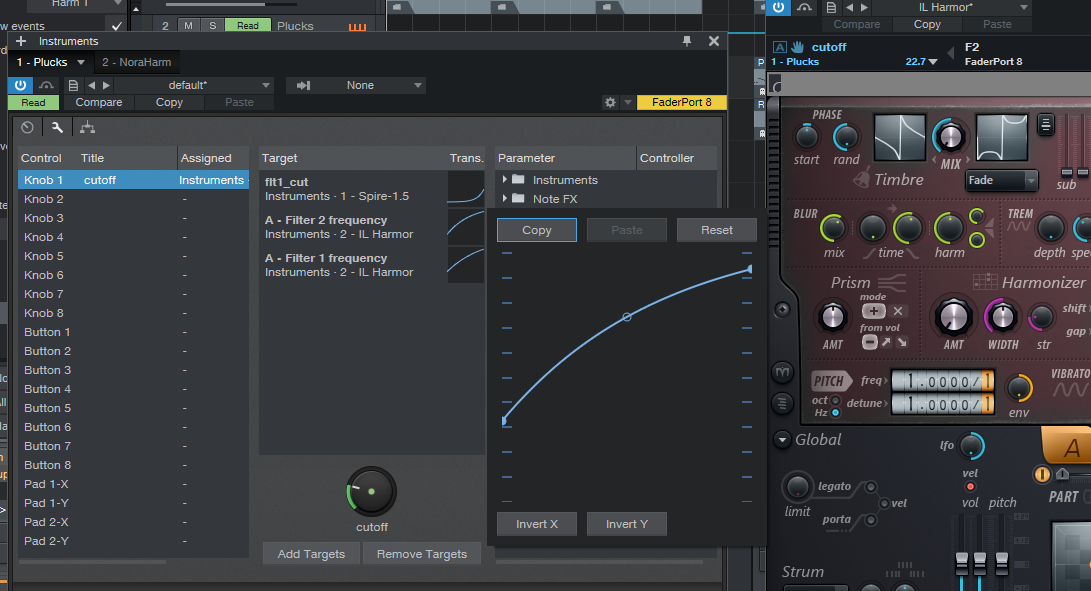
btw. common macroable multi instrument containers are totally missing from Cubase and the clonable arranger clips(which can be duplicated shared too) in the latest 5.2 version together with scratch pads are really handy at song starting
Image
+ MIDI sidechain, better pattern supporting etc. S1 seems better usable for me (ofc. faderport also works better with it ... what a surprise :) )

so this >>
Image
the scratchpads and the arranger clips in the main arranger can be connected together, workflow will be similar to the blocks one in Reason
"Where we're workarounding, we don't NEED features." - powermat

Post

xbitz wrote: Sat Mar 13, 2021 5:52 pm fyi there is 62% off on https://www.cableguys.com/shaperbox.html if somebody missed it, a must-have for both DAWs so put it here ... don't kill the messenger pls. :D

there are more shaper than on the video above: time, drive, filter, crush, volume, pan, and width
It's just the bundle price not a sale price...

Post

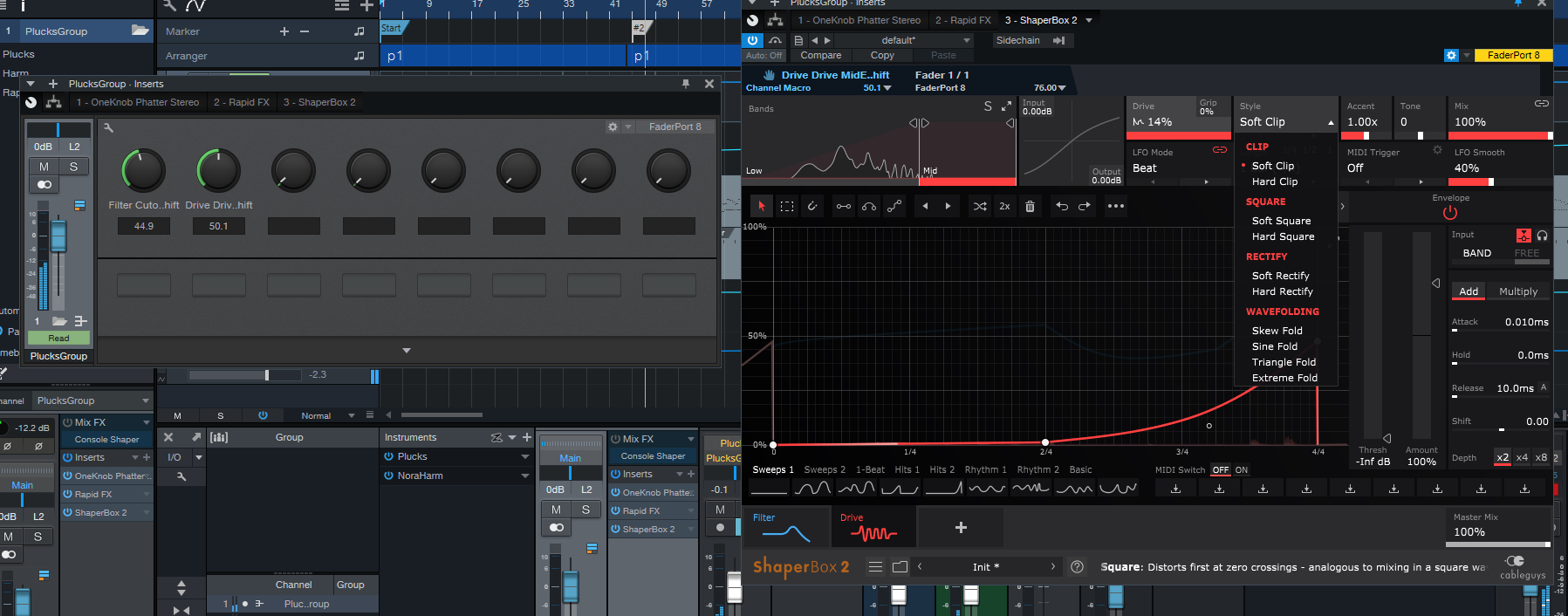
^^^ sry for the #fakenews, at least it contains distortion related shapers too so has better value than before (when last checked Protoculture's video, I've bought it anyway :party: ) not fully offtopic this is why I changed to S1

Image

I can the reason for macroing in S1 finally in C using shapers normally was PITA (wasn't able to use RapidFx and Shapers together)
"Where we're workarounding, we don't NEED features." - powermat

Post

xbitz wrote: Sun Mar 14, 2021 11:13 amthe scratchpads and the arranger clips in the main arranger can be connected together, workflow will be similar to the blocks one in Reason
Can they, though? Last time I tried (which was 5.0 or 5.1), changes made to clips in Scratch Pads wouldn't be carried over to Arranger, even though I was linking them.
Music tech enthusiast
DAW, VST & hardware hoarder
My "music": https://soundcloud.com/antic604

Post Reply

Return to “Hosts & Applications (Sequencers, DAWs, Audio Editors, etc.)”