Audacity 3.0.0 is released!

Audio Plugin Hosts and other audio software applications discussion
RELATED
PRODUCTS

Post

Shabdahbriah wrote: Sun Mar 21, 2021 4:42 am I could never get past the hideous UI, especially when the buttons were done in pastels.
Same. And, no markers is like :dog:.

Well... I always was a Wavelab fan anyway. It has the best GUI, and best handling of the audio editors I've tried, including Soundforge, by far. I used to use a haxed version of Wavelab 15 years ago, version 3 point something, and then bought Wavelab Elements about 8 years ago or so. Sold it one time then, just to buy it again. IMO, it's pretty much without competition.

Audacity is a pretty good example of the state most FOSS software is in.

Post

No way am I paying $100 (or $500 for Wavelab Pro) just because of the GUI. I get along fine with Audacity, and I'm amazed that it is free.
Doing nothing is only fun when you have something you are supposed to do.

Post

I didn't pay $100 for Wavelab Elements. I got Wavelab LE (from a Keys magazine DVD, I think), and then upgraded to Wavelab Elements, and then upgraded that a few versions, which always cost something like 25 €, with a few discounts over the years, often bringing down the upgrade price to 20 € or so. It's really not that expensive.

Of course, you gotta know if that's worth it for you. With Audacity, you definitely get what you pay for though. Does it even support ASIO natively now, or is it still using PortAudio? Doubt it can even support ASIO natively, due to the license, can it?

Post

Its free, so it is what it is, but it won't see 64-bit versions of VST plug-ins (or VST3s), so not much use if you want to process with VST fx.
X32 and 24C mixers, S88MK3, Live + PUSH 3, Osmose, RedShift 6, Pro3, S4, Tempera, Syntakt, Digitone, OP1-F, OPXY, TR-1000, Eurorack, TD27 Drums, Guitars, Basses, Amps and of course lots of pedals!

Post

chk071 wrote: Sun Mar 21, 2021 11:47 am Does it even support ASIO natively now, or is it still using PortAudio? Doubt it can even support ASIO natively, due to the license, can it?
The offical Audacity version of course can't support ASIO as it would violate the license agreement of Steinberg (oh damn, not them again...) regarding open source software. But with every official version comes an "unofficial" version, having the ASIO compiled in :wink:

I like the development of Audacity over all these years. It shows open source stays relevant, even on Windows/Mac. And the more people get f*cked up by the usual suspects, the more tools like this are in the rise.

Post

Wow, it's like Windows 95 is still alive and well...

With free apps like OcenAudio available, I wouldn't use this even if you paid me.

Post

The "expert" again.
No markers ? Yeah...

Post

chk071 wrote: Sun Mar 21, 2021 11:28 am... no markers is like :dog:.
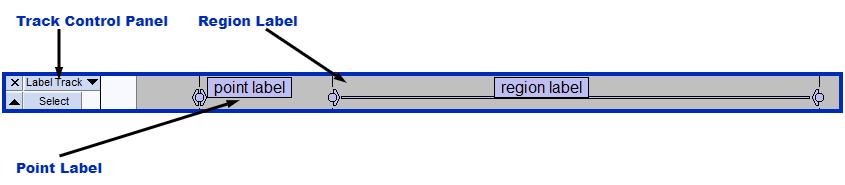
Image

Audacity's markers. :wink:

Source: https://manual.audacityteam.org/man/lab ... html#point

Post

i am waiting for the "why did you leave audacity 3" thread to pop up soon
[aˈtoːm] [aːl] [ˈa(ː)tonaːl] IV
https://soundcloud.com/atomaalatonal4

Post

All the GUI style discussion but then we have plugin devs around that are solely famous for their fugly plugins...
Matter of taste and what you want to do with it. I still work with CoolEdit, because it just works and isn't overcomplicated. I guess it's the same for Audacity. And there's a reason why it gets mentioned almost everytime someone asks for an audio editor.

Post

Etienne1973 wrote: Sun Mar 21, 2021 12:54 pm
chk071 wrote: Sun Mar 21, 2021 11:28 am... no markers is like :dog:.
Image

Audacity's markers. :wink:

Source: https://manual.audacityteam.org/man/lab ... html#point
Good to know, but, have you tried using them? As soon as you CTRL+M to set a marker your playback button (spacebar) is locked into the label renaming field, and if you press CTRL at the wrong moment, the screen starts to shake back and forth because it still points you to the label renaming thing, and the transport cursor that's moving tries to adjust the view position :D

Post

I wonder why they don't just use markers. It's much better to see the marker line over the actual waveform, especially when you are trying to hit the zero crossings.

Can you even snap to zero crossings with the labels? That's, like, the minimum I'd expect from markers/labels/whatevers.

Post

If markers are the biggest problem, Audacity can't be that bad.

Post

SonicBlue555 wrote: Sun Mar 21, 2021 1:18 pmAs soon as you CTRL+M to set a marker your playback button (spacebar) is locked into the label renaming field, ...
I give the marker a name and then move on. Problem solved.
SonicBlue555 wrote: Sun Mar 21, 2021 1:18 pm... and if you press CTRL at the wrong moment, the screen starts to shake back and forth because it still points you to the label renaming thing, and the transport cursor that's moving tries to adjust the view position :D
Can't reproduce that here. But I'm on Mac.
chk071 wrote: Sun Mar 21, 2021 1:22 pm I wonder why they don't just use markers. It's much better to see the marker line over the actual waveform, especially when you are trying to hit the zero crossings.

Can you even snap to zero crossings with the labels? That's, like, the minimum I'd expect from markers/labels/whatevers.
Place cursor near zero crossing in audio track(s), Hit Z (snaps to zero) and then CTRL+B (adds label/marker). Done.

Post

Sam-U wrote: Sun Mar 21, 2021 1:38 pm If markers are the biggest problem, Audacity can't be that bad.
I think it has already been mentioned that the GUI is a complete train wreck.

Post Reply

Return to “Hosts & Applications (Sequencers, DAWs, Audio Editors, etc.)”