How you use clip launcher in your DAW?

Audio Plugin Hosts and other audio software applications discussion
Post Reply New Topic

How you use clip launcher in your DAW?

(1) I never touch the arranger time-line, my projects stay in clip launcher
2
1%
(2) I record, create, edit & play in clip-launcher, only final touches happen on the arranger time-line
19
14%
(3) I go between both, treating clip launcher like a note pad with ideas to try & maybe use later
43
32%
(4) I primarily work on linear time-line, only chop & move things to clip launcher for live performance
6
4%
(5) I never touch the clip launcher
28
21%
My DAW doesn't have a clip launcher
24
18%
Fish
13
10%
 
Total votes: 135

RELATED
PRODUCTS

Post

More & more DAWs have clip launchers (Live, Bitwig, DP, Logic, Mixcraft, Cakewalk, etc.) or clip launcher-like features (FL, Reaper, etc.) and whenever new DAW update comes up there's always people demanding that feature to be added to their Cubase, Studio One or Reason, etc.

But how central is a clip launcher to your workflow?

I tried to order the poll by "intensity" of using the clip launcher and by the law of normal distribution I expect most votes to fall in the middle, probably skewed towards the upper options as some will use Live or Bitwig for their clip stuff & then perhaps arrange elsewhere? Let's see! :party:

Just for the sake of completeness, I've added an option for those that'd like to participate in the poll but their DAW doesn't have a clip launcher.

And a "Fish" option especially for @Karbon L. Forms :P
Music tech enthusiast
DAW, VST & hardware hoarder
My "music": https://soundcloud.com/antic604

Post

so I answered 3. Both. But I do have some issues... and some questions, to which there may be answers! edit: this is in Bitwig - apologies thought this was the Bitwig Forum!

I am happy to work in linear, which comes from years in cubase, but my bandmate prefers the clip launcher, so I have started to use that. So, we sketch ideas in clip pad, which can be jammed out, and are then arranged in the window. Items from the arrangement can then also be copied back to scenes.

My issues, or things I struggle with:
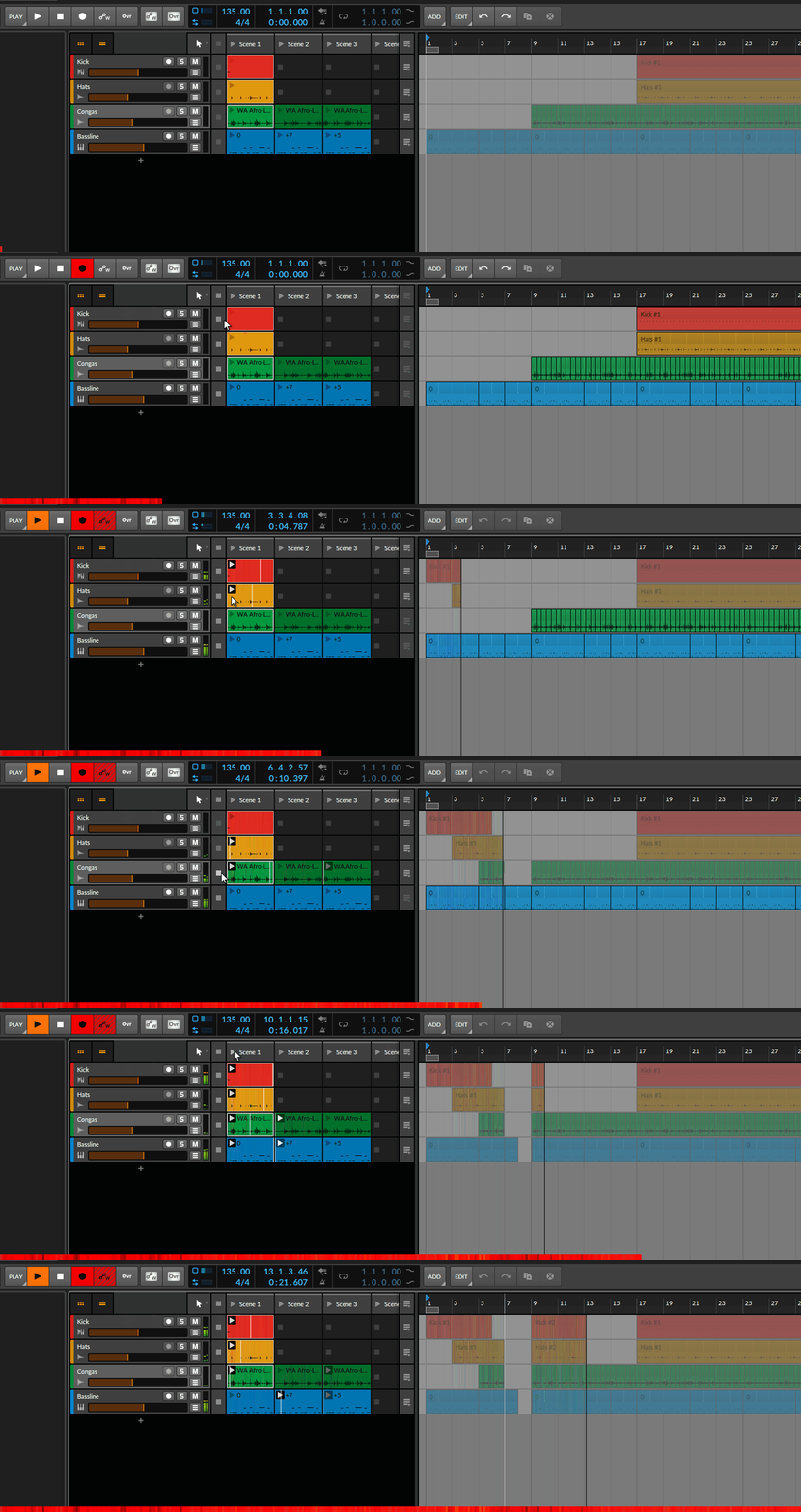
  • When using the scenes I seem to constantly overwrite the arrangement if I record anything. Clearly I'm doing something wrong but can't intuitively figure it out.
  • Is there a good way to handle a scene when you want e.g. a couple of notes to play on the last part of the previous loop to lead into it?
  • Recording into a scene, isn't intuitive for me yet... I had to email Bitwig support for them to help me with this... they answered quickly and helpfully!
(I would love mulitple linear arrangements to be stored within a project - that's the dream! And this might help with the scenes recording over the arrangement. The scenes writing into the arrangement is great though, for jamming out an arrangemenr in the first place)

So, I know I need to do a bit more RTFM. :-)

Post

reply 3 :
I use session view for techno live acts obviously but in the studio to steckup ideas, try ideas on the fly.

Post

antic604 wrote: Thu Mar 25, 2021 8:33 am More & more DAWs have clip launchers (Live, Bitwig, DP, Logic, Mixcraft, Cakewalk, etc.) or clip launcher-like features (FL, Reaper, etc.) and whenever new DAW update comes up there's always people demanding that feature to be added to their Cubase, Studio One or Reason, etc.

For Reaper, you mean playtime?
Last edited by dupont on Thu Mar 25, 2021 1:22 pm, edited 2 times in total.

Post

dupont wrote: Thu Mar 25, 2021 1:07 pm For Reaper, you mean Playtime ?
Yeah, but rather this one: https://www.helgoboss.org/projects/playtime/

God bless KvR's auto links :D :dog:
Music tech enthusiast
DAW, VST & hardware hoarder
My "music": https://soundcloud.com/antic604

Post

antic604 wrote: Thu Mar 25, 2021 1:09 pm
dupont wrote: Thu Mar 25, 2021 1:07 pm For Reaper, you mean Playtime ?
Yeah, but rather this one: https://www.helgoboss.org/projects/playtime/

God bless KvR's auto links :D :dog:
indeed, I edited my post :D
I'm not font of playtime in reaper, it looks more like a workaround. I wish Justin makes session view native to Reaper, several FRs on Reaper forum about this.
Cuurently, it's the main reason I use bitwig over Reaper for my tracks.

Post

Start in clip launcher, than when I have idea for arrangement, record it live or transfer it to arrangement page, would use clip launcher for creating new clips or trying new ideas later on.

Post

Passing Bye wrote: Thu Mar 25, 2021 1:51 pmStart in clip launcher, than when I have idea for arrangement, record it live or transfer it to arrangement page, would use clip launcher for creating new clips or trying new ideas later on.
Yeah, that's probably the most common use case :)

Has switching from Live to Bitwig (or flirting with the idea, not sure what the status is :) ) changed anything in your workflow on that front? You know, having both side-by-side without needing to "mentally" tilt your head 90deg when moving between them? :wink:
Music tech enthusiast
DAW, VST & hardware hoarder
My "music": https://soundcloud.com/antic604

Post

antic604 wrote: Thu Mar 25, 2021 1:55 pm
Passing Bye wrote: Thu Mar 25, 2021 1:51 pmStart in clip launcher, than when I have idea for arrangement, record it live or transfer it to arrangement page, would use clip launcher for creating new clips or trying new ideas later on.
Yeah, that's probably the most common use case :)

Has switching from Live to Bitwig (or flirting with the idea, not sure what the status is :) ) changed anything in your workflow on that front? You know, having both side-by-side without needing to "mentally" tilt your head 90deg when moving between them? :wink:
I’m all-in with Bitwig, gave Live 11 shot, not my thing, gave Logic 10.6 a shot, definitely no, that’s it for me. :)

Post

#3 for me. I use Live's clip launcher for ideas and then transfer to Studio One for structuring the final song.

I think it's psychological for me... Even though you have take lanes in a linear DAW, something about having all those empty clips makes me feel less inhibited about trying something out/improvising. And then being able to try out combinations of clips in real time.

-Dan
MacBook Pro M1 | Studio One, Live, Logic, Bitwig | LaunchKey 37 MK4, Arturia KeyLab 61 mkII | Audient ID14 | Fender, Godin, Taylor | Arturia Micro/Mini Freak

Post

_leras wrote: Thu Mar 25, 2021 10:49 am...When using the scenes I seem to constantly overwrite the arrangement if I record anything. Clearly I'm doing something wrong but can't intuitively figure it out...
You have to pay attention to the column of buttons between Clip Launcher and Arranger. Whenever a button is active, Bitwig will play from Arranger or if you click the button it will stop recording from Clip Launcher and start playing from Arranger. Your problem is that when you launch a whole scene all buttons get deactivated (also for those tracks where there's no active clips).

If you want to record to only selected tracks and keep others intact, launch only the clips you need, e.g. by first Ctrl+clicking to select them and then hitting Enter to launch them. Or use a controller like Push, Launchpad or APC40.

Image
Music tech enthusiast
DAW, VST & hardware hoarder
My "music": https://soundcloud.com/antic604

Post

I don't use Clips at all. Not useful for my workflow at all. I work with the arrangement in mind from the beginning. Thus I can't care less about this feature being forced-implemented in Cubase which is not a DAW for live performances at all.

In the past, I played a few gigs with Ableton where everything was prepared to play from Clip Launcher but I doubt that I would do the same again as I prefer to play DJ sets with live remixing now.

Post

pixel85 wrote: Sat Mar 27, 2021 10:17 amI don't use Clips at all. Not useful for my workflow at all. I work with the arrangement in mind from the beginning. Thus I can't care less about this feature being forced-implemented in Cubase which is not a DAW for live performances at all...
I'm not entirely sure how you feel about clip launchers :D :P

Please vote accordingly :tu:
Music tech enthusiast
DAW, VST & hardware hoarder
My "music": https://soundcloud.com/antic604

Post

antic604 wrote: Sat Mar 27, 2021 10:43 am
pixel85 wrote: Sat Mar 27, 2021 10:17 amI don't use Clips at all. Not useful for my workflow at all. I work with the arrangement in mind from the beginning. Thus I can't care less about this feature being forced-implemented in Cubase which is not a DAW for live performances at all...
I'm not entirely sure how you feel about clip launchers :D :P

Please vote accordingly :tu:
I voted 5 - I'm not touching Clip Launcher in Ableton at all under any circumstances ;)

Post

I go for the granularity of human time in music, so in the rare instances where I repeat a pattern or a ground, there is no literal copy of the last time, I'll do it the hard way one way or other. because the flatness of affect/lack of interest or life, & all that sameness... beyond boredom for me.

And as far as the linear DAW Cubase or Nuendo, all this bloat is a drag trying to satisfy the people that really rather hate Cubase's ways and want everything to replicate teh Ableton Live (or Fruity) ways. In fact they're screwing up other functionality by adding idiotic features, such as double-click to delete a note, so longtime users' muscle memory is disrupted and more has to be done to get to actual features (eg., Note Expression editing, was double-click now right-click and a menu to find it.). Not the only one either, in the latest version. Marketing ruling sense, new users' feature requests over old-timers' and norms. And they're rushing into it creating new bugs, making useless features like that.

Post Reply

Return to “Hosts & Applications (Sequencers, DAWs, Audio Editors, etc.)”