Studio One 5 Available Now (5.3 Out June 29th, 2021)

Audio Plugin Hosts and other audio software applications discussion
Post Reply New Topic
RELATED
PRODUCTS
Fender Studio Pro Studio One Artist

Post

Trancit wrote: Sun Apr 11, 2021 8:25 am

and while there is absolute random behaviour in all DAWs about zooming horizontally with the mouse wheel Shift+CTRL+ Wheel is for sure one of the most silliest and hardest to press modifier combination...

... and break my fingers for holding Shift+CTRL for horizontal zoom...
Alright, I can't really let this one go, sorry. S1 ranks about fourth in preference for me as far as DAWs go, so I'm no fanboy, but in what universe is holding down the shift and control keys at the same time abnormally difficult? or potentially finger breaking? you can hold them both down with one finger FFS, they are adjacent freaking keys which are conveniently located on BOTH sides of the keyboard. If holding control and shift at the same time is traumatic for you, you should in no way ever learn to play an instrument such as a piano or guitar.

now if it isn't user configurable, that's a fair point, as I would agree that it should be, but control-shift difficult?

Post

Quick question:

If I have two plugins on a track and I want to A/B them instantly, how do I go about it?

Is there a way to get a key-command that turns one on and one off in one-foul-swoop?

Is there a way to 'select' multiple plugins so I can even A/B between plugin chains?

Post

It's "one fell swoop". I find the easiest way to A/B stuff is to duplicate the track and mute one, then solo it. When it is soloed, you can't hear the other one but when you un-solo it, it goes back to mute and you can only hear the duplicate. Of course, it doesn't work if you want to hear one, then the other in a mix.
NOVAkILL : Legion GO, AMD Z1x, 16GB RAM, Win11 | Audient EVO 8 | Lumi Keys | Studio Pro 8
Korg Odyssey, bx-oberhausen, Proxima, PolyMax, GR8, JP6K, Union, Atomika,
Invader 2, Flow Motion, Olga, TRK 01, Thorn, Spire, VG Iron

Post

I don’t know about anything inside S1 that helps with A/B, but if it’s something you’re doing a lot maybe check out Melda MCompare
https://www.meldaproduction.com/MCompare

Are you safe?
"For now… a bit like a fish on the floor"
https://tidal.com/artist/33798849

Post

Kang wrote: Thu Apr 15, 2021 6:14 am Quick question:

If I have two plugins on a track and I want to A/B them instantly, how do I go about it?

Is there a way to get a key-command that turns one on and one off in one-foul-swoop?

Is there a way to 'select' multiple plugins so I can even A/B between plugin chains?
Use Splitter in 'normal' (i.e. parallel) mode and just mute one or the other.
Music tech enthusiast
DAW, VST & hardware hoarder
My "music": https://soundcloud.com/antic604

Post

antic604 wrote: Thu Apr 15, 2021 8:07 am
Kang wrote: Thu Apr 15, 2021 6:14 am Quick question:

If I have two plugins on a track and I want to A/B them instantly, how do I go about it?

Is there a way to get a key-command that turns one on and one off in one-foul-swoop?

Is there a way to 'select' multiple plugins so I can even A/B between plugin chains?
Use Splitter in 'normal' (i.e. parallel) mode and just mute one or the other.
Good idea, but when I have one muted is there a way to un-mute it and mute the other instantly?

I can use the power buttons on the track inserts easily but I'm more interested in an instant switchover.

Post

Kang wrote: Thu Apr 15, 2021 1:24 pmGood idea, but when I have one muted is there a way to un-mute it and mute the other instantly?

I can use the power buttons on the track inserts easily but I'm more interested in an instant switchover.
Parhaps they can be mapped - in opposite directions - to a macro button, that can then be MIDI-mapped?

I'll test this when I'm home in the evening.
Music tech enthusiast
DAW, VST & hardware hoarder
My "music": https://soundcloud.com/antic604

Post

antic604 wrote: Thu Apr 15, 2021 1:33 pm
Kang wrote: Thu Apr 15, 2021 1:24 pmGood idea, but when I have one muted is there a way to un-mute it and mute the other instantly?

I can use the power buttons on the track inserts easily but I'm more interested in an instant switchover.
Parhaps they can be mapped - in opposite directions - to a macro button, that can then be MIDI-mapped?

I'll test this when I'm home in the evening.
It's all good. I'll stick with the power buttons and live with a little gap between switch overs. I'm not gonna use anything that requires any setup, even if the splitter thing could do instant switchover I'm not sure I'd use it either, not because of the setup but because I feel like it would make things convoluted with how often I A/B plugins.

Post

Is there a macro to switch the mute state on selected tracks?

I was thinking I could duplicate the track, swap plugins on the dup, mute one track, select both, then run that macro. That would allow instant A/B with an added benefit of easier volume matching.

Post

Kang wrote: Thu Apr 15, 2021 2:39 pmI was thinking I could duplicate the track, swap plugins on the dup, mute one track, select both, then run that macro. That would allow instant A/B with an added benefit of easier volume matching.
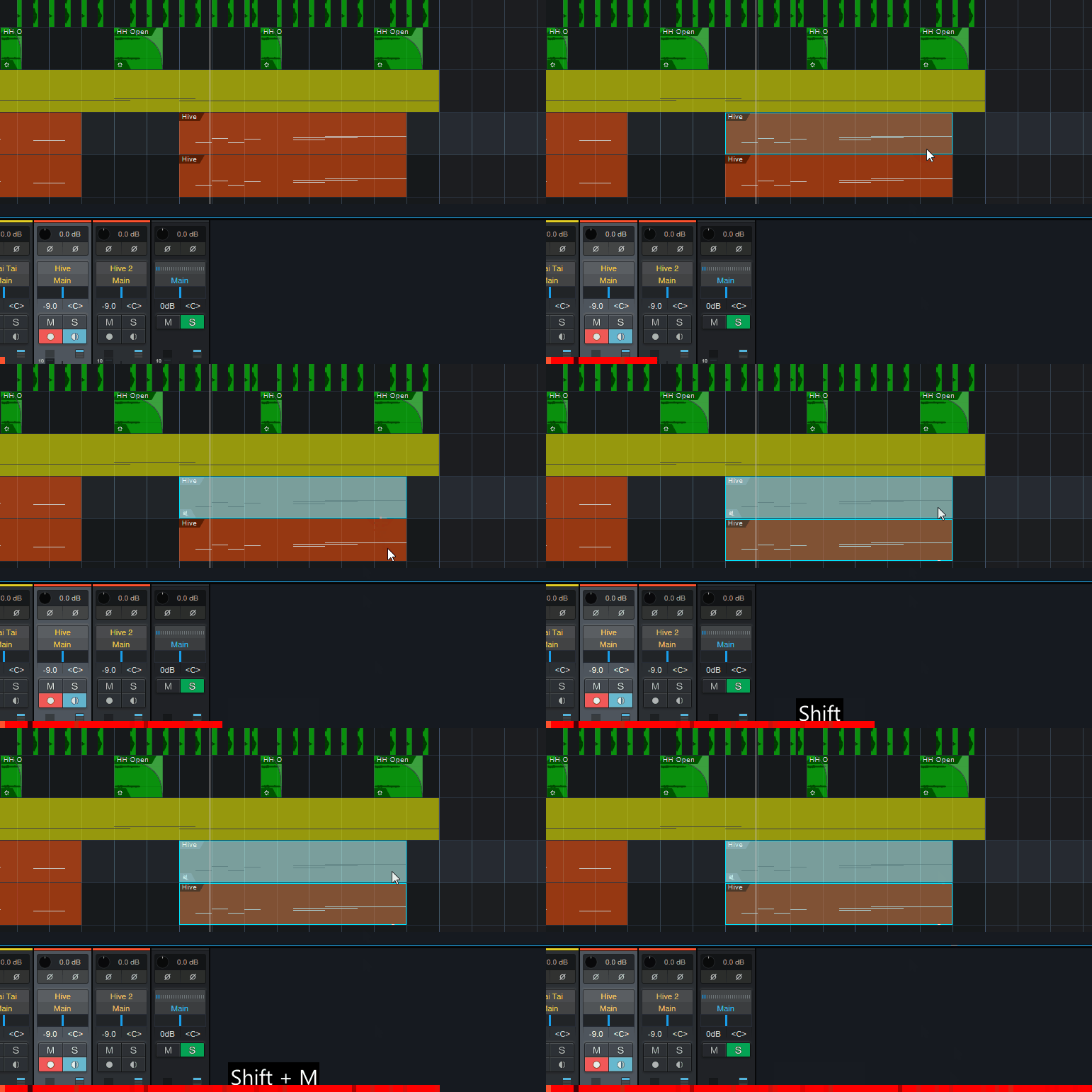
There's a way!

When you duplicate the track and swap plugins:
- select an event (midi or audio clip) on one of the tracks that you want to audition
- hit Shift+M (default PC shortcut for Toggle Mute for Event) to mute that event
- now select the same clips on both tracks & Shift+M will toggle their mute states!

It won't work great for time-based plugins (delays, reverbs, etc.) but should be enough to compare compression, EQing, saturation, distortion, etc.

Image
Music tech enthusiast
DAW, VST & hardware hoarder
My "music": https://soundcloud.com/antic604

Post

Version 5.2.1 Release Notes (April 27, 2021):

Please note:

- Make sure that your 3rd party plug-ins are updated to the most recent version.
- [macOS only] If you’re experiencing any graphics issues with 3rd-party plug-ins, you may disable graphics hardware acceleration (Preferences > General) for improved compatibility.

New features and improvements:
● Updated manuals in English, French, German and Spanish
● Extended "Find and Apply Sound Variation" command to include subfolders
● [Note Editor] Drum view pitch selection improvements
● [Note Editor] Synchronization of tracklist between views
● [FaderPort 8+16] Added feedback for click volume adjustment

The following issues have been fixed:
● Chord follow option on track breaks time stretch
● "Find and Apply Variation" should not find folder names
● "Fit Timeline to Contents" range broken by toggling browser visibility
● "Mixdown Selection" results in wrong length with tempo changes in the rendered range
● "No overlap" option sometimes removes events during move
● "Pin Editor" does not apply in certain situations
● "Show in Context" greyed out on many search results in Loops browser tab
● Compare button not working with 3rd party plug-ins
● “Copy to new Scratch Pad” scrolls arrangement to unwanted position

● [ATOM SQ] Using 'Section' function on Arranger Track returns focus to track
● [ATOM+ATOM SQ] Having ATOM and ATOM SQ running simultaneously can cause erratic bank assignments on ATOM
● [macOS] Cannot move detached mixer window when main window is in fullscreen mode
● [macOS] Settings imported from Windows prevent Studio One from playing audio while in background
● [macOS] Window size is not restored on launch when previously maximized
● [Melodyne] Crash when loading a song with missing clip/s
● [Windows] Mixer is un-maximized when small/large layout toggled

● [Note Editor] Action > Length > Legato isn't working reliably
● [Note Editor] Triangle or other form of automation curve is not correctly sized at certain zoom levels
● [Note Editor] Editor does not update displayed tracks when events are selected in the arrangement
● [Pro EQ2] Phase issues due to wrong reported latency
● [Pro EQ2] LLC is not latency-compensated
● [Score View] Note selection is not drawn in certain situations
● [Score View] Potential crash when inserting tab notes
● [Score View] Sending notes to different voices creates unexpected results
● [Score View] Staff preset name is cut off
● [Score View] Notes on wrong pitches when recording drums
● [Score View] Duplicating score item creates rests
● [Score View] View not aligned correctly when double-clicking an event
● [Score View] View not showing right measures after double-click event selection
● [PreSonus Sphere] Dragging audio into Arrangement to create new track puts file extension in track name
● [PreSonus Sphere] Refresh not working at workspace level
● [Splitter] Duplicate not working properly
● [Splitter] Song data import not working properly

● Arrangement does not release focus from Melodyne editor in certain cases
● Arranger sections overlap when moved to new Scratch Pad
● Audio events are not quantized correctly in certain situations
● BPM rounding discrepancy when confirming tempo of certain events
● Can't select instrument track with no events when editor is open for another instrument track's event
● Range tool export to folder does not render audio file
● Macro Editor down button fails for last entry
● Folder tracks that have been saved collapsed are expanded upon reopening song
● Graphical representation of drag and drop events corrupted when empty and nested folders are present
● Looped playback will unwantedly fade in transient on first bar
● Metronome on/off state not synced correctly with Studio One Remote
● Mixdown will not complete when audio files contain wrong frame count
● Moving arranger sections creates unwanted tempo nodes under certain conditions
● No latency compensation on side-chained channels

● Note events extend beyond loop range when punch and replace modes are active
● Plug-in parameters suddenly jumping to max/min while editing with left mouse button down
● Plug-in name with a number at the end is enumerated incorrectly in the console
● 3rd party plug-in window does not resize correctly in certain situations
● Plug-in loses sidechain send when copied to another track
● Potential crash when duplicating audio events edited with Melodyne
● Potential crash when transforming audio tracks
● Safety Options window appears right on first launch after updating to 5.2
● Saving Instrument+FX presets erroneously appends number to preset names
● Sidechain sends are removed when switching scenes with and without sidechains
● Sound variations are deleted when merging events using VSL Synchron Player

● Splitting takes recorded in a loop removes previous take’s event data
● Tempo changes and markers not read correctly from certain MIDI files
● Track controls UI glitch when using quick-zoom in/out
● "Separate Shared Copies" on shared audio part creates new audio clip version instead
● Umlauts not displayed correctly in new Setlist item name
● Undoing “Add Bus Channel” resets routing to main out instead of the original channel
● Unexpected behavior when transforming and re-transforming tracks with auto tail and "No overlaps" active
● Pitch name reverts to previous selection when editing
● “Zoom Full” sometimes sets wrong horizontal zoom

Post

No latency compensation on side-chained channels
Thank Flying Spaghetti Monster finally!! :party: :tu:
Take a single oscillator, producing a drone. Send it to the wave shaper, altering the tone.
This can be a triangle, Sawtooth or a square. Modulate the pulse width, nobody will care

Post

Is there a way to automatically select a desired block/buffer size when rendering or bouncing? Block size affects automation accuracy, so the smallest block size is the best. Or maybe a script or even macro that can easily switch between block sizes?

Post

SeeingInMidi wrote: Sat May 01, 2021 4:01 amBlock size affects automation accuracy, so the smallest block size is the best.
I don't think that's true at all.
Actually I'm 100% sure it's not.
Music tech enthusiast
DAW, VST & hardware hoarder
My "music": https://soundcloud.com/antic604

Post

antic604 wrote: Sat May 01, 2021 6:45 am [I don't think that's true at all.
Actually I'm 100% sure it's not.
Actually it is- Automation in S1 is buffer chunk dependent. theyve improved accuracy/fluctuations over the last 2 versions but its still far away from sample accurate. Cubase also isnt sample accurate but it still produces usable results.

This screen is an example from 5.1 and 5.2 with the internal Mixtool gain- observe the chunk at the end of the rendered file (bottom one). The ramp actually starts at next bar, render creates it far before that bar.It will also travel over to the start if you render it as loop.
autoissue-1611920821-25770.PNG
Ive been sending support tickets since v2 about thiese issues but it just gets passed- I always get an answer its been frowarded to quality control, but nothing happens.
Enough for me to use something else for serious work.
You do not have the required permissions to view the files attached to this post.

Post Reply

Return to “Hosts & Applications (Sequencers, DAWs, Audio Editors, etc.)”