

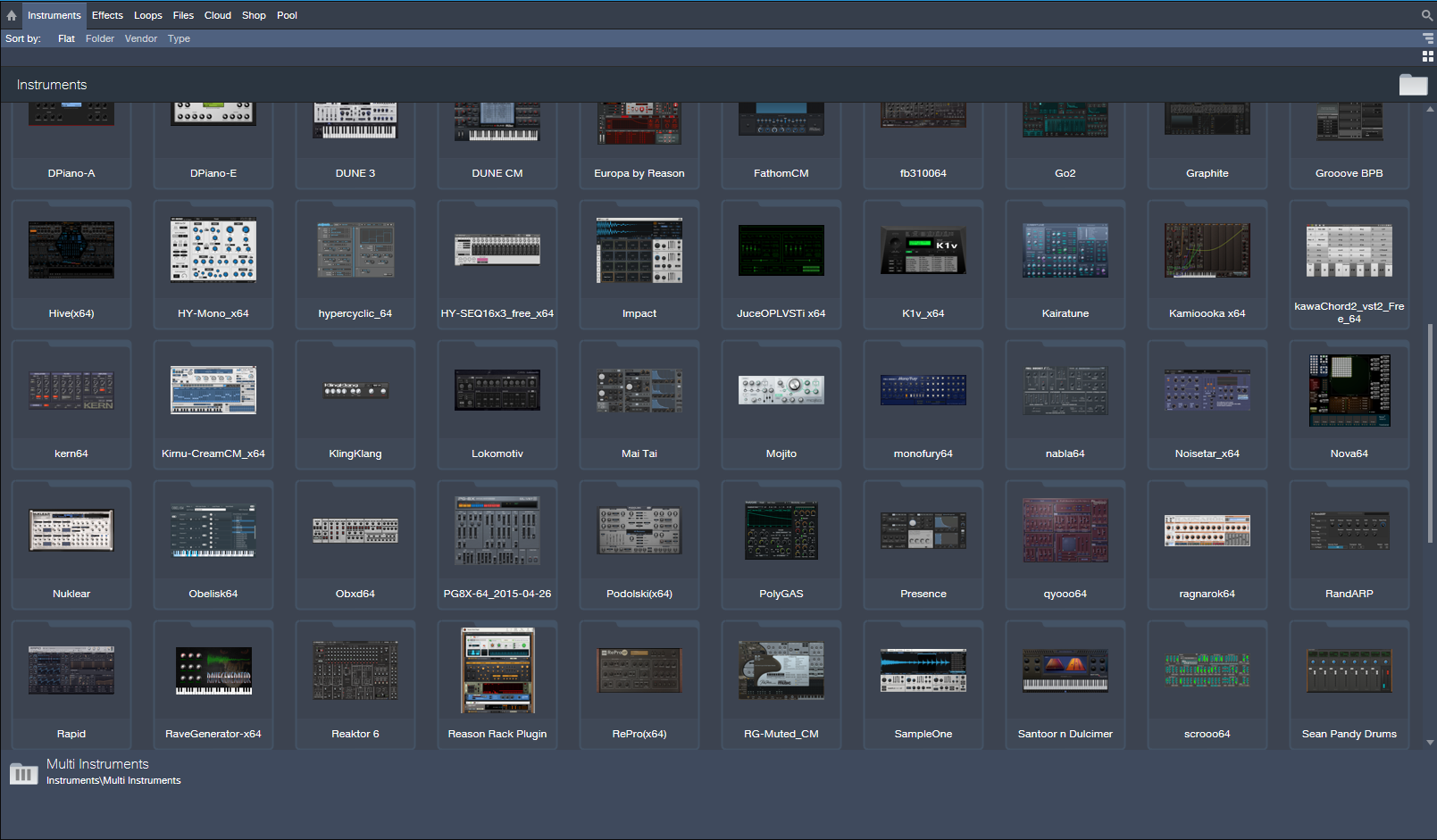
This isn’t modern to me, it was a thing many years ago (a brief trend) FL Studio did it as well, bloody awful unless you just want to admire your collection like Pokemon cards. The sidebar view I can see more use for if you like this stuff and just do half a dozen favorites (after all, Reason works this way and I have no problem with that) but 100s of them on a page, no thanks.THE INTRANCER wrote: Sun May 30, 2021 12:23 am With Studio One 4.5 and up you can actually show 50 plugin thumbnails of instruments at any one time at standard 1080P resolution. Just a matter of dragging the window across and dragging them to the left arrangement area to open. It's easy to manage them with ones you want to hide or use. I mean if Bitwig was ableto do this, then Bigwig would be more inviting and modern. Operators and whatever Bitwig uses could be managed this way also, other than VST instruments.
Bitwig Studio 4 announced (+beta available)!
-
- KVRAF
- 12094 posts since 2 Dec, 2004 from North Wales
X32 and 24C mixers, S88MK3, Live + PUSH 3, Osmose, RedShift 6, Pro3, S4, Tempera, Syntakt, Digitone, OP1-F, OPXY, TR-1000, Eurorack, TD27 Drums, Guitars, Basses, Amps and of course lots of pedals!
-
- KVRian
- 764 posts since 26 Sep, 2007
I'm not arguing for a one-size-fits-all approach. I'm just saying that thumbnails do indeed have their use and can in some cases be extremely helpful. Flatly stating that "they are a slower method" doesn't even make sense, because it doesn't take into account the rest of the implementation.You make some assumptions here, there's hardly a right answer to how a person sorts through plug ins, but some of us have strong opinions about the speed and efficiency of certain methods. I think thumbnails, or better icons, are a slower method, because I tend to know what plug ins I own.
I used to be a heavy user of FL Studio's full-screen plugin picker (), which I think was the first implementation of plugin thumbnails in a DAW. I only used the picker for my favourite plugins, not all of them. And for me it was BY FAR the fastest way to select plugins I have ever come across in any DAW. One hotkey to open the picker, drag the plugin you want to the location you want to add it to, done. No typing, scrolling, or filtering needed, plus muscle memory of where my most used plugins will appear on the screen, plus nice large click targets due to the thumbnails.
I've set up my favourite plugins in Bitwig and picking them by typing or clicking on the names in the list is fast enough for me to not lose sleep over it. But FL's plugin picker was pretty much instant, one of those cases of a UI so good that it basically disappeared.
If I could trade all of the filter columns Bitwig shows in the pop-up browser for a scrollable grid of plugin thumbnails, I'd totally do that.
No, but that seeing a thumbnail might inspire you to pick up a plugin you may not otherwise have thought about at the time. Do you really always know exactly which plugin you're going to reach for before you add one? I know I don't.The argument seems to be that you wouldn't know what VSTs you bought?
I mentioned that, but also provided an example where thumbnails would still be useful. (Similarily named plugins.)because flatly it's silly to think about this in terms of Bitwigs own plug ins, they pretty much all look the same.
Maybe some people are just more visually-oriented than others. I have a really shitty memory and thumbnails help me remember what a plugin is at a glance.
-
 machinesworking machinesworking https://www.kvraudio.com/forum/memberlist.php?mode=viewprofile&u=8505
 - KVRAF
- 8025 posts since 15 Aug, 2003 from seattle
That sums up your argument right there. Your FL Studio example had some serious flaws if in fact you do know what you want. Selecting UVI Falcon for instance is all on the keyboard in Bitwig, no mousing at all, your method includes dragging etc. I'm against mouses and trackpads, they're slower methods that could result in hand injury IMO.Dionysos wrote: Sun May 30, 2021 8:03 am Maybe some people are just more visually-oriented than others. I have a really shitty memory and thumbnails help me remember what a plugin is at a glance.
Plus to me in situaitons where I'm not certain what I want to use searching by manufacturer is what I go to. If you have a few favorites then your search is nicely compartmentalized. Since manufacturers impart a certain flavor (UVI vs U-He vs Plug in Alliance etc.), then you get those memory jogging moments.
Anyway it's flavors in the bigger picture, if this feature came to Bitwig I would hope you could ignore it completely. I don't care for it at all, for me it would slow down my browsing experience.
-
- KVRian
- 764 posts since 26 Sep, 2007
Again, that all depends on the implementation. FL's plugin picker can also be brought up contextually so that no dragging is necessary, and you can also type to narrow down what's shown.machinesworking wrote: Sun May 30, 2021 8:23 am Selecting UVI Falcon for instance is all on the keyboard in Bitwig, no mousing at all, your method includes dragging etc
In any case, I highly doubt that such a feature would ever be implemented non-optionally in any DAW.
-
- KVRian
- 504 posts since 12 Oct, 2003
Command+F (Mac) Anywhere on the screen, brings up the search box for Browser even if it is not visible and then you can type the name of the plugin. Only problem is you can not hit enter or click to load the plugin,' you still have to drag and drop after you locate your plugin.chk071 wrote: Sat May 29, 2021 8:44 pm Well, I'm stupid. Actually Studio One supports pressing keys in the plugin browser to find the plugin. It just doesn't have a search box, but, typing the plugin works. Hidden, but, it's there.
The plugin browser has to have the focus though, of course, otherwise you'll end up pressing general shortcut keys.
-
- KVRAF
- 12094 posts since 2 Dec, 2004 from North Wales
I think Reason may have been the first with little pictures of the synths for selection!
Now if you could put the little pictures as track icons that would make more sense to me!
To me a lot of this is solving a problem that didn't really exist, but as I say, I appreciate everyone has personal preference and nothing wrong with requesting something as an 'option' (although saying 'I cant believe your DAW cant even do this' sounds a bit churlish....especially when it is something quite superficial at best)
Bitwig doesn't do it and in all the (many and frequent!) polls we have had asking what features should be added I have never even seen this mentioned, so its save to assume not many people want it....but feel free to put a poll on the Bitwig forum, I may be wrong!
Now if you could put the little pictures as track icons that would make more sense to me!
To me a lot of this is solving a problem that didn't really exist, but as I say, I appreciate everyone has personal preference and nothing wrong with requesting something as an 'option' (although saying 'I cant believe your DAW cant even do this' sounds a bit churlish....especially when it is something quite superficial at best)
Bitwig doesn't do it and in all the (many and frequent!) polls we have had asking what features should be added I have never even seen this mentioned, so its save to assume not many people want it....but feel free to put a poll on the Bitwig forum, I may be wrong!
X32 and 24C mixers, S88MK3, Live + PUSH 3, Osmose, RedShift 6, Pro3, S4, Tempera, Syntakt, Digitone, OP1-F, OPXY, TR-1000, Eurorack, TD27 Drums, Guitars, Basses, Amps and of course lots of pedals!
-

- Banned
- Topic Starter
- 11467 posts since 4 Jan, 2017 from Warsaw, Poland
Sorry, but that's a silly discussion.
All DAWs that have thumbnails, can also do text search if you know what you need and need it quick (e.g. in S1 F6 opens instruments browser, Ctrl+F opens & focuses the search box that you can immediately type in). But thumbnails can be useful if you forgot a name of plugin you want added or are just looking to add something you don't use often, or just looking for inspiring "accident". With just plain text it's easy to forget you even had some plugins - I've around 10 delay plugins, but default to 2-3 just because I've been using them a lot, whereas others are just as good, or better.
And in most DAWs you can disable the thumbnails altogether.
All DAWs that have thumbnails, can also do text search if you know what you need and need it quick (e.g. in S1 F6 opens instruments browser, Ctrl+F opens & focuses the search box that you can immediately type in). But thumbnails can be useful if you forgot a name of plugin you want added or are just looking to add something you don't use often, or just looking for inspiring "accident". With just plain text it's easy to forget you even had some plugins - I've around 10 delay plugins, but default to 2-3 just because I've been using them a lot, whereas others are just as good, or better.
And in most DAWs you can disable the thumbnails altogether.
-

- KVRAF
- 26963 posts since 3 Feb, 2005 from in the wilds
I tested in Bitwig... added 3 different VST synths to tracks. Hive took 2 seconds cause I use it often. The other two I picked cause I use them less often and both of those were 3 seconds.THE INTRANCER wrote: Sun May 30, 2021 4:18 amSo you are 20 times slower in locating, recognising and selecting an image to drag than typing.... but what if you don't remember the name of the plugin (let alone know how to spell it), how are you going to recognise it from a list of perhaps hundreds, because I certainly don't remember the names of half my plugin namespdxindy wrote: Sun May 30, 2021 2:50 am
That is a terrible workflow! Bitwig is already 20x better/faster than that! I could have any plugin on a track before my eyes could even track a portion of that page.
Having to look at lots of thumbnails, some which I would instantly know and some I would have to take a moment or three to recognize (Fabfilter plugins all look quite similar for example), and then add scrolling time and mousing time and altogether than could be 10-20 seconds.
Plus it is not just the time, but the mental distraction of having to process lots of visual images.
I have never forgotten the name of a plugin I use.
-
- KVRAF
- 1596 posts since 19 Aug, 2009
First impressions
The good:
-The comping work well and easy, I am not a big comping user, so I can't compare, but it is quite straight forward and effortless in here.
-Operators can be really fun too, and add a lot of variety too.
-M1 native seems to work just fine, subjectively seems better than Rosetta, although I did not test.
The bad:
-I am not to fund of the Fill feature, seems a silly implementation, although I do like the concept.
-Not compatible with Akai Force ALS projects, although that probably is Akai fault.
I would really like to see a Bitwig standalone unit (like Akai Force/MPCs, or NI Maschine+)
The good:
-The comping work well and easy, I am not a big comping user, so I can't compare, but it is quite straight forward and effortless in here.
-Operators can be really fun too, and add a lot of variety too.
-M1 native seems to work just fine, subjectively seems better than Rosetta, although I did not test.
The bad:
-I am not to fund of the Fill feature, seems a silly implementation, although I do like the concept.
-Not compatible with Akai Force ALS projects, although that probably is Akai fault.
I would really like to see a Bitwig standalone unit (like Akai Force/MPCs, or NI Maschine+)
-
- KVRAF
- 5066 posts since 27 Jul, 2004
This might be true but FL Studio is the only DAW which did it right...antic604 wrote: Sun May 30, 2021 11:03 am Sorry, but that's a silly discussion.
All DAWs that have thumbnails, can also do text search if you know what you need and need it quick ...
The Plugin Picker window is always full screen not such nonsense like Studio One or Waveform have tried to copy and just by open the picker window you can start to type the plugin´s name which will not only be highlighted but the mouse cursor is placed directly over it that you can blindly just click and drag it to the place you want...
There is no other DAW offering such implementation which offers both ways quick and easy...
As often only the original is the only worthy one... copies are ...just copies... cheap and worse...

-
- Banned
- Topic Starter
- 11467 posts since 4 Jan, 2017 from Warsaw, Poland
Too bad it got most everything else wrong

-
- KVRAF
- 9145 posts since 7 Oct, 2005
That would be greatpc999 wrote: Sun May 30, 2021 2:21 pm
I would really like to see a Bitwig standalone unit (like Akai Force/MPCs, or NI Maschine+)
 In practice they can do it with Nektar.
Using: Cubase Pro 15, Reason 13, Tascam US-4x4HR, MODX6, DM12D, LaunchKey 49, Yamaha guitar(Pacifica 612v) and bass (BB234) and some virtual instruments and synths.
-
- KVRAF
- 3496 posts since 30 Dec, 2014
You have the flexibility to choose how many you want to view by widening the browser area in this view mode. Being able to stretch out and visually see a great number of plugins in this way is a great way to manage them. Previously if you wanted to see a great number of plugins, you would have needed to fire up an image editing application and place each dozen or so in a grid like way, copying / pasting / cropping / pasting / aligning... ect.. but you would still need to manage plugins in the old way. In the large view mode I posted you can have as few as five visible or fifty that cascade. In essence, you get to see a complete overview and one that you can manage.pdxindy wrote: Sun May 30, 2021 1:48 pmI tested in Bitwig... added 3 different VST synths to tracks. Hive took 2 seconds cause I use it often. The other two I picked cause I use them less often and both of those were 3 seconds.THE INTRANCER wrote: Sun May 30, 2021 4:18 amSo you are 20 times slower in locating, recognising and selecting an image to drag than typing.... but what if you don't remember the name of the plugin (let alone know how to spell it), how are you going to recognise it from a list of perhaps hundreds, because I certainly don't remember the names of half my plugin namespdxindy wrote: Sun May 30, 2021 2:50 am
That is a terrible workflow! Bitwig is already 20x better/faster than that! I could have any plugin on a track before my eyes could even track a portion of that page.
Having to look at lots of thumbnails, some which I would instantly know and some I would have to take a moment or three to recognize (Fabfilter plugins all look quite similar for example), and then add scrolling time and mousing time and altogether than could be 10-20 seconds.
Plus it is not just the time, but the mental distraction of having to process lots of visual images.
I have never forgotten the name of a plugin I use.
I made a quick video...
KVR S1-Thread | The Intrancersonic-Design Source > Program Resource | Studio One Resource | Music Gallery | 2D / 3D Sci-fi Art | GUI Projects | Animations | Photography | Film Docs | 80's Cartoons | Games | Music Hardware |
-
- KVRAF
- 26963 posts since 3 Feb, 2005 from in the wilds
Obviously this is a very important feature for you. Bitwig 4 doesn't have it and I am glad it doesn't, but that is just my interest expressing itself. In any case, this is unrelated to the thread topic.THE INTRANCER wrote: Sun May 30, 2021 11:01 pmYou have the flexibility to choose how many you want to view by widening the browser area in this view mode.