

Thanks for the update.
I have a number of expansions installed in Massive X but does anyone know how I can only show the core factory presets in the browser?

Massive X 1.6.1 update (September 2025)!
-

- KVRAF
- 2192 posts since 8 Jan, 2005

You do not have the required permissions to view the files attached to this post.
MacMini M2 Pro …… MacOS Tahoe ……… Reason 14
-
Echoes in the Attic Echoes in the Attic https://www.kvraudio.com/forum/memberlist.php?mode=viewprofile&u=180417
- KVRAF
- 12006 posts since 12 May, 2008
Good lord, look at that interface. It's like an old Reaktor ensemble where someone just mashed everything together. Hadn't looked at it in a while (I own it with Komplete but never open it).middle_color wrote: Mon Jun 28, 2021 11:04 pmYes. You can use either Random LFO. Or Switcher LFO with Frequency set to 0Hz.bundoo wrote: Mon Jun 28, 2021 11:03 am is it possible to create note on random modulators in massive x?
cheers
See image below.
You do not have the required permissions to view the files attached to this post.
-
- KVRAF
- 35671 posts since 11 Apr, 2010 from Germany
I don't have any issues when using it, TBH. Sometimes stuff looks worse on a pic than when you actually use it.
Of course, the Lego kids need a lot of rainbow colours these days (just take a look at MIDI controllers nowadays), but, nothing you can do about that really.
Of course, the Lego kids need a lot of rainbow colours these days (just take a look at MIDI controllers nowadays), but, nothing you can do about that really.
-
- KVRAF
- 5664 posts since 7 Feb, 2013
The grey GUI looks is much better readable though and it also looks better, that black one is pretty awful indeed.
You may think you can fly ... but you better not try
-

- KVRAF
- 6295 posts since 12 Jan, 2018
What grey GUI are you guys talking about? There are only 3 main themes (ignoring the flat ones), right? Default, dark, and light.
-
- KVRer
- 19 posts since 20 Mar, 2020
The Massive X browser is notoriously bad, but if you use Komplete Kontrol, you can select Massive X 1.0 (and 1.1, and 1.2, and 1.3...) as a bank.ZincT wrote: Sat Jul 03, 2021 12:01 pm Thanks for the update.
I have a number of expansions installed in Massive X but does anyone know how I can only show the core factory presets in the browser?
-
- KVRian
- 578 posts since 14 Sep, 2016
Thanks!jm.schloemer wrote: Sat Jul 03, 2021 4:57 pm
The Massive X browser is notoriously bad, but if you use Komplete Kontrol, you can select Massive X 1.0 (and 1.1, and 1.2, and 1.3...) as a bank.
-
- KVRAF
- 5664 posts since 7 Feb, 2013
This one (i think it's the defalut one)LoveEnigma18 wrote: Sat Jul 03, 2021 4:54 pm What grey GUI are you guys talking about? There are only 3 main themes (ignoring the flat ones), right? Default, dark, and light.
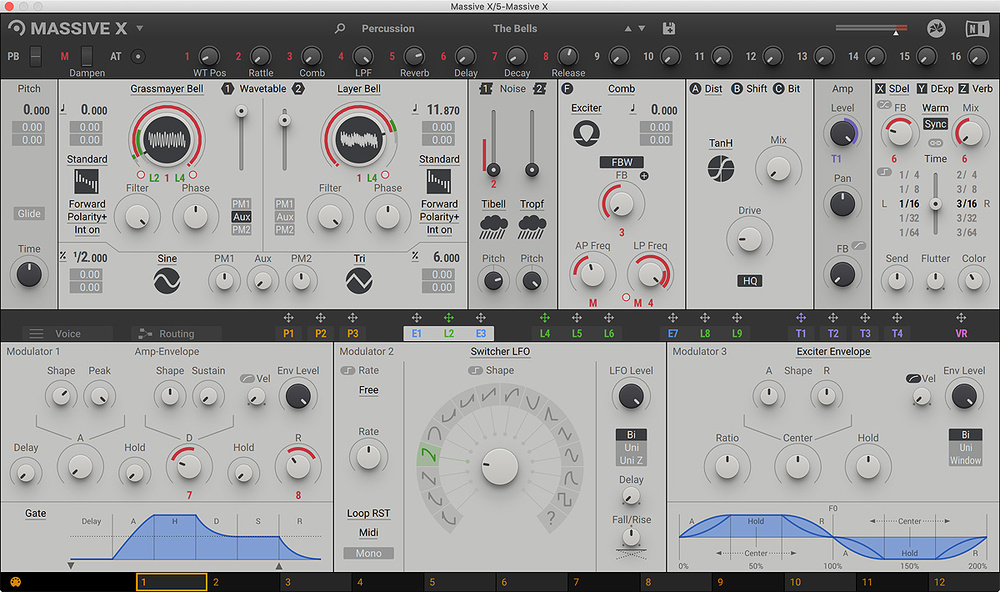
Last edited by recursive one on Sat Jul 03, 2021 5:41 pm, edited 1 time in total.
You may think you can fly ... but you better not try
-
- KVRAF
- 6295 posts since 12 Jan, 2018
Okay, thanks guys. I also like the default one best, but dark one is almost equally good. Good that they implemented these skins, because when Massive X was released they (NI) were against this. 
-

- KVRAF
- 24411 posts since 7 Jan, 2009 from Croatia
Yeah tbh I enjoy the dark skin more, but in general I usually don't like bright skins all that much.
-

- Banned
- 211 posts since 2 Nov, 2017
Love the default. But my eyes don’t work well with dark UIs.