
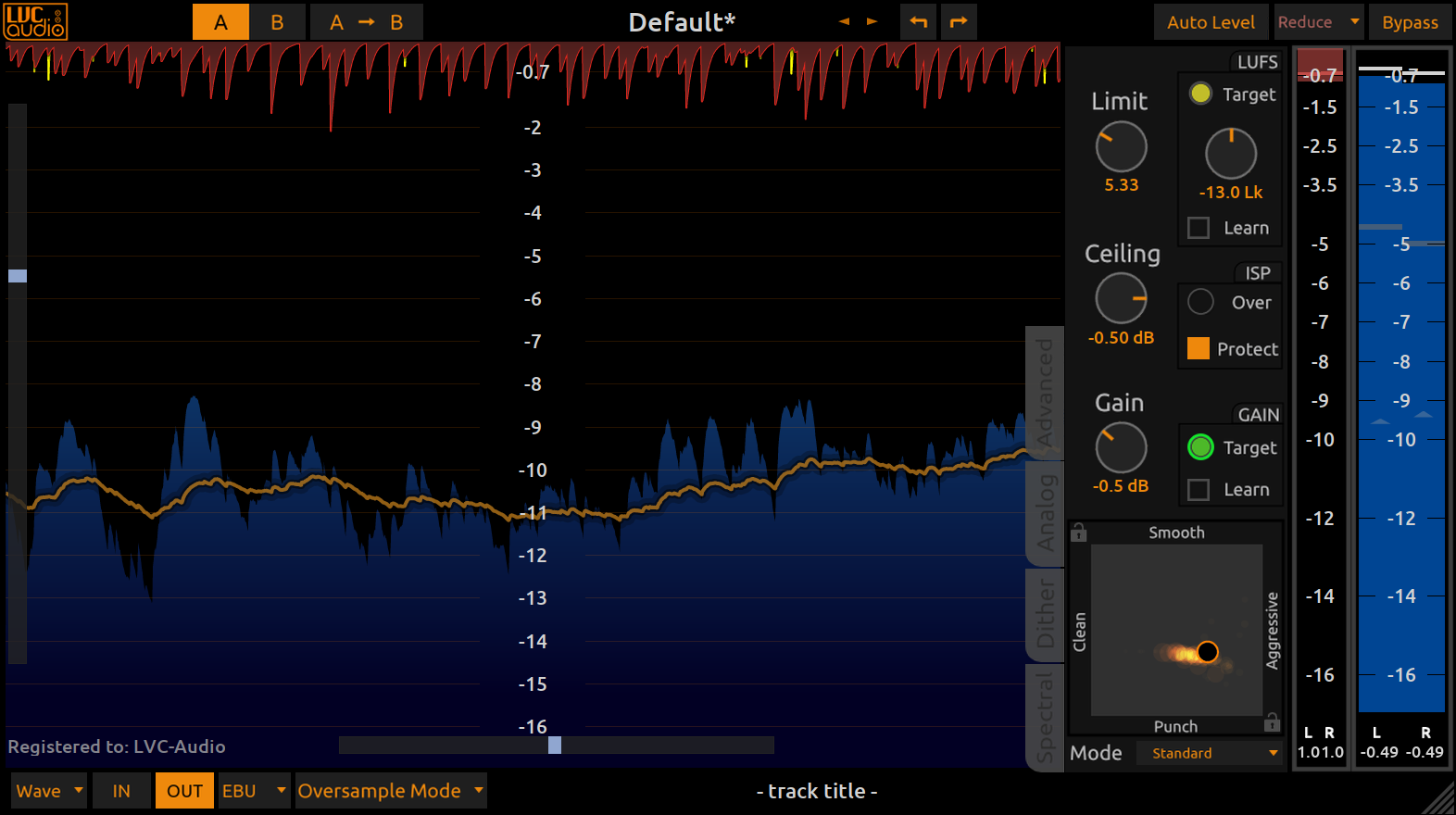
LVC-Audio: Limited-MAX 3 released

VST, AU, AAX, CLAP, etc. Plugin Virtual Effects Discussion
RELATED
PRODUCTS

Post

Image
Limited-MAX is a specialized limiter, based on the foundation of being a capable look-ahead brickwall limiter suitable for final mixing or mastering.  Limited-MAX dynamically combines several unique limiting algorithms to provide transparent limiting on all audio sources.  Limited-MAX is capable of substantial levels of compression/limiting without inadvertently creating excessive amounts of audible distortion. 

Limited-MAX is highly configurable and suitable for a wide range of musical sources.  Limited-MAX exposes all aspects of the multi-process limiting algorithm.  This lets the user continually adjust and find the best sound from a vast number of options, instead of choosing from only a handful of algorithms.  Other features include standard attack and release controls, adjustable look-ahead, adjustable stereo linking, and a variable style control that changes the sound and shape of the limiter’s compression curve.  Additionally, Limited-MAX includes a selectable DC filter and complete dithering controls, with selectable dither noise shape and psychoacoustic filtering.

Limited-MAX also builds on many standard LVC-Audio features.  This includes:
  • resizable interface with options to change/save the colors of the display
  • input and output metering that includes output true peak metering, EBU metering, and PSR
  • waveform history display with EBU metering
  • spectrum analyzer view and stereo vectorscope
  • auto level control (for auditioning the sound of the limiter without volume change
  • linear and minimal phase oversampling options
More information at LVC-Audio

Post

Congrats! Installed macPOS 10.13 Reaper 6 AU, working and looking and sounding great!

Post

Congrats! Upgrade for Limited_MAX owners? :)

Post

MogwaiBoy wrote: Tue Aug 10, 2021 10:44 pm Congrats! Upgrade for Limited_MAX owners? :)
I have V2. Downloaded the V3 installer and it fired up with my reg license.

Post

Yes. It is a free upgrade. If there are any problems with the registration, just let me know.

Post

I was an early adopter, and am a big fan of LVC. Recommended IMO. Clipped MAX is an master channel marvel. I'm also loving the EQ Toned MAX. It is very detailed tho, and not for immediate channel stripping IMO. Was not a fan of the "all in one solution" plugin he made, but he/she continues it, if that's your thing. The channel strip plugin should be combined for channel stripping imo. Immediate gratification type stuff.

Post

Bought.

When LVC made Toned Max 3 free to v2 users, including the new features that had been on my wishlist, I made a mental note to buy another LVC plugin at the next opportunity. Now, with this generous intro price, it was time to add another tool to my arsenal.

I'm a fan of the way these plugins work, and the thoughtful features. Can't wait to play around with this.

Post

I'm trying the demo right now and it's very good, really tempted to get it at this intro price. Couple of things 1st (Windows 10, Bitwig 4.x, 64-bit VST2):

1) CPU is more than twice what I get with Barricade 4. I'm sure this is something to do with multiple algos working in parallel but is there any way to optimize a little (this is without oversampling)?

2) Resizing is buggy. Must close and re-open GUI otherwise containing window is to big/small.

3) Right-clicking the preset area crash the plugin.

Post

Thanks for the feedback.

1 - The biggest factors of CPU usage is oversampling and any analog modeling. If both of those are turned off, the plugin should be relatively efficient. Was the analog turned off?

2 - Each host handles resizing a little differently. I will look at debugging Bitwig specifically for this.

3 - That is definitely no good. Again, I will test in Bitwig because I suspect that it is something DAW-specific.

Post

1) Yes, both oversampling and analog modeling were off.

Also, it would be nice to have an option that when turning off the display we can completely remove it from view and get a smaller window.

Post

xx JPRacer xx wrote: Sat Aug 14, 2021 1:21 am 3) Right-clicking the preset area crash the plugin.
I am trying to debug this, but I am not getting a crash. I am using Bitwig 4.0.1, Windows 10, and VST 64-bit. Is it crashing intermittently, or is when you click on one of the options from the drop-down window?

I do see the issue with the resizing. I will work on that.

Post

I tried in Reaper and the re-draw is fine, only in Bitwig with VST2 version (VST3 seems fine). But the crash is happening in both Reaper and Bitwig. Thing is I don't see any presets. It's blank. As soon as I right-click that area it crash. I tried a re-install and x86/x64 VST2 and VST3, same thing. There's no "C:\Users\[username]\AppData\Roaming\LVC-Audio" folder either. I tried running the DAW in Admin mode too. Maybe it's a bug in the demo version?

Post

Ok, I just purchased the plugin and pasted my info. No more crash. It's the demo.

Post

Thank you. That is helpful. I'll work on fixing it.
Now that it is registered, do you have the LVC-Audio folder? Is there a preset XML file, configuration XML file, and registration txt file in the folder?

Post

Yes, the folder and files were created successfully.

Post Reply

Return to “Effects”