

thank youThe most uncluttered DAW is the one you know how to use ...
Which DAW Has The Most Uncluttered Interface ?
-
- KVRAF
- Topic Starter
- 3496 posts since 30 Dec, 2014
Well you can try and hide it just like one tries to do with Reaper and it's GUI, but the facts remain that Cubase is all over the shop in a real practical sense in accessing things without going down the rabbit hole of menu's and a few shortcut keys. I mean if you want to do basic tracking fine, you can do that in any similar DAW without opening anything else, but if you want to use a DAW to do what you want in a full way of producing music / midi editing / audio editing using the transport bar because that's what you require then you do have to face what is a really ugly, and cluttered GUI. I mean you have a blue silver GUI element that looks like it came out of Magix Music Maker 20 years ago in the Inspector. Black on dark grey elements, white buttons with black icons.. and a hodge podge of other GUI elements that look out of place in not sharing conventions. White highlighted windows with rounded corners...being another with extra visual clutter. Design wise, it's a cluttered mess both in design and how colours are used.SJ_Digriz wrote: Mon Aug 30, 2021 10:46 pmtotally agree, there is not a single function unavailable to me from that view. I can multi-track drums with a simple key combo. Multi-track guitars with another. dump stems with another etc.. etc.. Cubase is not cluttered if you know how to use it. Most DAWs are uncluttered if you know how to use them.THE INTRANCER wrote: Mon Aug 30, 2021 10:42 pmUncluttered doesn't mean next to gimped of general usability.SJ_Digriz wrote: Mon Aug 30, 2021 10:18 pm The most uncluttered DAW is the one you know how to use ...
[img[/img]
So whilst you can de-clutter a GUI, throwing a blanket over everything doesn't solve the inherent problems in Cubase's case.
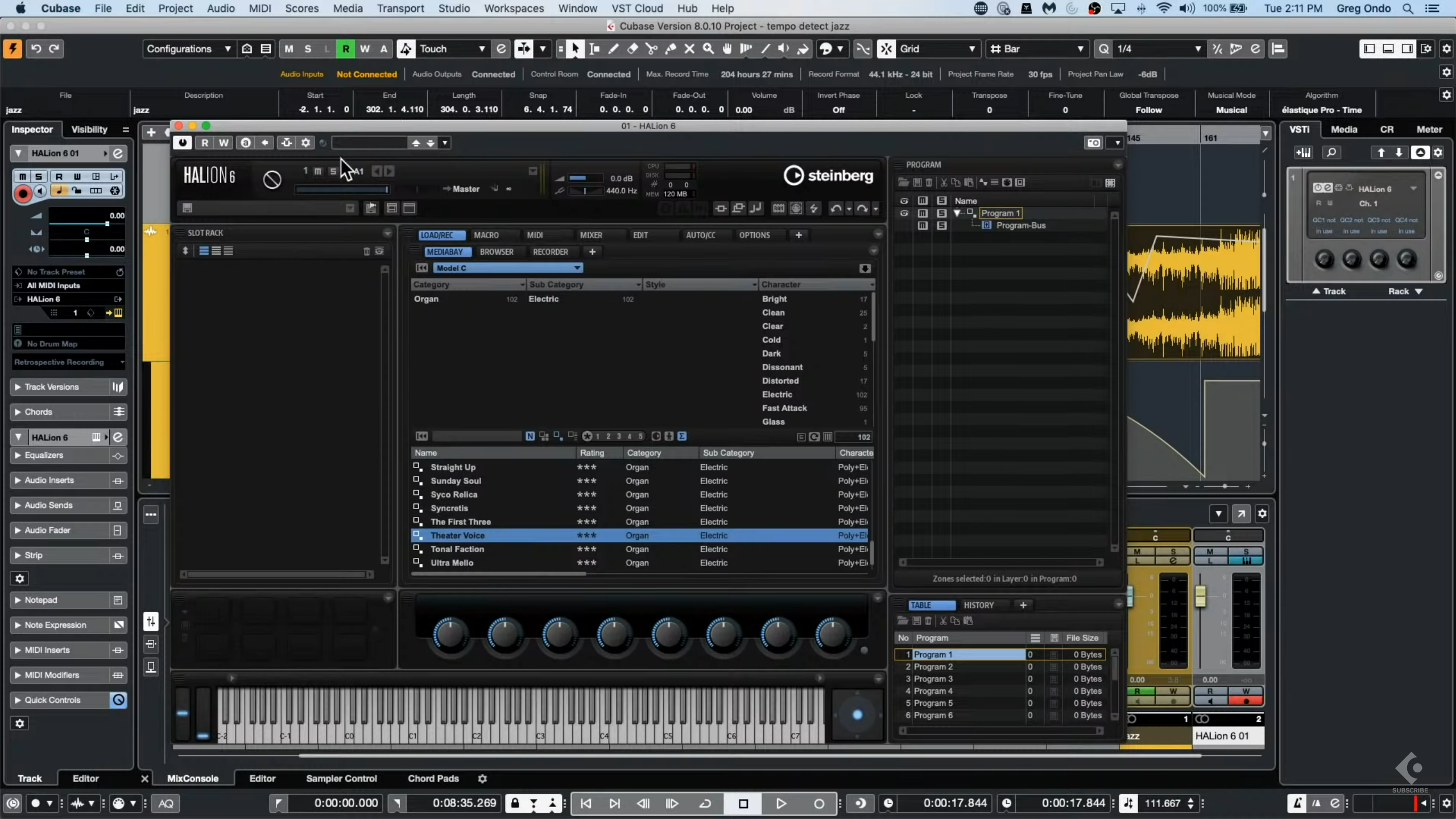
KVR S1-Thread | The Intrancersonic-Design Source > Program Resource | Studio One Resource | Music Gallery | 2D / 3D Sci-fi Art | GUI Projects | Animations | Photography | Film Docs | 80's Cartoons | Games | Music Hardware |
-
- KVRist
- 393 posts since 6 Aug, 2021
If you don't do audio recording and don't have audio files in your sessions, i.e. you mostly work with MIDI, then FL is a good option. But if you do the things mentioned above, it's a nightmare. Was using FL since 2016 to produce and also record/mix/master my songs but now switched to Studio One because it has almost everything FL has in terms of beat production and does everything else better.machine_spirit wrote: Mon Aug 30, 2021 4:01 pmI'm already bouncing around trying so many DAWs at this point that i might as well add another one i've already used. I'm way past the point where one should consider what you even need in the first place. Never tried Studio One, maybe i should check that out...Fornicras wrote: Mon Aug 30, 2021 2:45 pm If you have a large screen and can get the toolbar to be just one row, FL Studio looks super nice and uncluttered.

-

- GRRRRRRR!
- 17817 posts since 14 Jun, 2001 from Somewhere you're not!
Orion, for sure. Pretty much all the functionality is menu-driven, so there is very little in the actual GUI. No Inspectors (I still have no idea what they are supposed to be for in Cubase or in S1), no pointless lists, no browser. Of course, that's because it only has a fraction of the features you'd find in Cubase or Logic or Live or Studio One, so there is no reason for it to be cluttered.THE INTRANCER wrote: Sun Aug 29, 2021 10:57 pmI just looked at Cubase and thought Christ.... so that's what's prompted this topic...
Of course there is. How would you, for example, re-order the insert effects on either of those channels from that view? Or even call one up to adjust it's settings? How would you reduce the level in your master channel so that it was peaking at -0.1dB?SJ_Digriz wrote: Mon Aug 30, 2021 10:46 pmtotally agree, there is not a single function unavailable to me from that view.
But you need to have your computer keyboard where you can reach it for that so you are just swapping a cluttered virtual workspace for a cluttered physical workspace. Mind you, now that I've replaced my Surface Pro, I have to have a keyboard, too, but it was awesome when I didn't.I can multi-track drums with a simple key combo. Multi-track guitars with another. dump stems with another etc.. etc..
NOVAkILL : Legion GO, AMD Z1x, 16GB RAM, Win11 | Audient EVO 8 | Lumi Keys | Studio Pro 8
Korg Odyssey, bx-oberhausen, Proxima, PolyMax, GR8, JP6K, Union, Atomika,
Invader 2, Flow Motion, Olga, TRK 01, Thorn, Spire, VG Iron
Korg Odyssey, bx-oberhausen, Proxima, PolyMax, GR8, JP6K, Union, Atomika,
Invader 2, Flow Motion, Olga, TRK 01, Thorn, Spire, VG Iron
-
- KVRAF
- 2772 posts since 28 Mar, 2007
I own Cubase and I am not hiding that its cluttered. Others here have also agreed that its cluttered. It is cluttered, so what's your point ? It does not make it into your uncluttered list. People make choices. You could point out that its far too expensive, which I guess it is, but people still keep voting with their pockets so that avenue is exhausted. So what do you want to happen ? Next you will be telling us that you think grass should be a different colour.THE INTRANCER wrote: Tue Aug 31, 2021 5:36 am
Well you can try and hide it just like one tries to do with Reaper and it's GUI
Nothing much wrong with Reaper either. It is what it is. Its cluttered. You either love it or hate it.
-
- KVRer
- 1 posts since 26 Aug, 2016
Hi, my vote goes to Studio One.
I suffered many years of the endless panels on top of panels on top of panels which make up Cubase. It's a total mess.
Studio One has slide out tabs attached to the F keys. I've never looked back.
I suffered many years of the endless panels on top of panels on top of panels which make up Cubase. It's a total mess.
Studio One has slide out tabs attached to the F keys. I've never looked back.
-
- KVRAF
- 5144 posts since 3 Oct, 2013
disagree with the last part(+1 to the better audio handling it will be the main focus of FL21) none of the automation:modulation related workflow elements can be reproduced with the S1 itselfFornicras wrote: Tue Aug 31, 2021 6:24 amIf you don't do audio recording and don't have audio files in your sessions, i.e. you mostly work with MIDI, then FL is a good option. But if you do the things mentioned above, it's a nightmare. Was using FL since 2016 to produce and also record/mix/master my songs but now switched to Studio One because it has almost everything FL has in terms of beat production and does everything else better.machine_spirit wrote: Mon Aug 30, 2021 4:01 pmI'm already bouncing around trying so many DAWs at this point that i might as well add another one i've already used. I'm way past the point where one should consider what you even need in the first place. Never tried Studio One, maybe i should check that out...Fornicras wrote: Mon Aug 30, 2021 2:45 pm If you have a large screen and can get the toolbar to be just one row, FL Studio looks super nice and uncluttered.
S1 is a tier 2 DAW in EDM world
16:44
but it would be a totally different topic

ps. this is the problem with S1 (automation is similar(no clips in S1) to FLS but the absence of the modulation is sad)

https://www.admiralbumblebee.com/DAW-Chart.html
"Where we're workarounding, we don't NEED features." - powermat
-
- KVRist
- 393 posts since 6 Aug, 2021
Yes, I know. I think I should've stated that I only use basic automation. For EDM or something similar FL and Ableton must be better. I don't do complex modulation at all, in fact, I haven't created more than 2 automation clips in a single FL project for the last 5 years.xbitz wrote: Tue Aug 31, 2021 8:45 amdisagree with the last part(+1 to the better audio handling it will be the main focus of FL21) none of the automation:modulation related workflow elements can be reproduced with the S1 itselfFornicras wrote: Tue Aug 31, 2021 6:24 amIf you don't do audio recording and don't have audio files in your sessions, i.e. you mostly work with MIDI, then FL is a good option. But if you do the things mentioned above, it's a nightmare. Was using FL since 2016 to produce and also record/mix/master my songs but now switched to Studio One because it has almost everything FL has in terms of beat production and does everything else better.machine_spirit wrote: Mon Aug 30, 2021 4:01 pmI'm already bouncing around trying so many DAWs at this point that i might as well add another one i've already used. I'm way past the point where one should consider what you even need in the first place. Never tried Studio One, maybe i should check that out...Fornicras wrote: Mon Aug 30, 2021 2:45 pm If you have a large screen and can get the toolbar to be just one row, FL Studio looks super nice and uncluttered.
S1 is a tier 2 DAW in EDM world
16:44
but it would be a totally different topic
ps. this is the problem with S1 (automation is similar to FLS but the absence of the modulation is sad)
Let me re-phrase, Studio One has almost everything FL has in terms of beat production that I use and does everything else better for my needs.
Edit: Also thanks for sharing that chart. I used it and turns out I made the right choice of getting Studio One because Studio One and Reaper got the highest score depending on my needs.
-
- KVRist
- 213 posts since 28 Aug, 2021
I think Studio One and Logic and Ableton UI are very well organized.
-

- KVRAF
- 6097 posts since 5 Jul, 2001 from Just about .... there
I disagree 100%. Pretty much everything from the most simple to the most complex is available by simple key commands. The visual interface is clean. It is simple to do basic color tweaks. And the interface only needs to expose whatever level of complexity you want to expose. Cubase is pretty much the least cluttered interface of any DAW I've used. But, as I said before, I know how to use it. FL Studio and Reaper are god awful cluttered interfaces. But, I don't like using them so it is likely that they are fine, I just don't know how to use them.THE INTRANCER wrote: Tue Aug 31, 2021 5:36 am Well you can try and hide it just like one tries to do with Reaper and it's GUI, but the facts remain that Cubase is all over the shop in a real practical sense in accessing things without going down the rabbit hole of menu's and a few shortcut keys.
If you have to ask, you can't afford the answer
-
- KVRAF
- 5144 posts since 3 Oct, 2013
^^^ groups are the key in FL, should create channel filter group, picker groups, playlist track and a pattern (later the diff. patterns gonna get: group_name_001,_002 etc. names) with the same name, for ex. if there is 'Plucks' name then there will be (should create):
- 'Plucks' channel filter: with all the plucks associated instrument, internal controllers etc. inside
- 'Plucks' picker groups: with all the plucks related pattern, samples, automation (there will be on different picker tabs)
- "Plucks' playlist track with all the related tracks (instrument, automation etc.)
- "Plucks' _001,_002 patterns
clicking on a pattern inside the playlist editor gonna select the related group everywhere, realted mixer inserts can be reached with one clicking from the channel filter, [6] on the video beside Avenger goes to mixer insert 6
for ex. with two groups, a 'Drums' and a 'Plucks'
that's all FL 101 in 4 minutes so FL can auto organize itself nicely
- 'Plucks' channel filter: with all the plucks associated instrument, internal controllers etc. inside
- 'Plucks' picker groups: with all the plucks related pattern, samples, automation (there will be on different picker tabs)
- "Plucks' playlist track with all the related tracks (instrument, automation etc.)
- "Plucks' _001,_002 patterns
clicking on a pattern inside the playlist editor gonna select the related group everywhere, realted mixer inserts can be reached with one clicking from the channel filter, [6] on the video beside Avenger goes to mixer insert 6
for ex. with two groups, a 'Drums' and a 'Plucks'
that's all FL 101 in 4 minutes
so FL can auto organize itself nicely"Where we're workarounding, we don't NEED features." - powermat
-

- KVRAF
- 26033 posts since 20 Oct, 2007 from gonesville
many years and you couldn't figure out you may call any window via a key command, and a chain of events by a macro?dazh wrote: Tue Aug 31, 2021 8:01 am Hi, my vote goes to Studio One.
I suffered many years of the endless panels on top of panels on top of panels which make up Cubase. It's a total mess.
PEBKAC
-

- KVRAF
- 5383 posts since 25 Jan, 2014 from The End of The World as We Knowit
An under-appreciated phenom.
Peeps often want to blame the software "clutter" or blame themselves cuz "if it works for him then it should work for me" but too rarely do I hear folks say, "I don't think the way that developer does" and find software that fits your unique mindbodyculture.
F E E D
Y O U R
F L O W
Y O U R
F L O W
