Which DAW Has The Most Uncluttered Interface ?

Audio Plugin Hosts and other audio software applications discussion
Post Reply New Topic
RELATED
PRODUCTS

Post

THE INTRANCER wrote: Tue Aug 31, 2021 5:36 am

Image

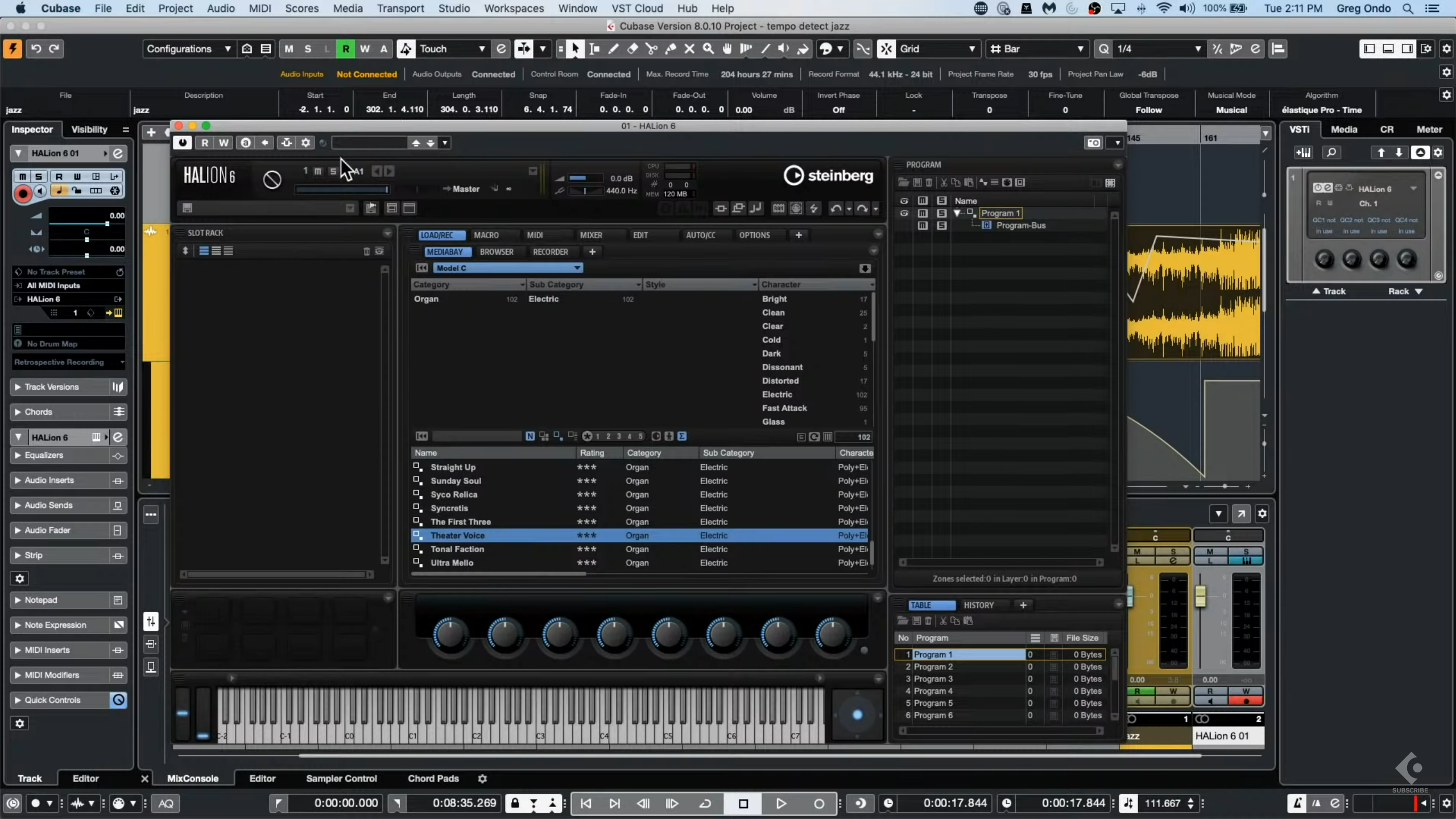
If you are running Cubase like on this image then it is not Cubase's fault.

You can make it look however you like. Mine looks nothing like the mess you posted after setting up the way I want. Why do you even need a tiny mixer screen on the bottom? Why do you need the left panel open at all times if you do not use it? Why have you not changed the colours to something better?

Do not blame Cubase for being lazy to make it look great and totally uncluttered.

This is what mine looks like

Image

Post

Sindikhate wrote: Tue Aug 31, 2021 11:30 pm
If you are running Cubase like on this image then it is not Cubase's fault.

You can make it look however you like. Mine looks nothing like the mess you posted after setting up the way I want. Why do you even need a tiny mixer screen on the bottom? Why do you need the left panel open at all times if you do not use it? Why have you not changed the colours to something better?

Do not blame Cubase for being lazy to make it look great and totally uncluttered.

This is what mine looks like

[img]/img]
If that's how you use Cubase, then it would drive my eyes nuts with a bright background like that, complimented with the visual clutter that surrounds it. Of course there is nothing you can do to change how the icons actually look, how the bordering looks like something like roads of a city, the weird light grey with white outlined icons that stand out on the transport whilst there is a different contrast to other outlined icons and background either side. White buttons jumping out at you, for example. It's Steinberg's lack of thought and attention with how everything looks. What's with that control panel that looks like something chopped off of an old Winamp skin on the left ? It's totally out of place... and I've not even gone into the text and knob aspects of Cubase that are out of whack.

The screenshot I posted is not my own, it's from a very recent YouTube video posted in the past week or so of someone using it that way. I did have Cubase installed for a while, but the trial expired earlier this year.

I didn't find the customisation options that useful when I tried them to address how cluttered the GUI looked in terms of colours. The preferences' pane doesn't even keep to GUI conventions of the rest of the GUI.

Honestly, Cubase as a DAW, needs a complete overhaul interface wise in how everything looks.
KVR S1-Thread | The Intrancersonic-Design Source > Program Resource | Studio One Resource | Music Gallery | 2D / 3D Sci-fi Art | GUI Projects | Animations | Photography | Film Docs | 80's Cartoons | Games | Music Hardware |

Post

THE INTRANCER wrote: Wed Sep 01, 2021 12:06 am Honestly, Cubase as a DAW, needs a complete overhaul interface wise in how everything looks.
No thanks, it's easily the best interface going right now.
If you have to ask, you can't afford the answer

Post

SJ_Digriz wrote: Wed Sep 01, 2021 12:18 am
THE INTRANCER wrote: Wed Sep 01, 2021 12:06 am Honestly, Cubase as a DAW, needs a complete overhaul interface wise in how everything looks.
No thanks, it's easily the best interface going right now.
The interface is so good that you need to hide everything from view so you don't have to look at it :hihi:

If the interface was the best then there would be something to look at (not hidden away as you've shown), an actual interface which is elegantly designed in a modern way, and consistent in design conventions and operations to use it that you would want to see it, whilst at the same time not presented in such a cluttered way. With Studio One, you don't have complete control over the visibility of everything natively, but the entire construct of the GUI is consistent and minimal when required. Lines are sharp to a point, without extraneous bordering that Cubase has around windows.

I mean, can you imagine plugin developers creating plugins with no interface and having to endlessly press a key combo to see a knob or a screen or navigate a long drop down menu to show something. Now, given the literally hundreds of things Cubase has, you are simply not going to remember every one other than just a few you might use often.

The fact that you need to hide almost everything you can from view with Cubase and only show it briefly, amplifies the case that Cubase as a whole has a real GUI problem.
KVR S1-Thread | The Intrancersonic-Design Source > Program Resource | Studio One Resource | Music Gallery | 2D / 3D Sci-fi Art | GUI Projects | Animations | Photography | Film Docs | 80's Cartoons | Games | Music Hardware |

Post

THE INTRANCER wrote: Wed Sep 01, 2021 12:44 am
The fact that you need to hide almost everything you can from view with Cubase and only show it briefly, amplifies the case that Cubase as a whole has a real GUI problem.
No! :borg:
Using: Cubase Pro 15, Reason 13, Tascam US-4x4HR, MODX6, DM12D, LaunchKey 49, Yamaha guitar(Pacifica 612v) and bass (BB234) and some virtual instruments and synths.

Post

He's kind of right, I couldn't imagine using Cubase without the Inspector open, for example, whereas I have never needed to use it at all in Studio One. And the Inspector window itself is a horrible hodge-podge of stuff thrown around in the most unintuitive way. I can't imagine why it ever existed and there is certainly no point to it now.
Sindikhate wrote: Tue Aug 31, 2021 11:30 pmYou can make it look however you like. Mine looks nothing like the mess you posted after setting up the way I want. Why do you even need a tiny mixer screen on the bottom? Why do you need the left panel open at all times if you do not use it? Why have you not changed the colours to something better?

Do not blame Cubase for being lazy to make it look great and totally uncluttered.

This is what mine looks like

Image
TBH, it looks just as bad as the other one. Why on Earth would you want that bright white background behind your arrangement? It looks hideous. If you don't have the mixer visible, where do you do your work? I spend 10 times longer mixing a song than I do getting the arrangement down. If I was going to do without a window, it would be the arrangement.
SJ_Digriz wrote: Wed Sep 01, 2021 12:18 amNo thanks, it's (Cubase) easily the best interface going right now.
No, it's not. It's a series of kludges put together over 30 years as processes and technology have evolved. Studio One is the GUI refresh Cubase needs. I really don't know if I could go back to Cubase now, it's so clunky and unattractive by comparison.

See how much calmer this is, without all those different shades of grey and unnecessary borders?

Image
NOVAkILL : Legion GO, AMD Z1x, 16GB RAM, Win11 | Audient EVO 8 | Lumi Keys | Studio Pro 8
Korg Odyssey, bx-oberhausen, Proxima, PolyMax, GR8, JP6K, Union, Atomika,
Invader 2, Flow Motion, Olga, TRK 01, Thorn, Spire, VG Iron

Post

I tried and discarded studio one. I much prefer the cubase ui approach.
If you have to ask, you can't afford the answer

Post

That's absolutely ridiculous. If you want them to be, they can be pretty much the same. Their "approach" is certainly identical.
NOVAkILL : Legion GO, AMD Z1x, 16GB RAM, Win11 | Audient EVO 8 | Lumi Keys | Studio Pro 8
Korg Odyssey, bx-oberhausen, Proxima, PolyMax, GR8, JP6K, Union, Atomika,
Invader 2, Flow Motion, Olga, TRK 01, Thorn, Spire, VG Iron

Post

xbitz wrote: Tue Aug 31, 2021 8:45 am S1 is a tier 2 DAW in EDM world
Well that's disappointing.
I had hoped EDM programmers stayed away from Studio One completely.
THIS MUSIC HAS BEEN MIXED TO BE PLAYED LOUD SO TURN IT UP

Post

Bitwig
Only shows you what you need really.

Post

MuzikFreq wrote: Wed Sep 01, 2021 6:00 am Bitwig
Only shows you what you need really.
Plot twist - because that's all it has ;) :D
Music tech enthusiast
DAW, VST & hardware hoarder
My "music": https://soundcloud.com/antic604

Post

antic604 wrote: Mon Aug 30, 2021 10:47 am Logic Pro looks pretty clean and well-organised, but I never used it so it might be all the complexity is hidden in endless menus & pop-up windows.
Well some of it is however:
- more or less everything is key-mappable, so if you keep reaching for one menu function all the time, you simply keymap it.
- it's in task specific structured menus that are surprisingly well thought out.

I really like the "doesnt get in the way" approach of logic, because i don't need most of function 90% off the time so everything they do is clutter the interface, and 10% i do need them is easily recallable with a key command
dellboy wrote: Mon Aug 30, 2021 12:23 pm I bought a Mac last year to try Logic Pro out and its very nice. It reminded me of Studio One. The included sounds are decent workman like but not great. I loved "Drummer", its a great fun drum machine. The samplers are really good as well.
yeah studio one v1 borrowed heavily from logic, it also had a similar color scheme to Logic 9.
then they started adding some cubase-like features, i find it like a need amalgam of the two.
if logic goes to shit it's like that DAW i'll end up with.
Image

Post

BONES wrote: Wed Sep 01, 2021 4:10 am He's kind of right, I couldn't imagine using Cubase without the Inspector open, for example, whereas I have never needed to use it at all in Studio One. And the Inspector window itself is a horrible hodge-podge of stuff thrown around in the most unintuitive way. I can't imagine why it ever existed and there is certainly no point to it now.
It would be a no brainer for Steinberg to add a volume and pan control to the main track control settings and therefore eliminate the need for the inspector to be open. Having said that, I like the inspector, I think its great, and one of my favourite parts of Cubase.

As for S1 not needing the inspector open, I have it setup to be open when S1 starts in my default template. I found I needed it all the time for various stuff and got fed up with opening and closing it. And the mixer being permanently on view is a no for me. Takes up too much space. It gets opened at mixing time and for adding fX sends.

Post

I can't believe people work without the mixer open. It's the centre of my workflow, just as it is in a physical studio. It tells me everything that's going on at a glance - which instruments are playing, what effects they have applied, levels, etc. The Inspector takes up tonnes of space but it only tells you about one channel at a time. It's useless.

Everything that's in the Arrangement window is duplicated in the Mixer so I mostly keep my tracks tiny, to maximise space for the mixer. Kind of like this guy's, only he has a ridiculous number of channels, where my Mixer is often taller than the main window, so I can see the FX GUIs -

Image
NOVAkILL : Legion GO, AMD Z1x, 16GB RAM, Win11 | Audient EVO 8 | Lumi Keys | Studio Pro 8
Korg Odyssey, bx-oberhausen, Proxima, PolyMax, GR8, JP6K, Union, Atomika,
Invader 2, Flow Motion, Olga, TRK 01, Thorn, Spire, VG Iron

Post

BONES wrote: Wed Sep 01, 2021 7:40 am I can't believe people work without the mixer open. It's the centre of my workflow, just as it is in a physical studio. It tells me everything that's going on at a glance - which instruments are playing, what effects they have applied, levels, etc. The Inspector takes up tonnes of space but it only tells you about one channel at a time. It's useless.

Everything that's in the Arrangement window is duplicated in the Mixer so I mostly keep my tracks tiny, to maximise space for the mixer. Kind of like this guy's, only he has a ridiculous number of channels, where my Mixer is often taller than the main window, so I can see the FX GUIs -
I would like the mixer open, but then the tracks get squeezed down small. A second monitor is the obvious answer I guess. Or maybe I need to re-think my workflow. For instance - I have yet to find a way on S1 to add an FX send and insert without opening the mixer. The inspector allows adding an insert but it does not show up as a send. I guess I should read the manual.

Post Reply

Return to “Hosts & Applications (Sequencers, DAWs, Audio Editors, etc.)”