

back when i first started using a pooter for moosics, i tried fl, it was quite similar to orion as i remember, but it gave me a headache using it (probably related to how dark it was and eye strain) so i didn't spend a lot of time with it.
but compared to protools or cubase it's definitely more in orions ease of use, regards midi entry.
Piano Roll - What's the next best DAW after FL Studio?
-

- addled muppet weed
- 111299 posts since 26 Jan, 2003 from through the looking glass

-
- addled muppet weed
- 111299 posts since 26 Jan, 2003 from through the looking glass
note slicing in orion was great, need a fast spurt drum roll? one long note, press s a few times, drill beats!!!! drrrrrrrrp!xbitz wrote: Sat Oct 09, 2021 5:05 pm ^^^ "It has all of those features, except maybe the "cut note in half" shortcut," try right shift + the left/right mouse buttons
-
- KVRian
- 766 posts since 26 Sep, 2007
I'm aware of that, but I think Bones is talking about a keyboard-only shortcut that just cuts whatever note is selected in half, without having to aim and click. FL's quick-chop (Ctrl/Cmd+U) is similar, but it chops to the grid instead.xbitz wrote: Sat Oct 09, 2021 5:05 pm ^^^ "It has all of those features, except maybe the "cut note in half" shortcut," try right shift + the left/right mouse buttons
-
- addled muppet weed
- 111299 posts since 26 Jan, 2003 from through the looking glass
yup, in orion, select notes you want slicing (or it will just do all) and press s.Dionysos wrote: Sat Oct 09, 2021 5:23 pmI'm aware of that, but I think Bones is talking about a keyboard-only shortcut that just cuts whatever note is selected in half, without having to aim and click. FL's quick-chop (Ctrl/Cmd+U) is similar, but it chops to the grid instead.xbitz wrote: Sat Oct 09, 2021 5:05 pm ^^^ "It has all of those features, except maybe the "cut note in half" shortcut," try right shift + the left/right mouse buttons
x and y will also flip the sequence by the X or y axis.
there's a few others i can't recall too
-

- Banned
- 9081 posts since 15 Oct, 2017 from U.S.
Dude. Same, but lifetime update license deal and they made it a vsti, which keeps me hanging on since Orion ended.vurt wrote: Sat Oct 09, 2021 5:06 pm back when i first started using a pooter for moosics, i tried fl, it was quite similar to orion as i remember, but it gave me a headache using it (probably related to how dark it was and eye strain) so i didn't spend a lot of time with it.
but compared to protools or cubase it's definitely more in orions ease of use, regards midi entry.
Don't feed the gators,y'all
https://m.soundcloud.com/tonedeadj
https://m.soundcloud.com/tonedeadj
-
- addled muppet weed
- 111299 posts since 26 Jan, 2003 from through the looking glass
yeah, i can see why so many choose it.melomood wrote: Sat Oct 09, 2021 5:37 pmDude. Same, but lifetime update license deal and they made it a vsti, which keeps me hanging on since Orion ended.vurt wrote: Sat Oct 09, 2021 5:06 pm back when i first started using a pooter for moosics, i tried fl, it was quite similar to orion as i remember, but it gave me a headache using it (probably related to how dark it was and eye strain) so i didn't spend a lot of time with it.
but compared to protools or cubase it's definitely more in orions ease of use, regards midi entry.
especially beginners, as the others do look a bit boring mostly and not very inviting.
ok, they're designed as tools, but give em a lick of paint so i don't feel like im opening a spreadsheet to do my taxes (which ive never done but hear things...).
-
- KVRAF
- 5144 posts since 3 Oct, 2013
^^^ + most of the native plugins can be automated per note based directly from the piano roll
so it's nicely integrated into the system
so it's nicely integrated into the system
"Where we're workarounding, we don't NEED features." - powermat
-

- KVRAF
- Topic Starter
- 6300 posts since 12 Jan, 2018
I am actually waiting for this to work with non-native plugins because I hardly use any native plugins.xbitz wrote: Sat Oct 09, 2021 6:26 pm ^^^ + most of the native plugins can be automated per note based directly from the piano roll
so it's nicely integrated into the system
 Not sure it will ever happen. I use FL Studio only as a DAW and I feel it REALLY needs to step up for what it is (DAW) rather than wasting time on stuff like Patcher, plugins, etc.
-
- KVRAF
- 5144 posts since 3 Oct, 2013
^^^ I would start to use Studio One from splice https://splice.com/daws/38892279-studio ... y-presonus the rent to own construction is 17$ per month and can be canceled/continued anytime (there is dunno 3-5 days free tryout period)
this is my state I've started to like Cubase (with BlueCat Patchwork finally able to route MIDI in without too much PITA) so canceled it but almost have an S4
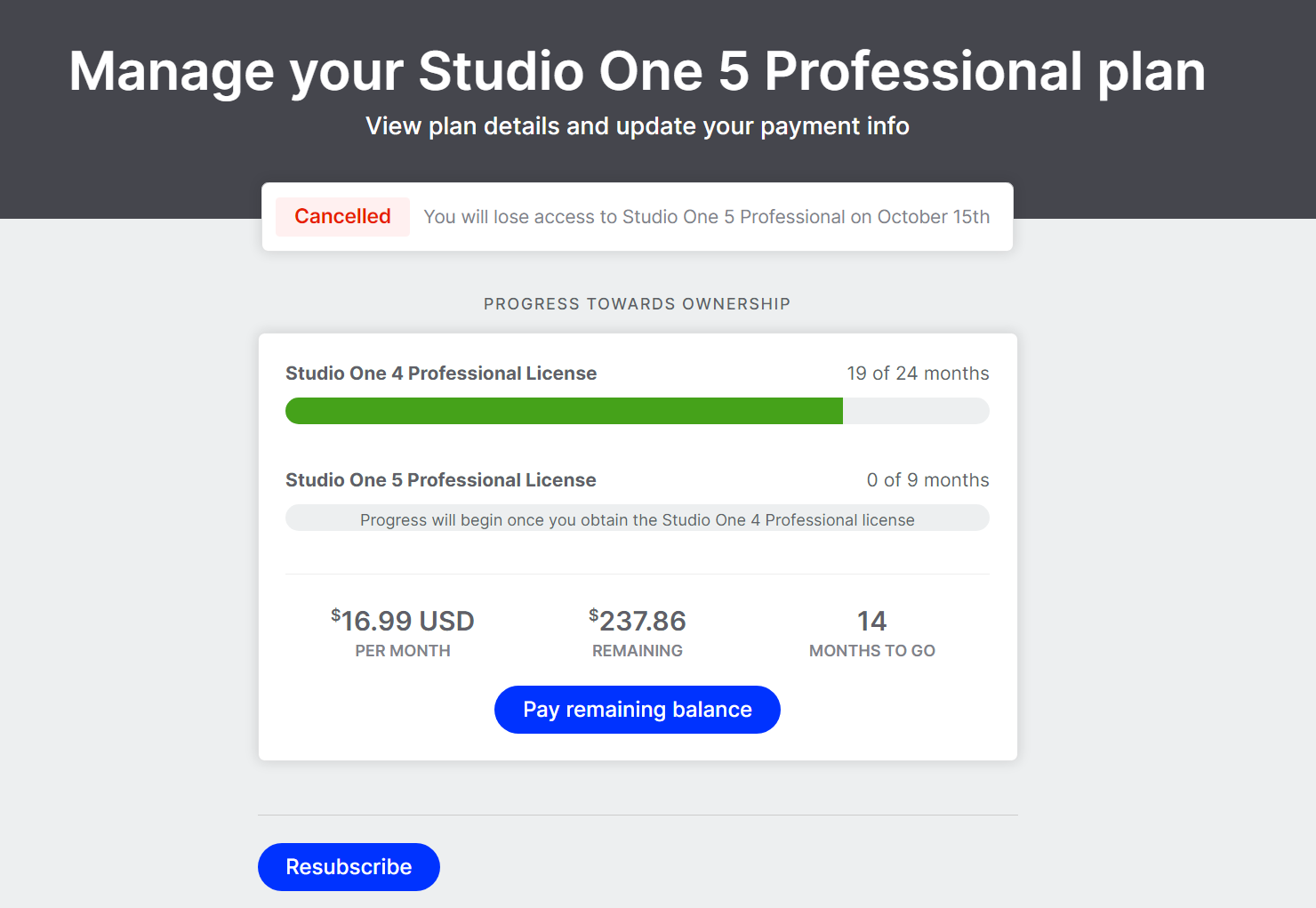
so it works, patterns are nice in S1, I just simply like the GUI of Cubase better that's all
this is my state I've started to like Cubase (with BlueCat Patchwork finally able to route MIDI in without too much PITA) so canceled it but almost have an S4
so it works, patterns are nice in S1, I just simply like the GUI of Cubase better that's all
"Where we're workarounding, we don't NEED features." - powermat
-

- GRRRRRRR!
- 17804 posts since 14 Jun, 2001 from Somewhere you're not!
In Orion, you just press "S" and every selected note, or every note if there is no selection, is cut in half. It's a really quick way to turn a pattern full of quarter notes into a pattern full of 16ths. e.g. To turn a pad part into a bassline.
Orion had a PR years before Fruityloops did, so I'd say Rich helped Gol out with it. They used to help each other out quite a bit in the early days.Dionysos wrote: Sat Oct 09, 2021 4:58 pm I wouldn't be surprised if the way Orion works/ed was directly inspired by FL, or the other way around.
That's not strictly true. What it really comes down to, and when it was pointed out to me I realised it was the same with Orion, is which tool is selected by default. The "Freehand Paint" tool in Studio One's PR is actually pretty good - click and drag out any note length you like, then click again to delete (CTRL+Click to edit). If that was the default selection in the PR in S1, I'd be happy enough with it. It's still annoying that it doesn't remember note lengths but that's why it's not as good as Orion's. But it definitely doesn't have to conform to OS norms, it's a choice they all seem to make. In Orion, it was a simple matter of Rich taking a user's advice and changing which was the default tool, from the Select tool to the Draw tool. It made all the difference.FL is more like a video game in that it defined its own opinionated, non-standard control paradigm that more or less ignores OS conventions, but is super optimised for its use case. So it's not super straightforward to copy that for the developers of other sequencers, unless they were willing to either massively sacrifice in-app consistency or go all-in on this control paradigm.
NOVAkILL : Legion GO, AMD Z1x, 16GB RAM, Win11 | Audient EVO 8 | Lumi Keys | Studio Pro 8
Korg Odyssey, bx-oberhausen, Proxima, PolyMax, GR8, JP6K, Union, Atomika,
Invader 2, Flow Motion, Olga, TRK 01, Thorn, Spire, VG Iron
Korg Odyssey, bx-oberhausen, Proxima, PolyMax, GR8, JP6K, Union, Atomika,
Invader 2, Flow Motion, Olga, TRK 01, Thorn, Spire, VG Iron
-
- KVRAF
- Topic Starter
- 6300 posts since 12 Jan, 2018
Exactly why I would avoid trying/using any other DAW if at all.xbitz wrote: Sat Oct 09, 2021 6:43 pm ^^^ I would start to use Studio One from splice https://splice.com/daws/38892279-studio ... y-presonus the rent to own construction is 17$ per month and can be canceled/continued anytime (there is dunno 3-5 days free tryout period)
this is my state I've started to like Cubase (with BlueCat Patchwork finally able to route MIDI in without too much PITA) so canceled it but almost have an S4
so it works, patterns are nice in S1, I just simply like the GUI of Cubase better that's all