RapidComposer v4 beta feedback and discussion (locked)

Official support for: musicdevelopments.com
Locked New Topic
RELATED
PRODUCTS
RapidComposer RapidComposer LE

Post

musicdevelopments wrote: Sun Oct 10, 2021 3:59 pm Hi BluGenes,

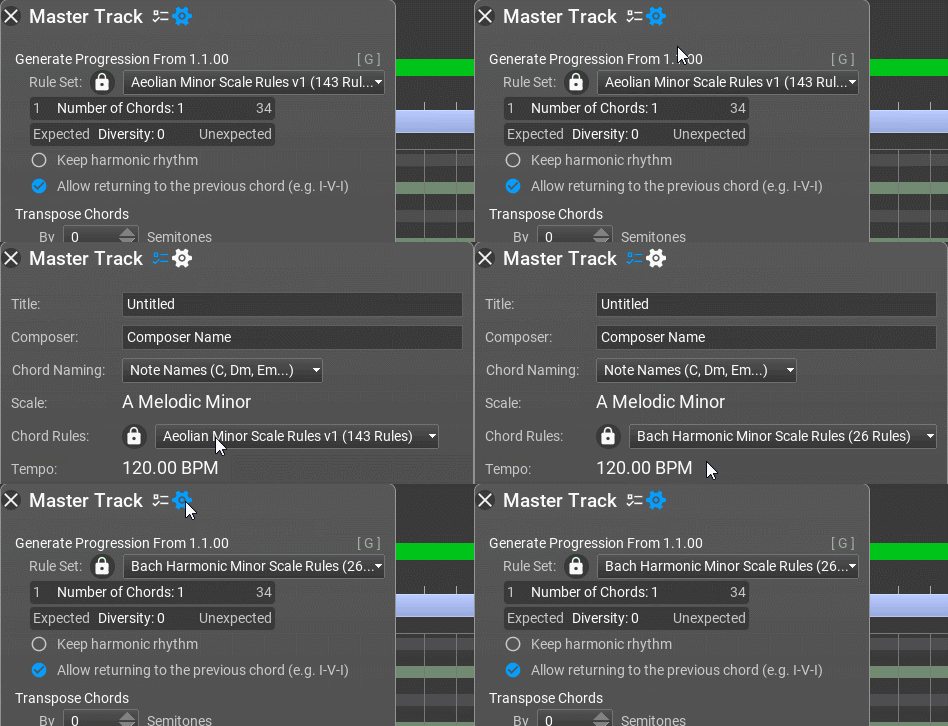
I'll think what can be done about this, but at the moment the chord rule set for the composition and the rule selected in the inspector has no relation to each other. They are independent, which lets you make a chord progression using another rule than the one used in the composition.

Thanks,
Attila

BluGenes wrote: Wed Oct 06, 2021 1:28 pm This probably should be changed for consistency...

The Master Track Inspector's settings for chord rules is not carried over to the Master Track Inspector's settings to generate a progression ..
That is all well and good, but, where the problem was, having to change it every time so that I could create a progression with the correct rules. But, seems fixed now, and it is that much easier to work with.

Can you include re-loading the rules in the editor, if there was rules present when RC is closed? (If using auto save and re-load)..

That would be a major time saver as well..

Thanks!!

Post

Hello Attila!
I'll try to repeat my request ...)))
If there is an opportunity, I would like to add .. When I hover the mouse over a chord in the master track, I see a pop-up menu (this is very convenient). But in the information on this menu, I would like to see not only the notes of the chord, but also the notes of the scale.This would make it possible to make faster decisions about the application of the scale. Thanks.
You do not have the required permissions to view the files attached to this post.

Post

Hi lulukom!

You'll find this in the next beta version:

Image

Thanks,
Attila

Post

:tu:

Post

ooh ooh add that to the scale browser too!!

Post

BluGenes wrote: Sun Oct 10, 2021 8:06 pm That is all well and good, but, where the problem was, having to change it every time so that I could create a progression with the correct rules. But, seems fixed now, and it is that much easier to work with.
I did not know the rule selection is also applied to the inspector, but it seems it is:

Image
BluGenes wrote: Sun Oct 10, 2021 8:06 pm Can you include re-loading the rules in the editor, if there was rules present when RC is closed? (If using auto save and re-load)..

That would be a major time saver as well..
I implemented that today, so rules will be saved from the next beta.

Thanks,
Attila

Post

Attila, what about dragging and dropping chords within the master track? When I compose a song, I often really want to just drag the chord to another place (the same with the scale) or change the places of the chords.

Post

I implemented dragging selected chords directly on the master track. It works the same way as dragging from the Progression browser: when holding down Ctrl, the harmonic rhythm is kept from the composition, only the chords are replaced. I hope you'll find it useful.

Thanks,
Attila

Post

Maybe I didn't explain very accurately, but I meant dragging and dropping chords within the master track itself.Or swap places among themselves.Thanks .
You do not have the required permissions to view the files attached to this post.

Post

Yes, lulukom, exactly that was added. You can drag multiple selected chords, and if you hold down Ctrl during dragging, the harmonic rhythm of the master track will be preserved. As a side effect you can also drop the chords on the progression browser to save them.
I am going to upload a new beta version today.

Thanks,
Attila

Post

Thank you, we look forward to it ! ))

Post

Yes, Attila, if it's time, then look at the Markov Generator. When I use the Random button, the values change, but the notes remain the same (and visually too) and of course, auto-apply also does not work with randomization. Maybe I didn't understand how it works? ))Thanks .

Post

Hi lulukom,
The new randomized values will be used if you regenerate the phrase. The 'randomize' button randomizes the settings, not the phrase.
Thanks,
Attila

Post

Ok.Thanks.

Post

RapidComposer v4.3b7 is available!

Improvements:
  • Dragging and dropping the selected chords on the master track is possible. Hold Ctrl to respect existing harmonic rhythm on the master track. Chords can be dropped on the progression browser to save them as a progression.
  • Scale notes are displayed in the master track pop-up help
  • Last edited rules are saved and restored between sessions

Locked

Return to “MusicDevelopments”