


It would work a bit like this.
https://maxforlive.com/library/device/5 ... -automator
RapidComposer v4 beta feedback and discussion (locked)
-
- KVRist
- 455 posts since 12 Aug, 2015
-
 musicdevelopments musicdevelopments https://www.kvraudio.com/forum/memberlist.php?mode=viewprofile&u=223336
 - KVRAF
- Topic Starter
- 6014 posts since 9 Jan, 2010
For displaying C note is used as the root. Drag and drop does not work, and I am not sure it would make sense. It would, with a scale finder tool, when root notes are also displayed in the browser.BluGenes wrote: Thu Oct 14, 2021 8:14 pm EDIT: Question then, what is going on when I DO use the scale browser, what key is it using there?
Thanks,
Attila
-
musicdevelopments musicdevelopments https://www.kvraudio.com/forum/memberlist.php?mode=viewprofile&u=223336
- KVRAF
- Topic Starter
- 6014 posts since 9 Jan, 2010
RapidComposer v4.3.0b8 is available!
Improvements:
Improvements:
- Piano Chord Pattern Generator: mute buttons added to the left and right hand patterns
- Piano Chord Pattern Generator: randomization respects the mute buttons for the left and right hand patterns
- Holding down Alt during dragging chords on the master track will swap the chords
- New chord detection option in MIDI Import: 'Allow 5th chords'
-
- KVRAF
- 1752 posts since 30 Nov, 2013
+++1Have to give some credit to lulukom as he originally posted a similar request a while back so I hope you agree with me on this suggestion as not only is this a very useful feature but if you scour YouTube you will realise how many producers take hours just messing with the voicing of chords to get a good progression so my suggestion is to have a voice randomizer which basically takes your chord progression and randomises the voicing of that set scale or swaps the voicing of each chords in a selective progression.
You can see from my demonstration video it's a very tedious thing to do manually but it's something that every producer does and I feel this would be a great time Saver and very inspirational especially for a happy accidents.. you can see how much it changes the sound of the piano just by moving notes up and down. Think of all the old piano progressions you could bring new life to. I know rc has a spread chord notes but that doesn't work for this scenario.
You could even have the option of apply voicings from other chord progressions you may like.
Rapidcomposer is definitely missing this when it comes to being creative with chords.
Thanks
-
- KVRAF
- 1752 posts since 30 Nov, 2013
Hello Attila!
Thanks for the new Beta. I believe that the swapping of chords in the master track should be done with another button pressed (not Alt), because too many times there is an accidental chord splitting and this greatly interferes with the work. Thanks . P.S. Maybe Ctrl+Alt ?
Thanks for the new Beta. I believe that the swapping of chords in the master track should be done with another button pressed (not Alt), because too many times there is an accidental chord splitting and this greatly interferes with the work. Thanks . P.S. Maybe Ctrl+Alt ?
-
musicdevelopments musicdevelopments https://www.kvraudio.com/forum/memberlist.php?mode=viewprofile&u=223336
- KVRAF
- Topic Starter
- 6014 posts since 9 Jan, 2010
Hello lulukom,
you never have to Alt-click. You need to hold down Alt only before releasing the mouse button, no sooner. Ctrl can be used during dragging, so when you release the button with Ctrl+Alt that means "swap chords and use the existing harmonic rhythm". Using the two modifiers (Ctrl and Alt) may be complicated, but it is very powerful.
Thanks,
Attila
you never have to Alt-click. You need to hold down Alt only before releasing the mouse button, no sooner. Ctrl can be used during dragging, so when you release the button with Ctrl+Alt that means "swap chords and use the existing harmonic rhythm". Using the two modifiers (Ctrl and Alt) may be complicated, but it is very powerful.
Thanks,
Attila
lulukom wrote: Sat Oct 16, 2021 9:29 am Hello Attila!
Thanks for the new Beta. I believe that the swapping of chords in the master track should be done with another button pressed (not Alt), because too many times there is an accidental chord splitting and this greatly interferes with the work. Thanks . P.S. Maybe Ctrl+Alt ?
-
musicdevelopments musicdevelopments https://www.kvraudio.com/forum/memberlist.php?mode=viewprofile&u=223336
- KVRAF
- Topic Starter
- 6014 posts since 9 Jan, 2010
Hello lovemusic15,
thanks for the video, I think I understand what you mean.
You can already do something similar, the only thing missing is making a random chord voicing:
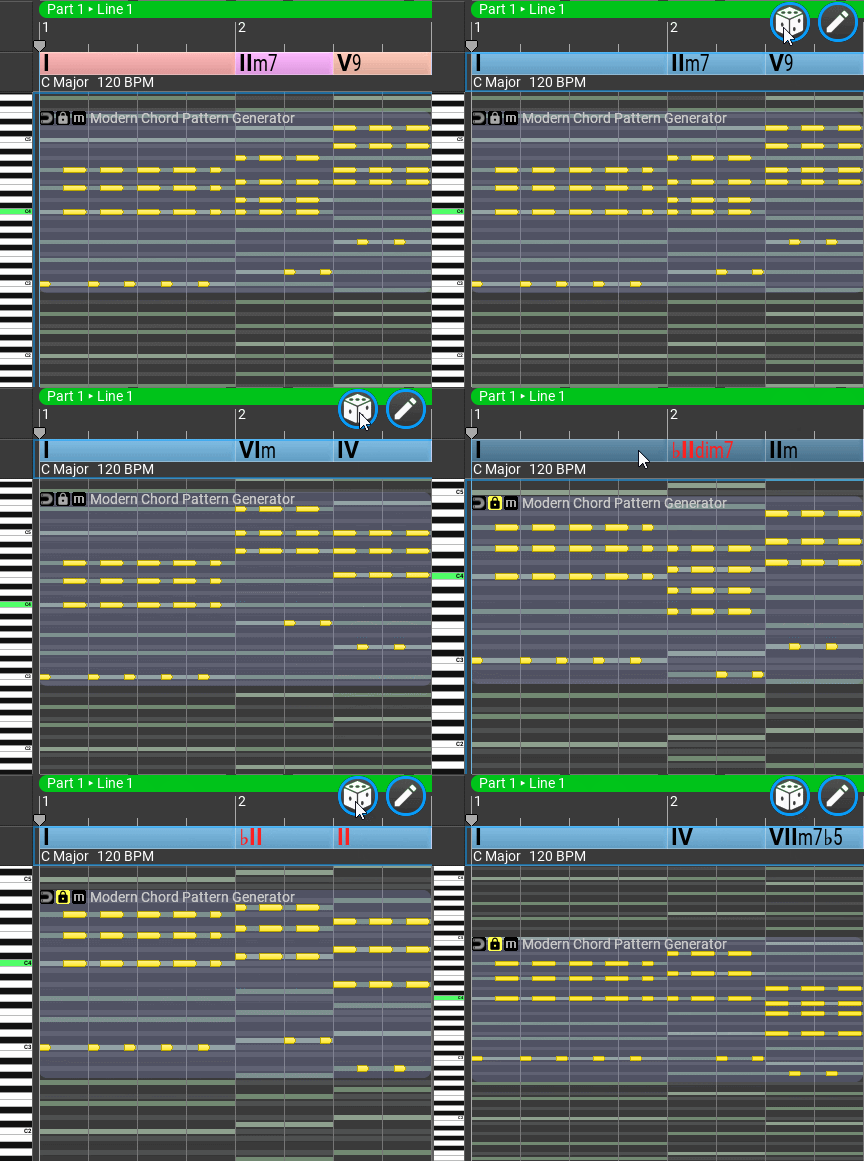
You need to select a chord rule in the master track inspector before clicking on 'dice'. Rules that allow more variation (E.g. Pop major or minor scale rules) will give better results, but creating custom rules is recommended. Setting the 'diversity' to unexpected will make the progression more interesting.
Thanks,
Attila
thanks for the video, I think I understand what you mean.
You can already do something similar, the only thing missing is making a random chord voicing:
You need to select a chord rule in the master track inspector before clicking on 'dice'. Rules that allow more variation (E.g. Pop major or minor scale rules) will give better results, but creating custom rules is recommended. Setting the 'diversity' to unexpected will make the progression more interesting.
Thanks,
Attila
-
- KVRAF
- 1752 posts since 30 Nov, 2013
This is a very good and important clarification, Attila! And this is done very well. I would even specify that you can press and release the modification buttons (without releasing the mouse button) when the cursor is already over the intended place of dragging. In general, we need to practice a little)) Thank you.you never have to Alt-click. You need to hold down Alt only before releasing the mouse button, no sooner. Ctrl can be used during dragging, so when you release the button with Ctrl+Alt that means "swap chords and use the existing harmonic rhythm". Using the two modifiers (Ctrl and Alt) may be complicated, but it is very powerful.
-
- KVRAF
- 1752 posts since 30 Nov, 2013
By the way, why not make the option/checkbox (when generating chords in the Master Track) 'Change scales with chords'? After all, if I generated chords in the Master Track and I really like them and at the same time the Scales do not correspond to them, then should I select them manually ?
-
musicdevelopments musicdevelopments https://www.kvraudio.com/forum/memberlist.php?mode=viewprofile&u=223336
- KVRAF
- Topic Starter
- 6014 posts since 9 Jan, 2010
If you use the universal (roman numeral) notation, the chords will always be on the selected scale.
Randomizing the scale is not part of the chord progression generation at the moment.
Thanks,
Attila
Randomizing the scale is not part of the chord progression generation at the moment.
Thanks,
Attila
-
- KVRist
- 455 posts since 12 Aug, 2015
musicdevelopments wrote: Sat Oct 16, 2021 10:05 am Hello lovemusic15,
thanks for the video, I think I understand what you mean.
You can already do something similar, the only thing missing is making a random chord voicing:
You are totally right you can do that with the chord rules but yet you still end up getting the same voicing that's why we really need this feature of swapping the voicing.
Just like when you add inversions, it makes a real difference to the sound of the chord.
I had an additional idea which would rely on a bit of midi learn which you've already implemented
What about if you had the option to import midi files with different voicings and the midi learn could save them inside a generator and you could swap through them when it comes to trying out different voicing with your chord progression.
It kinda combines with my option of apply voicing to phrase just in the same way you can apply Melody or shape.
There's definitely a need for this feature and I've researched heavily on the internet and no other software is doing this apart from one VST called chord jam. But that's only when making chords from scratch.
What I'm asking for would bring variations preexisting phrases.
Please let me know if this is possible.

-
- KVRAF
- 1752 posts since 30 Nov, 2013
Ok, Attila, then explain to me, please .. In a small video I generate a master track chords and have a universal notation and chords that do not correspond to the scale have a red color. What do I not understand ?If you use the universal (roman numeral) notation, the chords will always be on the selected scale.
You do not have the required permissions to view the files attached to this post.
-
musicdevelopments musicdevelopments https://www.kvraudio.com/forum/memberlist.php?mode=viewprofile&u=223336
- KVRAF
- Topic Starter
- 6014 posts since 9 Jan, 2010
It happens because you use a Minor scale with Major scale rules.
The rules should match the scale. If you highlight the 'magnet' the rules will not change with the scale.
In fact using Minor rules for Melodic Minor scale will mostly work, but it would be better to use Melodic Minor rules...
The rules should match the scale. If you highlight the 'magnet' the rules will not change with the scale.
In fact using Minor rules for Melodic Minor scale will mostly work, but it would be better to use Melodic Minor rules...
lulukom wrote: Sat Oct 16, 2021 12:26 pm Ok, Attila, then explain to me, please .. In a small video I generate a master track chords and have a universal notation and chords that do not correspond to the scale have a red color. What do I not understand ?
-
- KVRist
- 455 posts since 12 Aug, 2015
As you can see in this video changing voicing really helps with the sound and feel
And with 84,663 views You can see how many people want to make better sounding chord.
And with 84,663 views You can see how many people want to make better sounding chord.