

Morning
I have an old (fathful !) Ensoniq SDP1 piano with weighted keys.
For many years I have used Midi Ox to map the incoming data from my playing to a better velocity response curve (and still do in my 32 bit Win 10 DAW partition).
However I now have Reason 10 which is 64 bit only, installed on my 64 bit Win 10 partition and Midi Ox does not work with 64 bit programs.
Is there an alternative app/program I could use in this environment ?
Thanks
Simple MIDI app / plugin to map velocity curve for MIDI piano keyboard controller ?
-
- KVRian
- 966 posts since 28 Sep, 2002 from UK
If God did exist (and he doesn't) he would answer to the name of Maurizio
-

- Banned
- 7624 posts since 13 Nov, 2015 from Norway
EnergyXT3 - LMMS - FL Studio | Roland SH201 - Waldorf Rocket | SoundCloud - Bandcamp
-
- KVRian
- Topic Starter
- 966 posts since 28 Sep, 2002 from UK
Thanks - that could be just the ticket.
If God did exist (and he doesn't) he would answer to the name of Maurizio
-

- KVRist
- 405 posts since 14 Jul, 2005 from Germany
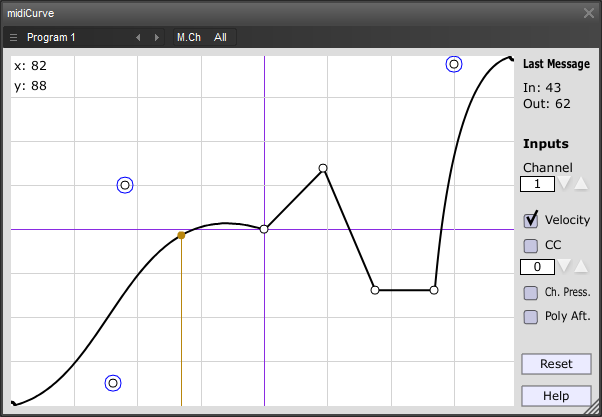
midiVelocityScaler or midiCurve from IPH.
midiVelocityScaler (32/64bit) in the "Piz MIDI plugin collection":
https://www.thepiz.org/plugins/?p=pizmidi
midiCurve (32-bit):
https://www.thepiz.org/plugins/?p=midiCurve
midiCurve (64-bit) can you find in the archive "pizjuce_x64_20120111.zip" from:
https://code.google.com/archive/p/pizmidi/downloads
midiVelocityScaler (32/64bit) in the "Piz MIDI plugin collection":
https://www.thepiz.org/plugins/?p=pizmidi
midiCurve (32-bit):
https://www.thepiz.org/plugins/?p=midiCurve
midiCurve (64-bit) can you find in the archive "pizjuce_x64_20120111.zip" from:
https://code.google.com/archive/p/pizmidi/downloads
It`s not a bug... it`s a feature!
-
- KVRer
- 2 posts since 9 Aug, 2016
AUTO-ADMIN: Non-MP3, WAV, OGG, SoundCloud, YouTube, Vimeo, Twitter and Facebook links in this post have been protected automatically. Once the member reaches 5 posts the links will function as normal.
Tooting my own horn here, but if someone stumbles upon this post looking for a solution, I developed a standalone tool for this purpose years ago called VelPro: https://springbeats.com/velpro/ (https://springbeats.com/velpro/)It's easy to use and lets you customise a curve per key if need be, but is a standalone app, not a VST. This way you can configure it once for your controller, and have it work with any music app you own, regardless of its supported plugin format.