DrumThrash Drum Software New Version 2.0.5 !!!

Audio Plugin Hosts and other audio software applications discussion
Post Reply New Topic
RELATED
PRODUCTS

Post

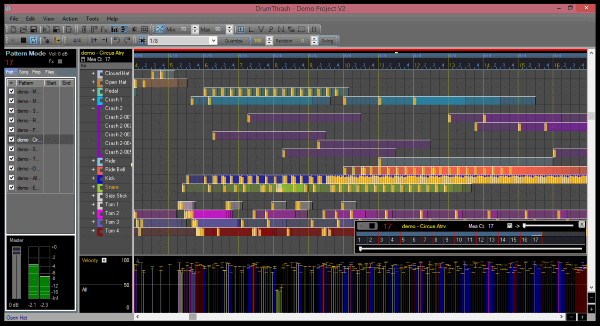
DrumThrash is drum software for Windows PC. Create your own custom drum racks. Lot's of new features in this version.

Image

What's new in 2.0.5

*New - Option to create tuplets has been added to the Quantize toolbar.

*New - Option to set custom divisions. Right-click the division box on the Quantize toolbar to open the Custom division panel.

*New - Draw tool. Hold down the left mouse button when adding a hit. Keep holding the mouse button down. After a moment your mouse cursor will change to a draw tool, you will then be able to draw hits on the grid.

*New - Hold down the [D] key to toggle the Draw tool. Release the key to return to the previous tool.

*New - Hold down the [X] key to toggle the Draw tool. Release the key to return to the previous tool.

*New - Hold down the [4] key to auto-fill tuplets.

*New - The export window has been updated. Now you can export loop regions. Pattern and song list are now displayed to give a better visual representation.

*New - Option to Delete All Patterns has been added to the Pattern list menu.

*New - Recently used time signatures have been added to the Time Signature menu.

*New - A new online help guide at https://www.drumthrash.com/help-guide

- Updated - The DrumThrash Help Guide included with the software has been updated.

- Updated - When opening the help guide i.e. clicking a help button the topic associated with the window will be displayed.

- Fixed - A few minor annoyances in the export window were addressed

- Fixed - There was an issue where the kit panel would run out of space at the bottom.

- Fixed - A new updater to prevent connection errors.

- Updated the User Presets dialog.

- Added indicator on playback button when auditioning files.

- Updated - Sample blender window is now resizable horizontally.

- Fixed timeline loop not updating when changing a time signature during live playback.

- Added an autoplay option when dragging DrumThrash pattern files to the Event panel.

- Fixed color of random label in the controller panel.

- Added images to menus.

- Fixed labels not updating on the controller panel.

- Fixed annoying tooltips from popping up when using the velocity labels.

- Updated - Any reference to the term 'note' has been changed to hit to avoid confusion.

- Fixed issue where dotted notes were not being placed correctly for different measure sizes using the nudge tool.

- Fixed auto-fill for dotted notes.

-Added Code Signing Certificate which does the following.

•Protects users from malware and viruses by assuring the authenticity and integrity of downloaded code.

•Trusted on all versions of Windows, preventing warning messages and errors when installing software.

For audio demos and free download visit: https://www.drumthrash.com

Post

So what does this offer over regular daw's midi tracks ?
Just curious
Eyeball exchanging
Soul calibrating ..frequencies

Post

gentleclockdivider wrote: Wed Dec 15, 2021 12:05 am So what does this offer over regular daw's midi tracks ?
Just curious
I actually get this question quite often, but it usually doesn't end with which options are provided. I was at GC the other day and I asked a group of employees which drum software they use. To no surprise they all used something different. I find that most people are more concerned with design and usability. Each of them were pretty loyal to the software they use. The conversation ended with the most important question. "Did you actually finish any of the projects you started?" The answer was yes and no.

Of course they all have their pros/cons and differences. Here is what Drumthrash offers that the others may not.

Affordability - $59.00 USD and no extra costs for upgrades.
Simplicity - The learning curve isn't so steep that you need hours of manual reading just to get started.
Close user base - Since I'm not from a major corporation I often communicate directly with the users and their needs. Features and design approach usually comes directly from user request.

Post

I don't know why someone would pay $59.00 when they can download Studio One 5 Prime which is free including any updates for it. You can export Midi files from it among many other formats and editing is pretty extensive. Different drum editor views, a library of samples, effects devices and the instrument Presence XT included too... A trimmed down version of a huge DAW which is modern and supports Hi-DPI resolutions.

https://shop.presonus.com/Studio-One-5-Prime
KVR S1-Thread | The Intrancersonic-Design Source > Program Resource | Studio One Resource | Music Gallery | 2D / 3D Sci-fi Art | GUI Projects | Animations | Photography | Film Docs | 80's Cartoons | Games | Music Hardware |

Post

If you are happy with studio one then you should stay with them, however it may not be for everyone. I'm sure Studio one has great features, but may be a little over-complicated for some. DT offers a different experience and may be more tailored for some people's needs. Not everyone drinks Coke or Pepsi, some prefer Shasta. I say use what works for you.

Post Reply

Return to “Hosts & Applications (Sequencers, DAWs, Audio Editors, etc.)”