How you use clip launcher in your DAW?

Audio Plugin Hosts and other audio software applications discussion
Post Reply New Topic

How you use clip launcher in your DAW?

(1) I never touch the arranger time-line, my projects stay in clip launcher
2
1%
(2) I record, create, edit & play in clip-launcher, only final touches happen on the arranger time-line
19
14%
(3) I go between both, treating clip launcher like a note pad with ideas to try & maybe use later
43
32%
(4) I primarily work on linear time-line, only chop & move things to clip launcher for live performance
6
4%
(5) I never touch the clip launcher
28
21%
My DAW doesn't have a clip launcher
24
18%
Fish
13
10%
 
Total votes: 135

RELATED
PRODUCTS

Post

antic604 wrote: Wed Jan 12, 2022 10:11 am

Why? In my case I never recorded anything into the clips and I also never used any commercial loops, because I do everything from scratch myself.

How should I call the feature then?
You do everything from yourself by scratch but are not recording anything? How are you doing that? If you input notes into a step recorder then you are "recording" your own stuff. If you use a chord input device then you are "recording" your own work. Personally I input all my stuff into the clip from a midi keyboard to a metronome click because any other way seems like hard work to me, but any method used to record your own stuff is fine, including inputting notes or chords using Ableton Push or whatever.

I already said what it should be called, a "clip recorder". Whats the point of Bitwig and Ableton going through all the trouble of giving the ability to record your own clips and people never use it?

Post

dellboy wrote: Wed Jan 12, 2022 12:16 pm
antic604 wrote: Wed Jan 12, 2022 10:11 am

Why? In my case I never recorded anything into the clips and I also never used any commercial loops, because I do everything from scratch myself.

How should I call the feature then?
You do everything from yourself by scratch but are not recording anything? How are you doing that? If you input notes into a step recorder then you are "recording" your own stuff. If you use a chord input device then you are "recording" your own work. Personally I input all my stuff into the clip from a midi keyboard to a metronome click because any other way seems like hard work to me, but any method used to record your own stuff is fine, including inputting notes or chords using Ableton Push or whatever.

I already said what it should be called, a "clip recorder". Whats the point of Bitwig and Ableton going through all the trouble of giving the ability to record your own clips and people never use it?
I "draw" everything in.

It's called "launcher" not "recorder" because you can record in both arranger and clip views, but you can only launch clips (asynchronously) in clip view. Hence the "launcher", because it's something that sets it apart.
Music tech enthusiast
DAW, VST & hardware hoarder
My "music": https://soundcloud.com/antic604

Post

antic604 wrote: Wed Jan 12, 2022 12:18 pm
I "draw" everything in.

It's called "launcher" not "recorder" because you can record in both arranger and clip views, but you can only launch clips (asynchronously) in clip view. Hence the "launcher", because it's something that sets it apart.
How do you "draw" stuff in? Using a mouse? If so, you are recording your own work. The "launcher" is playing back your own work. Its just the same as hitting play in a linear DAW.

Post

dellboy wrote: Wed Jan 12, 2022 12:27 pm
antic604 wrote: Wed Jan 12, 2022 12:18 pm
I "draw" everything in.

It's called "launcher" not "recorder" because you can record in both arranger and clip views, but you can only launch clips (asynchronously) in clip view. Hence the "launcher", because it's something that sets it apart.
How do you "draw" stuff in? Using a mouse? If so, you are recording your own work. The "launcher" is playing back your own work. Its just the same as hitting play in a linear DAW.
No.

Drawing stuff in isn't the same as recording, neither is playing stuff in clip launcher the same as hitting play in linear DAW.

Please don't respond to the poll because you clearly have no idea about it :)
Music tech enthusiast
DAW, VST & hardware hoarder
My "music": https://soundcloud.com/antic604

Post

it supports the subtractive arranging method pretty well https://www.edmprod.com/subtractive-music-production/

from the article above

this part of the process can happen in the cliplauncher area instead of the arranger
...Implementing it
Subtractive music production is fairly easy to implement, and I’m sure a lot of you have already done it without knowing.

1. Start with a loop, 8 or 16 bars
2. Add things… (I like to start with drums)
3. Copy out over a number of bars
4. Take things away
...

the clip launcher area is perfectly suitable for the 3. - 4. points without the unnecessary and repetitive duplication parts
"Where we're workarounding, we don't NEED features." - powermat

Post

antic604 wrote: Wed Jan 12, 2022 12:43 pm


No.

Drawing stuff in isn't the same as recording, neither is playing stuff in clip launcher the same as hitting play in linear DAW.

Please don't respond to the poll because you clearly have no idea about it :)
I made a song in Bitwig yesterday so I do know how to use it. When I was happy with all the clips I had recorded on various tracks I dragged them in their entirety out onto the arranger, and, arranged them into a finished song. (There is no option in the poll for this) I also recorded some scenes into the arranger in various orders just for fun. After that I exported the stems out to Studio One and Cubase for further work. Its not rocket science.

Post

dellboy wrote: Wed Jan 12, 2022 2:25 pmI made a song in Bitwig yesterday so I do know how to use it. When I was happy with all the clips I had recorded on various tracks I dragged them in their entirety out onto the arranger, and, arranged them into a finished song. (There is no option in the poll for this)
That's literally #3.
Music tech enthusiast
DAW, VST & hardware hoarder
My "music": https://soundcloud.com/antic604

Post

I’ve never used the clip launcher in any DAW I’ve ever owned. That doesn’t mean I’m opposed to developers adding them for people who do want them, it’s just not the way I work.
Logic Pro | LUNA Pro | OB-X8 | Prophet 6 | OB-6 | Rev2 | TEO-5 | Pro 3 | SE-1X | Minitaur | Deepmind 12D | Integra-7 | TR-1000 | Analog RYTM mk2 | Digitakt 2 | TD-3 MO | TD-3 | Maschine+

Post

antic604 wrote: Wed Jan 12, 2022 3:27 pm
dellboy wrote: Wed Jan 12, 2022 2:25 pmI made a song in Bitwig yesterday so I do know how to use it. When I was happy with all the clips I had recorded on various tracks I dragged them in their entirety out onto the arranger, and, arranged them into a finished song. (There is no option in the poll for this)
That's literally #3.
Not really... #3 says use like a note pad to try and use later. I'm somewhere between #2 and #3

Post

pdxindy wrote: Wed Jan 12, 2022 5:09 pm
antic604 wrote: Wed Jan 12, 2022 3:27 pm
dellboy wrote: Wed Jan 12, 2022 2:25 pmI made a song in Bitwig yesterday so I do know how to use it. When I was happy with all the clips I had recorded on various tracks I dragged them in their entirety out onto the arranger, and, arranged them into a finished song. (There is no option in the poll for this)
That's literally #3.
Not really... #3 says use like a note pad to try and use later. I'm somewhere between #2 and #3
Not really either. He said he records everything in clip launcher, but arranges in arranger. So it literally is treated like a scratch pad. #2 is more about doing most of work in clip launcher, incl. rough arrangement; then either recording the live performance or dragging that arrengement to arranger for further refinement.

Obviously no poll is perfect and complete, so maybe it's indeed somewhere in between. But it's for fun, not a doctoral dissertation :)
Music tech enthusiast
DAW, VST & hardware hoarder
My "music": https://soundcloud.com/antic604

Post

antic604 wrote: Wed Jan 12, 2022 3:27 pm
dellboy wrote: Wed Jan 12, 2022 2:25 pmI made a song in Bitwig yesterday so I do know how to use it. When I was happy with all the clips I had recorded on various tracks I dragged them in their entirety out onto the arranger, and, arranged them into a finished song. (There is no option in the poll for this)
That's literally #3.
Not really.

I am using both the clip launcher (hate that term) and the arranger as one complete entity.

The entire song is first completed in the session view, and then the entire shabang is is exported to the arranger to finish by subtracting bars, and adding stuff. I could have completed the entire song in the arranger in Bitwig if I knew it better.

I work much the same in Bitwig as I do in a traditional linear DAW, but instead of using the duplicate function in a linear DAW, I use looped clips of varying lengths and drag them out onto the timeline.

Post

dellboy wrote: Wed Jan 12, 2022 5:22 pm
antic604 wrote: Wed Jan 12, 2022 3:27 pm
dellboy wrote: Wed Jan 12, 2022 2:25 pmI made a song in Bitwig yesterday so I do know how to use it. When I was happy with all the clips I had recorded on various tracks I dragged them in their entirety out onto the arranger, and, arranged them into a finished song. (There is no option in the poll for this)
That's literally #3.
Not really.

I am using both the clip launcher (hate that term) and the arranger as one complete entity.

The entire song is first completed in the session view, and then the entire shabang is is exported to the arranger to finish by subtracting bars, and adding stuff.
Similar for me...

Post

dellboy wrote: Wed Jan 12, 2022 2:25 pm...When I was happy with all the clips I had recorded on various tracks I dragged them in their entirety out onto the arranger, and, arranged them into a finished song.
dellboy wrote: Wed Jan 12, 2022 5:22 pmThe entire song is first completed in the session view, and then the entire shabang is is exported to the arranger to finish by subtracting bars, and adding stuff.
So make up your mind which one is it? Are you only using the Clip Launcher to just record bits and pieces but arrange them in Arranger (#3)? Or do you basically complete the song in Clip Launcher and just refine in Arranger (#2)?

Obviously I don't expect anyone to always work the same way - sometimes I have nothing in Clip Launcher, sometime just one scene that inspires the rest of the track in Arranger, sometimes I have a big part of full arrangement spread out in scenes in Clip Launcher. But in my case it was closer - and definitely more frequent - to work as I described in #3 :)
Music tech enthusiast
DAW, VST & hardware hoarder
My "music": https://soundcloud.com/antic604

Post

pdxindy wrote: Wed Jan 12, 2022 5:36 pm
dellboy wrote: Wed Jan 12, 2022 5:22 pm
antic604 wrote: Wed Jan 12, 2022 3:27 pm
dellboy wrote: Wed Jan 12, 2022 2:25 pmI made a song in Bitwig yesterday so I do know how to use it. When I was happy with all the clips I had recorded on various tracks I dragged them in their entirety out onto the arranger, and, arranged them into a finished song. (There is no option in the poll for this)
That's literally #3.
Not really.

I am using both the clip launcher (hate that term) and the arranger as one complete entity.

The entire song is first completed in the session view, and then the entire shabang is is exported to the arranger to finish by subtracting bars, and adding stuff.
Similar for me...
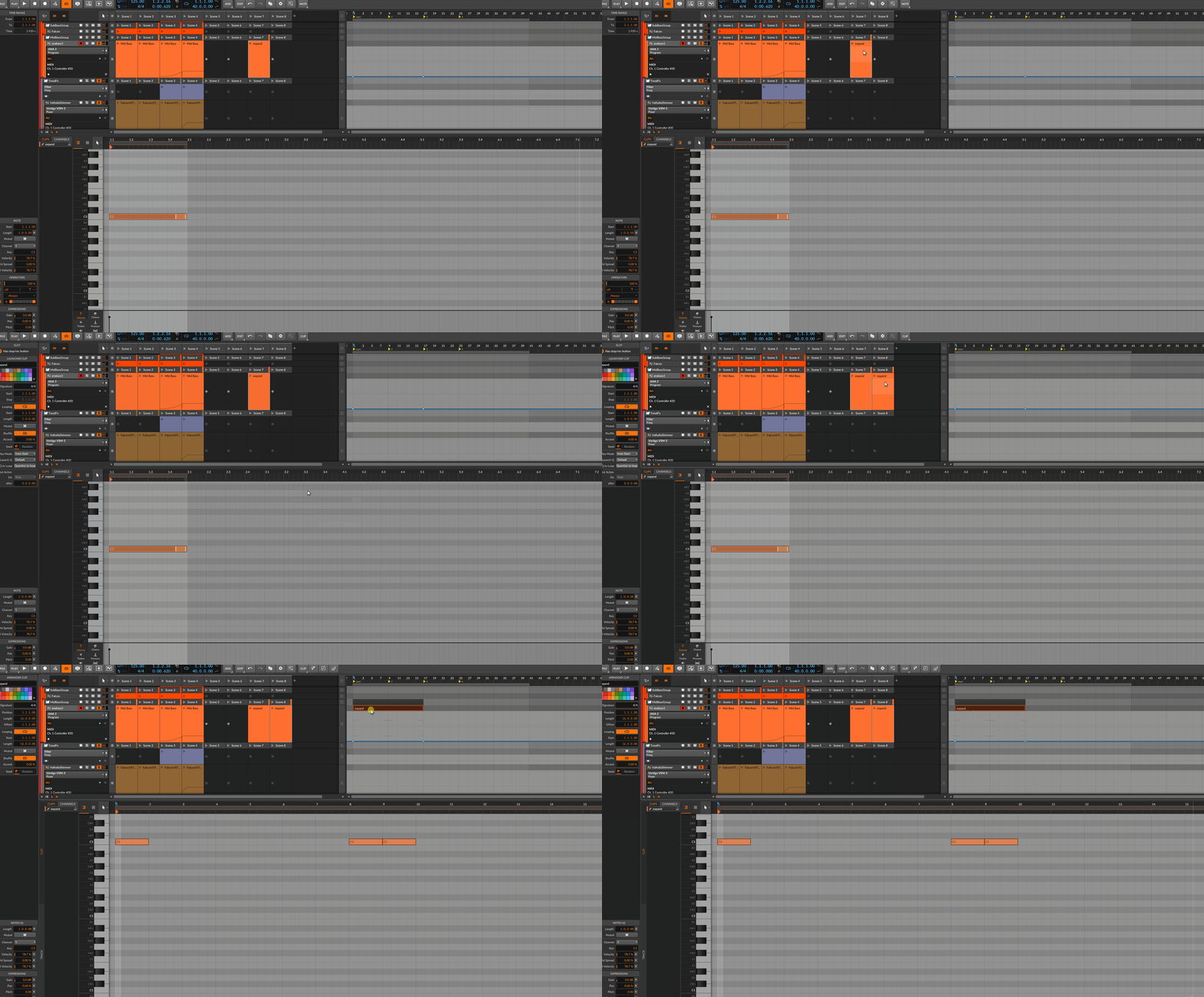
especially operators and 'expand...' works nicely together in Bitwig
Image
you need a note only in the first and last looping, voilà, lovely feature
"Where we're workarounding, we don't NEED features." - powermat

Post

antic604 wrote: Wed Jan 12, 2022 5:57 pm

So make up your mind which one is it? Are you only using the Clip Launcher to just record bits and pieces but arrange them in Arranger (#3)? Or do you basically complete the song in Clip Launcher and just refine in Arranger (#2)?

Obviously I don't expect anyone to always work the same way - sometimes I have nothing in Clip Launcher, sometime just one scene that inspires the rest of the track in Arranger, sometimes I have a big part of full arrangement spread out in scenes in Clip Launcher. But in my case it was closer - and definitely more frequent - to work as I described in #3 :)
You have to bear in mind that I am new to Bitwig, and the way I work is probably not optimum, but in many ways I am copying how I work in a linear DAW.

So I start in the normal way in session view by making as many tracks as I need with various synths sounds on them. You know, bass on one, pad on another, drums etc. I probably normally record a bass clip of four bars as a guide which then loops. Go ahead and record synth piano, pad etc on different tracks, and varying lengths of bars. The melody can be many bars long. Then I start copying clips into scenes leaving out bars as needed, and bringing them back in when needed. When the whole thing is arranged as scenes in the order I want them, I then drag them in that same sequence into the arranger view. The end result is much like it would be in a linear DAW.

I guess the main difference from a traditional linear DAW is that the original song is now in both views, the session, and arranger. And if I wanted I could play it live by triggering clips and scenes,or just treat it as a normal linear recording. A great way of working I think.

Now what number is that in your poll? :)

Post Reply

Return to “Hosts & Applications (Sequencers, DAWs, Audio Editors, etc.)”