Windows 10 audio recorder for recording soundcard

Audio Plugin Hosts and other audio software applications discussion
Post Reply New Topic
RELATED
PRODUCTS

Post

hi,
can't believe i am actually asking this, I am not a complete n00b when it comes to making music, but back in the days windows used to have an audio recorder to, well, record anything that was played back by the soundcard. I didn't have a need for it for years and years apparently, but yesterday I was in need and didn't know how to achieve it.

My question: what piece of software helps me to record my soundcard? 8)

thanks in advance, Slug

Post

A DAW ... Live, Cubase, Logic, etc or a WAV editor like Soundforge & Wavelab :)

Post

If you want to go free, try Audacity

Post

If something is playing on YouTube (for example) through your soundcard to the speakers you can't just use a DAW to record it. An audio interface like some Focusrite stuff has a loopback feature that will record "what you hear". My Scarlett has it as did the Saffire before it.
I do believe it was THE INTRANCER who got me into loopback recording back in the PUF days of long ago!

Usings Audacity’s WASAPI Loopback feature is a bit cheaper though!
Google it.

Grum.

Post

Yes Audacity works fine for this.

Post

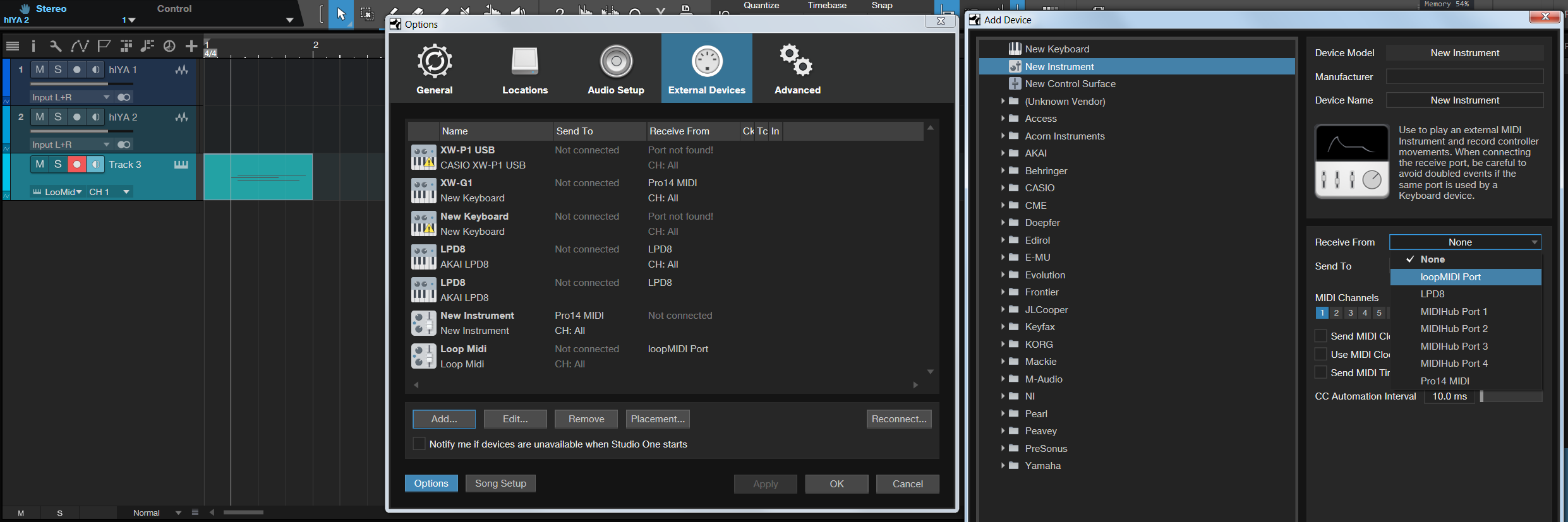
Yeah, as Grumbleweed mentions, the solution I used which was specifically to act as a workaround to bring Native Instruments Reaktor ensemble instruments into Propellerheads Reason 7 was to use the Focusrite feature of the Pro 14 Firewire interface, 'Loopback'. This is setup using the Saffire utility software and selected from the audio channel you create within Reason or any host audio software. Loopback essentially allows any audio to be passed through this pipeline source that has it selected, so in my case I set this up in Reaktors audio preferences. To trigger the instrument ensembles in Reaktor requires an additional free utility called 'Loopmidi' that sits in the background running (accessible vie the little icons on the windows toolbar).

With Reason 7 which included the Midi Out device, the midi out for loopmidi was selected and midi input selected in Reaktor. Once that's all setup, the ability to use ensembles is easy as the preferences are saved. The process would be to start up Reaktor load an ensemble, start up Reason, create a Midi Output device, create an audio channel track and record both the note data and the audio directly.
Caution is needed with the input volume level as it can explode the volume to cause a feedback loop explosion in Reason.

Until Reason supported VST instruments, it was really the only way to have Reaktor inside Reason outside using Rack Extensions and ended the need to buy any more. When I bought Studio One 2 Pro in 2014, I did have to do this. Still for anyone that has the same software and hardware capabilities, it's still a viable old-skool way of doing things.

Loopmidi in Studio One

Image

In the old days, you could select 'What You Hear' if using a Creative Blaster Soundcard from Windows audio settings.
Last edited by THE INTRANCER on Sun Feb 27, 2022 11:43 pm, edited 2 times in total.
KVR S1-Thread | The Intrancersonic-Design Source > Program Resource | Studio One Resource | Music Gallery | 2D / 3D Sci-fi Art | GUI Projects | Animations | Photography | Film Docs | 80's Cartoons | Games | Music Hardware |

Post


Post


Post Reply

Return to “Hosts & Applications (Sequencers, DAWs, Audio Editors, etc.)”