

Smart tool? But I think there is no way to disable the automatic eraser from the pen tool? Or is that option hidden in some smart tool options?THE INTRANCER wrote: Sun Mar 06, 2022 2:13 pmBartone wrote: Sun Mar 06, 2022 11:51 am
I could consider Cubase now since it doesn’t need the dongle anymore. But I am waiting for the demo to be available (the free trial version will be released soon - no any info /estimated time when it will be).
S1 is very nice. But I would really like to try Cubase12 how it feels/compares. Especially the workflow S1 vs Cubase12.
I really don’t like in S1 the pen & eraser function in piano roll. I know I can use the arrow tool for drawing and then the eraser tool isn’t automatically there… but I find the double clicking a bit frustrating compared to single click with the pen…
Studio One is vastly superior in looks, feel and workflow in comparison to Cubase. It is pretty much a modern version of Cubase that forgoes older conventions. Cubase looks old with it's curved corners, UI elements that look like they came Magix Music Maker 20 years ago, and a workflow that generally feels like a slog in comparison. Studio One does have smart tool features which you should explore.
Is Studio 1 the only realistic alternative to Cubase ?
-

- KVRist
- 387 posts since 4 Apr, 2021
-
- KVRAF
- 3496 posts since 30 Dec, 2014
If you hold CTRL whilst using the pointer, you can single click input notes rather than having to double click. You can't disable the behaviour of these tools by disabling them.Bartone wrote: Mon Mar 07, 2022 5:35 pm Smart tool? But I think there is no way to disable the automatic eraser from the pen tool? Or is that option hidden in some smart tool options?
If you have a gaming mouse, you could map a button to CTRL and Left mouse button click for example.
There are software solutions also for mapping your mouse.
https://www.raymond.cc/blog/changing-an ... s-actions/
KVR S1-Thread | The Intrancersonic-Design Source > Program Resource | Studio One Resource | Music Gallery | 2D / 3D Sci-fi Art | GUI Projects | Animations | Photography | Film Docs | 80's Cartoons | Games | Music Hardware |
-
- KVRAF
- 5144 posts since 3 Oct, 2013
^^^ yepp, also works in Cubase, Logitech
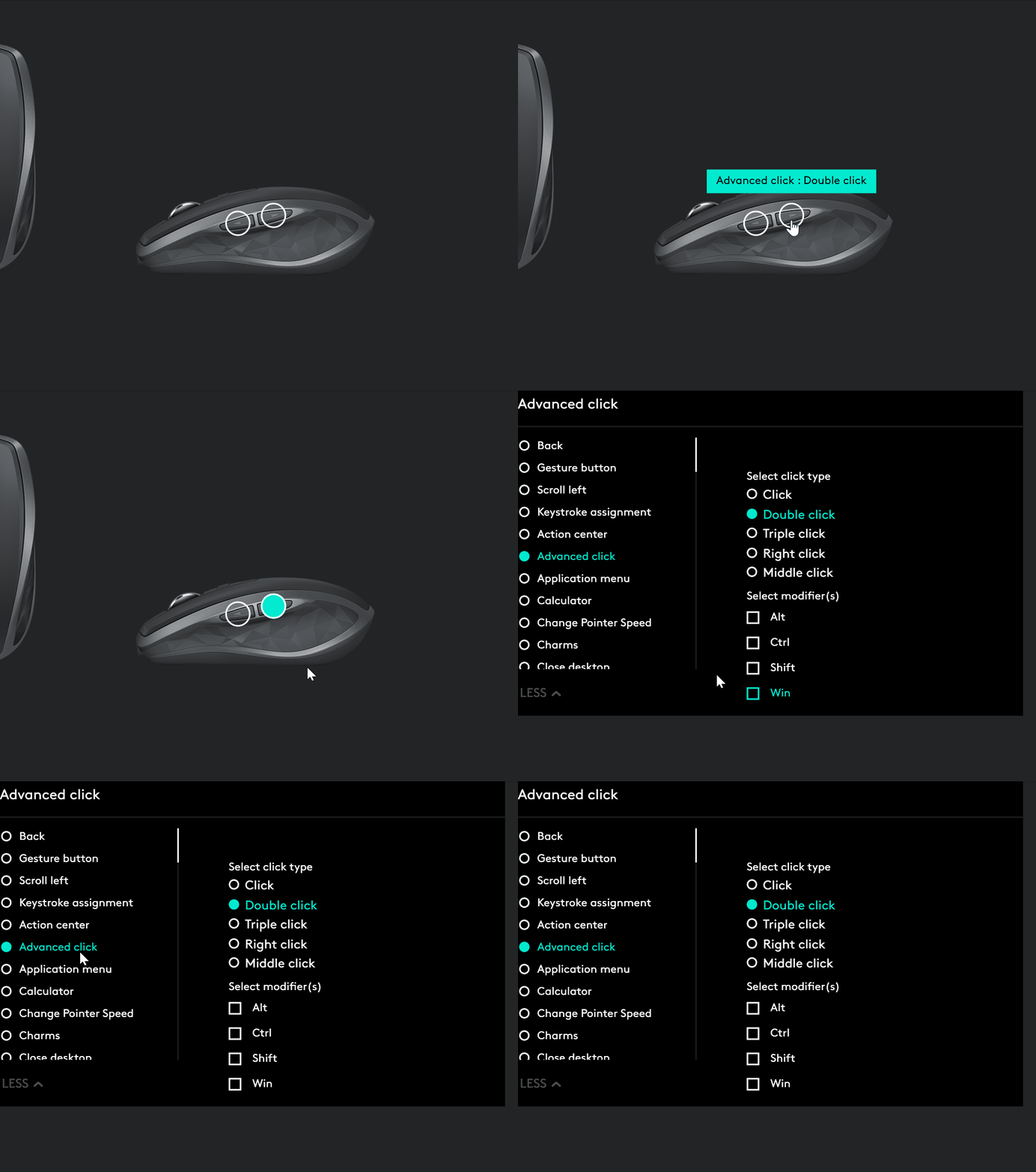
double-clicking can be assigned, so drawing/erasing can be done using this one
double-clicking can be assigned, so drawing/erasing can be done using this one
"Where we're workarounding, we don't NEED features." - powermat
-

- GRRRRRRR!
- 17766 posts since 14 Jun, 2001 from Somewhere you're not!
What automatic eraser? If I want to get rid of anything, I have to press the delete key (or double-press on notes in the piano roll). I don't even know if you can get to the eraser in the Smart Tool, I change tools.Bartone wrote: Mon Mar 07, 2022 5:35 pmSmart tool? But I think there is no way to disable the automatic eraser from the pen tool? Or is that option hidden in some smart tool options?
Oh, so that's why CTRL doesn't work to cut things in the piano roll, like it does in the arrangment. Good to know.THE INTRANCER wrote: Mon Mar 07, 2022 6:33 pmIf you hold CTRL whilst using the pointer, you can single click input notes rather than having to double click.
NOVAkILL : Legion GO, AMD Z1x, 16GB RAM, Win11 | Audient EVO 8 | Lumi Keys | Studio Pro 8
Korg Odyssey, bx-oberhausen, Proxima, PolyMax, GR8, JP6K, Union, Atomika,
Invader 2, Flow Motion, Olga, TRK 01, Thorn, Spire, VG Iron
Korg Odyssey, bx-oberhausen, Proxima, PolyMax, GR8, JP6K, Union, Atomika,
Invader 2, Flow Motion, Olga, TRK 01, Thorn, Spire, VG Iron
-
- KVRist
- 387 posts since 4 Apr, 2021
Are you using S1 5? I think if I remember right this feature did come only in S1 5.BONES wrote: Tue Mar 08, 2022 2:10 amWhat automatic eraser? If I want to get rid of anything, I have to press the delete key (or double-press on notes in the piano roll). I don't even know if you can get to the eraser in the Smart Tool, I change tools.Bartone wrote: Mon Mar 07, 2022 5:35 pmSmart tool? But I think there is no way to disable the automatic eraser from the pen tool? Or is that option hidden in some smart tool options?Oh, so that's why CTRL doesn't work to cut things in the piano roll, like it does in the arrangment. Good to know.THE INTRANCER wrote: Mon Mar 07, 2022 6:33 pmIf you hold CTRL whilst using the pointer, you can single click input notes rather than having to double click.
So it works like this: you have pen tool, you draw a midi note. If you want to replace the note the paint tool automatically changes into eraser tool. So you need to either erase the midi note and draw it again. Or change the pen tool into arrow tool.
It’s not a HUGE thing, but it is still a bit annoying and strange that you can’t choose if you want to use this type feature.
-
- KVRist
- 387 posts since 4 Apr, 2021
If you have a gaming mouse, you could map a button to CTRL and Left mouse button click for example.
There are software solutions also for mapping your mouse.
https://www.raymond.cc/blog/changing-an ... s-actions/
[/quote]
Thank you both for these ideas! This could be the trick! Thanks!xbitz wrote: Mon Mar 07, 2022 7:33 pm ^^^ yepp, also works in Cubase, Logitech
double-clicking can be assigned, so drawing/erasing can be done using this one
 I will try to do this
 -

- Banned
- Topic Starter
- 4491 posts since 8 Jul, 2008 from UK
Typical, I want to demo Studio 1 again and my trial period ran out from when I tried to demo it years ago and it never even loaded.
Are Presonus a decent company ? I asked for a new demo period, and maybe S1 might actually work this time.
Are Presonus a decent company ? I asked for a new demo period, and maybe S1 might actually work this time.
Don't trust those with words of weakness, they are the most aggressive
-
- KVRAF
- 2772 posts since 28 Mar, 2007
I had the same experience as you, the demo never worked and I still cannot demo 5.LeVzi wrote: Tue Mar 08, 2022 2:18 pm Typical, I want to demo Studio 1 again and my trial period ran out from when I tried to demo it years ago and it never even loaded.
Are Presonus a decent company ? I asked for a new demo period, and maybe S1 might actually work this time.
-
- Banned
- Topic Starter
- 4491 posts since 8 Jul, 2008 from UK
Ah shit, this aint good.dellboy wrote: Tue Mar 08, 2022 2:31 pmI had the same experience as you, the demo never worked and I still cannot demo 5.LeVzi wrote: Tue Mar 08, 2022 2:18 pm Typical, I want to demo Studio 1 again and my trial period ran out from when I tried to demo it years ago and it never even loaded.
Are Presonus a decent company ? I asked for a new demo period, and maybe S1 might actually work this time.
Don't trust those with words of weakness, they are the most aggressive
-
- KVRian
- 534 posts since 26 Mar, 2014
Just make a new account with a different email address to try the demo.LeVzi wrote: Tue Mar 08, 2022 3:14 pmAh shit, this aint good.dellboy wrote: Tue Mar 08, 2022 2:31 pmI had the same experience as you, the demo never worked and I still cannot demo 5.LeVzi wrote: Tue Mar 08, 2022 2:18 pm Typical, I want to demo Studio 1 again and my trial period ran out from when I tried to demo it years ago and it never even loaded.
Are Presonus a decent company ? I asked for a new demo period, and maybe S1 might actually work this time.
Mac mini m4 pro, Reaper, too many plugins, Modal Argon8, Novation Circuit Mono Station and now a lovely Waldorf Blofeld.
-
- Banned
- Topic Starter
- 4491 posts since 8 Jul, 2008 from UK
Yeah seems like that's the only option. PITA though.Kypresso wrote: Tue Mar 08, 2022 3:18 pmJust make a new account with a different email address to try the demo.LeVzi wrote: Tue Mar 08, 2022 3:14 pmAh shit, this aint good.dellboy wrote: Tue Mar 08, 2022 2:31 pmI had the same experience as you, the demo never worked and I still cannot demo 5.LeVzi wrote: Tue Mar 08, 2022 2:18 pm Typical, I want to demo Studio 1 again and my trial period ran out from when I tried to demo it years ago and it never even loaded.
Are Presonus a decent company ? I asked for a new demo period, and maybe S1 might actually work this time.
Don't trust those with words of weakness, they are the most aggressive
-
- GRRRRRRR!
- 17766 posts since 14 Jun, 2001 from Somewhere you're not!
I am on the latest version - 5.5.1 - and I can recall that happening to me on occasion but either I found a way around it or they changed it because I can't remember the last time it happened to me, unless you click and then click again straight away. Maybe try marquee selecting?Bartone wrote: Tue Mar 08, 2022 8:58 amAre you using S1 5? I think if I remember right this feature did come only in S1 5.
So it works like this: you have pen tool, you draw a midi note. If you want to replace the note the paint tool automatically changes into eraser tool. So you need to either erase the midi note and draw it again. Or change the pen tool into arrow tool.
NOVAkILL : Legion GO, AMD Z1x, 16GB RAM, Win11 | Audient EVO 8 | Lumi Keys | Studio Pro 8
Korg Odyssey, bx-oberhausen, Proxima, PolyMax, GR8, JP6K, Union, Atomika,
Invader 2, Flow Motion, Olga, TRK 01, Thorn, Spire, VG Iron
Korg Odyssey, bx-oberhausen, Proxima, PolyMax, GR8, JP6K, Union, Atomika,
Invader 2, Flow Motion, Olga, TRK 01, Thorn, Spire, VG Iron
-
musicproducerdee musicproducerdee https://www.kvraudio.com/forum/memberlist.php?mode=viewprofile&u=478446
- KVRist
- 422 posts since 9 Nov, 2020 from Los Angeles, CA
Ok, I'm not 100% sure as to what exactly you guys are trying to figure out with the smart tool, so I'm not gonna quote anyone on this, but here's what I understand.
So you're drawing notes on the piano roll using the "paint tool" which automatically turns into an "eraser" when you hover over the notes you've drawn. You can already change the note length by dragging the note from the start or end of it.
Now let's say you want to drag the note around or want to change the note itself (from G to G#), without having to erase it and draw it again (you still have the paint tool selected). All you need to do is hover over the note and wait for the cursor to change into the "eraser".
Now press hold "Ctrl" and click on the note you wish to move around. Now (this is important), release "Ctrl" without releasing the mouse click and drag the note around wherever you wish to. Done.
PS: If you do not release "Ctrl" before moving the note around, it's gonna keep the original note in place and create a duplicate note (basically copy paste).
Hope someone found this helpful
So you're drawing notes on the piano roll using the "paint tool" which automatically turns into an "eraser" when you hover over the notes you've drawn. You can already change the note length by dragging the note from the start or end of it.
Now let's say you want to drag the note around or want to change the note itself (from G to G#), without having to erase it and draw it again (you still have the paint tool selected). All you need to do is hover over the note and wait for the cursor to change into the "eraser".
Now press hold "Ctrl" and click on the note you wish to move around. Now (this is important), release "Ctrl" without releasing the mouse click and drag the note around wherever you wish to. Done.
PS: If you do not release "Ctrl" before moving the note around, it's gonna keep the original note in place and create a duplicate note (basically copy paste).
Hope someone found this helpful
Ableton Live | Pro Tools | Launchpad X | Numark Party Mix II | Arturia MINILAB 3
-
- KVRAF
- 2772 posts since 28 Mar, 2007
I just tried that with a different account and it still says that your demo has expired. So whether the license is tied to the computer or maybe a persons IP address I do not know. Maybe I will have to dig out my old laptop and see if it works on that.Kypresso wrote: Tue Mar 08, 2022 3:18 pm
Just make a new account with a different email address to try the demo.
-
musicproducerdee musicproducerdee https://www.kvraudio.com/forum/memberlist.php?mode=viewprofile&u=478446
- KVRist
- 422 posts since 9 Nov, 2020 from Los Angeles, CA
Studio One has a free version of the DAW, in case you just need to test out the workflow etc. Although it won't have all the features from artist/pro.dellboy wrote: Wed Mar 09, 2022 9:33 amI just tried that with a different account and it still says that your demo has expired. So whether the license is tied to the computer or maybe a persons IP address I do not know. Maybe I will have to dig out my old laptop and see if it works on that.Kypresso wrote: Tue Mar 08, 2022 3:18 pm
Just make a new account with a different email address to try the demo.
You can alternatively sign up for a splice.com account and sign up for the Studio One rent-to-own plan. They'll let you test out the software for 3 days (fully functional) before charging you. Although, if you do this, don't forget to cancel the rent-to-own plan before 3 days or you'll be charged. Hope this helps.
EDIT: You can also sign up for Sphere for a month for $14.99 which will give you the full version of the DAW and a lot of extras to go with. In case you want to test it out extensively before making a decision.
Ableton Live | Pro Tools | Launchpad X | Numark Party Mix II | Arturia MINILAB 3