
unwanted Loopback audio in UAD on Mac Os

Configure and optimize you computer for Audio.
Post Reply New Topic
RELATED
PRODUCTS

Post

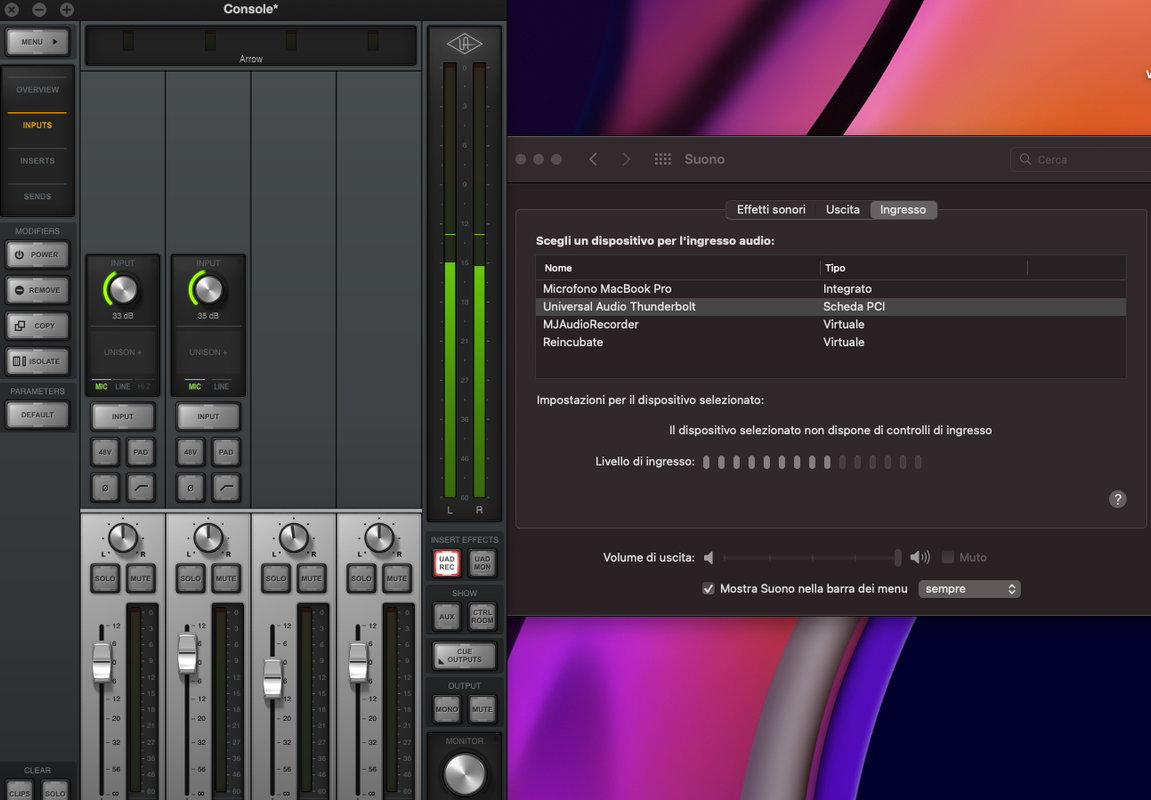
Hello there, I would like to know why meanwhile I listen to Spotify I'll see the audio that enters in my microphone on mac.

Image
As you can see in the image, on the UAD console side, the 2 input channels (my microphone) are not capturing any audio, but on my sound preferences does. This drives me crazy and I don't know how to fix it and why this sh*t happens!

This could be some misconfiguration on my macintosh? :help:
Thanks for the help.

Post

More information would help. I'm wondering why you have Spotify running when you are recording via microphones? From your post I get the idea you have 2 mics connected(?). Is this happening inside your DAW? If so, which DAW? Have you got the UAD set up correctly in the audio control panel? Are you using monitors, builtin speakers, or headphones? Please provide as much info about your setup as possible.

Post

thecontrolcentre wrote: Thu Mar 10, 2022 9:54 pm More information would help. I'm wondering why you have Spotify running when you are recording via microphones? From your post I get the idea you have 2 mics connected(?). Is this happening inside your DAW? If so, which DAW? Have you got the UAD set up correctly in the audio control panel? Are you using monitors, builtin speakers, or headphones? Please provide as much info about your setup as possible.
Hello there, I have 2 inputs on my interface, the first one is used by an external synth, the second one is used by the microphone. This happens everywhere, for example, If I'm using Zoom, and I choose Universal Audio interface as input (microphone) my output return in my input (as you can see in the previous photo) but this happens only on the system, not in the UAD mixer.
The point is, is normal that the sound that I hear returns in my input? even if I use headphones and the microphone is off?

Post Reply

Return to “Computer Setup and System Configuration”