Is Studio 1 the only realistic alternative to Cubase ?

Audio Plugin Hosts and other audio software applications discussion
RELATED
PRODUCTS

Post

_leras wrote: Sat Mar 19, 2022 4:45 pm
xbitz wrote: Sat Mar 19, 2022 1:33 pm ^^^ have you tried to use Bitwig with audio materials, multi drum tracks and quantizing audio with shuffling for ex. ?


( https://bitwish.top/t/audio-quantize/24 :) )
No. I never need to do that sort of thing and would lean to cubase for that or similar multi channel audio processing.

I use Bitwig for mainly electronic music production.

And for me, all the way up to the mixing stage, Bitwig just has better flow.
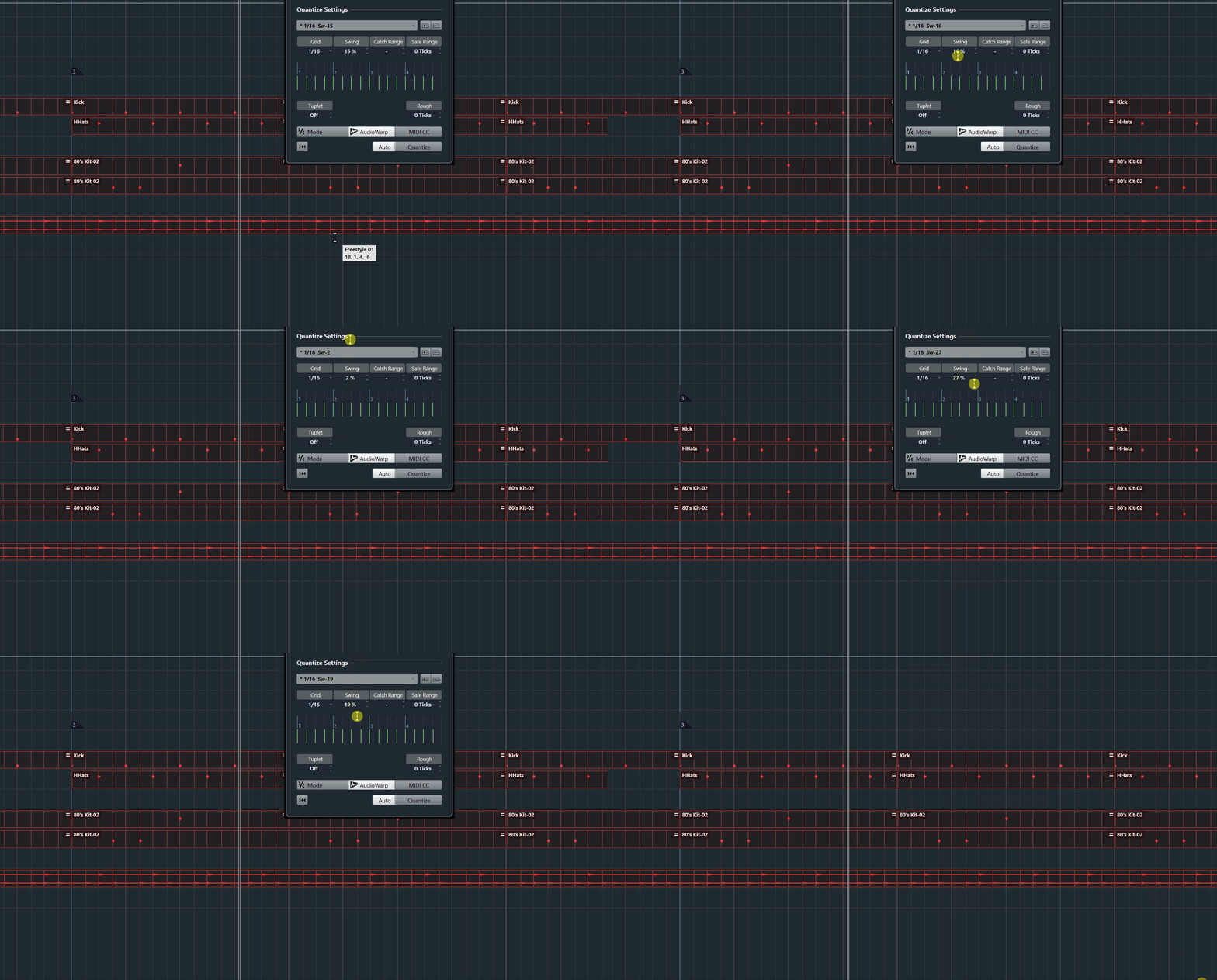
no need for multi-channel audio, EDM also uses shuffling so it comes up with mixed MIDI+audio cases too
Image
I love Bitwig otherwise but it's a really little bit simple in some areas but perfect as secondary DAW (has totally different focus than the post-processing oriented DAWs)
"Where we're workarounding, we don't NEED features." - powermat

Post

egbert wrote: Sat Mar 19, 2022 5:01 pm Why do people bag Reaper? Just the fact that it is there delivering a capable product at 60 bucks or whatever is keeping a lid on price gouging and rampant crippling of other products. It starts in notime flat, can run on any number of machines, and is as stable AF. I have used and beta tested many of the others mentioned here as well but I fire up Reaper at least once a day. I use it as a juke box for playalongs for instrumental practice, as a test platform and for simple projects. I have had innumerable projects crash over the years on all the other major DAWs but Reaper just soldiers on so reliably and is really processor efficient.
Because it's ugly. It fell out of the ugly tree and hit every branch on the way down.

I spent a month with v5 and put the lipstick on it and it still was ugly underneath and the lipstick kept wearing off. I know they've since addressed some graphics issues that I was seeing, but my previous experience doesn't make me want to try again. Maybe if they crammed even more settings into that tiny settings window... :hihi:

It was time spent programming and renovating when it should have been time spent creating. Otherwise, for people who don't care as much about such things, it's an incredible DAW for any price.
I started on Logic 5 with a PowerBook G4 550Mhz. I now have a MacBook Air M1 and it's ~165x faster! So, why is my music not proportionally better? :(

Post

BONES wrote: Sat Mar 19, 2022 2:58 am I used Cubase for months, maybe more than a year, before I accidentally found out that I didn't have to move the f**king thing back to the start with the mouse. Little things like that make it feel so out of touch.
I mean you can just hit the dot on the numpad or customize that to any shortcut you prefer.

Or even to any MIDI button with the new remote editor in Cubase 12.

Post

xbitz wrote: Sat Mar 19, 2022 5:11 pm no need for multi-channel audio, EDM also uses shuffling so it comes up with mixed MIDI+audio cases too

I love Bitwig otherwise but it's a really little bit simple in some areas but perfect as secondary DAW (has totally different focus than the post-processing oriented DAWs)
Sure, but you posted a clip about audio quantise, which I don't really need. I take care of that before bouncing to audio tracks.

I do hope Bitwig adds some kind of groove template/pool - but it doesn't stop me from playing or programming groove how I want it.

I don't think I'd suggest Bitwig as a post processing tool for putting audio to pictures or compositing and audio book. but that also isn't what I'm using it for.

Bitwig, for me, really shines as a tool for creating - it just doesn't slow me down. I like cubase too, but since using Bitwig when I go back to cubase it just feels clunky and slower to use in the creation stages - and that's even with some prebuilt templates I use.

Post

pierb wrote: Sat Mar 19, 2022 7:59 pm
BONES wrote: Sat Mar 19, 2022 2:58 am I used Cubase for months, maybe more than a year, before I accidentally found out that I didn't have to move the f**king thing back to the start with the mouse. Little things like that make it feel so out of touch.
I mean you can just hit the dot on the numpad or customize that to any shortcut you prefer.

Or even to any MIDI button with the new remote editor in Cubase 12.
I think because he is using a laptop, so he doesn't have num pad.
Isn't possible to access the same on the laptop keyboard? I don't know! I will check to see.
The num pad is very essential to the shortcuts. Not only Cubase, but Studio one uses almost the same shortcuts.
Using: Cubase Pro 15, Reason 13, Tascam US-4x4HR, MODX6, DM12D, LaunchKey 49, Yamaha guitar(Pacifica 612v) and bass (BB234) and some virtual instruments and synths.

Post

LeVzi wrote: Sun Feb 20, 2022 1:12 pm I've been looking at other DAW's , not because I plan to move from Cubase, but you never know what might happen, and from what I see Studio 1 is it's only real alternative that won't force a re-learn completely.

Linear DAW's similar structure, lots on the inside etc.

I've tried Ableton, just hate the way it works. I tried Bitwig earlier, identical feel to Ableton, I uninstalled instantly. Not saying they are bad, just do not suit my style of working.

I've never tried Reaper, so how does that compare to the way Cubase/S1 works ?

FL Studio is not an option, and I already have it.
Logic, Reaper, Mixbus, Digital Performer and Pro Tools are similar. I'm not familiar enough with Windows only DAWs to have an opinion about those. Find one that is stable and use that. It's easier to learn a new DAW than it is to stay inspired when you have constant crashes.

Post

egbert wrote: Sat Mar 19, 2022 5:01 pm Why do people bag Reaper? Just the fact that it is there delivering a capable product at 60 bucks or whatever is keeping a lid on price gouging and rampant crippling of other products. It starts in notime flat, can run on any number of machines, and is as stable AF. I have used and beta tested many of the others mentioned here as well but I fire up Reaper at least once a day. I use it as a juke box for playalongs for instrumental practice, as a test platform and for simple projects. I have had innumerable projects crash over the years on all the other major DAWs but Reaper just soldiers on so reliably and is really processor efficient.
Because Reaper is like using Windows 98 shareware. :shrug:
What's up with that plugin menu window? Truly awful.
THIS MUSIC HAS BEEN MIXED TO BE PLAYED LOUD SO TURN IT UP

Post

pierb wrote: Sat Mar 19, 2022 7:59 pmI mean you can just hit the dot on the numpad or customize that to any shortcut you prefer.
Laptops don't often have numpads. Even so, why would it be the period key when every other timeline based application in the universe uses the HOME key? This is a great example of how Cubase is - easy enough if you already know how to use it but quite unintuitive if you don't. OTOH, I took to S1 like a duck to water because all that stuff was far more intuitive. To be fair, having come from Cubase undoubtedly helped in some places but not to any great extent.
EnGee wrote: Sat Mar 19, 2022 9:02 pmNot only Cubase, but Studio one uses almost the same shortcuts.
S1 uses whichever shortcuts you care to assign. It's kinda cool like that. But the thing is, I am not a big user of hotkeys as my keyboard is often less accessible than my mouse - up on a stand with a hardware keyboard in front/below it. You also have to be able to learn hotkeys and if there isn't a button with a tooltip to tell you, you can't learn it.

The boxed version of one of my graphics applications, Xara, used to come with a little laminated card with all the important hotkeys on it and that was very handy. Later on they changed a lot of them to conform to Photoshop and that was even handier.
licasto2 wrote: Sat Mar 19, 2022 9:19 pmFind one that is stable and use that.
Is that really a big issue for many people? Because I've never had any serious problems with any of the hosts I've used. I think I might have lost work once or twice in 18 months with Cubase, hardly the end of the world, but I've never lost any work with S1 or Orion.
NOVAkILL : Legion GO, AMD Z1x, 16GB RAM, Win11 | Audient EVO 8 | Lumi Keys | Studio Pro 8
Korg Odyssey, bx-oberhausen, Proxima, PolyMax, GR8, JP6K, Union, Atomika,
Invader 2, Flow Motion, Olga, TRK 01, Thorn, Spire, VG Iron

Post

@Bones
It is getting harder to find laptops with numpads. All the larger 16/17" models used to have them, then Apple dumped the numpad on a 17" so that you would be able to admire more of the plastic top. Even some of the recent high-end Dells have followed suit and ditched the numpad. Some big Dells, the HP Envy and all the Clevo derived machines (MSI, Metabox etc) have numpads on their larger machines. All the old Toshibas had numpads but unfortunately they sold the laptop business on due to financial dramas.

Post

The numpad keys are useful part of the workflow because it includes the most important in navigation/recording:
* = start recording
/ = toggle loop
Enter = play
0 = return to the last stop
. = return to start
, = (forgot!)
1 is for marker 1,
2 and 3 are for loop start and end,
4 to 9 are for markers.
This from memory for both Cubase and S1 but there is a difference in using 1-9 between them. Here, there is an old video but useful for S1 shortcuts:
Using: Cubase Pro 15, Reason 13, Tascam US-4x4HR, MODX6, DM12D, LaunchKey 49, Yamaha guitar(Pacifica 612v) and bass (BB234) and some virtual instruments and synths.

Post

BONES wrote: Sun Mar 20, 2022 1:21 am Laptops don't often have numpads. Even so, why would it be the period key when every other timeline based application in the universe uses the HOME key? This is a great example of how Cubase is - easy enough if you already know how to use it but quite unintuitive if you don't. OTOH, I took to S1 like a duck to water because all that stuff was far more intuitive. To be fair, having come from Cubase undoubtedly helped in some places but not to any great extent.
But also... If it was so annoying you could/should have taken a quick look at the short cut key list and changed it if needed.

I don't think cubase ever misses a bit of functionality. In fact I'd say it has so much that no-one knows it all.

Post

_leras wrote: Sun Mar 20, 2022 8:13 am
BONES wrote: Sun Mar 20, 2022 1:21 am Laptops don't often have numpads. Even so, why would it be the period key when every other timeline based application in the universe uses the HOME key? This is a great example of how Cubase is - easy enough if you already know how to use it but quite unintuitive if you don't. OTOH, I took to S1 like a duck to water because all that stuff was far more intuitive. To be fair, having come from Cubase undoubtedly helped in some places but not to any great extent.
But also... If it was so annoying you could/should have taken a quick look at the short cut key list and changed it if needed.

I don't think cubase ever misses a bit of functionality. In fact I'd say it has so much that no-one knows it all.
I don't, I don't think I scratch the surface half the time tbh.
Don't trust those with words of weakness, they are the most aggressive

Post

I think for Cubase and S1 users who have laptops, it worth it to have a separate 101 keyboard & mouse because of the shortcuts and in general it is more comfy to control and input. Maybe wireless devices are more convenient than wired.
Using: Cubase Pro 15, Reason 13, Tascam US-4x4HR, MODX6, DM12D, LaunchKey 49, Yamaha guitar(Pacifica 612v) and bass (BB234) and some virtual instruments and synths.

Post

jamcat wrote: Sat Mar 19, 2022 9:26 pm
egbert wrote: Sat Mar 19, 2022 5:01 pm Why do people bag Reaper? Just the fact that it is there delivering a capable product at 60 bucks or whatever is keeping a lid on price gouging and rampant crippling of other products. It starts in notime flat, can run on any number of machines, and is as stable AF. I have used and beta tested many of the others mentioned here as well but I fire up Reaper at least once a day. I use it as a juke box for playalongs for instrumental practice, as a test platform and for simple projects. I have had innumerable projects crash over the years on all the other major DAWs but Reaper just soldiers on so reliably and is really processor efficient.
Because Reaper is like using Windows 98 shareware. :shrug:
What's up with that plugin menu window? Truly awful.
I so agree! I was very excited to try Reaper since it was said to be so cool and giving so much options… But I could not get over how it looked. I think you can modify it to look more modern (if I am not wrong) but I don’t have time not energy to do that when other DAWs look modern and inspiring right out of the box!

Post

EnGee wrote: Sat Mar 19, 2022 9:02 pm I think because he is using a laptop, so he doesn't have num pad.
Isn't possible to access the same on the laptop keyboard? I don't know! I will check to see.
The num pad is very essential to the shortcuts. Not only Cubase, but Studio one uses almost the same shortcuts.
Maybe but, like I wrote before, you can set up your own shortcut if your keyboard does not have a numpad.

Post Reply

Return to “Hosts & Applications (Sequencers, DAWs, Audio Editors, etc.)”