Is Studio 1 the only realistic alternative to Cubase ?

Audio Plugin Hosts and other audio software applications discussion
Post Reply New Topic
RELATED
PRODUCTS

Post

If I click on it (with a couple of options enabled) all that will happen anyway and clicking the mouse is easier than pressing a key.
andypryce wrote: Tue Mar 22, 2022 1:50 amIt is impossible to put all those features on the GUI, that would be carnage.
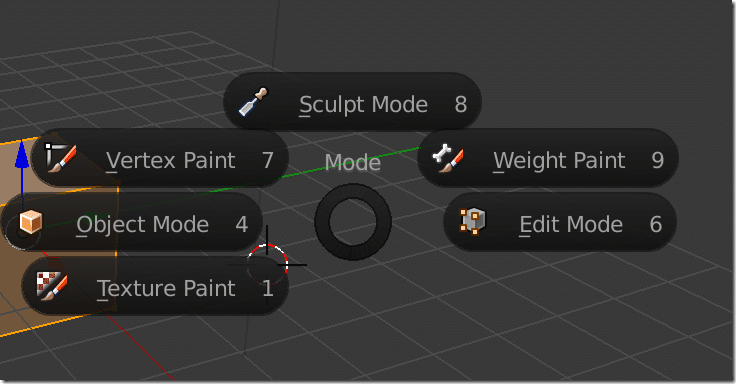
Things don't need to be directly on the GUI, they can simply be accessed via the GUI, in fly-outs and right-click menus and stuff like that. 3D applications tend to do it quite well - and DAWs are simple applications by comparison - like the completely customisable Quad Menu in 3DS Max -

Image

Or the contextual Pie Menu in Blender -
Image
NOVAkILL : Legion GO, AMD Z1x, 16GB RAM, Win11 | Audient EVO 8 | Lumi Keys | Studio Pro 8
Korg Odyssey, bx-oberhausen, Proxima, PolyMax, GR8, JP6K, Union, Atomika,
Invader 2, Flow Motion, Olga, TRK 01, Thorn, Spire, VG Iron

Post

sleepypoos wrote: Tue Mar 22, 2022 2:02 am
jamcat wrote: Tue Mar 22, 2022 1:54 am The only keystrokes I use are the spacebar, enter, and 'D'.
Sometimes I use the arrow keys to move MIDI notes.
What else do you need?

I'm very comfortable with the way I use Studio One.
What about being able to press a key and instantly have the lead vocal track selected and positioned on screen, the channel editor opened, the track height maximized, and zoom width perfectly focused on the totality of data on said lead vocal track... all one button press.
Nope. Never wanted to, either.
I pretty much just record audio and spend 99% of the time in the mixer and plugins.
I can't think of a reason to open an audio track in the editor.
Maybe the MIDI editor or Melodyne, but not the linear audio editor. :shrug:

Aw dang. He's banned now.
THIS MUSIC HAS BEEN MIXED TO BE PLAYED LOUD SO TURN IT UP

Post

sleepypoos wrote: Tue Mar 22, 2022 2:02 am
jamcat wrote: Tue Mar 22, 2022 1:54 am The only keystrokes I use are the spacebar, enter, and 'D'.
Sometimes I use the arrow keys to move MIDI notes.
What else do you need?

I'm very comfortable with the way I use Studio One.
What about being able to press a key and instantly have the lead vocal track selected and positioned on screen, the channel editor opened, the track height maximized, and zoom width perfectly focused on the totality of data on said lead vocal track... all one button press.
I think you can do that in Studio One (maybe you need to press 2 keys or a key & mouse click). I really haven’t used those functions but I remember there was a video showing them in Studio One - correct me if I am wrong/if you can do those in S1?

Any idea why he is banned?

Post

Look at his posts in HPC.

Post

Did they finally added cycle markers with batch export to S1? Without it and ability to make cycle marker per event under one key shortcut, S1 is useless for me. This is one example of a wee feature that for some can be a "be or not to be of a DAW".
Now C12 has also "export all events" functionality but it's less useful for multilayered sound design.

Post

pixel85 wrote: Wed Mar 23, 2022 7:09 am Did they finally added cycle markers with batch export to S1? Without it and ability to make cycle marker per event under one key shortcut, S1 is useless for me. This is one example of a wee feature that for some can be a "be or not to be of a DAW".
Now C12 has also "export all events" functionality but it's less useful for multilayered sound design.
Why not use render in place?

Post

jamcat wrote: Tue Mar 22, 2022 4:52 am
sleepypoos wrote: Tue Mar 22, 2022 2:02 am
jamcat wrote: Tue Mar 22, 2022 1:54 am The only keystrokes I use are the spacebar, enter, and 'D'.
Sometimes I use the arrow keys to move MIDI notes.
What else do you need?

I'm very comfortable with the way I use Studio One.
What about being able to press a key and instantly have the lead vocal track selected and positioned on screen, the channel editor opened, the track height maximized, and zoom width perfectly focused on the totality of data on said lead vocal track... all one button press.
Nope. Never wanted to, either.
I pretty much just record audio and spend 99% of the time in the mixer and plugins.
I can't think of a reason to open an audio track in the editor.
Maybe the MIDI editor or Melodyne, but not the linear audio editor. :shrug:

Aw dang. He's banned now.
I don't think he's talking about the audio editor, he's talking about just selecting the track thus bringing into view all relevant controls and also scrolling to the specific track whether in the mixer or arranger. I know in Cubase you can do things like track name targeting, or even track or event colour targeting.

Post

egbert wrote: Tue Mar 22, 2022 1:16 pm Look at his posts in HPC.
HPC... sounds like an STD :lol: ............ where is this place? :hihi:

Post

LivingParadox wrote: Wed Mar 23, 2022 7:40 am
pixel85 wrote: Wed Mar 23, 2022 7:09 am Did they finally added cycle markers with batch export to S1? Without it and ability to make cycle marker per event under one key shortcut, S1 is useless for me. This is one example of a wee feature that for some can be a "be or not to be of a DAW".
Now C12 has also "export all events" functionality but it's less useful for multilayered sound design.
Why not use render in place?
Because I'm creating multi-layered (layers/tracks) sound effects and I'm having dozens to hundreds of them per project. Cycle Markers (+ my own macro) let me automate the batch export process of all of them. Since new Cubase export options, I'm saving a lot of time every day. Render in place can't replace that.

Post

pixel85 wrote: Wed Mar 23, 2022 9:07 am
LivingParadox wrote: Wed Mar 23, 2022 7:40 am
pixel85 wrote: Wed Mar 23, 2022 7:09 am Did they finally added cycle markers with batch export to S1? Without it and ability to make cycle marker per event under one key shortcut, S1 is useless for me. This is one example of a wee feature that for some can be a "be or not to be of a DAW".
Now C12 has also "export all events" functionality but it's less useful for multilayered sound design.
Why not use render in place?
Because I'm creating multi-layered (layers/tracks) sound effects and I'm having dozens to hundreds of them per project. Cycle Markers (+ my own macro) let me automate the batch export process of all of them. Since new Cubase export options, I'm saving a lot of time every day. Render in place can't replace that.
I'm pretty certain it can do this.

Post

confirmed, unless you're talking about something else and I just don't understand.

Audio Export does have all it's great utlities though, but for a simple quick sum of parts, I'm pretty certain RIP would work for you. It can essentially be (I'm guessing it uses same engine but stripped down) Cycle Marker Audio Export but without the batch list and naming utilities and such

Post

LivingParadox wrote: Wed Mar 23, 2022 7:53 am
egbert wrote: Tue Mar 22, 2022 1:16 pm Look at his posts in HPC.
HPC... sounds like an STD :lol: ............ where is this place? :hihi:
It's on this site called KVR. So you started your memership yesterday? Fascinating.

Post

egbert wrote: Wed Mar 23, 2022 10:15 am
LivingParadox wrote: Wed Mar 23, 2022 7:53 am
egbert wrote: Tue Mar 22, 2022 1:16 pm Look at his posts in HPC.
HPC... sounds like an STD :lol: ............ where is this place? :hihi:
It's on this site called KVR. So you started your memership yesterday? Fascinating.
Is it yesterday already! I should probably go to bed.

Post

LivingParadox wrote: Wed Mar 23, 2022 9:22 am
pixel85 wrote: Wed Mar 23, 2022 9:07 am
LivingParadox wrote: Wed Mar 23, 2022 7:40 am
pixel85 wrote: Wed Mar 23, 2022 7:09 am Did they finally added cycle markers with batch export to S1? Without it and ability to make cycle marker per event under one key shortcut, S1 is useless for me. This is one example of a wee feature that for some can be a "be or not to be of a DAW".
Now C12 has also "export all events" functionality but it's less useful for multilayered sound design.
Why not use render in place?
Because I'm creating multi-layered (layers/tracks) sound effects and I'm having dozens to hundreds of them per project. Cycle Markers (+ my own macro) let me automate the batch export process of all of them. Since new Cubase export options, I'm saving a lot of time every day. Render in place can't replace that.
I'm pretty certain it can do this.
Hey, thanks for the video (on PM). Unfortunately, I'm talking about something else.
Anyway, it doesn't really matter because it's still in Cubase which I'm using anyway and Cycle Markers are making my workflow extremely fast :) And this topic is about StudioOne as an alternative, which doesn't have those tools.

Post

Got ya

Post Reply

Return to “Hosts & Applications (Sequencers, DAWs, Audio Editors, etc.)”