

Windows 10
Cubase Pro 11
So I have some nice full, two hand, piano chords and these range across 3 octives.
In Ableton there is a rather nice Mid/Side Utility that you put at the end of your FX/insert chain and this has the ability to put everything below a user stipulated frequency in Mono while keeping the rest in stereo.
I have been trying to do this in Cubase Pro 11 using FabFilter Pro Q3 which has mid/side/center and so on and a lot of people I know rave about it but I just can not get my head around making it do exactly what I need.
What ever I do affects the frequencies above 127 Hz which I do not want, I want them untouched
All I am trying to do is make any frequencys below 127 Hz mono, and everything above remain in Stereo?

Put 127 Hz from a piano in Mono but keep all above in Stereo?
-
- KVRAF
- 2658 posts since 13 Mar, 2004
In Pro Q set channel mode at the bottom to Mid/Side, insert a Low cut filter at 127 Hz (or whatever frequency you want), rightclick the point > Stereo placement > Side.
So you are filtering out the side (difference) signal below that frequency, effectively making it mono.
So you are filtering out the side (difference) signal below that frequency, effectively making it mono.
-
- KVRAF
- 3506 posts since 12 May, 2011
Cubase's Imager would be better
https://www.soundonsound.com/techniques ... ereo-image
[edit]
Set it to 2 bands, set the frequency in the, um, frequency display, narrow the width of the 1st band to suit, leave the other alone.
https://www.soundonsound.com/techniques ... ereo-image
[edit]
Set it to 2 bands, set the frequency in the, um, frequency display, narrow the width of the 1st band to suit, leave the other alone.
-
- KVRist
- Topic Starter
- 199 posts since 6 Mar, 2017
Hi and thanks for the suggestion.No_Use wrote: Sun Apr 03, 2022 7:38 pm In Pro Q set channel mode at the bottom to Mid/Side, insert a Low cut filter at 127 Hz (or whatever frequency you want), rightclick the point > Stereo placement > Side.
So you are filtering out the side (difference) signal below that frequency, effectively making it mono.
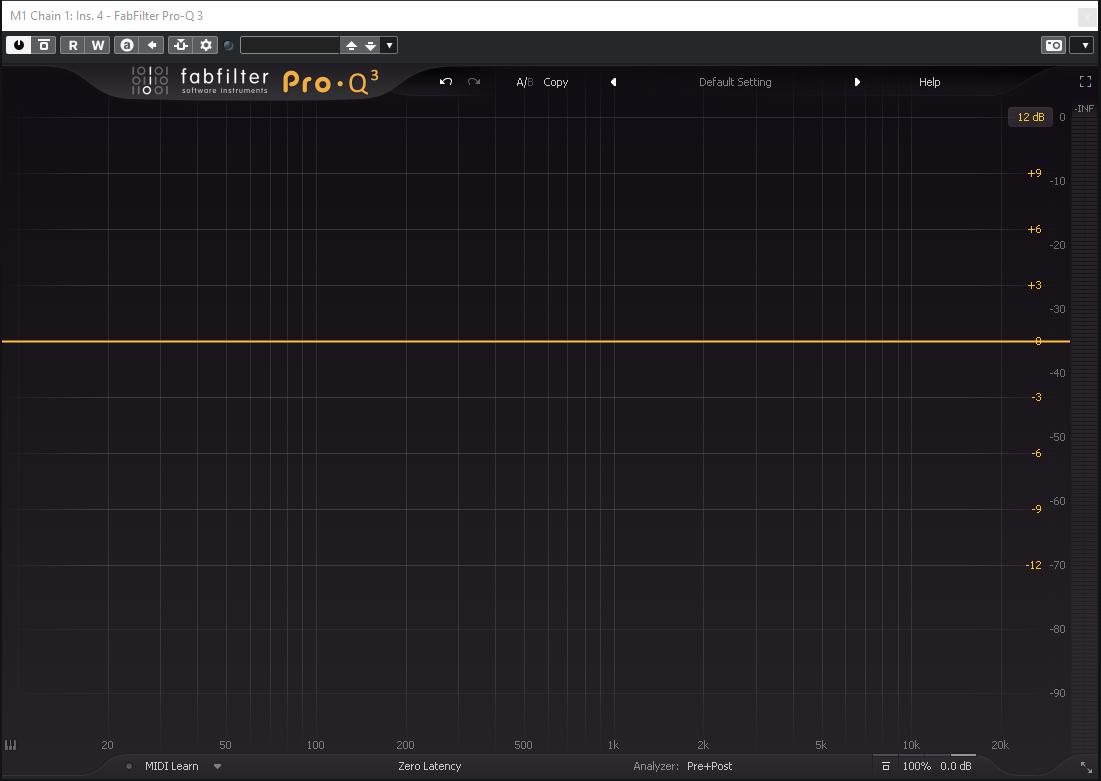
This is one of the things that has thrown me, I have seen the channel mode at the bottom selection mentioned in google search results but that does not appear on mine - see image.
-
- KVRist
- Topic Starter
- 199 posts since 6 Mar, 2017
Thank you I will give it a try.Googly Smythe wrote: Sun Apr 03, 2022 9:41 pm Cubase's Imager would be better
https://www.soundonsound.com/techniques ... ereo-image
[edit]
Set it to 2 bands, set the frequency in the, um, frequency display, narrow the width of the 1st band to suit, leave the other alone.
-

- KVRAF
- 16891 posts since 8 Mar, 2005 from Utrecht, Holland
May I ask: why?event2020 wrote: Sun Apr 03, 2022 6:53 pm All I am trying to do is make any frequencys below 127 Hz mono, and everything above remain in Stereo?
Would it work for you if you split the midi notes of the piano part in two: one containing the notes 0-47 and another 48-128, then play one in a mono patch and the other in stereo?
127 Hz is about twice the 60Hz mains power hum frequency. It is rather low, I'm not so sure how well you can sense direction in this range. There are subwoofer systems that have this set as the cutoff frequency.
I'm afraid what you want is not really possible in practice. (this is why I asked why you want it)event2020 wrote: Sun Apr 03, 2022 6:53 pm What ever I do affects the frequencies above 127 Hz which I do not want, I want them untouched
If you increase the steepness of a filter, then you also get a by-effect: ripples. Near the cutoff frequency the amplitude gets higher instead of lower. It sounds rather nasty, and there's not much you can do about it. This is a physical limitation of filters.
The famous Moog Ladder filter has a steepness of 24dB/oct. So over a whole octave the attenuation is 24dB. The cross-over filters in hifi systems are usually 12dB/oct. 24dB/oct is already pretty steep. But not enough to sense the B is mono and the C is stereo.
Also you have to be aware that especially piano tones have a rich content in high harmonics. This is where you hear stereo, not in the base frequency.
We are the KVR collective. Resistance is futile. You will be assimilated. 
My MusicCalc is served over https!!
My MusicCalc is served over https!!
-
- KVRAF
- 1895 posts since 9 Jul, 2014 from UK
I wonder what happens if I press this button...
-
- KVRAF
- 1895 posts since 9 Jul, 2014 from UK
https://a1audio.alexhilton.net/a1stereocontrol
Or this one. Set safe bass to 127 and you’re good to go
A lot of the Plugin Alliance EQ’s have mono makers, but they are paid plug-ins. The 2 I have suggested are both free
Or this one. Set safe bass to 127 and you’re good to go
A lot of the Plugin Alliance EQ’s have mono makers, but they are paid plug-ins. The 2 I have suggested are both free

I wonder what happens if I press this button...
-
- KVRian
- 502 posts since 3 Feb, 2018
KVR reveals themselves old farts still on Pro-Q2event2020 wrote: Sun Apr 03, 2022 10:28 pmHi and thanks for the suggestion.No_Use wrote: Sun Apr 03, 2022 7:38 pm In Pro Q set channel mode at the bottom to Mid/Side, insert a Low cut filter at 127 Hz (or whatever frequency you want), rightclick the point > Stereo placement > Side.
So you are filtering out the side (difference) signal below that frequency, effectively making it mono.
This is one of the things that has thrown me, I have seen the channel mode at the bottom selection mentioned in google search results but that does not appear on mine - see image.

It's changed a bit in 3. There's now an LR/MS switch on the global volume wheel, but this only affects the pan ring around it. You can switch around stereo placement for individual bands by right clicking on the channel's dot -> stereo placement. Or by clicking on the bar to the right of the 'Q' wheel that says 'stereo'. The scissors icon below it splits a channel between left and right. It's slightly annoying this doesn't follow what you set on the global volume control. It doesn't default to m/s if you change it there.
-
- KVRAF
- 3506 posts since 12 May, 2011
And yet...
Cubase's built-in tool will do the job, without all that ms faffing about.
Cubase's built-in tool will do the job, without all that ms faffing about.
-
- KVRian
- 502 posts since 3 Feb, 2018
Sure as does Ableton's utility called Utility.
Still I tend to just grab pro-q because it does all the jobs.
Still I tend to just grab pro-q because it does all the jobs.