Any plugin or hardware which does "echo loop"?
-
- KVRist
- Topic Starter
- 393 posts since 16 Aug, 2004
Ok so if I have to use this or any "pedal", I would need to connect it between the laptop and mixer or other device. Laptop's Headphone OUT [3.5mm] to pedal IN then pedal OUT to whatever's INPUT. Will this work please?
-

- KVRAF
- 18492 posts since 26 Jun, 2006 from San Francisco Bay Area
The Traktor Delay has a Freeze, so that would do it for you. Of course, Guitar Rig is basically a modular effects system, so it’s pretty amazing what can be done. It’s got a ton of tools that can automate stuff for some pretty crazy results. Bonus, it’s on sale for $99 right now.mikehende wrote: Fri May 06, 2022 12:24 pm Ok guys, to update, Gig Rig 6 has many utilities so I am waiting for Support to advise n exactly which utility is giving those fx in the Demo.
This is definitely more of a “Frippertronics” style looper, though it can be a delay too. Decent tape emulation, but the star of the show is that you can “play” the tape speed with MIDI notes. Con, the UI looks like they went back to 1992 and had someone do it then.I am trying out Augustus loop, yes you're right, hell of a lot of features in that so will take some doing.

Waiting for Soundtoys Primal Tap download link, from the video it seems to be more what I might need, very simple interface, will report back, thanks guys.
[/quote]
Primaltap is pretty great, especially when you start messing with the Freeze in conjunction with the modulation. Overall, it is fairly simple, like the Prime Time delay it’s modeled after. I sort of recommend buying the Soundtoys bundle, especially if you have some of their plugins already. They even count the free ones they give out at the holidays towards your purchase, so I ended up getting the bundle for a very low price, even though I had never purchased anything from them. My only criticism is their UIs can be small on high res monitors and some of the distortion effects can have a fair amount of aliasing if you play high notes into them. They really need an oversampling option and a scalable UI.
So… I own all of these.
 Feel free to ask any specific questions.
Zerocrossing Media
4th Law of Robotics: When turning evil, display a red indicator light. ~[ ●_● ]~
4th Law of Robotics: When turning evil, display a red indicator light. ~[ ●_● ]~
-
- KVRAF
- 18492 posts since 26 Jun, 2006 from San Francisco Bay Area
If you’re using hardware with a DAW, be prepared to have some issues.mikehende wrote: Fri May 06, 2022 9:22 pm Ok so if I have to use this or any "pedal", I would need to connect it between the laptop and mixer or other device. Laptop's Headphone OUT [3.5mm] to pedal IN then pedal OUT to whatever's INPUT. Will this work please?
1. You will need an audio interface for your laptop, which is probably a good idea to have anyway. Laptop audio generally sucks.
2. Any effect that you put on software is going to have to make a round trip. By that I mean, get converted from digital to analog, get converted back to digital by the pedal, then back to analog again, then back into the audio interface to become digital again. This can add what’s known as latency delay and sometimes that can be a bit annoying.
3. You can get around this if you just use the computer as a recorder, but that means having all your sound sources as hardware. You’d just put the pedal in the effects send/return loop of your mixer. I used to work this way, but over time I realized that working ITB with a few hardware pieces as sound sources works best for me, so all my looping is done as a plugin. This basically solves all your latency problems and gives a higher quality sound.
So, if you get the plugin, I’d recommend some sort of MIDI control pedal. Getting something like a Behringer FCB1010 is really good because you can program any of the buttons or pedals to send almost anything. In this way, your plugin will ultimately just feel like the pedal.
Zerocrossing Media
4th Law of Robotics: When turning evil, display a red indicator light. ~[ ●_● ]~
4th Law of Robotics: When turning evil, display a red indicator light. ~[ ●_● ]~
-
 thecontrolcentre thecontrolcentre https://www.kvraudio.com/forum/memberlist.php?mode=viewprofile&u=76240
 - KVRAF
- 37262 posts since 27 Jul, 2005 from Scottish Borders
mikehende wrote: Fri May 06, 2022 6:40 pm Ssampling,looping, echo, delay, hold, stutter, freeze, infinite repeat.
 I think almost any looper pedal (and some delay pedals) could give you the effect you are looking for ... you still need a DJ mixer, Audio Interface or desk with an effects send/return or aux connections. Do you have a mixer already?
This article may be of interest
In software, check out Audio Blast InstaLooper3. It's on sale at ADSR
This third version has new features, including:
A parameter sequencer with 16 independant & automatable knobs
16 steps by parameter track
4 independant loops to edit
6 integrated FX : Gate, Bit Crusher, Auto Pan, Filter, Phaser, Time Expand
A Dry/Wet effect knob
A parameter knob
A reverse button
A pitch modulation
You can apply those effects in real time while reversing, pitch shifting, and loop size range changing.
https://www.adsrsounds.com/product/soft ... er-plugin/
-

- KVRAF
- 9579 posts since 6 Jan, 2017 from Outer Space
As you seem to be in a DJ context, Serato Sample might be worth to check out…
-
- KVRist
- Topic Starter
- 393 posts since 16 Aug, 2004
Thank you very much, will do once I get it. Been a few days now and still no response from them.zerocrossing wrote: Fri May 06, 2022 11:52 pm
Primaltap is pretty great, especially when you start messing with the Freeze in conjunction with the modulation. Overall, it is fairly simple, like the Prime Time delay it’s modeled after. I sort of recommend buying the Soundtoys bundle, especially if you have some of their plugins already. They even count the free ones they give out at the holidays towards your purchase, so I ended up getting the bundle for a very low price, even though I had never purchased anything from them. My only criticism is their UIs can be small on high res monitors and some of the distortion effects can have a fair amount of aliasing if you play high notes into them. They really need an oversampling option and a scalable UI.
So… I own all of these.
-
- KVRist
- Topic Starter
- 393 posts since 16 Aug, 2004
No I won't be using any hardware with any DAW. The Canyon or other Pedal will be used with different DJ or other equipment setup, one with a mixer, one with just a Receiver and another connecting directly to an EQ or crossover. This is why I had said I will need to put the Pedal between the Laptop and "any" device. So like in the case of the Receiver, will the Pedal work between the Laptop and the Receiver's AUX Input please?zerocrossing wrote: Sat May 07, 2022 12:03 amIf you’re using hardware with a DAW, be prepared to have some issues.mikehende wrote: Fri May 06, 2022 9:22 pm Ok so if I have to use this or any "pedal", I would need to connect it between the laptop and mixer or other device. Laptop's Headphone OUT [3.5mm] to pedal IN then pedal OUT to whatever's INPUT. Will this work please?
3. You can get around this if you just use the computer as a recorder, but that means having all your sound sources as hardware. You’d just put the pedal in the effects send/return loop of your mixer. I used to work this way, but over time I realized that working ITB with a few hardware pieces as sound sources works best for me, so all my looping is done as a plugin. This basically solves all your latency problems and gives a higher quality sound.
-
- KVRist
- Topic Starter
- 393 posts since 16 Aug, 2004
Sorry I have to reply to each post separately guys, I don't know of any way to quote snippets in each post.thecontrolcentre wrote: Sat May 07, 2022 3:47 ammikehende wrote: Fri May 06, 2022 6:40 pm Ssampling,looping, echo, delay, hold, stutter, freeze, infinite repeat.
This article may be of interest
In software, check out Audio Blast InstaLooper3. It's on sale at ADSR
This third version has new features, including:
A parameter sequencer with 16 independant & automatable knobs
16 steps by parameter track
4 independant loops to edit
6 integrated FX : Gate, Bit Crusher, Auto Pan, Filter, Phaser, Time Expand
A Dry/Wet effect knob
A parameter knob
A reverse button
A pitch modulation
You can apply those effects in real time while reversing, pitch shifting, and loop size range changing.
https://www.adsrsounds.com/product/soft ... er-plugin/
Ok so to address my previous question you are saying that the only way for me to use a Pedal with "any" of the setups or equipments I have mentioned is I would need to use a sound card and cannot run a pedal directly between the laptop and a Receiver, is this correct please?
-
- KVRist
- Topic Starter
- 393 posts since 16 Aug, 2004
Yes it is to be used in a DJ and mp3 playback situation so I cannot use any specific DJ software which is why I am using Reaper as the final sound Output of my laptop so I can use VST plugins with any source of music playback [serato, vdi, Spotify, media monkey, youtube, e.t.c].Tj Shredder wrote: Sat May 07, 2022 6:27 am As you seem to be in a DJ context, Serato Sample might be worth to check out…
-
- KVRist
- Topic Starter
- 393 posts since 16 Aug, 2004
Yes guys, that is very accurate as I am now seeing looking at looping pedals.thecontrolcentre wrote: Sat May 07, 2022 3:47 am I think almost any looper pedal (and some delay pedals) could give you the effect you are looking for
Far as plugins go, I did some experimenting yesterday with different plugins. Sugarbytes looperator has a lot of features but might be overkill for me, still waiting on Primal support to try that out.
Seems I don't even need anything that expensive or fancy. For example with Serato basic loop features it does everything like the denon mixer just by hitting the 1/2, 1/4 e.t.c loop buttons so I will look for basic low cost loopers now, thanks.
-
- KVRist
- Topic Starter
- 393 posts since 16 Aug, 2004
BTW, this Instalooper is what I would like to try as first option but cannot get a download link, can I trouble any of you guys to see if it will download on your end please?
https://vstwarehouse.com/d/instalooper/
I am not seeing a direct download for it but rather it is leading me to Instalooper3 which is not what I want?
https://www.audioblast.me/product/instalooper3/
https://vstwarehouse.com/d/instalooper/
I am not seeing a direct download for it but rather it is leading me to Instalooper3 which is not what I want?
https://www.audioblast.me/product/instalooper3/
-
- KVRAF
- 18492 posts since 26 Jun, 2006 from San Francisco Bay Area
Correct.mikehende wrote: Sat May 07, 2022 1:22 pmSorry I have to reply to each post separately guys, I don't know of any way to quote snippets in each post.thecontrolcentre wrote: Sat May 07, 2022 3:47 ammikehende wrote: Fri May 06, 2022 6:40 pm Ssampling,looping, echo, delay, hold, stutter, freeze, infinite repeat.
This article may be of interest
In software, check out Audio Blast InstaLooper3. It's on sale at ADSR
This third version has new features, including:
A parameter sequencer with 16 independant & automatable knobs
16 steps by parameter track
4 independant loops to edit
6 integrated FX : Gate, Bit Crusher, Auto Pan, Filter, Phaser, Time Expand
A Dry/Wet effect knob
A parameter knob
A reverse button
A pitch modulation
You can apply those effects in real time while reversing, pitch shifting, and loop size range changing.
https://www.adsrsounds.com/product/soft ... er-plugin/
Ok so to address my previous question you are saying that the only way for me to use a Pedal with "any" of the setups or equipments I have mentioned is I would need to use a sound card and cannot run a pedal directly between the laptop and a Receiver, is this correct please?
Zerocrossing Media
4th Law of Robotics: When turning evil, display a red indicator light. ~[ ●_● ]~
4th Law of Robotics: When turning evil, display a red indicator light. ~[ ●_● ]~
-
- KVRist
- Topic Starter
- 393 posts since 16 Aug, 2004
Thanks for confirming. Now that I have the plugin side of things settled, thanks for helping with this you guys! I will now start looking for a wireless device which will allow me to trigger all 3 fx in Reaper [Mreverb, BBD and Instalooper]. I won't really need to control any parameters in those 3 plugins, only to trigger [toggle] each one on/off.
Should you guys think of anything which might do this please post, thanks.
Should you guys think of anything which might do this please post, thanks.
-
- KVRist
- Topic Starter
- 393 posts since 16 Aug, 2004
Hey, I can use your help with this if you won't mind please since so far Soundtoys hasn't been able to help solve this problem.zerocrossing wrote: Fri May 06, 2022 11:52 pm
Primaltap is pretty great, especially when you start messing with the Freeze in conjunction with the modulation. Overall, it is fairly simple, like the Prime Time delay it’s modeled after. I sort of recommend buying the Soundtoys bundle, especially if you have some of their plugins already. They even count the free ones they give out at the holidays towards your purchase, so I ended up getting the bundle for a very low price, even though I had never purchased anything from them. My only criticism is their UIs can be small on high res monitors and some of the distortion effects can have a fair amount of aliasing if you play high notes into them. They really need an oversampling option and a scalable UI.
So… I own all of these.
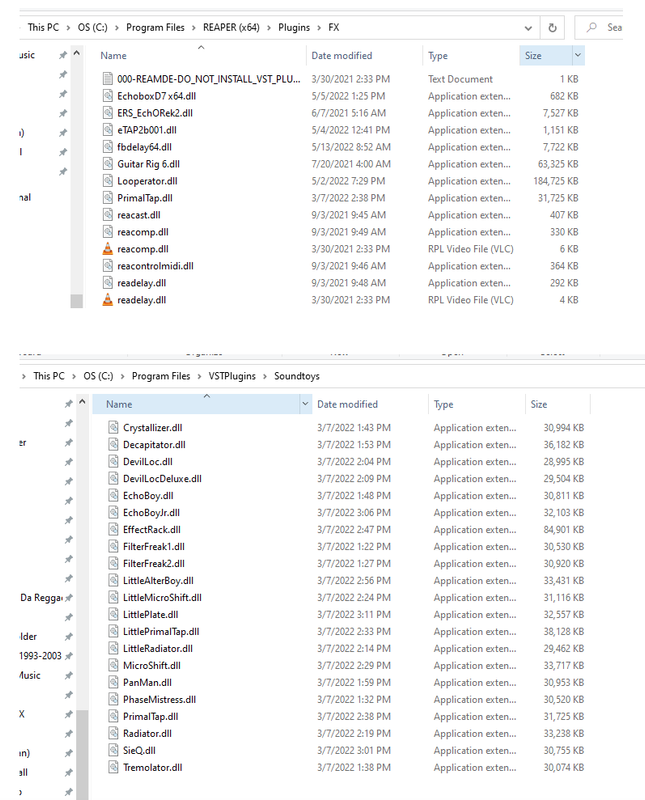
As you can see by the screenshots below, Soundtoys installed by default into the VST plugins folder, I then copied the PrimalTap.dll file into Reaper's FX folder, started reaper but it does not recognize Soundtoys plugin. So, is this something you can advise which I can try please? I really would love to try out Primal tap to see if it will work for me which is why I am going to any lengths to try it out.