


Just out of interest, I have, among other keyboards, a casio CTK-3200. I use it strictly as a MIDI controller, but I LIKE the feel of it; it's light, velocity, and was about $160 at the time. . When recording piano-like stuff, it's my favorite because of the feel.
(I just use it's MIDI out and turn the volume control down all the way).
Few Questions About Waveform
-
Peter Widdicombe Peter Widdicombe https://www.kvraudio.com/forum/memberlist.php?mode=viewprofile&u=336849
- KVRian
- 1205 posts since 29 Aug, 2014
Waveform 13; Win10 desktop/8 Gig; Win11 Laptop; MPK261; VFX+disfunctional ESQ-1
-
- KVRist
- Topic Starter
- 142 posts since 9 Apr, 2022
So dumb question along these lines, because I still have no clue quite yet if, A) I even need or could benefit by a keyboard MIDI controller, or 2) for my purposes, do I even need to be all that picky with regard to quality?
I was looking at this one for instance, which honestly looks like some generic off brand of a 61 key model for $120.00, which seems quite cheap, and the customer reviews are overwhelmingly positive on Amazon.
https://www.amazon.com/Nektar-Impact-GX ... RydWU&th=1
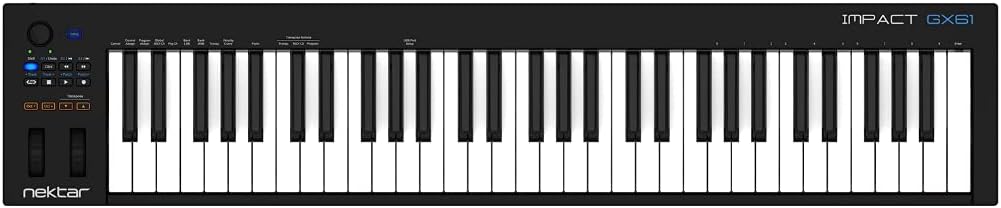
Edit: Actually, I may have to keep looking, because space is an issue. I didn't realize how wide these controllers are. I may actually need to get a 25 Key unit, if for no other reason than it will fit on my sliding keyboard draw on my computer desk. So I would have to use a keyboard stand and set the Midi Controller off to the side, which would probably be awkward to use, since it would mean I would have to turn like 45 to 60 degrees to the left every time I want to use it with Waveform. I suppose I could just pull the sliding tray out, and set the keyboard across it so that it hangs over by about 4.5 inches on each side. I probably won't be using the MIDI controller all the time, so perhaps just pulling off the keyboard and mouse, and replacing it with the MIDI Controller only when I want to actually fumble through recording parts, might be a viable solution? Again, this is even assuming I end up needing to buy one of these.
I was looking at this one for instance, which honestly looks like some generic off brand of a 61 key model for $120.00, which seems quite cheap, and the customer reviews are overwhelmingly positive on Amazon.
https://www.amazon.com/Nektar-Impact-GX ... RydWU&th=1
Edit: Actually, I may have to keep looking, because space is an issue. I didn't realize how wide these controllers are. I may actually need to get a 25 Key unit, if for no other reason than it will fit on my sliding keyboard draw on my computer desk. So I would have to use a keyboard stand and set the Midi Controller off to the side, which would probably be awkward to use, since it would mean I would have to turn like 45 to 60 degrees to the left every time I want to use it with Waveform. I suppose I could just pull the sliding tray out, and set the keyboard across it so that it hangs over by about 4.5 inches on each side. I probably won't be using the MIDI controller all the time, so perhaps just pulling off the keyboard and mouse, and replacing it with the MIDI Controller only when I want to actually fumble through recording parts, might be a viable solution? Again, this is even assuming I end up needing to buy one of these.
-
- KVRAF
- 1601 posts since 9 Jan, 2018
There's nothing generic about Nektar controllers: very capable; I know lots of people who own them. They work very well by all accounts.
Spotify, Apple Music, YouTube, and even Deezer, whatever the hell Deezer is.
More fun at Twitter @watchfulactual
More fun at Twitter @watchfulactual
-
Peter Widdicombe Peter Widdicombe https://www.kvraudio.com/forum/memberlist.php?mode=viewprofile&u=336849
- KVRian
- 1205 posts since 29 Aug, 2014
Yeah, space can be an issue. A guitar you have to pull out of a case doesn't get played like one on a stand... A keyboard in the way that is inconvenient may also get less use than one that is convenient.
They have a 49-key as well (just under 32" wide), but it probably doesn't fit much better. Looks like a good keyboard - USB powered means just one cable to the computer. Doesn't have pads, which may not mean much - but they can be useful to put down drum loops.
They have a 49-key as well (just under 32" wide), but it probably doesn't fit much better. Looks like a good keyboard - USB powered means just one cable to the computer. Doesn't have pads, which may not mean much - but they can be useful to put down drum loops.
Waveform 13; Win10 desktop/8 Gig; Win11 Laptop; MPK261; VFX+disfunctional ESQ-1
-
- KVRist
- Topic Starter
- 142 posts since 9 Apr, 2022
That's good to know! I assumed when I saw the price and the features, compared to some of the more expensive model, that this was a generic.Watchful wrote: Sat May 21, 2022 4:17 am There's nothing generic about Nektar controllers: very capable; I know lots of people who own them. They work very well by all accounts.
I'm an idiot. lol For some reason I had it in my head these were all Bluetooth. Good thing I read your post, because apparently I can't read Amazon ads. Although, in truth, this may not be a huge problem. I have a long USB-extension somewhere, and for all practical purposes, in a cramped space a very long, thin cable is pretty much just as convenient as a wireless device.Peter Widdicombe wrote: Sat May 21, 2022 4:34 am Yeah, space can be an issue. A guitar you have to pull out of a case doesn't get played like one on a stand... A keyboard in the way that is inconvenient may also get less use than one that is convenient.
They have a 49-key as well (just under 32" wide), but it probably doesn't fit much better. Looks like a good keyboard - USB powered means just one cable to the computer. Doesn't have pads, which may not mean much - but they can be useful to put down drum loops.
That said, the more I think about it, the more I think I am going to need one of these if I am going to be doing any sort of track creation. I'm sure I can borrow a bass, and the more I think about it and have started listening to bass lines I might want to replicate, I'm pretty sure I can play anything I am hearing for songs I might want to make tracks out of. Also, and I may be deluding myself here, I think I can replicate any keyboard parts/ideas I might want to reproduce to make piano, Rhodes, Hammond parts for my tracks. It won't be in real time, the way I can easily do on guitar, and will probably be able to do with a little practice on bass, but I think I can play little pieces of keyboard parts and string them together.
I don't need one like tomorrow, so I can take a few days to decide the size and features I need to make a decision. I will say that it might be substantially to create parts, to have more than a two octave range. I don't think I need as many as 61 keys, but that's splitting hairs, in terms of the few inches of size difference. Seems like 49 keys might be a good compromise. Unless you think it would be just as easy to replicate keyboard parts and ideas with a 25 key keyboard? That would fit easily on my keyboard tray. However, I'm not sure it would be the worst thing in the world to just put the thing on my lap and close the tray, or simply lay the keyboard on it and let it overlap on both sides a few inches. I mean, it's not like I'm going to be spending hours and hours like that.
Probably, I would stick if on the tray or my lap, hunt and peck for notes and chords, record them, and then put the thing off to the side out of the way.
Are there any specific features and onboard gizmos you would recommend for these? It certainly looks convenient to have the 8 tapping pads that the M-Audio Oxygen 25 IV you recommended above. That series also has a 49 Key version and a 61 Key version, same model Oxygen. The 49 and 61 key versions look pretty elaborate and feature heavy, and none of them break the bank. I mean, for what you get, to my tech-eyes they seem to be a lot of bang for the buck, any of the ones you recommended if I'm honest.
Question: Do these Keyboard Controllers also function in a similar way to those Control Surfaces like the ones we were talking about in the thread about them on the first page the other day? Because it sounds to me that, at least for all the utility, and there's a two-birds with one stone metaphor that comes to mind if this is the case.
-
Peter Widdicombe Peter Widdicombe https://www.kvraudio.com/forum/memberlist.php?mode=viewprofile&u=336849
- KVRian
- 1205 posts since 29 Aug, 2014
MANY keyboards have some controller features built into them - not all. The particular model of Nektar didn't have many for controlling the DAW. Some have "default integration" for specific DAW's; true controllers all have some level of functionality. (My cheap Casio, though, is "keys only"; any buttons on IT are used just to control it's built-in functions).
I'm still on Waveform 11 - some additional controllers are/will be better supported in 12. The Akai MPK series doesn't have direct affinity for Waveform, and so far it took minor tweaking to get the run/stop/record/rewind working; and I've mapped the first 7 sliders to the first 7 tracks in Waveform for volume, and set the 8th one to master volume. Easy enough to extend that, as it has 4 banks of 8, but then you get into track 17 is really bank 3 fader 1... Select the waveform function or macro, and then just touch or move the control on the keyboard.
Track SELECTION unfortunately only works when the DAW has a track selected, so I can go up and down. May need some macros on the Waveform side to get that working like I want. MPC Beats works well with the keyboard controls, but I don't like it at all.
I'm still on Waveform 11 - some additional controllers are/will be better supported in 12. The Akai MPK series doesn't have direct affinity for Waveform, and so far it took minor tweaking to get the run/stop/record/rewind working; and I've mapped the first 7 sliders to the first 7 tracks in Waveform for volume, and set the 8th one to master volume. Easy enough to extend that, as it has 4 banks of 8, but then you get into track 17 is really bank 3 fader 1... Select the waveform function or macro, and then just touch or move the control on the keyboard.
Track SELECTION unfortunately only works when the DAW has a track selected, so I can go up and down. May need some macros on the Waveform side to get that working like I want. MPC Beats works well with the keyboard controls, but I don't like it at all.
Waveform 13; Win10 desktop/8 Gig; Win11 Laptop; MPK261; VFX+disfunctional ESQ-1
-
- KVRist
- Topic Starter
- 142 posts since 9 Apr, 2022
Based on the functions you outlined, it honestly doesn't sound like I really need any of them for anything I will be doing. Everything can be done with a PC keyboard/mouse, and it sounds like trying to control tracks and other DAW functionality with a USB Keyboard controller may just be an instance of the juice not being worth the squeeze. I think once I create any keyboard/synth tracks, it's just simply time to put the synth-keyboard away and just use my regular keys and mouse.
-
- KVRAF
- 1601 posts since 9 Jan, 2018
Correct. Now, in the future, if you want to do live riffing from a keyboard, throwing in pitch bends or crushing on the mod wheel, obviously you're going to want a controller than to try doing any of that with the pencil tool! I'd work up to that--if indeed you ever need it at all.
Spotify, Apple Music, YouTube, and even Deezer, whatever the hell Deezer is.
More fun at Twitter @watchfulactual
More fun at Twitter @watchfulactual
-
- KVRist
- Topic Starter
- 142 posts since 9 Apr, 2022
I’m sorry if this sounds ignorant, mostly because it is, but could you clarify what you mean by all this. I understand all the words you’re saying, but I don’t know what a lot of the stuff means, like with a pencil tool is, for instance, or if you’re telling me that these are functions I would need another controller in addition to a USB keyboard for.Watchful wrote: Sat May 21, 2022 9:35 pm Correct. Now, in the future, if you want to do live riffing from a keyboard, throwing in pitch bends or crushing on the mod wheel, obviously you're going to want a controller than to try doing any of that with the pencil tool! I'd work up to that--if indeed you ever need it at all.
-
- KVRAF
- 1601 posts since 9 Jan, 2018
I was referring to the pencil tool in Waveform that lets you draw in controller information. It's good for small things, but if you want to really put in complex or live recording, it's not going to work. For that, you would want some form of keyboard-style controller.
Spotify, Apple Music, YouTube, and even Deezer, whatever the hell Deezer is.
More fun at Twitter @watchfulactual
More fun at Twitter @watchfulactual
-
Peter Widdicombe Peter Widdicombe https://www.kvraudio.com/forum/memberlist.php?mode=viewprofile&u=336849
- KVRian
- 1205 posts since 29 Aug, 2014
I think almost any controller or keyboard will have pitch bend and modulation wheel - although my cheapie Casio only had pitch bend. Aftertouch and breath controller and filter cutoffs are probably something you will not need. Play/stop/record are all available via mouse or QWERTY.
While not as convenient, you CAN even use just the "regular" keys to play drum beats as well; so for instance C1 and D1 can be bass drum, E1&F1 can be snare (mapping 2 just so you can "play rolls...), and an assortment of # keys to cymbals. In fact, if you have a drum kit VST and bring up the on-screen keyboard, by holding the mouse button and running the mouse across the keyboard, you can hear (and find out where...) all the nuanced drum sounds are.
I may be getting ahead of myself here. Did you realize you have 2 different flavors of virtual MIDI keyboard in Waveform? If you have a MIDI track and click on the grey area immediately UNDER the "Track 7" "Track 8", etc, you will get a keyboard bottom of screen (if you have the "properties area" at the bottom enabled), which you can actually plan and record with the mouse.
The other one is available lower left, under View -> MIDI typing. You CAN actually play chords there, although only just over one octave. You can shift up and down via the z/x keys, and control velocity with c/v keys. asdf keys are CDEF, and the upper row are the black keys for minor chords, etc. Can't really play piano that way, but can do horns, strings, flute, etc. if you're nimble on the mouse or have a good QWERTY. You can then use the MIDI editor to "fix" mistakes. Very unnatural, but I have used it when travelling and have laptop with me...
While not as convenient, you CAN even use just the "regular" keys to play drum beats as well; so for instance C1 and D1 can be bass drum, E1&F1 can be snare (mapping 2 just so you can "play rolls...), and an assortment of # keys to cymbals. In fact, if you have a drum kit VST and bring up the on-screen keyboard, by holding the mouse button and running the mouse across the keyboard, you can hear (and find out where...) all the nuanced drum sounds are.
I may be getting ahead of myself here. Did you realize you have 2 different flavors of virtual MIDI keyboard in Waveform? If you have a MIDI track and click on the grey area immediately UNDER the "Track 7" "Track 8", etc, you will get a keyboard bottom of screen (if you have the "properties area" at the bottom enabled), which you can actually plan and record with the mouse.
The other one is available lower left, under View -> MIDI typing. You CAN actually play chords there, although only just over one octave. You can shift up and down via the z/x keys, and control velocity with c/v keys. asdf keys are CDEF, and the upper row are the black keys for minor chords, etc. Can't really play piano that way, but can do horns, strings, flute, etc. if you're nimble on the mouse or have a good QWERTY. You can then use the MIDI editor to "fix" mistakes. Very unnatural, but I have used it when travelling and have laptop with me...
Waveform 13; Win10 desktop/8 Gig; Win11 Laptop; MPK261; VFX+disfunctional ESQ-1
-
- KVRist
- Topic Starter
- 142 posts since 9 Apr, 2022
Thanks for the answers, guys. Okay, so, Peter Widdicombe, reading over your post several times, I realize that I am too unfamiliar with all of those features and their implementation to worry about it just yet. I think the lesson here is that the moderate to higher end USB MIDI keyboards are all capable of doing all the things you listed, and if I get one of them, then when the time comes I have practical need or functional understanding of any of these features, then I will be able to use them.
I guess I just have to decide what size I need, and what brand/model. I think the best compromise is a 49 key unit. I would be too worried about my needs growing out of the 25 key unit, and then having to buy a larger one later on, as I think you sort of hinted at. The prices are so close between them, that the extra money is almost negligible when going from 25 to 49 and 61 keys.
I guess I just have to decide what size I need, and what brand/model. I think the best compromise is a 49 key unit. I would be too worried about my needs growing out of the 25 key unit, and then having to buy a larger one later on, as I think you sort of hinted at. The prices are so close between them, that the extra money is almost negligible when going from 25 to 49 and 61 keys.
-
Peter Widdicombe Peter Widdicombe https://www.kvraudio.com/forum/memberlist.php?mode=viewprofile&u=336849
- KVRian
- 1205 posts since 29 Aug, 2014
There's a lot of variety out there to choose from; pick something "conventional" and your choices are mind-boggling. Like on a guitar - solid, semi-acoustic, single coil or humbuckers, no whammy or whammy, Floyd-Rose, scale, strings; you have the wide array of choices.
Unlike a synth, the sound-generation part is now changeable and potentially free software VST's; but #/size of keys, portability, buttons, aftertouch, and build quality (and price!) are all selectable. The XKEY though is a niche product I would not initially recommend, as they had to compromise too much for the compact size - particularly if it's your first/only keyboard.
Unlike a synth, the sound-generation part is now changeable and potentially free software VST's; but #/size of keys, portability, buttons, aftertouch, and build quality (and price!) are all selectable. The XKEY though is a niche product I would not initially recommend, as they had to compromise too much for the compact size - particularly if it's your first/only keyboard.
Waveform 13; Win10 desktop/8 Gig; Win11 Laptop; MPK261; VFX+disfunctional ESQ-1
-
- KVRist
- Topic Starter
- 142 posts since 9 Apr, 2022
Thanks, Peter!
Is this an insanely good deal on Amazon, too good to pass up in case the price goes up? Or is it just so-so and I can wait a few days until I actually need to buy one? I mean, I don't mind waiting, and I think I would prefer a larger one, perhaps 49 keys to make things a little easier, but knowing very little about these keyboards, and remembering this was one of the ones you mentioned, I can't help but wonder if this is too good a deal to pass up, even if it means settling for something smaller. $59.99 for a name brand like this seems very low. I also don't mind spending a few dollars more if you think this is too bargain-basement for my needs.
https://www.amazon.com/gp/product/B00IW ... X0DER&th=1
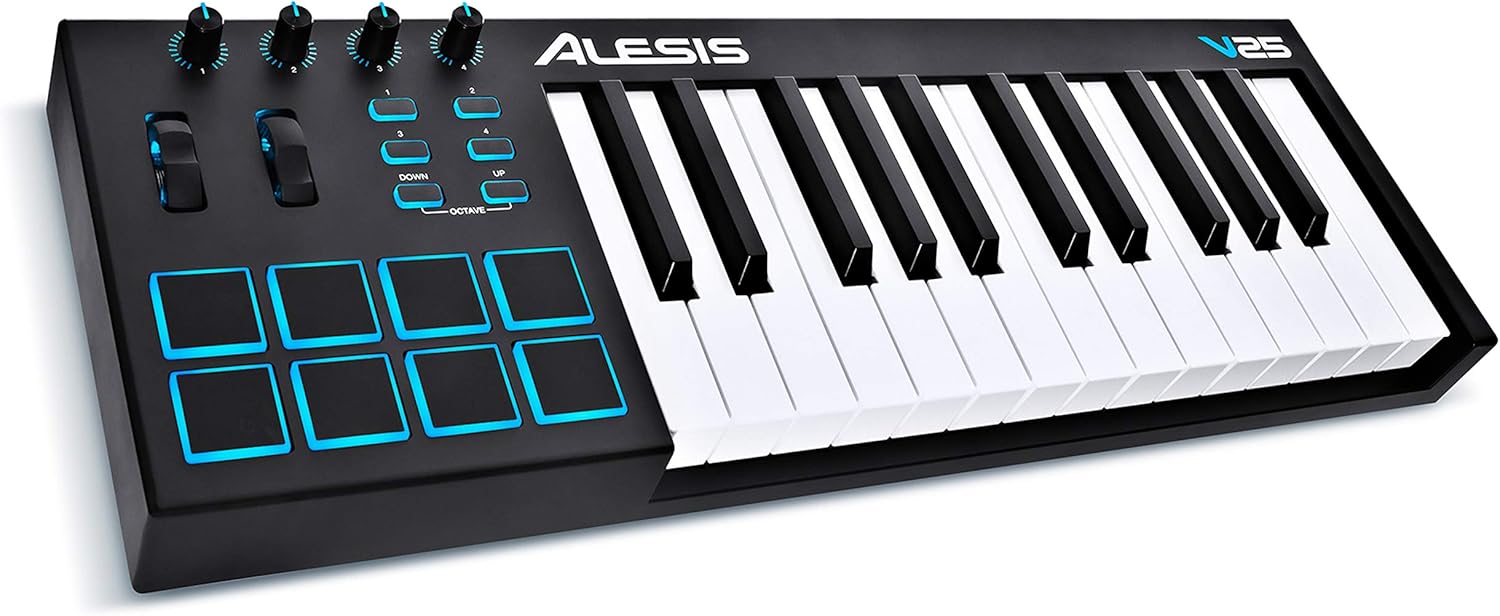
Is this an insanely good deal on Amazon, too good to pass up in case the price goes up? Or is it just so-so and I can wait a few days until I actually need to buy one? I mean, I don't mind waiting, and I think I would prefer a larger one, perhaps 49 keys to make things a little easier, but knowing very little about these keyboards, and remembering this was one of the ones you mentioned, I can't help but wonder if this is too good a deal to pass up, even if it means settling for something smaller. $59.99 for a name brand like this seems very low. I also don't mind spending a few dollars more if you think this is too bargain-basement for my needs.
https://www.amazon.com/gp/product/B00IW ... X0DER&th=1
-
Peter Widdicombe Peter Widdicombe https://www.kvraudio.com/forum/memberlist.php?mode=viewprofile&u=336849
- KVRian
- 1205 posts since 29 Aug, 2014
Seems like a good basic keyboard - reliable, pads, good feeling keys (you need to install the control software that comes with it and choose the velocity curve that suits you ! ). If in the future you DO feel the need for a larger keyboard, relegating this as alternate for, say, sustain strings or bass parts can be surprisingly useful. You still have 4 buttons that can be mapped for stop/start, record, home.
Waveform 13; Win10 desktop/8 Gig; Win11 Laptop; MPK261; VFX+disfunctional ESQ-1