
RayBlaster - a radically different approach to sound generation.

VST, AU, AAX, CLAP, etc. Plugin Virtual Instruments Discussion
RELATED
PRODUCTS
RayBlaster$99.00Buy

Post

We invite you to join the pubic beta of RayBlaster3:
https://www.tone2.com/download.html

RayBlaster unveils a completely new dimension of sounds, impossible with other synths. The revolutionary Impulse Modeling Synthesis is not just a marketing buzzword, but a radically different approach to synthetic sound generation.
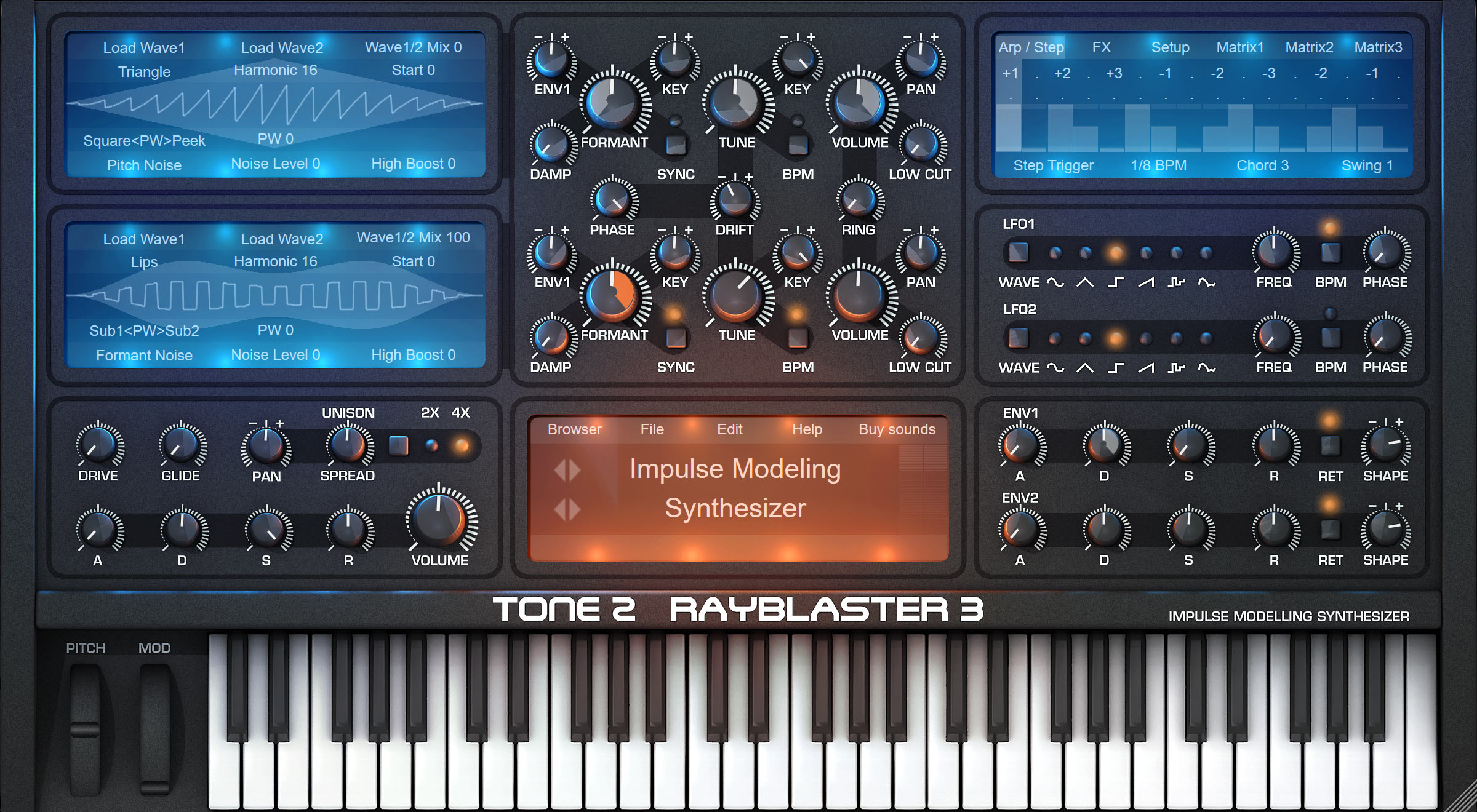
Image

Website:
https://www.tone2.com/rayblaster2.html

Price:
The price has been reduced to $99 (formerly it was $189).

Download link (free demo and free update):
https://www.tone2.com/download.html

A radically different sound generation
  • A radically different sound generation
  • Revolutionary, new synthesis method
  • Unique signature sound
  • Over 1100 inspiring sounds created by professional designers
  • Discover a completely new sonic territory
  • High-end sound quality
  • Huge sonic range and high flexibility
  • Easy to use & fun to play
  • Powerful sound engine with true stereo architecture
  • Create distinctive sounds that are impossible to produce with other synthesizers
  • Quickly catches your audiences' attention and makes your music to stand out from the crowd
  • Comfortable patch browser and flexible preset management
  • Modular effect section with 44 effect types
  • Drag & drop modulation
  • Expandability
What is Impulse-Modeling-Synthesis?

This innovative approach to sound generation goes far beyond traditional forms of synthesis. It offers a whole new world of sounds and enormous potential for producing creative modern music.
Many conventional synthesizers use a technique that is known as 'subtractive synthesis': An oscillator plays a looped waveform that is passed through a filter to shape the sound. In contrast, RayBlaster uses an entirely new approach to synthesis. It creates its distinctive sound with a convolution-based synthesis technique: Many short samples containing impulse responses are overlapped to create a complex sound. We named this innovative technique 'Impulse Modeling Synthesis' (IMS). IMS can be considered a superset of granular synthesis. However, it does not suffer from its weaknesses like detuning, poor sound quality or many musically unusable sounds.

Ambient:
https://www.tone2.com/mp3download/Tone2 ... aiders.mp3
https://www.tone2.com/mp3download/Tone2 ... _Space.mp3
https://www.tone2.com/mp3download/Tone2 ... mbient.mp3
https://www.tone2.com/mp3download/Tone2 ... c_Pads.mp3
https://www.tone2.com/mp3download/Tone2 ... sphere.mp3

Electronic:
https://www.tone2.com/mp3download/Tone2 ... tronic.mp3
https://www.tone2.com/mp3download/Tone2 ... ubstep.mp3
https://www.tone2.com/mp3download/Tone2 ... uturon.mp3
https://www.tone2.com/mp3download/RayBl ... lusive.mp3
https://www.tone2.com/mp3download/Tone2 ... esizer.mp3

Sounds

RayBlaster's radically different approach to synthesis makes it possible to create unique signature sounds that are absolutely impossible with other synthesizers.
The pychoacoustic model of IMS resembles the way our human brain perceives sounds. As a result, these sounds seem enormously immersive or even completely pychedelic.
RayBlaster ships with an inspiring library of over 1100 presets created by the world's top sound designers. Many complex sounds such as arpeggios, vocals or drumloops automatically synchronize with the BPM-rate of your track.
For quick and easy access to a specific sound, we've carefully organized them into logical categories. A comfortable patch browser gives you instant access to a huge sound library with ready-to-use patches.


Modulation

Spice up your tracks with exciting movement! Do you want to use the LFO to wobble your sound? Simply drop it to a knob and you've got it. Modulation can be as simple or complex as you want. You can use drag&drop or the modulation matrix to connect dozens of sources to all important sound parameters. Modulate almost any parameter with audio-rate speed, from internal modulation sources like LFOs, punchy envelopes, step sequencers, and a wide variety of MIDI signals. We've also included midi-learn, so assigning CC's is as simple as a right-click.

Effects

RayBlaster comes with a huge variety of effects that were developed and fine-tuned to complement RayBlaster's Impulse-Modeling-Synthesis. 44 different stereo effects are included, all carefully crafted to offer the highest quality possible: We have included a large variety of Reverbs, Delays, Chorus, Ensemble, Phaser, Flanger, Rotary, Compressor, Amp-Sim, Equalizer, Surround-Encode, TranceGate, Resonator, Hypersaw and so on.

Waveforms, Samples & Resynthesis

In addition to importing filter characteristics into RayBlaster's oscillators, you can also import the waveform of any other synthesizer. This gives you an unlimited number of possible waveshapes, all of which are capable of being morphed in real-time. You can re-synthesize short samples like a drumloop or a vocal phrase. RayBlaster also offers many possibilities to synchronize complex sounds to your track's BPM as well as providing the ability to manipulate the pitch, timing and the timbre of all your sounds in real-time.

System requirements:

PC: Windows XP / Vista / 7 / 8 / 10 / 11 (32 bit or 64 bit); Plugin formats: 32-bit VSTi, 64-bit VSTi, VST3, Standalone
Mac: macOS 10.7 or higher / macOS 11 / macOS 12; 32bit Intel or 64bit Intel or M1 (native Apple silicon support); Plugin formats: VSTi, Audio Unit (AUi), Universal Binary
User-friendly copy-protection: No dongle, no cloud, no need to be online
Last edited by Markus Krause on Thu Mar 16, 2023 3:53 pm, edited 9 times in total.
https://www.tone2.com
Our award-winning synthesizers offer true high-end sound quality.

Post

RayBlaster 2.8 (free update)

The update is available for free for all RayBlaster users. It adds native Apple M1 ARM support for Mac and contains enhancements.

New features:
  • AudioUnit version supports M1 native.
  • VSTi version supports M1 native.
  • Help->'Show version info' displays the mode in which the plugin is running (ARM/Intel).
Enhancements:
  • Much faster loading times on M1 Macs.
  • The native M1 support results in 20% lower CPU use compared to Rosetta2 Mode.
  • More responsive GUI on M1 Macs.
  • The ideal GUI size is detected automatically.
  • Several small enhancements.
Fixes:
  • Workaround for the 'unusual' designed audio architecture of FL Studio. It is not longer necessary to enable 'Use fixed size buffers' to avoid crackles.
  • Clicking on the stars in the patch browser did not always work when GUI was set to big.
  • Several small compatibility fixes for MacOS 11 and MacOS 12.
  • Workaround for Apple's unrelieable AudioUnit validation. It is not longer necessary to reboot the Mac after an installation.
Changes:
  • AudioUnit is now an AUv2 plugin.
  • AudioUnit and VSTi are now a Universal Binary for 64bit Intel and M1.
  • Apple's development tools are unable to build 32bit Intel binaries when you support M1. Sadly we had to drop support for it.
  • Apple's Notarisation and the M1 support requires a macOS version higher or equal than 10.11. If you still use an older version you must stick with RayBlaster v2.6.
Notes:

Unlike what Apple suggests to their customers porting complex products to native M1 is not easy at all. In our case it did mean many months of additional work.

--------------------------------------------------

RayBlaster 2.7.2 (free update)

The update to v2.7.2 is available for free for all RayBlaster users. It extends the PC version with a VST3 version and adds several enhancements.
RayBlaster 2.7.2 is downward-compatible with all previous versions. All existing song projects and patches can be loaded without any further steps necessary.

New features:
  • Added a VST3 version.
  • You can select from 3 different installation types: Minimal (VST2 only), Default (VST2 + Standalone) and Full (VST2 + VST3 + Standalone).
  • Added a Microsoft-approved certificate to the installer.
  • HiDPI support.
Enhancements:
  • More beautiful keyboard graphics.
  • More contrast.
  • More smart detection of the VST2 path.
  • Slightly higher performance.
  • Smaller binary and slightly faster loading.
  • More precise timing.
  • Higher sound-quality in 44 kHz, 48 kHz and 88 kHz sample-rate.
  • Further optimisations against denormalisation.
  • More robustness.
  • Several small enhancements.
Fixes:
  • Workaround for the 'unusual' designed audio architecture of FL Studio. It is not longer necessary to enable 'Use fixed size buffers' to avoid crackles.
Changes:

Microsoft dropped support for 32-bit Windows. As a result, we will not longer provide updates for it. If you still depend on it you can install v2.6 instead.

Notes:

Steinberg advertises that their VST3 format has 'many essential new features' and 'advantages' compared to competing plugin-formats.
In practise, we do not think that this is true for synthesizers, since VST3 does not offer proper MIDI support.
That's why we recommend to use the VST2 version if your DAW supports both formats.
https://www.tone2.com
Our award-winning synthesizers offer true high-end sound quality.

Post

Are you saying VST3 is _worse_ for MIDI than VST2? Can you elaborate a little on that, I'm not knowledgeable about this. Wondering if I need to go reinstall all my synths......

Post

VST3 is definitely worse for Midi than VST2. It does not offer proper Midi support.

I can't further discuss VST2 vs VST3 here, since this is off-topic.
There are plenty of threads about it in the developer forums:
https://forums.steinberg.net/t/vst3-and ... all/201879
viewtopic.php?t=538083
viewtopic.php?t=554336
https://www.tone2.com
Our award-winning synthesizers offer true high-end sound quality.

Post

Thanks for this!!! :)

Post

Tone2, really great support for all plugins so far, i have to check the updates for the FL Studio enhancements and also i like how you point out the bad vst3 structure! and not just riding the hype.
DAW FL Studio Audio Interface Focusrite Scarlett 1st Gen 2i2 CPU Intel i7-7700K 4.20 GHz, RAM 32 GB Dual-Channel DDR4 @2400MHz Corsair Vengeance. MB Asus Prime Z270-K, GPU Gainward 1070 GTX GS 8GB NT Be Quiet DP 550W OS Win10 64Bit

Post

Markus Krause wrote: Fri Jun 03, 2022 2:27 pm It creates its distinctive sound by overlapping many short bursts of energy to form a complex sound.
This is the only sentence in that pretty long with marketing speech overloaded post which describes what is supposedly a new synthesis method.
That is almost nothing and if I wanted to imagine what it does I’d say it might describe something like granular synthesis, which isn’t that new at all.
Is there more info about that “new” synthesis than that? If its a business secret, its would turn down my interest to zero and I simply assume its cooking with water…
I am all ears about new synthesis methods. (Subtractive is just boring…)
I’d appreciate some enlightenment…

Post

My understanding is that it is based on convolution.

The simplest case would be wavetable-like playback of a single-cycle waveform. Instead of using a phasor to scan through the waveform, you could fire off a short impulse (delta function) once per period amd convolve it with the waveform (stretched to a length of one cycle).

That's a slightly cumbersome way of reading a wavetable, but gives some interesting parameters to play with: tweaking the pulse train for a sparser or denser signal, introducing a windowing function to smooth overlaps, changing how the waveform is scaled with pitch... You end up with elements of wavetable, granular and VOSIM synthesis.

This isn't something you could easily patch together from other plugins, either, because it will need some clever implementation around pitch modulation.

Post

That sounds much, much more interesting than the marketing speech. The only convolution based synth I came across yet it BT Phobos, but that is based on samples and a completely different approach…
Does it support MPE yet or in the future?

Post

imrae wrote: Sat Jun 04, 2022 6:15 am My understanding is that it is based on convolution.

The simplest case would be wavetable-like playback of a single-cycle waveform. Instead of using a phasor to scan through the waveform, you could fire off a short impulse (delta function) once per period amd convolve it with the waveform (stretched to a length of one cycle).

That's a slightly cumbersome way of reading a wavetable, but gives some interesting parameters to play with: tweaking the pulse train for a sparser or denser signal, introducing a windowing function to smooth overlaps, changing how the waveform is scaled with pitch... You end up with elements of wavetable, granular and VOSIM synthesis.

This isn't something you could easily patch together from other plugins, either, because it will need some clever implementation around pitch modulation.
I wonder if the modelling how we hear relates to bark filtering?
The ear behaves as if it contains a bank of filters, each filter passing frequencies within their respective critical band. Two tones apart more than the frequency dependant critical bandwidth are perceived as separate tones. For this reason Bark contains a filter bank with 27 very steep bandpass filters matching the critical bandwidth characteristic of the human ear. In fact, the human ear have also its own built in multi band compression system which are based on the critical bands.
The Bark scale is a frequency scale on which equal distances correspond with perceptually equal distances. Above about 500 Hz this scale is more or less equal to a logarithmic frequency axis. Below 500 Hz the Bark scale becomes more and more linear.
https://synthyfrog.com/app/bark-filter/

Post

It's an amazing synth! I'm not going to try to pretend I understand the synthesis method, I'm starting to understand some of the basic features of the oscillators though, and I'm already making patches which doesn't sound quite like anything else I've ever made and more professional than most other patches I've made in other synths

I'm going to keep learning how to use it, and if anyone has any links to more detailed tutorials about the oscillator section than those provided by Tone2 I would appreciate it a lot

Post

I'm trying the demo and it's a great sounding synth. I may try to purchase depending on the finances for this month but one thing I dislike is the demo automatically connecting to the internet and opening your website when the plugin is closed.

Also even if I choose install "VST 2 only" the installer still drops an icon on the desktop (Win 10) that is an invalid shortcut since the standalone wasn't installed.
None are so hopelessly enslaved as those who falsely believe they are free. Johann Wolfgang von Goethe

Post

YnJ wrote: Sun Jun 05, 2022 12:17 pm It's an amazing synth! I'm not going to try to pretend I understand the synthesis method, I'm starting to understand some of the basic features of the oscillators though, and I'm already making patches which doesn't sound quite like anything else I've ever made and more professional than most other patches I've made in other synths

I'm going to keep learning how to use it, and if anyone has any links to more detailed tutorials about the oscillator section than those provided by Tone2 I would appreciate it a lot
RayBlaster is very easy to make musically interesting pads and soundscape stuff. It kinda effortlessly sounds good.

Post

What is the max polyphony and memory usage per instance?

Post

Quick question about Rayblaster for anyone who can answer…

A feature that’s not mentioned yet in this thread or on the main Rayblaster product page on Tone2.com, is the “Create Random Patch” function that was introduced in version 2.5: https://www.tone2.com/rayblaster-update.html

Does this function similarly to randomize feature in Warlock, where it intelligently limits the randomization somewhat to provide musically useful results? The Warlock randomizer does a really good job of this.

For those who have experience with both plugins, would you say the Rayblaster randomizer is as “fine-tuned” (so to speak) as the one in Warlock, and is as likely to reliably return musically useful results?

Thanks!

Post Reply

Return to “Instruments”