
Now available: Gladiator 4.2

VST, AU, AAX, CLAP, etc. Plugin Virtual Instruments Discussion
Post Reply New Topic
RELATED
PRODUCTS
Gladiator 4$169.00Buy

Post

Gladiator
https://www.tone2.com/gladiator.html

Free demo download link:
https://www.tone2.com/download.html
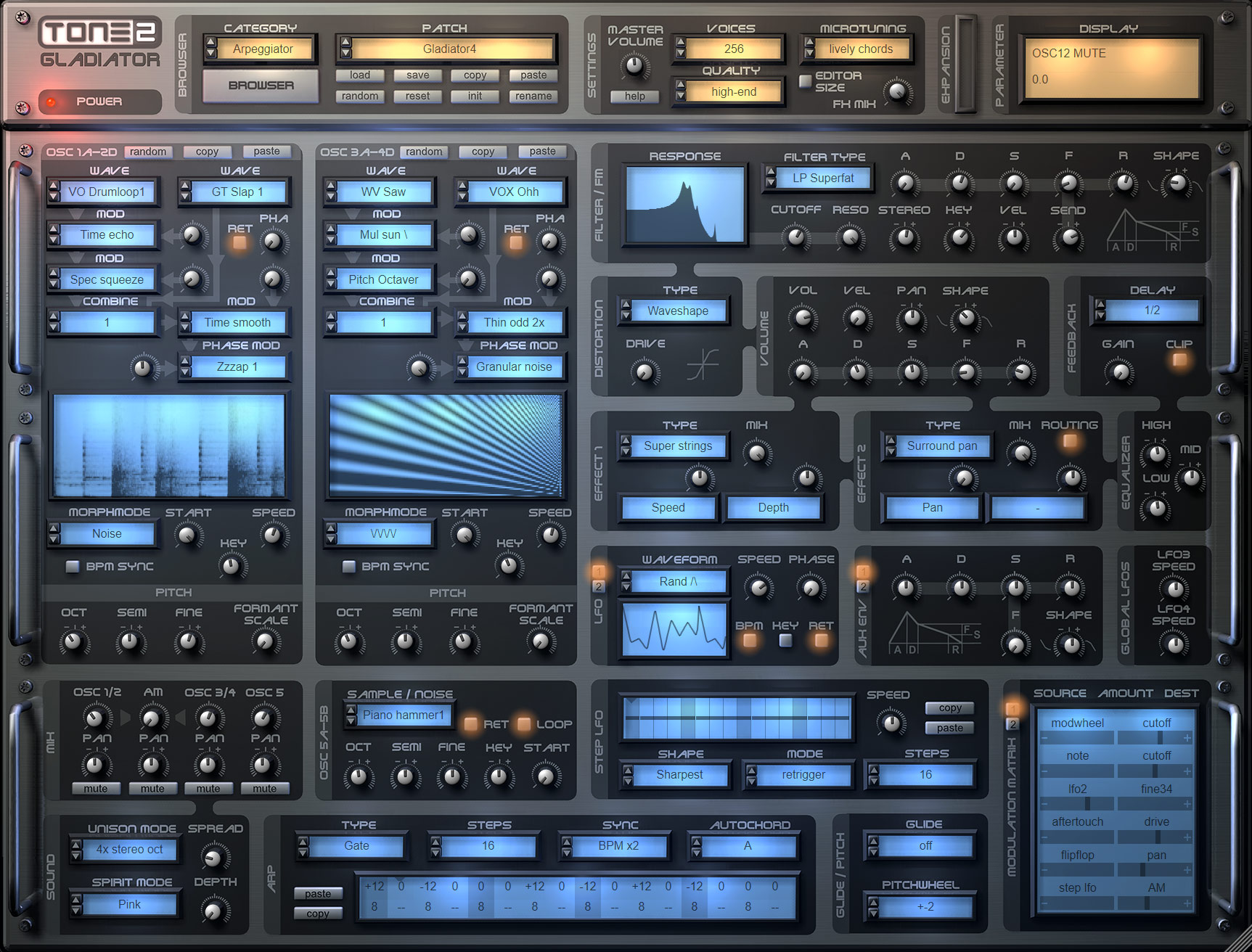
Image
Big image: https://www.tone2.com/mypic/Tone2_Gladi ... enshot.jpg
 
Overview
  • Innovative synthesis method (HCM™)
  • Unique sounds which no other synthesizer can create
  • Huge sonic range
  • High-end quality: Warm, crystal clear & rich sound
  • One of the most successful software synthesizers
  • Has been used in a vast number of movies and chart hits
  • Different synthesis methods can be combined freely
  • 40 filter types and 37 effects are included
  • You can select from six different interface sizes
  • Boundless possibilities
  • Psychoacoustic processing
  • Low CPU and high reliability
  • Over 1200 sounds from professionals
  • Handbook in 5 languages
Synthesis
Gladiator is a very powerful synthesizer, which supports an exhaustive list of synthesis methods. Most synthesis types can be combined freely to create new and exciting sounds. Synthesis types supported by Gladiator are:
  • Tone2's exclusive Harmonic-Content-Morphing™ (HCM)
  • Frequency Modulation (FM)
  • Pulse Width Modulation (PWM)
  • Subtractive
  • Re-synthesized instruments
  • Vocoder sounds
  • Oscillator Sync
  • Phase Distortion
  • Amplitude Modulation (AM)
  • Phase Modulation (PM)
  • Waveshaping
  • Super-saw
  • Additive spectra
  • Sampled noises and plucks
  • Unison
How does HCM-synthesis work?
The award-winning HCM-synthesis is exclusive to Gladiator and not available from any other company. It is based on a wide range of exciting waveforms, wavetables, resynthesized samples, voices and natural sounds. The harmonic structure can be modified with 10 modules and 132 different algorithms to alter the sound. A powerful randomize-function allows the creation of an unlimited number of musically useful and unheard sounds with a single mouse-click!
Gladiator supports up to 18 oscillators per voice with stacking, 4x stereo unison and crystal clear sound-quality.

Sounds
Gladiator ships with an inspiring library of over 1200 outstanding presets from professional sound-designers. A variety of expansions is available to extend Gladiator's features and preset library. All sounds are arranged into categories for a quick and easy access to the sound you need.

Filters
The filter section comes with top-quality stereo-filters. Many of them are exclusive to Tone2 products. Gladiator ships with 40 different filter types: Low Pass, High Pass, Band Pass, Vocals, Comb, EQ, FM, AM, Phaser, Re-sample, Analog, ...

Effects
Gladiator comes with an impressive selection of stereo effects. 37 different units are included, all carefully crafted to offer the highest quality possible, such as Reverbs, Delays, Flanger, Phaser, Chorus, Ensemble, Rotary, Bitcrusher, Talkbox, Ringmod, Dolby Prologic II surround encoding, Waveshaper, Pingpong, Filters and so on.

Modulation
Gladiator has a powerful, user-friendly and flexible modulation section. Four fast envelopes add punch to your sounds. There are 22 different LFOs available, which can be synced to your track's BPM-rate. The Step LFO's design was inspired by step-sequencers and can be used to create rhythmic sequences and trance-gates.

User-friendly copy-protection
No dongle, no cloud, no need to be online

Last edited by Markus Krause on Thu Jun 04, 2026 7:03 am, edited 20 times in total.
https://www.tone2.com
Our award-winning synthesizers offer true high-end sound quality.

Post

Gladiator 3.5.x beta (free update for PC and Mac)

The update is available for free for all Gladiator 2 and 3 users.
It includes a bigger GUI, many anhancements and native Apple M1 ARM support for Mac.

New features:
  • Added a huge GUI that is suitable for WQHD or 4K screens.
  • You can select form 6 different sizes for the interfaces (small/ medium/ big, with/without editor).
  • AudioUnit version supports M1 native.
  • VST version supports M1 native.
  • The patch browser is available in 3 different sizes.
  • The best size for the GUI is detected automatically.
  • The lists display checkmarks for the currently selected items.
  • HiDpi font support for the patch-browser.
  • Help->'Show version info' displays the mode in which the plugin is running (ARM/Intel).
Enhancements
  • The 3D effect of the GUI's knobs is more subtle.
  • Changing the GUI size can now be done with a more comfortable list selector.
  • The spectrum displays have more contrast.
  • Much faster loading times on M1 Macs.
  • The native M1 support results in 20% lower CPU use compared to Rosetta2 Mode.
  • More responsive GUI on M1 Macs.
  • Fine-tuned the corrdinates of the knobs.
  • Many small enhancements.
Fixes:
  • Several small compatibility fixes for MacOS 11 and MacOS 12.
  • Workaround for Apple's unrelieable AudioUnit validation. It is not longer necessary to reboot the Mac after an installation.
Changes:
  • AudioUnit is now an AUv2 plugin.
  • AudioUnit and VSTi are now a Universal Binary for 64bit Intel and M1.
  • Apple's development tools are unable to build 32bit Intel binaries when you support M1. Sadly we had to drop support for it.
  • Apple's Notarisation and the M1 support requires a MacOS version higher or equal than 10.11. If you still use an older version you must stick with Gladiator 3.0.
Notes:
Unlike what Apple suggests to their customers porting complex products to native M1 is not easy at all. In our case it did mean many months of additional work.


Gladiator 3.1.5 (free update for PC)

This update is available for free. Gladiator 3.1.5 is downward-compatible with all previous versions. All existing song projects and patches can be loaded without any further steps necessary.

New features:
  • HiDPI support for the VST3 version.
Enhancements
  • Slightly better performance.
  • Further optimisation to prevent denormalisation.
  • Several small enhancements.
Fixes:
  • The VST3 plugin did not properly sync the BPM-rate.
  • Workaround for some DAWs that did not update the GUI properly after re-sizing it.
Gladiator 3.1 (free update)

The update to v3.1 is available for free. It includes a VST3 version and a completely new standalone-version for PC.
Gladiator 3.1 is downward-compatible with all previous versions. All existing song projects and patches can be loaded without any further steps necessary.

New features:
  • Added a VST3 version.
  • You can select from 3 different installation types: Minimal (VST2 only), Default (VST2 + Standalone) and Full (VST2 + VST3 + Standalone).
  • Added a Microsoft-approved certificate to the installer.
Enhancements:
  • More smart detection of the VST2 path.
  • Higher performance, faster loading and faster saving.
  • Updated some links.
  • Slightly enhanced sound of the reverb.
  • More precise timing in 44kHz.
  • More linear frequency respone for very high frequencies.
  • FreebeiHost.cfg and .log file is not longer created in VST2 directory.
New features (standalone-version):
  • Added a recorder that can export your jam-session to a wav-file.
  • The BPM-rate can be changed.
  • Added a soft-clipping-algorithm with low harmonic distortion.
  • The current patch can be saved on exit and is reloaded automatically on start.
  • MME-driver support.
  • Midi-through support with output-routing.
  • Added Midi-velocity-curves with multipoint-splines.
  • Optional Midi-transposition with up to +-48 semitones.
  • Optional Midi-channel-filtering.
  • The current BPM-rate, CPU-load and volume is shown on the top-panel.
  • Tooltips are shown on the top-panel.
Enhancements (standalone-version for PC):
  • Lower latencies for the soundcard drivers.
  • More responsive GUI with 120 Hz refresh-rate for smooth knob movements.
  • Many further small enhancements.
Changes:
  • Microsoft dropped support for 32-bit Windows. As a result, we will not longer provide updates for it. If you still depend on it you can install v3.0 instead.
https://www.tone2.com
Our award-winning synthesizers offer true high-end sound quality.

Post

Thank you for keeping your care for this great synth :)

I can't compare to the previous versions as I just bought it today, but it sounds amazing :D

Just a question before I delve into the manual: Is the Quality settings are related to oversampling? or does it mean something else?
Anyway, I wish there is a general preset (for all presets, not only per a preset). I'm setting it to "high end" all the times and it just consumes a tiny bit from my CPU! It does make a difference in the quality of the sound though :)
Using: Cubase Pro 15, Reason 13, Tascam US-4x4HR, MODX6, DM12D, LaunchKey 49, Yamaha guitar(Pacifica 612v) and bass (BB234) and some virtual instruments and synths.

Post

Sigh. I wish in addition to Up, Down, Up/Down, Down/Up, etc in their arpeggiators, they'd also have a Random. That would be icing on the cake.
If you can't dazzle 'em with brilliance, baffle 'em with bullshit.

Post

You could use an LFO with Random selected as the waveform shape and target the tuning in the matrix. Not exactly the same as what you wanted, but it might work for now.

Post

EnGee wrote: Wed Jul 06, 2022 8:51 am Thank you for keeping your care for this great synth :)

I can't compare to the previous versions as I just bought it today, but it sounds amazing :D

Just a question before I delve into the manual: Is the Quality settings are related to oversampling? or does it mean something else?
Anyway, I wish there is a general preset (for all presets, not only per a preset). I'm setting it to "high end" all the times and it just consumes a tiny bit from my CPU! It does make a difference in the quality of the sound though :)
First of all a big THANK YOU for supporting our small company!

The quality settings make indeed a small difference in sound. It is not related to the oversampling, but to the way how the spectrum is morphed and interpolated.
Gladiator 3.x always uses oversampling by default.
https://www.tone2.com
Our award-winning synthesizers offer true high-end sound quality.

Post

MANY MANY THANKS! so far it seems all my projects with Tone2 VSTs work and load without problems and my patches work too, also projects 10 years old which im currently all re-opening, manually saving etc. I appreciate such PLUGINS so much!!!! rock solid and awesome Tone2 still cares.

i am so happy you guys dont abandon these.

oh Markus, you know im a sucker for RANDOMIZER options, hope you will further improve/enhance them in all VSTs if possible ;D. Gladiator is one of the best in this!
DAW FL Studio Audio Interface Focusrite Scarlett 1st Gen 2i2 CPU Intel i7-7700K 4.20 GHz, RAM 32 GB Dual-Channel DDR4 @2400MHz Corsair Vengeance. MB Asus Prime Z270-K, GPU Gainward 1070 GTX GS 8GB NT Be Quiet DP 550W OS Win10 64Bit

Post

Markus Krause wrote: Wed Jul 06, 2022 11:20 am
EnGee wrote: Wed Jul 06, 2022 8:51 am Thank you for keeping your care for this great synth :)

I can't compare to the previous versions as I just bought it today, but it sounds amazing :D

Just a question before I delve into the manual: Is the Quality settings are related to oversampling? or does it mean something else?
Anyway, I wish there is a general preset (for all presets, not only per a preset). I'm setting it to "high end" all the times and it just consumes a tiny bit from my CPU! It does make a difference in the quality of the sound though :)
First of all a big THANK YOU for supporting our small company!

The quality settings make indeed a small difference in sound. It is not related to the oversampling, but to the way how the spectrum is morphed and interpolated.
Gladiator 3.x always uses oversampling by default.
Thank you Markus :oops:
Using: Cubase Pro 15, Reason 13, Tascam US-4x4HR, MODX6, DM12D, LaunchKey 49, Yamaha guitar(Pacifica 612v) and bass (BB234) and some virtual instruments and synths.

Post

Many thanks for this update Markus!!!
M1 support is so much appreciated.

Post

Gladiator is a cool synth. Always wished it had mono legato though. That didn't get added did it?

Post

You can change the Voices count to 1 at the top of the UI and there are Glide settings in the Glide/Pitch section (with a Legato) option at the bottom.

Post

Many thanks for the update Markus! This synthesizer is absolutely 100% UNIQUE and I love it!

My general complaint still stands for ALL your synths though. We need more Modulation Matrix SLOTS!!! At least double for every damn synth you've made. :D

They fill up sooooo fast with just basic modwheel+aftertouch to various targets, leaving almost none for actual synthesis.
"Wisdom is wisdom, regardless of the idiot who said it." -an idiot

"They don't ban hate speech; they ban speech they hate." -an oracle

Post

bmanic wrote: Wed Jul 06, 2022 2:00 pm Many thanks for the update Markus! This synthesizer is absolutely 100% UNIQUE and I love it!

My general complaint still stands for ALL your synths though. We need more Modulation Matrix SLOTS!!! At least double for every damn synth you've made. :D

They fill up sooooo fast with just basic modwheel+aftertouch to various targets, leaving almost none for actual synthesis.
Or they could make clap versions and let the host take care of the extra modulations! You could have infinite modulations in Bitwig !

Post

Examigan wrote: Wed Jul 06, 2022 12:31 pm You can change the Voices count to 1 at the top of the UI and there are Glide settings in the Glide/Pitch section (with a Legato) option at the bottom.
oh I thought glide didn’t do a proper mono legato where glide doesnt retrigger envelopes.

Post

Echoes in the Attic wrote: Wed Jul 06, 2022 5:25 pm
Examigan wrote: Wed Jul 06, 2022 12:31 pm You can change the Voices count to 1 at the top of the UI and there are Glide settings in the Glide/Pitch section (with a Legato) option at the bottom.
oh I thought glide didn’t do a proper mono legato where glide doesnt retrigger envelopes.
I’m not at my PC to check, but you can ask Markus or Troels about that part of it.

Post Reply

Return to “Instruments”