

It's not hard in Bitwig. Make a selection and put the selected notes on their own midi channel. Then there are various ways to affect only those notes.Trancit wrote: Wed Aug 03, 2022 2:22 pmExactly this... The tools in FLS already print everything to midi either as a non destructive preview or permanent if you click OK...pdxindy wrote: Wed Aug 03, 2022 1:21 pm I'm pretty happy with the tools for note generation/manipulation in Bitwig... but it is clumsy to have to bounce to a new track to print to midi. I'd love to see a method to efficiently print directly like FL has.
And they can work with just a selection of the notes in your clip and do not process automatically everything like a plugin ... it´s quite some work to filter out notes for plugin processing to be able to do the same if it´s even possible
Bitwig Studio 4.3 Released!
-

- KVRAF
- Topic Starter
- 26931 posts since 3 Feb, 2005 from in the wilds
-
- KVRAF
- 5055 posts since 27 Jul, 2004
We want to talk about features... not wonky workarounds...pdxindy wrote: Wed Aug 03, 2022 5:24 pm It's not hard in Bitwig. Make a selection and put the selected notes on their own midi channel. Then there are various ways to affect only those notes.
Of course there are mostly some ways to make it somehow happen... but this has nothing in comon with a streamlined or good workflow...
Sorry... no argument at all...

-
- KVRAF
- Topic Starter
- 26931 posts since 3 Feb, 2005 from in the wilds
I was responding to your comment: "it's quite some work to filter out notes for plugin processing to be able to do the same if it's even possible". So I was pointing out that it is possible and also not hard.Trancit wrote: Wed Aug 03, 2022 10:53 pmWe want to talk about features... not wonky workarounds...pdxindy wrote: Wed Aug 03, 2022 5:24 pm It's not hard in Bitwig. Make a selection and put the selected notes on their own midi channel. Then there are various ways to affect only those notes.
Of course there are mostly some ways to make it somehow happen... but this has nothing in comon with a streamlined or good workflow...
Sorry... no argument at all...
Create Note FX Layer device with 2 layers. Put a Channel Filter device on layer 1 that let's midi channel 1 through and Channel Filter on layer 2 lets midi channel 2 through. Save that as the default for Note FX Layer (My default is 4 layers each with channel filters for channels 1-4). Now it's easy to add an Arp to layer 2, select some notes, put them to midi channel 2 and the arp is now playing only those notes.
All non-destructive... at any time I can add/remove notes from that 'selection'. I can change/modulate arp settings. If the clip is looping and I want the Arp to play at a different speed every other iteration, no problem... and so on.
If you go to layered editing by channel, you can double click on any channel and it selects all the notes on that channel so it is easy to re-select that same set of notes.
Likewise, it is also easy to add a modulator to a synth and have it only affect certain notes using Channel-16
I find this workflow fresh and enjoyable. Doesn't feel clumsy or wonky to me. The one thing that is needed is to be able to quickly print to midi in the clip. Right now if you want to do so, you have to record to a separate track. That is where for me, the workflow falls down.
-
- KVRAF
- 5055 posts since 27 Jul, 2004
This is for me already the case before...pdxindy wrote: Thu Aug 04, 2022 12:44 am...Trancit wrote: Wed Aug 03, 2022 10:53 pmWe want to talk about features... not wonky workarounds...pdxindy wrote: Wed Aug 03, 2022 5:24 pm It's not hard in Bitwig. Make a selection and put the selected notes on their own midi channel. Then there are various ways to affect only those notes.
Of course there are mostly some ways to make it somehow happen... but this has nothing in comon with a streamlined or good workflow...
Sorry... no argument at all...
Doesn't feel clumsy or wonky to me. The one thing that is needed is to be able to quickly print to midi in the clip. Right now if you want to do so, you have to record to a separate track. That is where for me, the workflow falls down.
All what you describe...all the necessary steps, create this , create that, edit here and there this takes minutes to setup...
This stands against 2 clicks in FLS... minutes against 2 seconds... do this 15 times a day and you have an hour of work against 30 seconds... and this not even includes the printing to midi...
This not even includes having a bit more controlled randomness and not having changed everything constantly and completely...
For me personally this is a huge drawback in workflow...
I am with you... it´s not hard to do... but workflow is something else... here doesn´t fly anything... it´s more hobbling while the others are sprinting...
Even the hobbling one will reach the finish line... but he will not be happy about his time...

Of course, there are situations too, where you want exactly what Bitwig does tons better with it´s plugins and operators...
These are the cases where Bitwig is far ahead again as it is most of the time...
-
- KVRAF
- 5200 posts since 17 Aug, 2004
Yes but then you save it in preset and it's second to drag and drop next time.Trancit wrote: Thu Aug 04, 2022 8:07 am
All what you describe...all the necessary steps, create this , create that, edit here and there this takes minutes to setup...
Yeah, that's exactly my experience. I am quite new to Bitwig. I tried it 2 years ago and was shaking my head in disbelief by (at that time in my head) horrendous GUI and silly workflow. I don't know why I just couldn't click with it.Trancit wrote: Thu Aug 04, 2022 8:07 am These are the cases where Bitwig is far ahead again as it is most of the time...
Then (because I was curious) I tried it 2 months ago only to test MIDI clock abilities and connection with hardware and I was stumped about how good it is in that regard.
Then I told myself: ok let's try another round.
Now I get it. It's a universe of creativity which can also be a huge block to the creativity itself (it's a subjective per person thing ). And the way how things are laid out and how Bitwig developers are making Bitwig and this whole mindset is EXACTLY opposite of ongoing trends. Sure it has similar features to other DAWs but the way they are making this stuff is very forward-thinking and geeky in a good way.
I wouldn't be surprised NONE of the features people request here - won't find their way into Bitwig. But I am sure they will make their own rounds of improvements in their own geeky way.
So I love it and each day it's something else to learn. I can tell you without a shadow of a doubt that it will take my year or so to learn everything and perhaps I don't even need all the features it offers but knowing how to do something when needed is a must.
I am drifting offtopic but yes - very ahead of time. I am still stumped.
-
- KVRAF
- Topic Starter
- 26931 posts since 3 Feb, 2005 from in the wilds
All what I describe is for people who don't know how to do it. Takes me 5 seconds* to add an arp to a selection of midi notes.Trancit wrote: Thu Aug 04, 2022 8:07 am All what you describe...all the necessary steps, create this , create that, edit here and there this takes minutes to setup...
This stands against 2 clicks in FLS... minutes against 2 seconds...
Since you wondered if it was even possible in Bitwig, that tells me you are not well versed in Bitwig's workflow so I can understand why you might think it takes minutes.
* (In my real world use, it is unlikely to be 5 seconds cause I may want to tweak the arp settings, or add or remove a note from the selection, or adjust a couple note lengths and so on.)
-
- KVRAF
- 5055 posts since 27 Jul, 2004
Are you sure you aren´t "The Flash"???pdxindy wrote: Thu Aug 04, 2022 2:30 pmAll what I describe is for people who don't know how to do it. Takes me 5 seconds* to add an arp to a selection of midi notes.Trancit wrote: Thu Aug 04, 2022 8:07 am All what you describe...all the necessary steps, create this , create that, edit here and there this takes minutes to setup...
This stands against 2 clicks in FLS... minutes against 2 seconds...
But even if so... I bet your arp isn´t as powerful... and again it isn´t printed to Midi directly...
So you say whatever you want... I win... (just kidding of course)...
My parents told me already back in the days: Always you have to have the last word... and this wasn´t meant as a compliment

-
- KVRian
- 1402 posts since 17 Oct, 2018
While this is all well and good. I don't think it's the same thing at all. We are talking about the Piano Roll no? I consider everything you wrote here outside of the scope of the Piano Roll. I can pretty much do everything you wrote here in pretty much any DAW with midi effects. For me if I'm working on the Piano Roll I want arps, strums etc, to actually be visible in the piano roll. The thing is the Bitwig has all the framework in place to do this stuff, but they don't seem to take the extra steps to bring this all together.pdxindy wrote: Thu Aug 04, 2022 12:44 amI was responding to your comment: "it's quite some work to filter out notes for plugin processing to be able to do the same if it's even possible". So I was pointing out that it is possible and also not hard.Trancit wrote: Wed Aug 03, 2022 10:53 pmWe want to talk about features... not wonky workarounds...pdxindy wrote: Wed Aug 03, 2022 5:24 pm It's not hard in Bitwig. Make a selection and put the selected notes on their own midi channel. Then there are various ways to affect only those notes.
Of course there are mostly some ways to make it somehow happen... but this has nothing in comon with a streamlined or good workflow...
Sorry... no argument at all...
Create Note FX Layer device with 2 layers. Put a Channel Filter device on layer 1 that let's midi channel 1 through and Channel Filter on layer 2 lets midi channel 2 through. Save that as the default for Note FX Layer (My default is 4 layers each with channel filters for channels 1-4). Now it's easy to add an Arp to layer 2, select some notes, put them to midi channel 2 and the arp is now playing only those notes.
All non-destructive... at any time I can add/remove notes from that 'selection'. I can change/modulate arp settings. If the clip is looping and I want the Arp to play at a different speed every other iteration, no problem... and so on.
If you go to layered editing by channel, you can double click on any channel and it selects all the notes on that channel so it is easy to re-select that same set of notes.
Likewise, it is also easy to add a modulator to a synth and have it only affect certain notes using Channel-16
I find this workflow fresh and enjoyable. Doesn't feel clumsy or wonky to me. The one thing that is needed is to be able to quickly print to midi in the clip. Right now if you want to do so, you have to record to a separate track. That is where for me, the workflow falls down.
Like they have the histogram which imo is pretty genius. If they had scales they could use the same thing to do Arps or spread notes across the keyboard. They can probably use operators for that as well. How amazing would it be to draw in one note and then see chords, patterns, arps etc as operators functions, then if I want to "print" the effects I can just use the Slice to Note function. The same with the swing/groove settings. They are almost there.
It's just weird to me that they've let the situation go on this long. They added operators in version 4(?). Are we going to have to wait until version 5 or 6 (or 7) for them to add this?
Studio One // Bitwig // Logic Pro // Ableton // Reason // FLStudio // MPC // Force // Maschine
-
- KVRAF
- Topic Starter
- 26931 posts since 3 Feb, 2005 from in the wilds
Absolutely you win...Trancit wrote: Thu Aug 04, 2022 3:26 pm Are you sure you aren´t "The Flash"???
But even if so... I bet your arp isn´t as powerful... and again it isn´t printed to Midi directly...
So you say whatever you want... I win... (just kidding of course)...
My parents told me already back in the days: Always you have to have the last word... and this wasn´t meant as a compliment

Bitwig has the Expand function, but that only works with Operators, not Note Devices and only works in the Clip Launcher. There is no print to midi for note devices so you have to record midi to a separate track.
I don't know the FL Arp... is it powerful? I thought it was pretty basic.
-
- KVRAF
- 5144 posts since 3 Oct, 2013
^^^ furthermore FL is able to group the corresponding chopped note pieces together so they can be still handled as one note(group) so don't have to play zillions of 1/16-32 length notes one by one,(can be switched off temporarily so have access to notes pieces too)
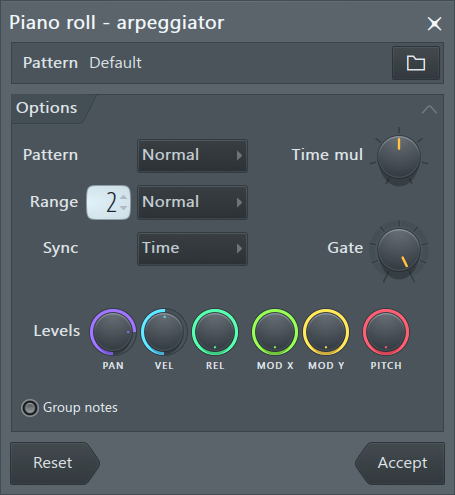
bottom left
bottom left
- https://www.image-line.com/fl-studio-le ... ggiate.htm also missing from BWSGroup notes - Groups chopped notes (that is horizontal grouping of the original notes chopped pieces).
"Where we're workarounding, we don't NEED features." - powermat
-
- KVRAF
- Topic Starter
- 26931 posts since 3 Feb, 2005 from in the wilds
I suspect we have different ways of working... I'm happy to avoid piano rolls where possible. I have little interest in piano roll scales and any sort of chord tools cause I directly record into clips from my keyboard. If I want a scale, I play in that scale and if I want a chord progression, I record those chords in realtime. I can switch scales on the fly as I play. For me, it is much more fun to play stuff than to program it into a piano roll. And no matter how sophisticated a piano roll gets, it will not be as fast as playing scales and chords with my hands in realtime.apoclypse wrote: Thu Aug 04, 2022 5:01 pm While this is all well and good. I don't think it's the same thing at all. We are talking about the Piano Roll no? I consider everything you wrote here outside of the scope of the Piano Roll. I can pretty much do everything you wrote here in pretty much any DAW with midi effects. For me if I'm working on the Piano Roll I want arps, strums etc, to actually be visible in the piano roll.
I like Bitwig's Note devices. They all work in realtime and with the Selector and Layer devices they are quite flexible. That FL piano roll arpeggiator that prints notes is not realtime. You cannot play it with live notes which from my perspective is added work, not less.
-
- KVRian
- 1402 posts since 17 Oct, 2018
No. I play my stuff in, that's my preferred way of working. I mostly use the PR for editing what I played in. However like I said what you wrote is outside of the scope of what people want from a piano roll. Regardless of how you work or what your preference is when using Bitwig, its Piano Roll is pretty rudimentary for someone who may live in the piano roll as their man way to input notes. It's not a workflow thing you are discussing completely different tools imo.pdxindy wrote: Thu Aug 04, 2022 7:12 pmI suspect we have different ways of working... I'm happy to avoid piano rolls where possible. I have little interest in piano roll scales and any sort of chord tools cause I directly record into clips from my keyboard. If I want a scale, I play in that scale and if I want a chord progression, I record those chords in realtime. I can switch scales on the fly as I play. For me, it is much more fun to play stuff than to program it into a piano roll. And no matter how sophisticated a piano roll gets, it will not be as fast as playing scales and chords with my hands in realtime.apoclypse wrote: Thu Aug 04, 2022 5:01 pm While this is all well and good. I don't think it's the same thing at all. We are talking about the Piano Roll no? I consider everything you wrote here outside of the scope of the Piano Roll. I can pretty much do everything you wrote here in pretty much any DAW with midi effects. For me if I'm working on the Piano Roll I want arps, strums etc, to actually be visible in the piano roll.
I like Bitwig's Note devices. They all work in realtime and with the Selector and Layer devices they are quite flexible. That FL piano roll arpeggiator that prints notes is not realtime. You cannot play it with live notes which from my perspective is added work, not less.
Studio One // Bitwig // Logic Pro // Ableton // Reason // FLStudio // MPC // Force // Maschine
-
- KVRAF
- Topic Starter
- 26931 posts since 3 Feb, 2005 from in the wilds
It's a friendly discussion on a general Bitwig thread. I'm enjoying it. Hopefully you are too.apoclypse wrote: Thu Aug 04, 2022 7:26 pmHowever like I said what you wrote is outside of the scope of what people want from a piano roll. Regardless of how you work or what your preference is when using Bitwig, its Piano Roll is pretty rudimentary for someone who may live in the piano roll as their man way to input notes. It's not a workflow thing you are discussing completely different tools imo.

My impression is that Bitwig is less focused on the piano roll and instead are providing different tools to accomplish some of the same tasks. For example, they added a Strum device, not a Strum function in the piano roll.
My way of thinking about it is that it's not a completely different tool when the end result is basically the same. You obviously think differently. No worries

-

- KVRian
- 522 posts since 25 Dec, 2002
Care to post the changelog? I'm curious to see what they are fixing or adding. I have not renewed my license yet and therefore have no access to the beta versions.
Mac Studio M1 Max 10-core CPU, 32-core GPU, 64GB RAM, 4TB SSD | Logic Pro 10.7.5 | Cubase Pro 12 | Nuendo 12 | Studio One 6 | Seagate 8TB external HDD | Focusrite Scarlett 18i8 2nd Gen | Akai MPK261 | Akai MPC X